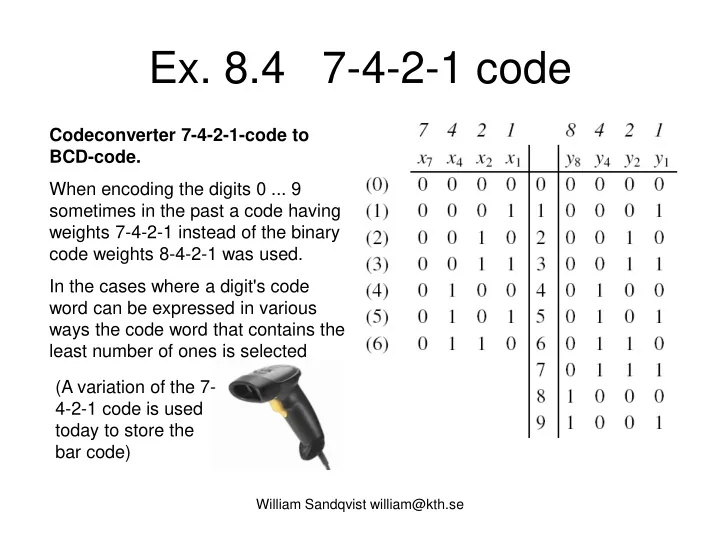
Ex. 8.4 7-4-2-1 code Codeconverter 7-4-2-1-code to BCD-code. - - PowerPoint PPT Presentation

ex 8 4 7 4 2 1 code
SMART_READER_LITE
LIVE PREVIEW

Ex. 8.4 7-4-2-1 code Codeconverter 7-4-2-1-code to BCD-code. - - PowerPoint PPT Presentation

Ex. 8.4 7-4-2-1 code Codeconverter 7-4-2-1-code to BCD-code. When encoding the digits 0 ... 9 sometimes in the past a code having weights 7-4-2-1 instead of the binary code weights 8-4-2-1 was used. In the cases where a digit's code word


slide-1
SLIDE 1

William Sandqvist william@kth.se

  • Ex. 8.4 7-4-2-1 code

Codeconverter 7-4-2-1-code to BCD-code. When encoding the digits 0 ... 9 sometimes in the past a code having weights 7-4-2-1 instead of the binary code weights 8-4-2-1 was used. In the cases where a digit's code word can be expressed in various ways the code word that contains the least number of ones is selected (A variation of the 7- 4-2-1 code is used today to store the bar code)

slide-2
SLIDE 2

William Sandqvist william@kth.se

  • Ex. 8.4 7-4-2-1 code

Codeconverter 7-4-2-1-code to BCD-code. When encoding the digits 0 ... 9 sometimes in the past a code having weights 7-4-2-1 instead of the binary code weights 8-4-2-1 was used. In the cases where a digit's code word can be expressed in various ways the code word that contains the least number of ones is selected (A variation of the 7- 4-2-1 code is used today to store the bar code)

slide-3
SLIDE 3

William Sandqvist william@kth.se

  • Ex. 8.4 7-4-2-1 code

Codeconverter 7-4-2-1-code to BCD-code. When encoding the digits 0 ... 9 sometimes in the past a code having weights 7-4-2-1 instead of the binary code weights 8-4-2-1 was used. In the cases where a digit's code word can be expressed in various ways the code word that contains the least number of ones is selected (A variation of the 7- 4-2-1 code is used today to store the bar code)

slide-4
SLIDE 4

William Sandqvist william@kth.se

8.4

slide-5
SLIDE 5

William Sandqvist william@kth.se

8.4

slide-6
SLIDE 6

William Sandqvist william@kth.se

8.4

1 7 2 7 8

x x x x y + =

slide-7
SLIDE 7

William Sandqvist william@kth.se

8.4

1 7 2 7 8

x x x x y + =

1 2 7 4 4

x x x x y + =

slide-8
SLIDE 8

William Sandqvist william@kth.se

8.4

1 7 2 7 8

x x x x y + =

1 2 7 4 4

x x x x y + =

1 2 7 2 7 2

x x x x x y + =

1 2 7 2 7 1 7 1

x x x x x x x y + + =

slide-9
SLIDE 9

William Sandqvist william@kth.se

8.4

1 7 2 7 8

x x x x y + =

1 2 7 4 4

x x x x y + =

1 2 7 2 7 2

x x x x x y + =

1 2 7 2 7 1 7 1

x x x x x x x y + + = Common groupings can provide for shared gates!

slide-10
SLIDE 10

William Sandqvist william@kth.se

8.4

PLA circuits containing programmable AND and OR gates. (This turned out to be unnecessarily complex, so the common chips became PAL circuits with only the AND network programmable). The gates have many programmable input connections. The many inputs are usually drawn in a "simplified" way.

slide-11
SLIDE 11

William Sandqvist william@kth.se

8.4

Shared-gates!

slide-12
SLIDE 12

William Sandqvist william@kth.se

8.4

Shared-gates!

slide-13
SLIDE 13

William Sandqvist william@kth.se

8.4

Shared-gates!

slide-14
SLIDE 14

Real numbers

Decimalcomma ”,” and Binarypoint ”.” 10,312510 = 1010.01012

slide-15
SLIDE 15

William Sandqvist william@kth.se

  • Ex. 1.2b

110100.0102 =

slide-16
SLIDE 16

William Sandqvist william@kth.se

  • Ex. 1.2b

110100.0102 = = ( 25+24+22 + 2-2 = 32+16+4 + 0.25 ) = = 52,2510

slide-17
SLIDE 17

Calculation with complement

Subtraction with an adding machine = counting with the complement 63 - 17 = 46 The number -17 is entered with red digits 17 and gets 82. When the – key is pressed 1 is added. The result is: 63+82+1 = 146. If

  • nly two digits are shown: 46
slide-18
SLIDE 18

2-complement

The binary number 3, 0011, gets negative -3 if one inverts the digits and adds one, 1101.

slide-19
SLIDE 19

Register arithmetic

Either 8 positive (+0…+7) and 8 negative (-1…-8) ”signed integers”,

  • r 16 (0…F) ”unsigned integers”.
  • Computer registers are ”rings”

If the register is full +1 makes the register to the "turn around".

A four bit register could contains 24 = 16 numbers.

slide-20
SLIDE 20

Register width

  • 4 bit is called a Nibble. The register contains 24 = 16
  • numbers. 0…15, -8…+7
  • 8 bit is called a Byte. The register contains 28 = 256

numbers 0…255, -128…+127

  • 16 bit is a Word. 216 = 65536 numbers.

0…65535, -32768…+32767 Today, general sizes are now 32 bits (Double Word) and 64 bits (Quad Word)..

William Sandqvist william@kth.se

slide-21
SLIDE 21

William Sandqvist william@kth.se

  • Ex. 1.8

b) -1 =

Write the following signed numbers with two's complement notation, x = (x6, x5, x4, x3, x2, x1, x0).

a) -23 d) -64 = c) +38 =

slide-22
SLIDE 22

William Sandqvist william@kth.se

b) -1 = a) -23 = (+2310 = 00101112 → -2310 = 11010002 + 12 ) = 11010012 = 10510 d) -64 = c) +38 =

  • Ex. 1.8

Write the following signed numbers with two's complement notation, x = (x6, x5, x4, x3, x2, x1, x0).

slide-23
SLIDE 23

William Sandqvist william@kth.se

b) -1 = (+110 = 00000012 → -110 = 11111102 + 12) = 11111112 = 12710 a) -23 = (+2310 = 00101112 → -2310 = 11010002 + 12 ) = 11010012 = 10510 d) -64 = c) +38 =

  • Ex. 1.8

Write the following signed numbers with two's complement notation, x = (x6, x5, x4, x3, x2, x1, x0).

slide-24
SLIDE 24

William Sandqvist william@kth.se

b) -1 = (+110 = 00000012 → -110 = 11111102 + 12) = 11111112 = 12710 a) -23 = (+2310 = 00101112 → -2310 = 11010002 + 12 ) = 11010012 = 10510 d) -64 = c) +38 = (3210+410+210) = 01001102 = 3810

  • Ex. 1.8

Write the following signed numbers with two's complement notation, x = (x6, x5, x4, x3, x2, x1, x0).

slide-25
SLIDE 25

William Sandqvist william@kth.se

b) -1 = (+110 = 00000012 → -110 = 11111102 + 12) = 11111112 = 12710 a) -23 = (+2310 = 00101112 → -2310 = 11010002 + 12 ) = 11010012 = 10510 d) -64 = (+6410 = 10000002 är ett för stort positivt tal! men fungerar ändå -6410 → 01111112 + 12) = 10000002 = 6410 c) +38 = (3210+410+210) = 01001102 = 3810

  • Ex. 1.8

Write the following signed numbers with two's complement notation, x = (x6, x5, x4, x3, x2, x1, x0).

slide-26
SLIDE 26

William Sandqvist william@kth.se

  • Ex. 2.1

a) 110 + 010 b) 1110 + 1001 c) 11 0011.01 + 111.1 d) 0.1101 + 0.1110

slide-27
SLIDE 27

Full adder

slide-28
SLIDE 28

Full adder

A logic circuit that makes a binary addition on any bit position with two binary numbers is called a full adder.

slide-29
SLIDE 29

4-bit adder

An addition circuit for binary four bit numbers thus consists of four fulladder circuits.

slide-30
SLIDE 30

Subtraction?

Subtracting the binary numbers can be done vith the two-complement. Negative numbers are represented as the true complement, which means that all bits are inverted and a one is added. The adder is then used also for subtraction. The inversion of the bits could be done with XOR-gates, and a one could then be added to the number by letting CIN = 1.

slide-31
SLIDE 31

Figure 5.13. Adder/subtractor unit.

s s

1

s

n 1 –

x x

1

x

n 1 –

c

n

n

  • bit adder

y y

1

y

n 1 –

c Add

Sub control

slide-32
SLIDE 32

2-complement ”fast”

William Sandqvist william@kth.se

  • In order to easily produce 2's complement of a binary

number, you can use the following procedure:

– Start from right – Copy all bits from all zeroes to the first 1. – Invert all the rest of the bits

Example: 2-complement of 110 is 010

Copy Invert

slide-33
SLIDE 33

William Sandqvist william@kth.se

  • Ex. 2.2

Add or subtract (add with the corresponding negative number) the numbers below. The numbers are representated as binary 2-complement 4-bit numbers (nibble). a) 1 + 2 b) 4 – 1 c) 7 – 8 d) -3 – 5 The negative number that are used in the examples:

  • 110 = (+110 = 00012 → -110 = 11102 +12 ) = 11112
  • 810 = (+810 = 10002 → -810 = 01112 +12 ) = 10002
  • 310 = (+310 = 00112 → -310 = 11002 +12 ) = 11012
  • 510 = (+510 = 01012 → -510 = 10102 +12 ) = 10112
slide-34
SLIDE 34

William Sandqvist william@kth.se

2.2

  • 110 = 11112
  • 810 = 10002
  • 310 = 11012
  • 510 = 10112
slide-35
SLIDE 35

William Sandqvist william@kth.se

  • Ex. 2.3 a,b

Multiplicate by hand the following pairs of unsigned binary numbers. a) 110⋅010 b) 1110⋅1001

slide-36
SLIDE 36

William Sandqvist william@kth.se

  • Ex. 2.3 c,d

(51,25⋅7,5 =384,376) (0,8125⋅0,875 =0.7109375) =110000000.011 =0.10110110 Fixpointmultiplication is an ”integermultiplication”, the binarypoint is inserted in the result. Multiplicate by hand the following pairs of unsigned binary numbers.

slide-37
SLIDE 37

William Sandqvist william@kth.se

  • Ex. 2.4

Divide by hand the following pairs of unsigned binary numbers. Methood the Stairs:

slide-38
SLIDE 38

William Sandqvist william@kth.se

  • Ex. 2.4

If integer division the answer will be 1. Divide by hand the following pairs of unsigned binary numbers. Methood the Stairs:

slide-39
SLIDE 39

William Sandqvist william@kth.se

Ex 2.4

Divide by hand the following pairs of unsigned binary numbers. Methood Short division:

a) 110/010=(6/2=3)=011

110 10 = 1 110 1 10 = 1 110 11 10 =

slide-40
SLIDE 40

William Sandqvist william@kth.se

Ex 2.4

b) 1110/1001=(14/9=1,55…)=1.10…

1110 1001 = 101 1110 1 1001 = 10 1 0 1110. 1. 1001 = 1 1110. 1.1 1001 = . . . Divide by hand the following pairs of unsigned binary numbers. Methood Short division: If integer division the answer will be 1.

slide-41
SLIDE 41

IEEE – 32 bit float

Dec → IEEE-754 The exponent is written exess-127. It is then possible to sort float by size with ordinary integer arithmetic!

William Sandqvist william@kth.se

slide-42
SLIDE 42

2.5 Float format

IEEE 32 bit float s eeeeeeee fffffffffffffffffffffff 31 30 23 22 0

William Sandqvist william@kth.se

slide-43
SLIDE 43

2.5 Float format

IEEE 32 bit float s eeeeeeee fffffffffffffffffffffff 31 30 23 22 0 4 0 C 8 0 0 0 0 01000000110010000000000000000000 What is:

William Sandqvist william@kth.se

slide-44
SLIDE 44

2.5 Float format

IEEE 32 bit float s eeeeeeee fffffffffffffffffffffff 31 30 23 22 0 4 0 C 8 0 0 0 0 01000000110010000000000000000000 What is: 0 10000001 10010000000000000000000 + 129-127 1 + 0.5+0.0625

William Sandqvist william@kth.se

slide-45
SLIDE 45

2.5 Float format

IEEE 32 bit float s eeeeeeee fffffffffffffffffffffff 31 30 23 22 0 4 0 C 8 0 0 0 0 01000000110010000000000000000000 What is: +1,5625⋅22 = +6,25 0 10000001 10010000000000000000000 + 129-127 1 + 0.5+0.0625

William Sandqvist william@kth.se

slide-46
SLIDE 46

http://babbage.cs.qc.cuny.edu/IEEE-754/32bit.html

William Sandqvist william@kth.se

slide-47
SLIDE 47

Figure 5.34. IEEE Standard floating-point formats.

Sign 32 bits 23 bits of mantissa excess-127 exponent 8-bit 52 bits of mantissa 11-bit excess-1023 exponent 64 bits Sign S M S M

(a) Single precision (b) Double precision

E + E 0 denotes – 1 denotes

slide-48
SLIDE 48

William Sandqvist william@kth.se

Overflow

When using signed numbers the sum of two positive numbers cold be incorrectly negative (eg. ”+4” + ”+5” = ”-7”), in the same way the sum of two negative numbers could incorrectly be positive (eg. ”-6” + ”-7” = ”+3”). This is called Overflow.

slide-49
SLIDE 49

Logic to detect overflow

William Sandqvist william@kth.se

For 4-bit-numbers Overflow if c3 and c4 are different Otherwise it’s not overflow

Overflow = c3c

4 + c 3c4 = c3 ⊕c4

Overflow = cn−1 ⊕cn

For n-bit-numbers XOR detects ”not equal”

slide-50
SLIDE 50

Figure 5.42. A comparator circuit.

slide-51
SLIDE 51

William Sandqvist william@kth.se

BV ex 5.10, < > =

Flags, Comparator. Two four-bit signed numbers, X = x3x2x1x0 and Y = y3y2y1y0, can be compared by using a subtractor circuit, which performs the

  • peration X – Y. The three Flag-outputs denote the following:

Show how Z, N, and V can be used to determine the cases X = Y, X < Y, X >Y. Subtractor circuit

  • Z = 1 if the result is 0; otherwise Z = 0
  • N = 1 if the result is negative; otherwise N = 0
  • V = 1 if aritmetic overflow occurs; otherwise V = 0
slide-52
SLIDE 52

William Sandqvist william@kth.se

BV ex 5.10

X = Y ?

) (

1 2 3 3 3 4

s s s s Z s N c c V Y X + + + = = ⊕ = −

X = Y ?

slide-53
SLIDE 53

William Sandqvist william@kth.se

BV ex 5.10

X = Y ?

) (

1 2 3 3 3 4

s s s s Z s N c c V Y X + + + = = ⊕ = − 1 = ⇒ = Z Y X

X = Y ?

slide-54
SLIDE 54

William Sandqvist william@kth.se

BV ex 5.10

X < Y ?

Some test numbers:

) (

1 2 3 3 3 4

s s s s Z s N c c V Y X + + + = = ⊕ = − 3 4 3 4 1 1 4 3 4 3 1 1 3 4 3 4 7 1 5 4 5 4 7 1 X Y X Y V N < − − = − − − − − − = − − − − = − − − − = +

slide-55
SLIDE 55

William Sandqvist william@kth.se

BV ex 5.10

X < Y ?

If X and Y has the same sign X - Y will always be correct and the flag V = 0. X, Y positive eg. 3 – 4 N = 1. X, Y negative eg. -4 – (-3) N = 1. If X neg and Y pos and X – Y has the correct sign, V = 0 and N = 1.

  • Tex. -3 – 4.

If X neg and Y but X – Y gets the wrong sign, V = 1. Then N = 0. Ex. -5 – 4 .

  • Summary: when X<Y the flags V and N is always different. This could be

indicated by a XOR gate.

) (

1 2 3 3 3 4

s s s s Z s N c c V Y X + + + = = ⊕ = −

slide-56
SLIDE 56

William Sandqvist william@kth.se

BV ex 5.10

) (

1 2 3 3 3 4

s s s s Z s N c c V Y X + + + = = ⊕ = − V N Y X ⊕ ⇒ <

X < Y ?

If X and Y has the same sign X - Y will always be correct and the flag V = 0. X, Y positive eg. 3 – 4 N = 1. X, Y negative eg. -4 – (-3) N = 1. If X neg and Y pos and X – Y has the correct sign, V = 0 and N = 1.

  • Tex. -3 – 4.

If X neg and Y but X – Y gets the wrong sign, V = 1. Then N = 0. Ex. -5 – 4 .

  • Summary: when X<Y the flags V and N is always different. This could be

indicated by a XOR gate.

slide-57
SLIDE 57

William Sandqvist william@kth.se

BV ex 5.10

) (

1 2 3 3 3 4

s s s s Z s N c c V Y X + + + = = ⊕ = − 1 X Y Z X Y N V X Y X Y X Y = ⇒ = < ⇒ ⊕ ≤ ⇒ > ⇒ ≥ ⇒

slide-58
SLIDE 58

William Sandqvist william@kth.se

BV ex 5.10

) (

1 2 3 3 3 4

s s s s Z s N c c V Y X + + + = = ⊕ = − V N Y X V N Z V N Z Y X V N Z Y X V N Y X Z Y X ⊕ ⇒ ≥ ⊕ ⋅ = ⊕ + ⇒ > ⊕ + ⇒ ≤ ⊕ ⇒ < = ⇒ = ) ( 1

slide-59
SLIDE 59

William Sandqvist william@kth.se

BV ex 5.10

) (

1 2 3 3 3 4

s s s s Z s N c c V Y X + + + = = ⊕ = − V N Y X V N Z V N Z Y X V N Z Y X V N Y X Z Y X ⊕ ⇒ ≥ ⊕ ⋅ = ⊕ + ⇒ > ⊕ + ⇒ ≤ ⊕ ⇒ < = ⇒ = ) ( 1

This is how a computer can perform the most common comparisions …

slide-60
SLIDE 60

William Sandqvist william@kth.se

slide-61
SLIDE 61

William Sandqvist william@kth.se

Ex 8.11 Multiply with 6 ?

slide-62
SLIDE 62

William Sandqvist william@kth.se

Ex 8.11 Multiply with 6 !

1 x⋅

slide-63
SLIDE 63

William Sandqvist william@kth.se

Ex 8.11 Multiply with 6 !

1 x⋅ 2 x⋅

slide-64
SLIDE 64

William Sandqvist william@kth.se

Ex 8.11 Multiply with 6 !

1 x⋅ 2 x⋅ 0 2 ( 2 1) x x ⋅ ⋅ + ⋅

slide-65
SLIDE 65

William Sandqvist william@kth.se

Ex 8.11 Multiply with 6 !

1 x⋅ 2 x⋅ 1111 15 = 1011010 90 =

15 6 90 ⋅ =

2 ( 2 1) x x ⋅ ⋅ + ⋅

slide-66
SLIDE 66

William Sandqvist william@kth.se