ETL Overview Extract, Transform, Load (ETL) General ETL issues - - PowerPoint PPT Presentation

etl overview extract transform load etl
SMART_READER_LITE
LIVE PREVIEW

ETL Overview Extract, Transform, Load (ETL) General ETL issues - - PowerPoint PPT Presentation

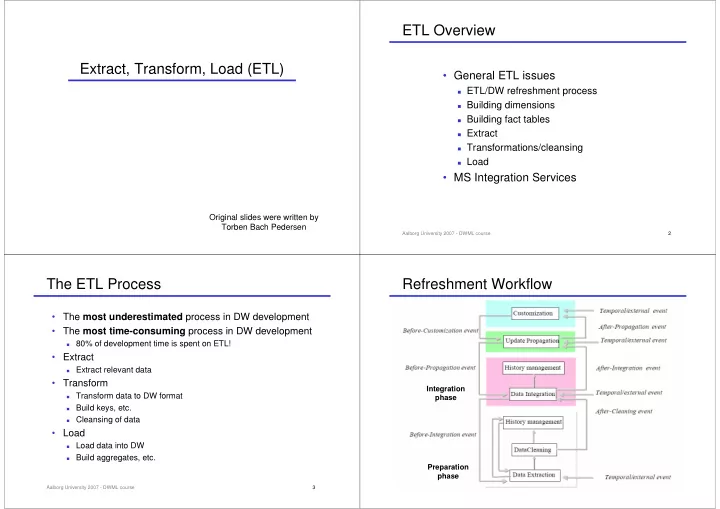
ETL Overview Extract, Transform, Load (ETL) General ETL issues ETL/DW refreshment process Building dimensions Building fact tables Extract Transformations/cleansing Load MS Integration Services Original slides


slide-1
SLIDE 1

Extract, Transform, Load (ETL)

Original slides were written by Torben Bach Pedersen

Aalborg University 2007 - DWML course 2

ETL Overview

  • General ETL issues

ETL/DW refreshment process Building dimensions Building fact tables Extract Transformations/cleansing Load

  • MS Integration Services

Aalborg University 2007 - DWML course 3

The ETL Process

  • The most underestimated process in DW development
  • The most time-consuming process in DW development

80% of development time is spent on ETL!

  • Extract

Extract relevant data

  • Transform

Transform data to DW format Build keys, etc. Cleansing of data

  • Load

Load data into DW Build aggregates, etc.

Aalborg University 2007 - DWML course 4

Refreshment Workflow

Integration phase Preparation phase

slide-2
SLIDE 2

Aalborg University 2007 - DWML course 5

ETL In The Architecture

Data Staging Area

Metadata

ETL side Query side

Query Services

  • Extract
  • Transform
  • Load

Data mining

Data Service Element

Data sources Presentation servers

Operational system Desktop Data Access Tools Reporting Tools Data marts with aggregate-only data

Data Warehouse Bus

Conformed dimensions and facts

Data marts with atomic data

  • Warehouse Browsing
  • Access and Security
  • Query Management
  • Standard Reporting
  • Activity Monitor

Aalborg University 2007 - DWML course 6

Data Staging Area (DSA)

  • Transit storage for data in the ETL process

Transformations/cleansing done here

  • No user queries
  • Sequential operations on large data volumes

Performed by central ETL logic No need for locking, logging, etc. RDBMS or flat files? (DBMS have become better at this)

  • Finished dimensions copied from DSA to relevant marts
  • Allows centralized backup/recovery

Often too time consuming to initial load all data marts by failure Backup/recovery facilities needed Better to do this centrally in DSA than in all data marts

Aalborg University 2007 - DWML course 7

ETL Construction Process

  • Plan

1)

Make high-level diagram of source-destination flow

2)

Test, choose and implement ETL tool

3)

Outline complex transformations, key generation and job sequence for every destination table

  • Construction of dimensions

4)

Construct and test building static dimension

5)

Construct and test change mechanisms for one dimension

6)

Construct and test remaining dimension builds

  • Construction of fact tables and automation

7)

Construct and test initial fact table build

8)

Construct and test incremental update

9)

Construct and test aggregate build (you do this later)

10) Design, construct, and test ETL automation

Aalborg University 2007 - DWML course 8

Building Dimensions

  • Static dimension table

DW key assignment: production keys to DW keys using table Combination of data sources: find common key? Check one-one and one-many relationships using sorting

  • Handling dimension changes

Described in last lecture Find the newest DW key for a given production key Table for mapping production keys to DW keys must be updated

  • Load of dimensions

Small dimensions: replace Large dimensions: load only changes

slide-3
SLIDE 3

Aalborg University 2007 - DWML course 9

Building Fact Tables

  • Two types of load
  • Initial load

ETL for all data up till now Done when DW is started the first time Very heavy - large data volumes

  • Incremental update

Move only changes since last load Done periodically (e.g., month or week) after DW start Less heavy - smaller data volumes

  • Dimensions must be updated before facts

The relevant dimension rows for new facts must be in place Special key considerations if initial load must be performed again

Aalborg University 2007 - DWML course 10

Types of Data Sources

  • Non-cooperative sources

Snapshot sources – provides only full copy of source, e.g., files Specific sources – each is different, e.g., legacy systems Logged sources – writes change log, e.g., DB log Queryable sources – provides query interface, e.g., RDBMS

  • Cooperative sources

Replicated sources – publish/subscribe mechanism Call back sources – calls external code (ETL) when changes occur Internal action sources – only internal actions when changes occur ◆ DB triggers is an example

  • Extract strategy depends on the source types

Aalborg University 2007 - DWML course 11

Extract

  • Goal: fast extract of relevant data

Extract from source systems can take long time

  • Types of extracts:

Extract applications (SQL): co-existence with other applications DB unload tools: faster than SQL-based extracts

  • Extract applications the only solution in some scenarios
  • Too time consuming to ETL all data at each load

Extraction can take days/weeks Drain on the operational systems Drain on DW systems => Extract/ETL only changes since last load (delta)

Aalborg University 2007 - DWML course 12

Computing Deltas

  • Delta = changes since last load
  • Store sorted total extracts in DSA

Delta can easily be computed from current+last extract + Always possible + Handles deletions

  • High extraction time
  • Put update timestamp on all rows (in sources)

Updated by DB trigger Extract only where “timestamp > time for last extract” + Reduces extract time

  • Cannot (alone) handle deletions
  • Source system must be changed, operational overhead
slide-4
SLIDE 4

Aalborg University 2007 - DWML course 13

Changed Data Capture

  • Messages

Applications insert messages in a “queue” at updates + Works for all types of updates and systems

  • Operational applications must be changed+operational overhead
  • DB triggers

Triggers execute actions on INSERT/UPDATE/DELETE + Operational applications need not be changed + Enables real-time update of DW

  • Operational overhead
  • Replication based on DB log

Find changes directly in DB log which is written anyway + Operational applications need not be changed + No operational overhead

  • Not possible in some DBMS

Aalborg University 2007 - DWML course 14

Common Transformations

  • Data type conversions

EBCDIC ASCII/UniCode String manipulations Date/time format conversions

  • Normalization/denormalization

To the desired DW format Depending on source format

  • Building keys

Table matches production keys to surrogate DW keys Correct handling of history - especially for total reload

Aalborg University 2007 - DWML course 15

Data Quality

  • Data almost never has decent quality
  • Data in DW must be:

Precise ◆ DW data must match known numbers - or explanation needed Complete ◆ DW has all relevant data and the users know Consistent ◆ No contradictory data: aggregates fit with detail data Unique ◆ The same things is called the same and has the same key

(customers)

Timely ◆ Data is updated ”frequently enough” and the users know when

Aalborg University 2007 - DWML course 16

Cleansing

  • BI does not work on “raw” data

Pre-processing necessary for BI analysis

  • Handle inconsistent data formats

Spellings, codings, …

  • Remove unnecessary attributes

Production keys, comments,…

  • Replace codes with text (Why?)

City name instead of ZIP code,…

  • Combine data from multiple sources with common key

E.g., customer data from customer address, customer name, …

slide-5
SLIDE 5

Aalborg University 2007 - DWML course 17

Types Of Cleansing

  • Conversion and normalization

Text coding, date formats, etc. Most common type of cleansing

  • Special-purpose cleansing

Normalize spellings of names, addresses, etc. Remove duplicates, e.g., duplicate customers

  • Domain-independent cleansing

Approximate, “fuzzy” joins on records from different sources

  • Rule-based cleansing

User-specifed rules, if-then style Automatic rules: use data mining to find patterns in data ◆ Guess missing sales person based on customer and item

Aalborg University 2007 - DWML course 18

Cleansing

  • Mark facts with Data Status dimension

Normal, abnormal, outside bounds, impossible,… Facts can be taken in/out of analyses

  • Uniform treatment of NULL

Use explicit NULL value rather than “special” value (0,-1,…) Use NULLs only for measure values (estimates instead?) Use special dimension keys for NULL dimension values ◆ Avoid problems in joins, since NULL is not equal to NULL

  • Mark facts with changed status

New customer, Customer about to cancel contract, ……

Aalborg University 2007 - DWML course 19

Improving Data Quality

  • Appoint “data quality administrator”

Responsibility for data quality Includes manual inspections and corrections!

  • Source-controlled improvements

The optimal?

  • Construct programs that check data quality

Are totals as expected? Do results agree with alternative source? Number of NULL values?

  • Do not fix all problems with data quality

Allow management to see “weird” data in their reports? Such data may be meaningful for them? (e.g., fraud detection)

Aalborg University 2007 - DWML course 20

Load

  • Goal: fast loading into DW

Loading deltas is much faster than total load

  • SQL-based update is slow

Large overhead (optimization, locking, etc.) for every SQL call DB load tools are much faster

  • Index on tables slows load a lot

Drop index and rebuild after load Can be done per index partition

  • Parallellization

Dimensions can be loaded concurrently Fact tables can be loaded concurrently Partitions can be loaded concurrently

slide-6
SLIDE 6

Aalborg University 2007 - DWML course 21

Load

  • Relationships in the data

Referential integrity and data consistency must be ensured (Why?) Can be done by loader

  • Aggregates

Can be built and loaded at the same time as the detail data

  • Load tuning

Load without log Sort load file first Make only simple transformations in loader Use loader facilities for building aggregates

  • Should DW be on-line 24*7?

Use partitions or several sets of tables (like MS Analysis)

Aalborg University 2007 - DWML course 22

ETL Tools

  • ETL tools from the big vendors

Oracle Warehouse Builder IBM DB2 Warehouse Manager Microsoft Integration Services

  • Offers much functionality at a reasonable price

Data modeling ETL code generation Scheduling DW jobs …

  • The “best” tool does not exist

Choose based on your own needs Check first if the “standard tools” from the big vendors are OK

Aalborg University 2007 - DWML course 23

Issues

  • Pipes

Redirect output from one process to input of another process

ls | grep 'a' | sort -r

  • Files versus streams/pipes

Streams/pipes: no disk overhead, fast throughput Files: easier restart, often only possibility

  • ETL tool or not

Code: easy start, co-existence with IT infrastructure Tool: better productivity on subsequent projects

  • Load frequency

ETL time dependent of data volumes Daily load is much faster than monthly Applies to all steps in the ETL process

Aalborg University 2007 - DWML course 24

MS Integration Services

  • A concrete ETL tool
  • Example ETL flow
  • Demo
slide-7
SLIDE 7

Aalborg University 2007 - DWML course 25

Integration Services (IS)

  • Microsoft’s ETL tool

Part of SQL Server 2005

  • Tools

Import/export wizard - simple transformations BI Development Studio – advanced development

  • Functionality available in several ways

Through GUI - basic functionality Programming - advanced functionality

Aalborg University 2007 - DWML course 26

Packages

  • The central concept in IS
  • Package for:

Sources, Connections Control flow Tasks, Workflows Transformations Destinations ……

Aalborg University 2007 - DWML course 27

Package Control Flow

Arrows: green (success) red (failure)

  • “Containers” provide

Structure to packages Services to tasks

  • Control flow

Foreach loop container ◆ Repeat tasks by using an enumerator For loop container ◆ Repeat tasks by testing a condition Sequence container ◆ Groups tasks and containers into

control flows that are subsets of the package control flow

  • Task host container

Provides services to a single task

Aalborg University 2007 - DWML course 28

Tasks

  • Data Flow – runs data flows
  • Data Preparation Tasks

File System – operations on files FTP – up/down-load data

  • Workflow Tasks

Execute package – execute other IS packages, good for structure! Execute Process – run external application/batch file

  • SQL Servers Tasks

Bulk insert – fast load of data Execute SQL – execute any SQL query

  • Scripting Tasks

Script – execute VN .NET code

  • Analysis Services Tasks

Analysis Services Processing – process dims, cubes, models Analysis Services Execute DDL – create/drop/alter cubes, models

  • Maintenance Tasks – DB maintenance
slide-8
SLIDE 8

Aalborg University 2007 - DWML course 29

Event Handlers

  • Executables (packages,

containers) can raise events

  • Event handlers manage the events
  • Similar to those in languages

JAVA, C#

Aalborg University 2007 - DWML course 30

Data Flow Elements

  • Sources
  • Makes external data available
  • All ODBC/OLE DB data sources:

RDBMS, Excel, Text files, ……

  • Transformations
  • Update
  • Summarize
  • Cleanse
  • Merge
  • Distribute
  • Destinations
  • Write data to specific store
  • Create in-memory data set
  • Input, Output, Error output

Aalborg University 2007 - DWML course 31

Transformations

  • Business intelligence transformations
  • Term Extraction - extract terms from text
  • Term Lookup – look up terms and find term counts
  • Row Transformations
  • Character Map - applies string functions to character data
  • Derived Column – populates columns using expressions
  • Rowset Transformations (rowset = tabular data)
  • Aggregate - performs aggregations
  • Sort - sorts data
  • Percentage Sampling - creates sample data set by setting %
  • Split and Join Transformations
  • Conditional Split - routes data rows to different outputs
  • Merge - merges two sorted data sets
  • Lookup Transformation - looks up ref values by exact match
  • Other Transformations
  • Export Column - inserts data from a data flow into a file
  • Import Column - reads data from a file and adds it to a data flow
  • Slowly Changing Dimension - configures update of a SCD

Aalborg University 2007 - DWML course 32

A Simple IS Case

  • Use BI Dev Studio/Import Wizard to copy TREO tables
  • Save in

SQL Server File system

  • Look at package structure

Available from mini-project web page

  • Look at package parts

DROP, CREATE, source, transformation, destination

  • Execute package

Error messages?

  • Steps execute in parallel

But dependencies can be set up

slide-9
SLIDE 9

Aalborg University 2007 - DWML course 33 Aalborg University 2007 - DWML course 34

ETL Demo

  • Load data into the Product dimension table

Construct the DW key for the table by using “IDENTITY” Copy data to the Product dimension table

  • Load data into the Sales fact table

Join “raw” sales table with other tables to get DW keys for each

sales record

Output of the query written into the fact table

Aalborg University 2007 - DWML course 35

ETL Part of Mini Project

  • Core:

Build an ETL flow using MS DTS that can do an initial (first-time)

load of the data warehouse

Include logic for generating special DW surrogate integer keys for

the tables

Discuss and implement basic transformations/data cleansing

  • Extensions:

Extend the ETL flow to handle incremental loads, i.e., updates to

the DW, both for dimensions and facts

Extend the DW design and the ETL logic to handle slowly

changing dimensions of Type 2

Implement more advanced transformations/data cleansing Perform error handling in the ETL flow

Aalborg University 2007 - DWML course 36

A Few Hints on ETL Design

  • Don’t implement all transformations in one step!

Build first step and check that result is as expected Add second step and execute both, check result Add third step…

  • Test SQL before putting into IS
  • Do one thing at the time

Copy source data one-one to DSA Compute deltas ◆ Only if doing incremental load Handle versions and DW keys ◆ Versions only if handling slowly changing dimensions Implement complex transformations Load dimensions Load facts

slide-10
SLIDE 10

Aalborg University 2007 - DWML course 37

Summary

  • General ETL issues

The ETL process Building dimensions Building fact tables Extract Transformations/cleansing Load

  • MS Integration Services