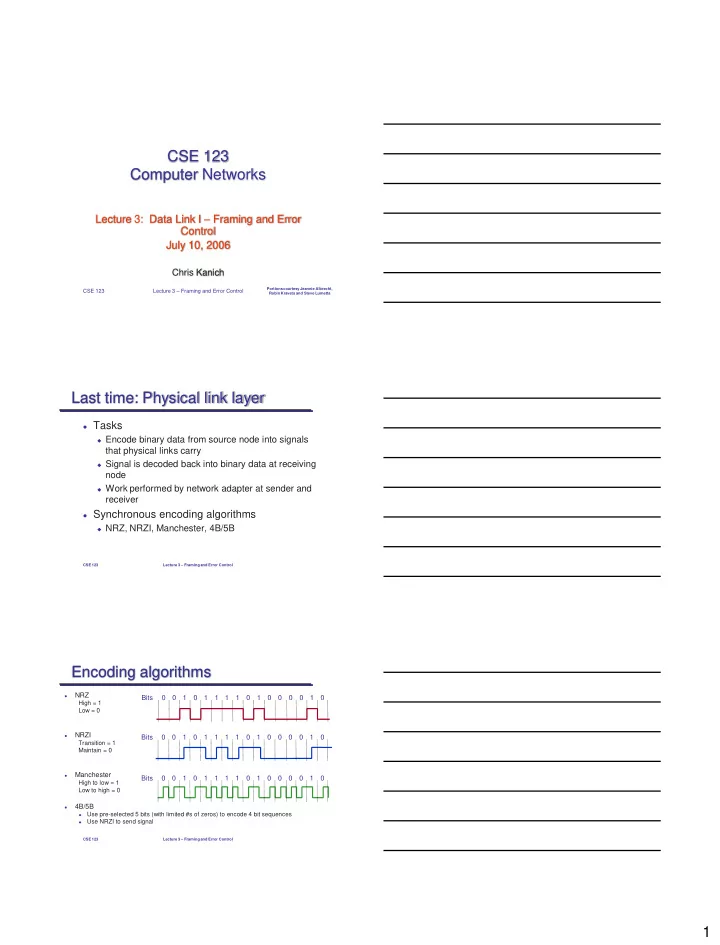
Encoding algorithms NRZ Bits 0 0 1 0 1 1 1 1 0 1 0 0 - - PDF document

encoding algorithms
SMART_READER_LITE
LIVE PREVIEW

Encoding algorithms NRZ Bits 0 0 1 0 1 1 1 1 0 1 0 0 - - PDF document

CSE 123 Computer Networks Lecture 3: Data Link I Framing and Error Control July 10, 2006 Chris Kanich Portions courtesy Jeannie Albrecht, Lecture 3 Framing and Error Control CSE 123 Robin Kravets and Steve Lumetta Last time:


slide-1
SLIDE 1

1 CSE 123 Computer Networks

Lecture 3: Data Link I – Framing and Error Control July 10, 2006

Chris Kanich

Portions courtesy Jeannie Albrecht, Robin Kravets and Steve Lumetta

CSE 123 Lecture 3 – Framing and Error Control

Last time: Physical link layer

 Tasks

 Encode binary data from source node into signals

that physical links carry

 Signal is decoded back into binary data at receiving

node

 Work performed by network adapter at sender and

receiver

 Synchronous encoding algorithms

 NRZ, NRZI, Manchester, 4B/5B

CSE 123 Lecture 3 – Framing and Error Control CSE 123 Lecture 3 – Framing and Error Control

Encoding algorithms

NRZ

High = 1 Low = 0

NRZI

Transition = 1 Maintain = 0

Manchester

High to low = 1 Low to high = 0

4B/5B

Use pre-selected 5 bits (with limited #s of zeros) to encode 4 bit sequences

Use NRZI to send signal

Bits 1 1 1 1 1 1 1 Bits 1 1 1 1 1 1 1 Bits 1 1 1 1 1 1 1

slide-2
SLIDE 2

2

CSE 123 Lecture 3 – Framing and Error Control

Today: Data-link layer

 Framing (2.3)  Error detection/correction (2.4)

CSE 123 Lecture 3 – Framing and Error Control

Framing

 In packet-switched networks, blocks of data (called

frames), not bit streams, are exchanged between nodes

 Goal: Separate bit stream into frames (distinct units of

transfer)

 Why?

 Synchronization recovery  Link multiplexing  Efficient error detection

 Challenges

 How can we determine exactly what set of bits constitute a

frame?

 How do we determine the beginning and end of a frame? CSE 123 Lecture 3 – Framing and Error Control

Framing

 Approaches

 Sentinel

(like C strings)

 Length-based

(like Pascal, SQLite)

 Clock based

 Characteristics

 Bit- or byte-oriented  Fixed or variable length  Data-dependent or data-independent length

slide-3
SLIDE 3

3

CSE 123 Lecture 3 – Framing and Error Control

Sentinel-based framing

 Basic idea: Identify start/end of frame with

special “marker”

 Byte pattern, bit pattern, signal pattern

 Challenge: What if marker is in data stream?  Solution: “Character stuffing” used to recode

data and insert extra escape characters

 Analogous to escaping quotation marks with

backslashes in strings in C

CSE 123 Lecture 3 – Framing and Error Control

Byte-oriented sentinels

STX – start of text

ETX – end of text

Problem: What if ETX appears in the data portion of the frame?

Solution

 If ETX appears in the data, introduce a special character DLE (Data

Link Escape) before it – this is character/byte stuffing

 If DLE appears in the text, introduce another DLE character before it  Efficiency can be only 50% (worst case) 

Protocol examples

 BISYNC, PPP

ETX STX ETX BODY HEADER 0x48 0x69 ETX DLE 0x69 0x48

CSE 123 Lecture 3 – Framing and Error Control

Code Followed by Meaning 0x00 (not applicable) (not allowed) 0x01 No data bytes A single zero byte n (n-1) data bytes Data followed by 0 0xFF 254 data bytes Data, no following 0

Consistent-Overhead Byte Stuffing (COBS)

 Sentinel based framing  Run length encoding applied to byte stuffing

 Add implied 0 to end of frame  Each 0 is replaced with (number of bytes to next 0) + 1  What if no 0 within 255 bytes? – 255 value indicates 254

bytes followed by no zero

 Worst case – no 0’s in packet – 1/254 overhead

 Appropriate for very low-bandwidth links

slide-4
SLIDE 4

4

CSE 123 Lecture 3 – Framing and Error Control

How COBS works

00 45 00 00 2C 4C 79 00 00 40 06 4F 37 45 00 00 2C 4C 79 00 00 40 06 4F 37 02 45 01 04 2C 4C 79 01 40 06 4F 37 05 02 45 01 04 2C 4C 79 01 40 06 4F 37 05 00 00

Length-based framing

 Byte-counting approach  End of frame

 Calculated from length sent at start of frame  Challenge: Corrupt length markers

 Examples

 DECNET’s DDCMP:

» Byte-oriented, variable-length

CSE 123 Lecture 3 – Framing and Error Control

LENGTH BODY HEADER

CSE 123 Lecture 3 – Framing and Error Control

Bit-oriented sentinel framing

 Not concerned with byte boundaries

 Frame = collection of bits (variable length)

 Examples: HDLC and SDLC  HDLC denotes beginning and end of frame with

distinguished bit sequence 01111110

 Use analog of character stuffing to escape “01111110”

called bit stuffing

 Sender stuffs 0 after any string of five 1’s (except for

01111110)

 011111 followed by 0 → bit stuffing  011111 followed by 10 → end of frame marker  011111 followed by 11 → error

slide-5
SLIDE 5

5

CSE 123 Lecture 3 – Framing and Error Control

Clock-based framing

 Continuous stream of fixed-length frames  Clocks must remain synchronized

 No bit or byte stuffing

 Example:

 Synchronous Optical Network (SONET)

 Problems:

 Frame synchronization – when do frames start and end  Clock synchronization – sender and receiver must have

synchronized clocks

CSE 123 Lecture 3 – Framing and Error Control

SONET

All frames (STS formats) are 125 μsec long

Problem: How do we recover frame synchronization

 2-byte synchronization pattern starts each frame (unlikely in data)  Wait until pattern appears in same place repeatedly 

Problem: How do we maintain clock synchronization

 NRZ encoding, data scrambled (XOR’d) with 127-bit pattern  Creates transitions to avoid longs strings of 0s and 1s in NRZ  Also reduces chance of finding false sync. pattern

… … … … … … … … …

Overhead Payload 9 rows 90 bytes

CSE 123 Lecture 3 – Framing and Error Control

Error Detection

 Bit errors are sometimes introduced in frames  Goal: Validate “correctness” of frame  Idea: Send additional redundant (add no new

information) data with frame to check if it has been damaged

 Checked at many layers

 Physical (e.g. modulation)  Datalink (e.g. cyclic redundancy check)  Network/Transport (e.g. IP Checksum)  Application (e.g. MD5 hash)

 Today: simple parity, redundancy w/voting, 2

dimensional parity, IP checksum, CRCs

slide-6
SLIDE 6

6

CSE 123 Lecture 3 – Framing and Error Control

Error Detection from 10,000 feet

  • EDC= Error Detection bits (redundancy)
  • D = Data protected by error checking, may include header fields
  • Error detection not 100% reliable!
  • Protocol may miss some errors, but rarely
  • Larger EDC field yields better detection

CSE 123 Lecture 3 – Framing and Error Control

Simple parity

 1-bit error detection with parity

 Add an extra bit to a code to ensure an even (odd)

number of 1s

 Every code word has an even (odd) number of 1s  If # of 1s = odd, add 1 as parity bit  If # of 1s = even, add 0 as parity bit

01 11 10 00 Valid code words 010 110 100 000 011 111 101 001 Parity Encoding: White = invalid (error)

CSE 123 Lecture 3 – Framing and Error Control

Voting

 1-bit error correction with voting

 Every codeword is transmitted n times  “Majority rules”  Doesn’t always work

010 110 100 000 011 111 101 001 Voting: White = correct to 1 Blue = correct to 0 n = 3 1 Valid code words

slide-7
SLIDE 7

7

CSE 123 Lecture 3 – Framing and Error Control

Hamming distance

The Hamming distance between two code words is the minimum number of bit flips to move from one to the other

 Example:  00101 and 00010  Hamming distance of 3 

The minimum Hamming distance of a code is the minimum distance over all pairs of codewords

 Minimum Hamming Distance for parity = 2  Minimum Hamming Distance for voting = 3 

N-bit error detection

 No code word changed into another code word  Requires Minimum Hamming Distance of N+1 CSE 123 Lecture 3 – Framing and Error Control

Two-dimensional parity

Use 1-dimensional (simple) parity

 Add one bit to a 7-bit code to ensure an

even/odd number of 1s

Add 2nd dimension

 Add an extra byte to frame

» Bits are set to ensure even/odd number of 1s in that position across all bytes in frame

Comments

 Catches all 1-, 2- and 3-bit and most 4-bit

errors

1 1 1 1 1111011 Parity Bits Parity Byte 0101001 1101001 1011110 0001110 0110100 1011111 Data

CSE 123 Lecture 3 – Framing and Error Control

Internet checksum

Idea

 Add up all the words  Transmit the sum called the checksum  Receiver performs same calculation 

Internet Checksum

 Assume data is sequence of 16-bit 1’s complement integers  Find 1’s complement sum of sequence of 16-bit codewords  Take 1’s complement of resulting sum = checksum  Example

» Message: e34f 2396 4427 99f3 » 2s complement sum is 1e4ff » 1s complement sum is e4ff + 1 = e500 » Checksum is 1aff

Comments

 VERY easy to implement, fast incremental updates  Not very robust

slide-8
SLIDE 8

8

CSE 123 Lecture 3 – Framing and Error Control

IP Checksum

u_short cksum(u_short *buf, int count) { register u_long sum = 0; while (count--) { sum += *buf++; if (sum & 0xFFFF0000) { /* carry occurred, so wrap around */ sum &= 0xFFFF; sum++; } } return ~(sum & 0xFFFF); }

Length of buf

CSE 123 Lecture 3 – Framing and Error Control

Cyclic Redundancy Check (CRC)

 Polynomial code

 Treat packet bits a coefficients of n-bit polynomial

» Message = 10011010 » Generator polynomial = 1 x7  0 x6  0 x5  1 x4  1 x3  0 x2  1 x  0 = x7  x4  x3  x

 Choose r+1 bit generator polynomial (well known – chosen in

advance)

 Add r bits to packet such that message is divisible by

generator polynomial

 Note: easy way to think of polynomial arithmetic mod 2

» Multiplication: binary addition without carries » Division: binary subtraction without carries

 Better loss detection properties than checksums

CSE 123 Lecture 3 – Framing and Error Control

Error Detection – CRC

View data bits, D, as a binary number

Choose r+1 bit pattern (generator), G

Goal: choose r CRC bits, R, such that

<D,R> exactly divisible by G (modulo 2)

 Receiver knows G, divides <D,R> by G. If non-zero remainder: error

detected!

 Can detect all burst errors less than r+1 bits 

Widely used in practice (Ethernet, FDDI, ATM)

slide-9
SLIDE 9

9

CSE 123 Lecture 3 – Framing and Error Control

Common Generator Polynomials

CRC-8

x8  x2  x1  1

CRC-10

x10  x9  x5  x4  x1  1

CRC-12

x12  x11  x3  x2  x1  1

CRC-16

x16  x15  x2  1

CRC-CCITT

x16  x12  x5  1

CRC-32

x32  x26  x23  x22  x16  x12  x11  x10  x8  x7  x5  x4  x2  x1  1

CSE 123 Lecture 3 – Framing and Error Control

CRC – Example Encoding

1001 1101 1000 1101 1011 1101 1100 1101 1000 1101 1101 r + 1 bit check sequence g, equivalent to a degree-r polynomial 101 1101 Remainder m mod g 10011010000 Message plus r zeros

Result: Transmit message followed by remainder: 10011010101

x3  x2  1 = 1101 Generator g (degree r) x7  x4  x3  x = 10011010 Message m

CSE 123 Lecture 3 – Framing and Error Control

CRC – Example Decoding – No Errors

1001 1101 1000 1101 1011 1101 1100 1101 1101 1101 1101 r + 1 bit check sequence g, equivalent to a degree-r polynomial 1101 Remainder m mod g 10011010101 Received message, no errors

Result: CRC test is passed

x3  x2  1 = 1101 Generator g x10  x7  x6  x4  x2  1 = 10011010101 Received Message m

slide-10
SLIDE 10

10

CSE 123 Lecture 3 – Framing and Error Control

CRC – Example Decoding – with Errors

1000 1101 1011 1101 1101 1101 1101 r + 1 bit check sequence g, equivalent to a degree-r polynomial 0101 1101 Remainder m mod g 10010110101 Received message

Result: CRC test failed

Two bit errors

x3  x2  1 = 1101 Generator g x10  x7  x5  x4  x2  1 = 10010110101 Received Message m

CSE 123 Lecture 3 – Framing and Error Control

Summary

 Framing

 Bunching bits into distinct messages (frames)  Challenge is in finding where one frame starts and another

begins

 Error detection

 Determine if frame is corrupted by checking it against

redundant data

 Next time: more on the datalink layer

 Reliable Transmission: Section 2.5 CSE 123 Lecture 3 – Framing and Error Control

Administrative details

 Project 1 is out – due next next Monday (7/11)  No discussion next week – 4th of July Holiday  Office Hours for project help are VERY important  Neha and I alternate office hours – one every day of

the class week!

 We have a “make up session” scheduled for Fri, July 8

 Can use that for project discussion / extended OH/prj help

 Please see me after class if you cannot access

ieng6.ucsd.edu