EMOL Education Management Online All-in-one College and School - - PowerPoint PPT Presentation

emol education management online
SMART_READER_LITE
LIVE PREVIEW

EMOL Education Management Online All-in-one College and School - - PowerPoint PPT Presentation

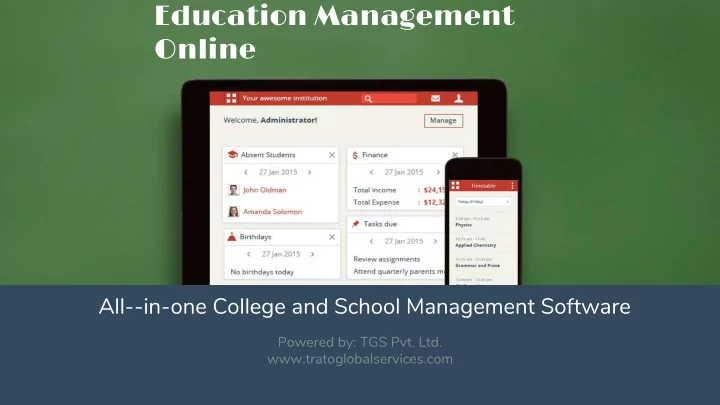
EMOL Education Management Online All-in-one College and School Management Software Powered by: TGS Pvt. Ltd. www.tratoglobalservices.com What is EMOL Ultimate School ERP software for all kinds of Institutes EMOL School ERP System provides

slide-1
SLIDE 1

All­-in-one College and School Management Software

Powered by: TGS Pvt. Ltd. www.tratoglobalservices.com

EMOL Education Management Online

slide-2
SLIDE 2

What is EMOL

EMOL School ERP System provides user-friendly dashboards with login access for teachers, non-teaching staff, students, parents and management personnel of your

  • institution. The various modules available in EMOL facilitate all the processes of your

institution, from admission of new students to generating transfer certificates when students complete their studies.

Ultimate School ERP software for all kinds of Institutes

slide-3
SLIDE 3

School/college management software Parent teacher collaboration Fee management & online payment Timetable, attendance & scheduling Gradebook & reports Online examination & assignment

40+ feature-rich modules

slide-4
SLIDE 4

Everything an institution will ever need.

slide-5
SLIDE 5

Admin Employee Employee Parents Student Users

slide-6
SLIDE 6

Multi-school Admin Institution Institution Admin Institution Parents Employee Students

Hierarchy

slide-7
SLIDE 7

Every institute has it’s own account, with a different URL

The admin of the institute can login and act as an operator of that institute An institute admin enjoys various privileges in the following areas Administration Academics Student Management System Settings Finance Control Social

Institution Overview

slide-8
SLIDE 8

Academics

Applicant Registration Remarks Placement Examination Students Discipline Batch Summary Attendance Automatic Timetable Generator Timetable Library Assignment Student Records Transfer Certificate Online Exam

Administration

Finance Hostel Inventory Human Resources Online Payment Settings Transport User Management Reminders

Features

slide-9
SLIDE 9

Collaboration

Blog Discussion Documents Alumni Forms Gallery Poll

Data & Reports

Custom Imports Custom Reports Data Exports Data Management Reports Tasks

slide-10
SLIDE 10

Communication Tools

E-mail SMS-Mobile Internal Messaging News Event Creation & Calendar

Other Unique Features

Dashboard Mobile App Multi Lingual Support

slide-11
SLIDE 11
  • Registration module to manage new admissions and enquiries
  • Fully customizable form for each course with sections, custom fields and attachments
  • Create custom form status to manage different stages of registration
  • Send out notifications as applicant moves to different stages
  • Subject based registration and registration amount collection
  • Link with payment gateway to collect fees online after application form is submitted
  • Archive registrations after application close for a year

Applicant Registration

slide-12
SLIDE 12
slide-13
SLIDE 13
  • Comprehensive admission form with option to add custom fields
  • Unique login username for each student
  • Quick assignment of parents and emergency contact
  • Record previous education details for each student
  • Biometric assignment for easy management of student attendance
  • Hassle free assignment of fees while admitting student
  • Bulk upload of students and guardians

Student Admission

slide-14
SLIDE 14
slide-15
SLIDE 15
  • Setup daily or subject-wise attendance mode
  • Rapid attendance mode for one click marking
  • Check overall strength of students absent on daily basis or for each subject
  • Mark students absent for half/full day with appropriate remarks
  • Get number of students absent in each batch in a downloadable format
  • Automate attendance marking with RFID and Biometric

Attendance

slide-16
SLIDE 16
slide-17
SLIDE 17

Batch Summary

  • Let the teachers keep track of all their batch activities
  • Check batch’s student details in one view
  • Outline student attendance details for any day
  • Manage subject and employee allocation details for the batch
  • Timetable for the day along with classroom allocation details
  • View batch’s examination status

Student Records

  • Capture student related information on different levels
  • Create Record Groups to group data into various heads
  • Select from different input methods like single or multiline text, options, data and file attachments
  • Link Record Groups to different courses and batches

Student Records & Batch Summary

slide-18
SLIDE 18
slide-19
SLIDE 19
  • Compatible with GPA, CWA, CBSE and ICSE examination systems
  • Quickly manage multiple exams based on grades, marks, etc.
  • Connect exam groups and combine them for final result
  • Generate extensive reports for each grading system
  • Students and parents can check their exam’s statistical and graphical reports
  • Statutory as well comprehensive report cards as per requirement
  • Configure additional data to be shown in report card using settings

Examination

slide-20
SLIDE 20
slide-21
SLIDE 21
  • A configurable online examination system for the whole institution
  • Questions in one exam can be reused in other exams
  • Choose between general exams and subject specific exams
  • Exam can be created for specific students or for a complete batch
  • Objective and hybrid exam types
  • Digital content such as word-processed documents, spreadsheets, images and

videos can be attached to the questions

  • Questions can be randomized for each student
  • Students may be allowed only one attempt at an exam. However, teacher can

choose to reset the exam and students can retake the exam

Assessments : Online Exam

slide-22
SLIDE 22
  • Automatic timetable generator with option to set constraints
  • Manual timetable override with easy to use drag and drop functionality
  • Define subject hour limits and work allotment for teachers
  • Alerts on exceeding subject or employee hours limits
  • Manage classes in different sessions using class timing sets
  • Edit/Delete timetable
  • Swap and cancel classes feature to handle changes in schedule

Timetable

slide-23
SLIDE 23
slide-24
SLIDE 24
  • Integrated with barcode reader to add and issue books
  • Manage books, library tags and status of books
  • Detailed book search
  • Manage book Returns/Issue/Renewal
  • Collect fine for late returns
  • Issues/Renewed book status

Library

slide-25
SLIDE 25
  • Easily conduct placement drives in your institution
  • Create the event and invite batch students to participate
  • Track status of students who get placed with different companies
  • Invited students are reminded about the placements in their login
  • Mark student attendance for the placement event
  • Give control to the placement officer to accept or reject the application
  • Check reports related to the placement drive based on different status

Placement

slide-26
SLIDE 26
  • Transfer certificate generator with template designer
  • Configure the header, student details and footer of the TC
  • Link to student information in EMOL as well as capture manual data
  • Preview and generate transfer certificates in few steps after student leaves the institution

Transfer Certificate Generator

slide-27
SLIDE 27
  • Remarks or feedback about a student’s overall performance in a course
  • Remarks can be viewed by the student and the parents/guardian

Remarks

slide-28
SLIDE 28
  • Register disciplinary complaints against students and teachers
  • View/Search/Sort registered complaints
  • Add Comments and Clarifications
  • Jury can convict or acquit the accused
  • Record the action taken and close the complaint

Discipline

slide-29
SLIDE 29
  • Fast way to issue and replace pen and paper assignments
  • Simple management of assignments for teachers and students
  • Helps teachers and students to save time when dealing with assignments
  • Upload assignments in form of attachments
  • Track status of submissions vs pending assignments
  • Quick download of answers and acceptance of assignment
  • Option of resubmission of assignment answer by students

Assignment

slide-30
SLIDE 30
  • Comprehensive fee creation and scheduling system to handle various fee scenarios
  • Quick setup of fee concessions and late fee fine
  • Easy fee collection process
  • Configurable landscape and portrait size fee receipts
  • Multiprinter support for fee receipts - Dot matrix, laser and thermal printers
  • Notification system for pending and paid fees
  • Head-wise detailed fees reports in downloadable format
  • Collection of hostel, transport and academic fees in one page
  • Assign and unassign applicable fees for students
  • Collect miscellaneous fees from students, employees and guest users using Instant fees

Fees Management

slide-31
SLIDE 31
slide-32
SLIDE 32
  • Let your students and parents pay fees through EMOL from anywhere
  • Collect academic, transport and hostel fees quickly in one go
  • Configure partial or full payment mode for fee collection
  • Compatible with popular payment gateways like Paypal, PayU, CCavenue,

Authorize.net, Braintree, Stripe, HDFC, Interswitch, etc.

  • Control online fee payment delays by setting late fine
  • Automatic generation of fee receipt and Email/SMS notification with transaction details

Online Payment

slide-33
SLIDE 33
slide-34
SLIDE 34

Finance

  • Create and manage different income and expense categories
  • Comprehensive finance reports
  • One click approval/rejection of generated employee payslips
  • Produce custom payslip reports
  • Easy management of assets and liabilities
  • Record and manage donations quickly

Finance

slide-35
SLIDE 35
slide-36
SLIDE 36
  • Institute Information like address, website, email, etc.
  • Easy configuration of language, currency, country, time-zone, etc.
  • Setup examination grading systems
  • Add custom fields to student/employee admission forms
  • Unique ID for all the users and quick assignment of roll nos
  • Simple and easy management of courses and batches
  • Batch transfer and graduation facility
  • Manage mandatory or elective subjects for batches
  • Activate SMS to send alerts for student absenteeism, events, fee collection, etc.
  • Save student certificates or educational documents
  • Manage feature that can be accessed by parents/guardians
  • Integrate EMOL with 3rd Party apps by generating access tokens

System Settings & Control

slide-37
SLIDE 37
  • Easily check employee, student and parent details
  • Manage multiple administrators
  • Configure user’s profile, password and privileges
  • Simple and quick user search using the handy search bar
  • Quickly check and edit user’s profile
  • Assign privileges based on employee responsibility

Users & Privileges

slide-38
SLIDE 38
slide-39
SLIDE 39

Hostel

  • Configure different hostels and rooms
  • Allocate hostel rooms to students
  • Check hostel report for available rooms and allocate quickly
  • Setup hostel fee scheduling mechanism
  • Assign and unassign hostel fees for students
  • Easy collection of hostel fee
  • Hassle free management of change of rooms for hostelites

Transport

  • Manage vehicle transport routes and vehicle details
  • Allocate transport for selective or all students
  • Setup fees for each route for a vehicle
  • Setup transport fee scheduling mechanism
  • Assign and unassign transport fees for students
  • Easy collection of transport fee
  • Comprehensive reports on transport data

Hostel & Transport

slide-40
SLIDE 40
slide-41
SLIDE 41
  • Setup employee departments and positions
  • Define leave types and assign them to specific employees
  • Configure gross-based or custom payroll structure
  • Manage varied payroll structures for employees using payroll groups
  • Build payrolls with custom formulae
  • Editable loss of pay conditions
  • Audit employee attendance and track leave balances
  • One click payslip generation
  • Configurable employee payslip using settings

Human Resources

slide-42
SLIDE 42
slide-43
SLIDE 43
  • Setup virtual brick and mortar stores
  • Bulk addition of store items
  • Manage both issuable and sellable items
  • Add multiple suppliers in one click
  • Allow employees to raise requests for items like chalks, markers, etc.
  • End to end management of purchase orders
  • Effortless generation of invoices for the sold items
  • Exhaustive reports for bills, indents, purchase orders and GRNs

Inventory Management

slide-44
SLIDE 44
  • A modern messaging and communication system
  • Send direct messages to users or broadcast to many users at once
  • Effective communication between administration, teachers, students and parents on important matters
  • Control who can message whom using message settings
  • Automatic notifications sent to users for important events

Internal Messaging and Notifications

slide-45
SLIDE 45
  • Send text message and emails for various events to:
  • Employees
  • Departments
  • Students
  • Batches
  • Parents
  • All users
  • Configure which events should send out automatic SMS and Email
  • Manually send text messages and emails to individual users
  • SMS Package manager to configure SMS package for various institutions under a group

SMS & Email Integration

slide-46
SLIDE 46

Calendar Event Creation

  • Display events, examination, holidays and dues in the calendar
  • Color coded events for easy identification
  • Display events on hovering over the color spots in the calendar
  • Monthly view of all items
  • Create any type of event
  • Can mark event as a holiday
  • Create a common event for the whole institution or for individual batches

Calendar & Event Creation

slide-47
SLIDE 47
  • Create/edit/delete important institution level announcements
  • Add news in rich text format
  • Search news using search bar
  • Add attachments like circulars, newsletters etc.
  • Comment on news to send updates and clarifications

News & Announcements

slide-48
SLIDE 48
  • Never miss out on an important activity or event with custom and automatic reminders.
  • Create custom reminders with Email and/or SMS notifications
  • Configure automatic reminders for calendar events, exams, and fee due dates

Reminder

slide-49
SLIDE 49

Blog

  • Create Blog
  • Search, and Filter blogs based on available filter
  • View all the activities in the blog
  • Comment and rate blogs
  • Ban abusive blog posts, comments

Forms

  • Simple drag and drop interface to create powerful forms
  • Capture feedback on teachers, collect data on admissions and much more
  • Save Templates
  • Extract the responses as CSV Files
  • Analyse response and take action

Blog & Forms

slide-50
SLIDE 50

Poll

  • Create/Edit/Delete polls
  • Create active/closed polls
  • Title and Description
  • Multiple Answers

Task

  • Filter tasks
  • Create/Edit/Delete tasks
  • Upload document
  • Comment and Update status

Poll & Task

slide-51
SLIDE 51

Document Management

Document Manager gives the user complete control to manage the documents within EMOL This module sorts the documents under 3 basic categories of folders

  • Shareable Folders are created by users to store documents user wants to share with other users
  • Privileged Folders can be created by admin, privileged users & some employees who has permission
  • User Specific Folders help the admin to collect documents in a folder associated with different users
slide-52
SLIDE 52
  • Create groups to manage employees and students
  • Members can create posts to discuss topics
  • Comment on topics to clarify, Edit/Delete comment to moderate

Discussion Forum & Groups

slide-53
SLIDE 53
  • View alumni in different courses
  • Create alumni events
  • Invite alumni to events
  • Contact alumni via email

Alumni & Events

slide-54
SLIDE 54
  • Share moments from your institution with all stakeholders
  • Create gallery categories to group events in the institution
  • Upload photos into categories
  • Share photos with courses and departments

Gallery

slide-55
SLIDE 55

Bulk Data Upload - Custom Import Bulk Data Export - Data Export

  • Bulk upload into EMOL using CSV files
  • Student and Guardian details
  • Employee details
  • Daily wise attendance
  • Examination scores
  • Library book
  • Employee Payroll
  • Stores, Items and Suppliers
  • View import log to identify and correct errors
  • Export important data report as CSV file

Bulk Data Management

slide-56
SLIDE 56

Reports Custom Report

Take smart decisions using various reports available

  • Course/batch details
  • Former students/employee details
  • Student fee head wise details
  • Fee collection and fee defaulter details
  • Report of student and employees
  • Create report based on custom input criteria
  • Decide on report headers, order of display etc.
  • Arrange reports in ascending and descending order
  • View/delete custom reports

Report

slide-57
SLIDE 57

EMOL support 20+ languages including

  • 1. Arabic
  • 2. English
  • 3. Spanish
  • 4. Latin American Spanish
  • 5. Hindi
  • 6. German

7.Portuguese

  • 8. Marathi
  • 9. Japanese
  • 10. French
  • 11. Vietnamese
  • 12. Chinese
  • 13. Galician
  • 14. Kurdish
  • 15. Italian
  • 16. Mongolian
  • 17. Dominican Spanish
  • 18. Russian
  • 19. Turkish
  • 20. Gujarati
  • 21. Dutch
  • 22. Korean
  • 23. Greek
  • 24. Burmese

Multilingual Support

slide-58
SLIDE 58
  • Modern and easy to use app to complement EMOL
  • One app for Teachers, Students and Parents
  • Custom pages for institution related information
  • Notifications for announcements and messages
  • Mark attendance of students
  • Teachers can apply leaves from the app
  • View timetable for the day
  • Check due fees and pay online
  • Available for Android and iOS

Mobile App

slide-59
SLIDE 59

Extended functionality of EMOL with API

  • API system for EMOL offers multiple methods of integrating and extending functionality
  • Use API and create seamless integration with other software
  • Build applications that fetch data from EMOL or send data to EMOL as per your need

API or Application Programming Interface is a set of standard and programming instructions which allow access to functions and features of a product. This help people outside the company to design products that are powered by web application.

EMOL API

slide-60
SLIDE 60

WELCOME TO EMOL