ELECTRONIC MEDICAL RECORDS FOR So, what is Project Buendia? - - PowerPoint PPT Presentation

electronic medical records for
SMART_READER_LITE
LIVE PREVIEW

ELECTRONIC MEDICAL RECORDS FOR So, what is Project Buendia? - - PowerPoint PPT Presentation

Hi, I'm Fabian. I'm the lead software engineer on MSFs Electronic Medical Records for Emergencies Project. Were working on Project Buendia, an OpenMRS deployment for humanitarian relief scenarios. Today I'm going to be talking a little


slide-1
SLIDE 1

ELECTRONIC MEDICAL RECORDS FOR EMERGENCIES / PROJECT BUENDIA

Fabian Tamp @capnfabs

Hi, I'm Fabian. I'm the lead software engineer on MSF’s Electronic Medical Records for Emergencies Project. We’re working on Project Buendia, an OpenMRS deployment for humanitarian relief scenarios. Today I'm going to be talking a little about the project, its background and origins, and some of the challenges and requirements unique to the project. I'm going to stay fairly high level with technical details in this talk, but there's a follow up talk later this afternoon, where I'm happy to go into a little more detail. So, what is Project Buendia? Essentially, we're building an OpenMRS-based system that is tough enough to withstand conditions in MSF missions, and flexible enough to be able to configured easily to changing needs. The core aspects of this are a highly portable hardware platform that can handle low-power, zero-internet environments, and a software system that allows for the flexibility to be completely reconfigured in a matter of hours.

WORKS EVERYWHERE EXTREMELY ADAPTABLE

Photos: MSF

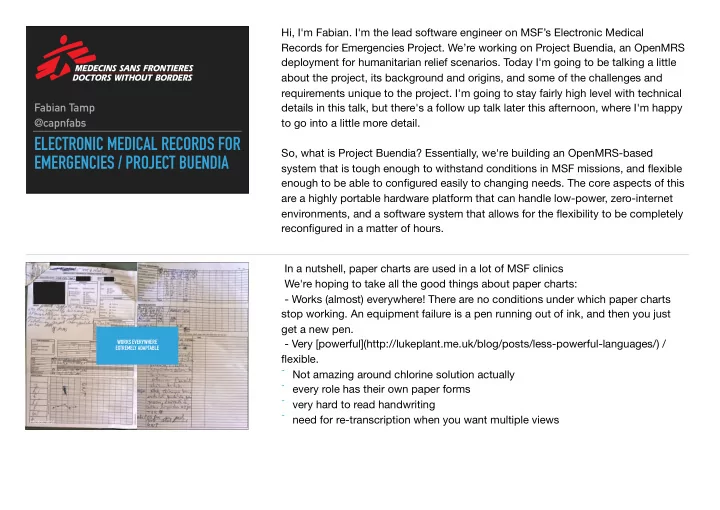
In a nutshell, paper charts are used in a lot of MSF clinics We're hoping to take all the good things about paper charts:

  • Works (almost) everywhere! There are no conditions under which paper charts

stop working. An equipment failure is a pen running out of ink, and then you just get a new pen.

  • Very [powerful](http://lukeplant.me.uk/blog/posts/less-powerful-languages/) /

flexible.

  • Not amazing around chlorine solution actually
  • every role has their own paper forms
  • very hard to read handwriting
  • need for re-transcription when you want multiple views
slide-2
SLIDE 2

PORTABLE EASY TO ANALYSE EASY TO BACK UP EASY TO ACCESS HISTORICAL DATA BETTER DESIGN FOR DECISION SUPPORT

And merge them with all the good things about electronic records:

  • Easy to back up
  • Easy to analyse
  • Easy to access *more information*
  • Highly replicable
  • Good design, which leads to better decision making.

LIVE DEMO

  • Here's what it looks like, I'll explain why everything is the way it is soon.
  • Talk through tablet interface.
  • Click through to a patient chart
  • Talk about how it's entirely customisable
  • Choose a form from the list
  • Input some observations
  • Talk about where everything is stored / cached.
  • Talk through server.

Before we discuss that in detail, however, it's worth talking about the history of the project to understand where our requirements came from.

slide-3
SLIDE 3

HISTORY

Ebola Crisis

Photo: MSF Photos: MSF

The project started in late 2014 during the Ebola crisis in West Africa, as a collaboration between MSF , Google, and volunteers from the London tech

  • community. The idea was to develop some kind of technology to help make ebola

management centres more efficient. If you enable staff to be more efficient, you either do one of two things - improve the quality of care, or allow them to see more patients.

slide-4
SLIDE 4

Photos: MSF

This is especially true in an EMC. Ebola is extremely contagious, so doctors have to wear this dual-layer hazmat suit, which turns any person into a low-vision, low- dexterity user. Goggles fog up, touchscreens are less responsive and your fingers are fatter through multiple layers of gloves. User interfaces had to be designed accordingly to help users navigate an app through these conditions. Additionally, doctors are only allowed to spend an hour at a time in the high-risk area, and materials aren't allowed to leave the high-risk zone unless they've been submerged in 0.5% chlorine solution for 10 mins. For each patient visited, staff would take measurements, and then spend a lot of time shouting the measurements over the isolation zone to a team-member on the other side who would record the details again on another paper form. Aside from the potential for transcription errors, this takes a significant amount of time.

Photos: MSF

We figured a big win we could make to staff productivity was to eliminate this double-entry step, and this is the solution that we came up with. This is a tiny little server and a whole lot of batteries in a poly-carbonate case. You put this server

  • utside of the high-risk zone, and it's capable of serving data to and accepting
  • bservations from the tablets, so there's no need to communicate observations
  • ver the fence. It could run for 24 hours on a single battery charge and recharge in

4 hours. Now, instead of shouting records across, doctors could just punch them in to the

  • form. They've also got more history on demand, which enables better quality of
  • care. We also observed staff collecting _more_ information - on a paper form, there

were fields that tended to get skipped over. Using the tablet, staff would skip less

  • f these. They preferred it to the paper charts as well and could see the benefit to

patient care.

slide-5
SLIDE 5

CURRENT FOCUS

Nutrition Programs

Photo: MSF

So, this worked pretty well. Google handed the project over to MSF in March this year, and then in August MSF ramped up the project again as EMR-E, or Electronic Medical Records for Emergencies.

Photos: MSF

Now, we're targeting Nutrition programmes instead. Why?

  • MSF treated 217,900 children for malnutrition in 2014 alone
  • Relatively well understood
  • Standardized protocol
  • Need for analysis and display over time
  • Malnutrition increases mortality (5x, 10x) of malaria, TB, HIV, ...
  • Expanding reach —> big impact
  • Reducing error rates —> big impact

BUT the end goal now isn't direct applicability to a specific relief scenario - it's to build something that's generic and flexible enough that it can be used by many relief efforts. Without the flexibility to be customised by staff in the field, our project has no longevity.

slide-6
SLIDE 6

KEY GOALS

Photo: MSF

KEY FOCUS

RESILIENCE

▸ Battery powered ▸ ~10 hrs at normal load ▸ Can be charged from a car battery ▸ Zero internet ▸ All data replicated on tablets ▸ Physically rugged

  • Battery powered. Lasts 20 hours on battery
  • Zero internet. Everything is deployable / updateable / backupable from USB /

microSD card (whatt???)

  • Everything stored locally on the tablets as well, so if you can't connect to the

server, you can still carry all the patients' data with you.

  • Tough. We've stuck these in hot vans driving around subsaharan africa and they

still work. We've dunked them in cholorine - it's all good.

slide-7
SLIDE 7

KEY FOCUS

FLEXIBILITY

▸ CSV profiles

Because we're targeting flexibility and adaptability, we needed to choose a scenario different enough to Ebola to have to adapt the software, and one where practices varied between teams. Nutrition is a perfect spot for this - practices vary between teams and between scenarios. In Bokoro, Chad, for example, we've got both intensive and ambulatory centres - the ambulatory centres go out to different villages, whereas the intensive centre is in the middle and for treating children with life-threatening malnutrition. Processes for the two roles are different.

USER-CONFIGURABLE CHARTS AND FORMS

To power this flexibility, we've developed the idea of CSV profiles. You know the recent trend of making programming accessible to everyone? Microsoft Excel was doing this before it was cool. MSF staff (hospital staff, a lot of people actually)

  • ften have a lot of experience with Excel, and at least with tweaking things to get

the result you want. It's the ultimate trial and error programming language. So here's how it works: Our profiles have two basic sections:

  • Chart - This is the chart here, and it's been programmed using this CSV. The

chart is rendered HTML, so it's extremely flexible, but as per usual, flexibility comes at the cost of increased complexity.

  • Forms - You can add multiple types of forms. This profile CSV configures the

Xforms module etc etc.

slide-8
SLIDE 8

KEY FOCUS

FLEXIBILITY

▸ CSV profiles ▸ Commodity Hardware ▸ Off-the-shelf server parts ▸ Android Tablets

The other way we're addressing flexibility is by using commodity hardware as much as possible. Our Ebola servers used custom circuit borders manufactured by a partner and had RFID and NFC support - we were hoping to use them for some logistics tracking stuff as well. We've narrowed the scope for these ones, which has meant that you can build one of our servers with a single screwdriver and a single shipment of parts from Sparkfun. Assuming they have everything in stock :)

LOOKING FORWARD

Photo: MSF

  • Extended pilot and evaluation in Chad in January
  • Work out what we can contribute back to the OMRS and broader community
  • e.g. It’s worth noting that people are using our server platform for other

technologies as well

slide-9
SLIDE 9

http://projectbuendia.org @projectbuendia fabian.tamp@gmail.com @capnfabs

Thanks!

Photo: MSF Photo: MSF

If you’re keen to get involved let me know - we’re always looking for developers, especially if you’ve got Android experience :)