EE 209 in Context Hardware / Software Systems EE 109L (Assembly - - PowerPoint PPT Presentation

ee 209 in context
SMART_READER_LITE
LIVE PREVIEW

EE 209 in Context Hardware / Software Systems EE 109L (Assembly - - PowerPoint PPT Presentation

1.1 1.2 EE 209 in Context Hardware / Software Systems EE 109L (Assembly Language Programming) Introduction to Digital System Spiral 0 Review of EE 109L EE 209 Design EE 354L More Digital System Design Class Overview Analog to


slide-1
SLIDE 1

1.1

Spiral 0 – Review of EE 109L

Class Overview Analog to Digital Conversion Binary Representation MIPS Assembly and CPU Organization

1.2

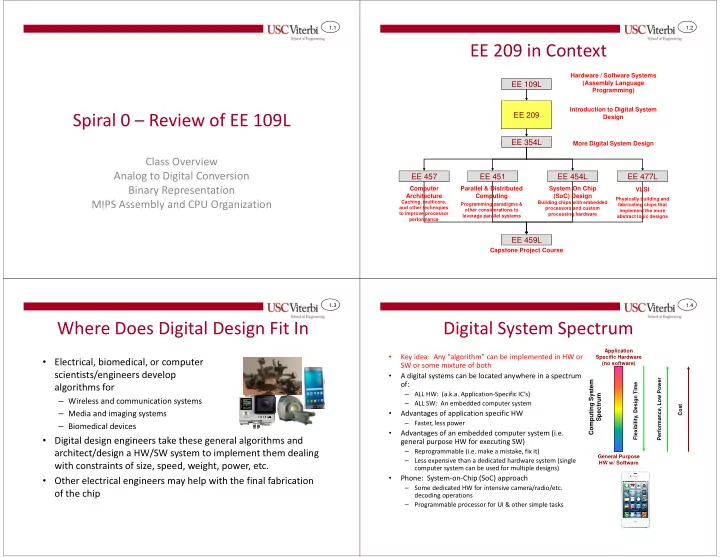
EE 209 in Context

EE 109L EE 209 EE 457 EE 354L EE 477L EE 459L

Hardware / Software Systems (Assembly Language Programming) Computer Architecture

Caching, multicore, and other techniques to improve processor performance Physically building and fabricating chips that implement the more abstract logic designs

VLSI Capstone Project Course

EE 451

Building chips with embedded processors and custom processing hardware

EE 454L

Introduction to Digital System Design More Digital System Design System On Chip (SoC) Design Parallel & Distributed Computing

Programming paradigms &

  • ther considerations to

leverage parallel systems 1.3

Where Does Digital Design Fit In

  • Electrical, biomedical, or computer

scientists/engineers develop algorithms for

– Wireless and communication systems – Media and imaging systems – Biomedical devices

  • Digital design engineers take these general algorithms and

architect/design a HW/SW system to implement them dealing with constraints of size, speed, weight, power, etc.

  • Other electrical engineers may help with the final fabrication
  • f the chip

1.4

Digital System Spectrum

  • Key idea: Any “algorithm” can be implemented in HW or

SW or some mixture of both

  • A digital systems can be located anywhere in a spectrum
  • f:

– ALL HW: (a.k.a. Application-Specific IC’s) – ALL SW: An embedded computer system

  • Advantages of application specific HW

– Faster, less power

  • Advantages of an embedded computer system (i.e.

general purpose HW for executing SW)

– Reprogrammable (i.e. make a mistake, fix it) – Less expensive than a dedicated hardware system (single computer system can be used for multiple designs)

  • Phone: System-on-Chip (SoC) approach

– Some dedicated HW for intensive camera/radio/etc. decoding operations – Programmable processor for UI & other simple tasks

Computing System Spectrum

Application Specific Hardware (no software) General Purpose HW w/ Software Flexibility, Design Time Performance, Low Power Cost

slide-2
SLIDE 2

1.5

Processing Logic Approaches

  • Custom Logic

– Logic that directly implements a specific task – Example above may use separate adders and a multiplier unit

  • General Purpose Processor

– Logic designed to execute SW instructions – Provides basic processing resources that are reused by each instruction

  • Design Decision: HW only or

HW/SW

– HW only = faster – HW/SW = much more flexible

+ *

Data storage Instruc. Store

ADD X,Y ADD A,B MUL X,A GPP Implementation of (X+Y)*(A+B)

+ + *

X Y A B Out Custom Logic Circuit Implementation

1.6

HW/SW Design Example

  • Suppose you need to design a JPEG encoder (converts raw pixels to JPG format…consisting
  • f a preprocessing stage + encoding stage) for the camera on your mobile phone
  • Your design considerations requirements

– 1 second max. latency (time) – 200 mW max power – Energy (Power * Time) as low as possible – Consider time to market (design time) and cost

  • Options

1. Software only running on microcontroller/processor 2. Hardware preprocessor + Software encoder 3. Hardware preprocessor + Fixed-point software encoder 4. Hardware preprocessor + encoder

Taken from "Embedded System Design" by Vahid and Givargis, Wiley and Sons Publishing 2002.

Option 1 Option 2 Option 3 Option 4 Performance (sec.) > 10 9.1 1.5 0.1 Power (milliwatt) < 200 33 33 40 Size (gates) N/A 98,000 90,000 128,000 Energy (Joules=sec*watt) 0.3 0.05 0.004 Time to Market 3 months 6 months 8 months 12 months

1.7

Integrated Solutions: Systems-On-Chip

  • Chips now combine general

purpose processing, hardware accelerated engines for things like comm., video, security, etc., and integrated I/O peripherals

  • Some contain customizable

hardware resources (FPGAs) for custom hardware processing engines

Xilinx Zynq MPSoC Qualcomm SnapdragonTM

1.8

Mobile Phone Block Diagram

Analog to Digital Conversion (ADC) Speaker, LCD Display, Antenna USB Sensors Digital Processing Interconnect Microprocessors (Software for User Interface Control) Custom Logic (JPEG Encoding) Interconnect Outputs Digital to Analog Conversion (DAC) Analog Inputs (Radio, WiFi, sensors) Digital Inputs (USB, Buttons) Clock Reset

slide-3
SLIDE 3

1.9

Digital System Abstraction Levels

C / C++ / Java Logic Gates Transistors

HW SW

Voltage / Currents Assembly / Machine Code Applications Libraries OS Processor / Memory / I/O Functional Units (Registers, Adders, Muxes)

Controlling Input (Gate ) Output (Drain ) Source

F x y z

+

B A S if (x > 0) x = x + y - z; a = b*x; Transistors Logic AND gate Functional Units Chips (Processors) Software Code

CMPR X,0 JLE SKIP ADD X,X,Y SUB X,X,Z SKIP MUL A,B,X

  • -
  • -
  • - -

1110010101…

Our Focus in EE 209

1.10

LEARNING

How are we going to go about this class

1.11

Reflecting on Learning

  • Bjork's Presentation
  • Spiral Model (Interleaving)
  • We need to be a team?

– I need you – You need me

  • What do you want to learn?

– I will be your guide and try to build experiences

1.12

Concept Map

Digital HW Design Design Entry

Target Implementation Technology

EDA (CAD) Tools Constructs

Programmable Logic (FPGA) ASIC SoC / MPSoC

Custom or Semi-Custom Layout Combinational Logic (Gates) Sequential Logic Registers & Counters Multiplexers State Machines Adders Synthesis Simulation Physical Design (Layout & Routing) Hardware Description Languages Schematic Entry Verilog / System Verilog Power / Timing Analysis VHDL SystemC RTL Code Behavioral

  • vs. Cycle

Accurate High-Level Synthesis Standard Cell Layout HW / SW Co- Simulation Process / Technology Boolean Algebra Structural (Gate) Level CMOS VLSI MOSFET

slide-4
SLIDE 4

1.13

Spiral Content Mapping

Spiral Theory Combinational Design Sequential Design System Level Design Implementation and Tools Project

1

  • Performance

metrics (latency

  • vs. throughput)
  • Boolean Algebra
  • Canonical

Representations

  • Decoders and

muxes

  • Synthesis with

min/maxterms

  • Synthesis with

Karnaugh Maps

  • Edge-triggered

flip-flops

  • Registers (with

enables)

  • Encoded State

machine design

  • Structural Verilog

HDL

  • CMOS gate

implementation

  • Fabrication

process

2

  • Shannon's

Theorem

  • Synthesis with

muxes & memory

  • Adder and

comparator design

  • Bistables,

latches, and Flip- flops

  • Counters
  • Memories
  • One-hot state

machine design

  • Control and

datapath decomposition

  • MOS Theory
  • Capacitance,

delay and sizing

  • Memory

constructs

3

  • HW/SW

partitioning

  • Bus interfacing
  • Single-cycle CPU
  • Power and other

logic families

  • EDA design

process 1.14

REVIEW

1.15

Analog to Digital Conversion

  • 1 Analog signal can be converted to a set of digital

signals (0’s and 1’s)

  • 3 Step Process

– Sample – Quantize (Measure) – Digitize

Analog

time

Digital Analog to Digital Converter

volts time

1 1 1 1 1

11000 1.16

ADC Conversion

  • Sampling converts continuous time scale to a discrete (finite)

set of voltage samples

  • Quantization converts continuous voltage scale to a discrete

(finite) set of numbers

  • Each number is then output as bits

000 255

177=10110001

∆t

Sampled Signal Each sample is quantized

slide-5
SLIDE 5

1.17

Interpreting Binary Strings

  • Given a string of 1’s and 0’s, you need to know the

representation system being used, before you can understand the value of those 1’s and 0’s.

  • Information (value) = Bits + Context (System)

01000001 = ?

6510 ‘A’ASCII

Unsigned Binary system ASCII system Signed System

1.18

Unsigned and Signed Variables

  • Unsigned variables use unsigned binary (normal

power-of-2 place values) to represent numbers

  • Signed variables use the 2’s complement system

(Neg. MSB weight) to represent numbers

128 64 32 16 8 4 2 1 1 1 1 1 = +147

  • 128

64 32 16 8 4 2 1 1 1 1 1 = -109

1.19

2’s Complement System

  • MSB has negative weight
  • MSB determines sign of the number

– 1 = negative – 0 = positive

  • Positive numbers retain same representation as unsigned

– 0110 = +6 in unsigned and in 2's complement

  • To take the negative of a number requires taking the

complement

1001 0110 + 1

0111

x = -7 Bit flip (1’s comp.) Add 1

  • x = -(-7) = +7

0111 1000 + 1 1001 x = +7 Bit flip (1’s comp.) Add 1

  • x = -(+7) = -7

1.20

Zero and Sign Extension

2’s complement = Sign Extension (Replicate sign bit): Unsigned = Zero Extension (Always add leading 0’s): 111011 = 00111011 011010 = 00011010 110011 = 11110011 pos. neg.

Increase a 6-bit number to 8-bit number by zero extending Sign bit is just repeated as many times as necessary

  • Extension is the process of increasing the number of bits used

to represent a number without changing its value

slide-6
SLIDE 6

1.21

Zero and Sign Truncation

  • Truncation is the process of decreasing the number of bits used

to represent a number without changing its value 2’s complement = Sign Truncation (Remove copies of sign bit): Unsigned = Zero Truncation (Remove leading 0’s): 00111011 = 111011 00011010 = 011010 11110011 = 10011 pos. neg.

Decrease an 8-bit number to 6-bit number by truncating 0’s. Can’t remove a ‘1’ because value is changed Any copies of the MSB can be removed without changing the numbers value. Be careful not to change the sign by cutting off ALL the sign bits.

1.22

Representation Range

  • Given an n-bit system we

can represent 2n unique numbers

– In unsigned systems we use all combinations to represent positive numbers [0 to 2n-1] – In 2’s complement we use half for positive and half for negative [-2n-1 to +2n-1-1]

n 2n 1 2 2 4 3 8 4 16 5 32 6 64 7 128 8 256 9 512

1.23

Hexadecimal Representation

  • Since values in modern computers are many

bits, we use hexadecimal as a shorthand notation (4 bits = 1 hex digit)

– 1101 0010 = D2 hex – 0111 0110 1100 1011 = 76CB hex

1.24

REVIEW OF MIPS ASSEMBLY

slide-7
SLIDE 7

1.25

MIPS Instruction Set

  • 32-bit data and address

– Memory supports Byte, Halfword (2-bytes), and Word (4-bytes) access

  • 32 General Purpose Registers ($0-$31)

– $0 = Constant value of 0

  • Fixed Size Instructions of 32-bits (4 bytes)

– Three formats (ways to partition and interpret those 32-bits) – R-Type (Register Type) [ex. ADD $5, $10, $20] – I-Type (Immediate Type) [ex. LW $5, 0x230($6)] – J-Type (Jump Type) [ex. J Addr.]

1.26

MIPS Data Sizes

Integer

  • 3 Sizes Defined

– Byte (B)

  • 8-bits

– Halfword (H)

  • 16-bits = 2 bytes

– Word (W)

  • 32-bits = 4 bytes

Floating Point

  • 3 Sizes Defined

– Single (S)

  • 32-bits = 4 bytes

– Double (D)

  • 64-bits = 8 bytes
  • (For a 32-bit data bus, a

double would be accessed from memory in 2 reads)

1.27

MIPS GPR’s

Assembler Name

  • Reg. Number

Description $zero $0 Constant 0 value $at $1 Assembler temporary $v0-$v1 $2-$3 Procedure return values or expression evaluation $a0-$a3 $4-$7 Arguments/parameters $t0-$t7 $8-$15 Temporaries $s0-$s7 $16-$23 Saved Temporaries $t8-$t9 $24-$25 Temporaries $k0-$k1 $26-$27 Reserved for OS kernel $gp $28 Global Pointer (Global and static variables/data) $sp $29 Stack Pointer $fp $30 Frame Pointer $ra $31 Return address for current procedure

1.28

MIPS Programmer-Visible Registers

MIPS Core 00400000 PC: $0 - $31 32-bits

  • General Purpose Registers (GPR’s)

– Hold data operands or addresses (pointers) to data stored in memory

  • Special Purpose Registers

– PC: Program Counter (32-bits)

  • Holds the address of the next

instruction to be fetched from memory & executed

– HI: Hi-Half Reg. (32-bits)

  • For MUL, holds 32 MSB’s of
  • result. For DIV, holds 32-bit

remainder

– LO: Lo-Half Reg. (32-bits)

  • For MUL, holds 32 LSB’s of
  • result. For DIV, holds 32-bit

quotient

  • Memory

– Stores instructions and data

GPR’s Special Purpose Registers HI: LO:

Memory

01345008 0168900a 2035f00c 0x400004 0x400008 ADD SUB LW 0x400000 … 2035f00c 0x1000100

slide-8
SLIDE 8

1.29

Instruction Format

  • 32-bit Fixed Size Instructions
  • R-Type

– 3 register

  • perands
  • I-Type

– 2 register + 16-bit const.

  • J-Type

– 26-bit jump address

  • pcode

rs (src1) 6-bits 5-bits rt (src2) 5-bits rd (dest) 5-bits shamt 5-bits function 6-bits

  • pcode

rs (src1) 6-bits 5-bits rt (src/dst) 5-bits immediate 16-bits

  • pcode

J-Type

Jump address 26-bits 6-bits

I-Type R-Type

add $5,$7,$8 000000 00111 01000 00101 00000 100000 lw $18, -4($3) 100011 00011 10010 1111 1111 1111 1100 j 0x0400018 000010 0000 0100 0000 0000 0000 0001 10

1.30

R-Type Instructions

  • Format

– rs, rt, rd are 5-bit fields for register numbers – shamt = shift amount and is used for shift instructions indicating # of places to shift bits – opcode and func identify actual operation

  • Example:

– ADD $5, $24, $17

  • pcode

rs (src1) 6-bits 5-bits rt (src2) 5-bits rd (dest) 5-bits shamt 5-bits function 6-bits 000000 11000

  • pcode

rs 10001 rt 00101 rd 00000 shamt 100000 func

  • Arith. Inst.

$24 $17 $5 unused ADD

1.31

R-Type Arithmetic/Logic Instructions

C operator Assembly Notes + ADD Rd, Rs, Rt

  • SUB Rd, Rs, Rt

Order: R[s] – R[t]. SUBU for unsigned * MULT Rs, Rt MULTU Rs, Rt Result in HI/LO. Use mfhi and mflo instruction to move results * MUL Rd, Rs, Rt If multiply won’t overflow 32-bit result / DIV Rs, Rt DIVU Rs, Rt R[s] / R[t]. Remainder in HI, quotient in LO & AND Rd, Rs, Rt | OR Rd, Rs, Rt ^ XOR Rd, Rs, Rt ~( | ) NOR Rd, Rs, Rt Can be used for bitwise-NOT (~) << SLL Rd, Rs, shamt SLLV Rd, Rs, Rt Shifts R[s] left by shamt (shift amount) or R[t] bits >> (signed) SRA Rd, Rs, shamt SRAV Rd, Rs, Rt Shifts R[s] right by shamt or R[t] bits replicating sign bit to maintain sign >> (unsigned) SRL Rd, Rs, shamt SRLV Rd, Rs, Rt Shifts R[s] left by shamt or R[t] bits shifting in 0’s <, >, <=, >= SLT Rd, Rs, Rt SLTU Rd, Rs, Rt Order: R[s] – R[t]. Sets R[d]=1 if R[s] < R[t], 0 otherwise

1.32

I-Type Instructions

  • Format

– rs, rt are 5-bit fields for register numbers – immediate is a 16-bit constant – opcode identifies actual operation

  • Example:

– ADDI $5, $24, 1 – LW $5, -8($3)

  • pcode

rs (src1) 6-bits 5-bits rt (src/dst) 5-bits immediate 16-bits 001000 11000

  • pcode

rs 00101 rt ADDI $24 $5 0000 0000 0000 0001 immediate 1 010011 00011 00101 LW $3 $5 1111 1111 1111 1000

  • 8
slide-9
SLIDE 9

1.33

Load Format (LW)

  • LW Rt, offset(Rs)

– Rt = Destination register – offset(Rs) = Address of desired data – Shorthand: R[t] = M[ offset + R[s] ] – offset limited to 16-bit signed number

  • Examples

– LW $2, 0x40($3) // R[2] = 0xF8BE97CD – LW $2, 0xFFFC($4) // R[2] = 0x5A12C5B7

5A12C5B7 134982FE F8BE97CD 00002000 R[3] 0000204C R[4]

  • ld val.

R[2] 0x002048 0x002044 0x002040

1.34

Store Format (SW)

  • SW Rt, offset(Rs)

– Rt = Source register – offset(Rs) = Address to store data – Shorthand: M[ offset + R[s] ] = R[t] – offset limited to 16-bit signed number

  • Examples

– SW $2, 0x40($3) – SW $2, 0xFFF8($4)

00002000 R[3] 0000204C R[4] 123489AB R[2] 123489AB 0x002048 123489AB 00000000 0x002044 0x002040

1.35

Loading an Immediate

  • If immediate (constant) 16-bits or less

– Use ORI or ADDI instruction with $0 register – Examples

  • ADDI $2, $0, 1

// R[2] = 0 + 1 = 1

  • ORI

$2, $0, 0xF110 // R[2] = 0 | 0xF110 = 0xF110

  • If immediate more than 16-bits

– Immediates limited to 16-bits so we must load constant with a 2 instruction sequence using the special LUI (Load Upper Immediate) instruction – To load $2 with 0x12345678

  • LUI

$2,0x1234

  • ORI

$2,$2,0x5678

12340000 R[2] 12345678 R[2] OR 00005678 LUI ORI

1.36

Branch Instructions

  • Add a displacement to the PC (PC = PC + disp.)
  • Conditional Branches

– Branches only if a particular condition is true – Fundamental Instrucs.: BEQ (if equal), BNE (not equal) – Syntax: BNE/BEQ Rs, Rt, label

  • Compares Rs, Rt and if EQ/NE, branch to label, else continue
  • Unconditional Branches

– Always branches to a new location in the code – Instruction: BEQ $0,$0,label

label:

  • b label
  • beq $2,$3,label
  • label: ----

!= =

  • pcode

rs (src1) 6-bits 5-bits rt (src/dst) 5-bits immediate 16-bits 000100 00010 00011 0000 0000 0000 0010 BEQ $2,$3,+0x8

slide-10
SLIDE 10

1.37

Two-Operand Compare & Branches

  • Two-operand comparison is accomplished

using the SLT/SLTI instruction

– Syntax: SLT Rd,Rs,Rt or SLT Rd,Rs,imm

  • If Rs < Rt then Rd = 1, else Rd = 0

– Use appropriate BNE/BEQ instruction to infer relationship

Branch if… SLT BNE/BEQ $2 < $3 SLT $1,$2,$3 BNE $1,$0,label $2 ≤ $3 SLT $1,$3,$2 BEQ $1,$0,label $2 > $3 SLT $1,$3,$2 BNE $1,$0,label $2 ≥ $3 SLT $1,$2,$3 BEQ $1,$0,label

1.38

Jump Instructions

  • Jumps provide method of

branching beyond range of 16-bit displacement

  • Syntax: J label/address

– Operation: PC = address – Address is appended with two 0’s just like branch displacement yielding a 28- bit address with upper 4-bits

  • f PC unaffected
  • New instruction format:

J-Type

  • pcode

6-bits Jump address 26-bits Old PC 00 Jump address

Old PC [31:28]

PC before execution of Jump New PC after execution of Jump Sample Jump instruction 4-bits 26-bits 2-bits

1.39

Jump Register

  • ‘jr’ instruction can be used if a full 32-bit jump

is needed or variable jump address is needed

  • Syntax: JR rs

– Operation: PC = R[s] – R-Type machine code format

  • Usage:

– Can load rs with an immediate address – Can calculate rs for a variable jump (class member functions, switch statements, etc.)

1.40

Instruction Ordering

  • Identify which components each instruction type would use

and in what order: ALU-Type, LW, SW, BEQ

ALU-Type (ADD $5,$6,$7)

PC I-Cache / I-MEM Addr. Data D-Cache / D-MEM Addr. Data General Purpose Registers

ALU

Res. Zero

LW (LW $5,40($7) ) SW (SW $5,40($7) ) BEQ (BEQ $2,$3,disp)

slide-11
SLIDE 11

1.41

Single Cycle CPU Datapath

  • Each instruction will execute in one LONG clock cycle
  • To understand the whole datapath we’ll walk through it in five phases

(Fetch, Decode, Execute, Memory, Writeback)

Fetch Decode Exec. Mem WB

I-Cache

1

PC

+

Addr. Instruc.

Register File

Read

  • Reg. 1 #

Read

  • Reg. 2 #

Write

  • Reg. #

Write Data Read data 1 Read data 2 Sign Extend

ALU

Res. Zero 1 Sh. Left 2

+

D-Cache

Addr. Read Data Write Data A B 4 1 16 32 5 5 5

CLK 1.42

Multiplexers

  • Your first HW building block
  • Traffic cop…Selects 1 data input and passes it to the output

A[31:0]

Thus, input 1 = B[31:0] is selected and passed to the

  • utput

Select bits = 12 = 110.

1 2 2-to-1 Mux

i0 i1 y s

B[31:0] B[31:0]

1.43

ADD $12,$13,$14

Fetch ADD Decode instruction and fetch operands Add $13 +$14 Just pass sum through Write sum to $t4

I-Cache

1

PC

+

Addr. Instruc.

Register File

Read

  • Reg. 1 #

Read

  • Reg. 2 #

Write

  • Reg. #

Write Data Read data 1 Read data 2 Sign Extend

ALU

Res. Zero 1 Sh. Left 2

+

D-Cache

Addr. Read Data Write Data A B 4 1 16 32 5 5 5

$13 value $14 value $13 $14 $12 sum sum sum

  • Addr. of

ADD PC+4

1.44

LW $9,0x40($16)

Fetch LW Decode instruction and fetch operands Add offset 0x40 to $16 Read word from memory Write word to $9

I-Cache

1

PC

+

Addr. Instruc.

Register File

Read

  • Reg. 1 #

Read

  • Reg. 2 #

Write

  • Reg. #

Write Data Read data 1 Read data 2 Sign Extend

ALU

Res. Zero 1 Sh. Left 2

+

D-Cache

Addr. Read Data Write Data A B 4 1 16 32 5 5 5

$16 value 0x00000040 0x0040 16 9 0x00000040 $16 + 0x40 Data Data

  • Addr. of

LW PC+4

slide-12
SLIDE 12

1.45

SW $9,0x40($16)

Fetch LW Decode instruction and fetch operands Add offset 0x40 to $16 Write word to memory

I-Cache

1

PC

+

Addr. Instruc.

Register File

Read

  • Reg. 1 #

Read

  • Reg. 2 #

Write

  • Reg. #

Write Data Read data 1 Read data 2 Sign Extend

ALU

Res. Zero 1 Sh. Left 2

+

D-Cache

Addr. Read Data Write Data A B 4 1 16 32 5 5 5

$16 value 0x00000040 0x0040 16 9 0x00000040 $16 + 0x40 Data

  • Addr. of

LW PC+4 $9 value

1.46

BEQ $4,$5,disp.

Fetch BEQ, increment PC, pass on PC+4 Decode instruction and fetch operands, pass on PC+4

Do $4-$5 and check if result = 0 Calculate branch target address

Update PC Do Nothing

I-Cache

1

PC

+

Addr. Instruc.

Register File

Read

  • Reg. 1 #

Read

  • Reg. 2 #

Write

  • Reg. #

Write Data Read data 1 Read data 2 Sign Extend

ALU

Res. Zero 1 Sh. Left 2

+

D-Cache

Addr. Read Data Write Data A B 4 1 16 32 5 5 5

$4 $5 $4 value $5 value displacement displacement PC+4 PC+4+disp. (Branch Addr.)

1.47

SAMPLE PROBLEMS (IF TIME ALLOWS)

1.48

AND, OR, NOT Gates

NOT (Inverter) AND OR X Z X Y Z Z X Y X Y Z 0 0 0 0 1 0 1 0 0 1 1 1 X Y Z 0 0 0 0 1 1 1 0 1 1 1 1 X Z 0 1 1 0 Y X Z ⋅ = Y X Z + =

~X X X Z

  • r
  • r

' =

AND = ‘ALL’ (true when ALL inputs are true) OR = ‘ANY’ (true when ANY input is true)

slide-13
SLIDE 13

1.49

Staircase Light Switch Logic

S1 S2 Light

1.50

Water Tank Problem

  • Build a control system for a pump to keep the

tank from going empty

Sensor Low Sensor

Pump Pump

High Sensor 1.51

Instruction Ordering Solutions

  • Identify which components each instruction type would use

and in what order: ALU-Type, LW, SW, BEQ

ALU-Type (ADD $5,$6,$7) 1. PC 2. I-Memory 3. Registers 4. ALU 5. WB to Reg.

PC I-Cache / I-MEM Addr. Data D-Cache / D-MEM Addr. Data General Purpose Registers

ALU

Res. Zero

LW (LW $5,40($7)) 1. PC 2. I-Memory 3.

  • Base. Reg.

4. ALU 5. Read Mem. 6. WB to Reg. SW (SW $5,40($7)) 1. PC 2. I-Memory 3.

  • Base. Reg.

4. ALU 5. Write Mem. BEQ (BEQ $2,$3,disp) 1. PC 2. I-Memory 3. Register Access 4. Compare 5. If Zero, Update PC=PC+d