Edge Detection What Causes Image Intensity Changes? Many types - - PowerPoint PPT Presentation

edge detection what causes image intensity changes
SMART_READER_LITE
LIVE PREVIEW

Edge Detection What Causes Image Intensity Changes? Many types - - PowerPoint PPT Presentation

Edge Detection What Causes Image Intensity Changes? Many types of physical events cause intensity changes l l Why Detect Edges? u Surface reflectance discontinuity - change in the fraction of light u Information reduction incident on the


slide-1
SLIDE 1

1

1

Edge Detection

l Why Detect Edges?

u Information reduction

l Replace image by a cartoon in which objects and surface markings are

  • utlined ⇒ create line drawing description

l These are the most informative parts of the image

u Biological plausibility

l Initial stages of mammalian vision systems involve detection of edges

and local features

u Applications

l Object recognition, stereo, texture analysis, motion analysis, image

enhancement, image compression

2

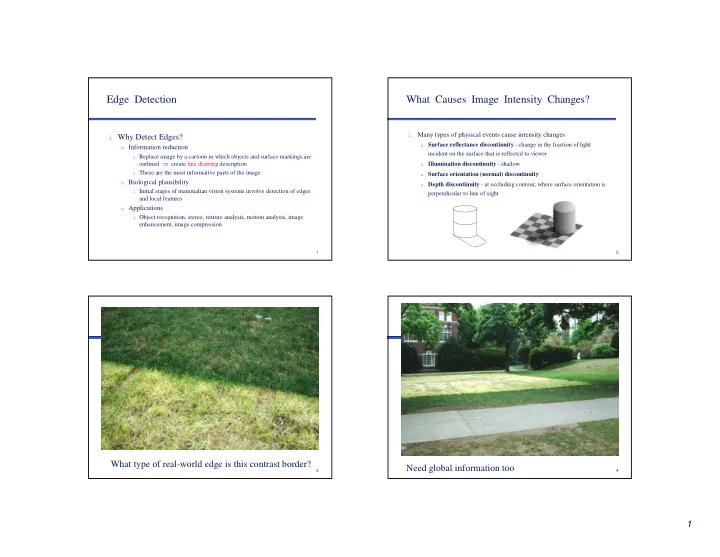
What Causes Image Intensity Changes?

l

Many types of physical events cause intensity changes

u Surface reflectance discontinuity - change in the fraction of light

incident on the surface that is reflected to viewer

u Illumination discontinuity - shadow u Surface orientation (normal) discontinuity u Depth discontinuity - at occluding contour, where surface orientation is

perpendicular to line of sight

3

What type of real-world edge is this contrast border?

4

Need global information too

slide-2
SLIDE 2

2

5

What Does an Edge Look Like?

l Step l Ramp l Roof l Line (bar)

6 7

fine scale high threshold

8

coarse scale, high threshold

slide-3
SLIDE 3

3

9

coarse scale low threshold

10

Edge Detectors in the HVS

l Sum activity from an array of oriented simple cells Complex Simple (border)

11

Orientation Columns in V1

l A “hypercolum” = complete set of orientations

12

Craik-O’Brien-Cornsweet Illusion

slide-4
SLIDE 4

4

13

Koffka Ring

14

Luminance Differences Affect our Perceptions

l Artists use the technique of “equiluminance” to

blur outlines and suggest motion. We cannot perceive the edges of objects where object and background have the same luminance. If parts of a painting are equiluminant, their positions become

  • ambiguous. They may seem to shift position or to

float

l Equiluminant colors have special properties, e.g.,

they can make a painting appear unstable

15

Equiluminant Colors

l An object that can be seen by both subdivisions of the visual

system will be perceived accurately. But if the two subdivisions are not balanced in their response to an object, it may look peculiar.

l For example, an object defined by equiluminant colors can be

seen by the What system but is invisible (or poorly seen) by the Where system. It may seem flat, it may seem to shift position, or it may seem to float ambiguously because there is too little luminance contrast to provide adequate information about its three-dimensional shape, its location in space, or its motion (or lack of it).

l Conversely, something defined by very low contrast contours

is seen by the Where system but not the What system and may seem to have depth and spatial organization but no clear shape.

16

Detail from Richard Anuszkiewicz’s Plus Reversed, 1960

slide-5
SLIDE 5

5

17

Edge Detection Goals

l Good detection: Low false alarm rate and low false

dismissal rate ⇒ maximize signal-to-noise (S/N) ratio

l Good localization: Mark point closest to “center” of true

edge ⇒ minimize distance between marked point and center

l Uniqueness: Only one response to a single edge l Good property measurement: Orientation, contrast, etc.

18

Edge Operator Properties

l Shift invariant (translation invariant, position invariant)

u If g(x,y) = Op[f(x,y)] then g(x-a, y-b) = Op[f(x-a, y-b)]

l Isotropic (rotation invariant) vs. non-isotropic l Derivative order (if differentiation-based method) l Linear vs. non-linear

u Op[a f1(x,y) + b f2(x,y)] = a Op[f1(x,y)] + b Op[f2(x,y)]

= a g1(x,y) + b g2(x,y)

l Scale (operator neighborhood size)

u g(x,y) = Op[f(x+a, y+b), ∀ -k < a, b < k ]

l Convolution (linear and shift-invariant)

19

Edge and Local Feature Detection Methods

l Gradient-based edge detection l Edge detection by function fitting l Second derivative edge detectors l Edge linking and the construction of the chain graph

20

1D Edge Detection

l An ideal edge is a step function x

I(x)

x

I′(x)

slide-6
SLIDE 6

6

21

1D Edge Detection

l The first derivative of I(x) has a peak at the edge l The second derivative of I(x) has a zero crossing at the

edge

x

I′′(x)

22

1D Edge Detection

l More realistically, image edges are blurred and the regions

that meet at those edges have noise or variations in intensity

u Blur - high first derivatives near edges u Noise - high first derivatives within regions that meet at edges x I(x) x I′(x)

23

Edge Detection in 2D

l Let I(x,y) be the image intensity function. It has

derivatives in all directions

u ∂I(x, y)/∂x = lim I(x+∆x, y) - I(x, y) / ∆x ≈ I(u+1, v) - I(u,v) u Gradient of I(x, y) is a vector ∇

∇ ∇ ∇I(x, y) = [∂I/∂x, ∂I/∂y]T specifying the direction of greatest rate of change in intensity (i.e., perpendicular to the edge’s direction)

u From gradient can determine the direction in which the first

derivative is highest, and the magnitude of the first derivative in that direction

u Magnitude = [(∂ I/∂x)2 + (∂I/∂y)2]1/2 u Direction = tan-1 (∂I/∂y)/(∂I/∂x)

24

Computing First Derivative

l To compute first derivative in direction θ, calculate from

linear combination of derivatives from any two non-collinear directions

x = x′cos θ - y′sin θ

y = x′sin θ + y′cos θ

  • ∂I/∂x′ = ∂I/∂x ∂x/∂x′ + ∂I/∂y ∂y/∂y′

= ∂I/∂x cos θ + ∂I/∂y sin θ ∂I/∂y′ = -∂I/∂x sin θ + ∂I/∂y cos θ

(∂I/∂x′)2 + (∂I/∂y′)2 = (∂I/∂x)2 + (∂I/∂y)2 So, sum of squares of first derivative is

isotropic, non-linear

Similarly, all derivatives of odd ordcr

raised to an even power are isotropic

y x x′ y′ θ

slide-7
SLIDE 7

7

25

Gradient

l Gradient = [∂I/∂x, ∂I/∂y]T l What direction is first derivative a maximum?

u Set ∂/∂θ (∂I/∂x′) = 0, and solve for θ

⇒ ∂/∂θ (∂I/∂x cos θ + ∂I/∂y sin θ) = 0 ⇒ θ = tan-1 (∂I/∂y / ∂I/∂x)

l Gradient direction is perpendicular to “edge direction” l Gradient magnitude is isotropic

2 2

        ∂ ∂ +       ∂ ∂ = ∇ y I x I I

26

Edge Detection in 2D

l With a digital image, the partial derivatives are replaced by

finite differences:

u ∆xI = I(u+1, v) - I(u, v) u ∆yI = I(u, v) - I(u, v+1)

l An alternative (Sobel)

u ∆sobel_XI = I(u+1, v+1) + 2I(u+1, v) + I(u+1, v-1) - I(u-1, v+1) - 2I(u-1, v) - I(u-1, v-1) u ∆sobel_YI = I(u-1, v-1) + 2I(u, v-1) + I(u+1, v-1) - I(u-1, v+1) - 2I(u, v+1) - I(u+1, v+1)

l Roberts’s “Cross”

u ∆+I = I(u, v) - I(u+1, v-1) u ∆-I = I(u, v-1) - I(u+1, v) 1 0 0 -1 0 -1 1 0

u v

27

Gradient Operator Example

l I = 0 0 0 1 2 3 4 4 4 8 8 8 3 3 3 l ∆x = -1 1 l ∆xI = * 0 0 1 1 1 1 0 0 4 0 0 -5 0 0

slide-8
SLIDE 8

8

30

Directional Edge Operators

l Kirsch 8-direction masks l Gradient magnitude = l Gradient direction = 45° argmax k n

5 3 3 5 3 5 3 3 − − − − − = k 3 3 3 5 3 5 5 3

1

− − − − − = k

3 3 3 3 3 5 5 5

2

− − − − − = k 5 5 3 5 3 3 3 3

7

− − − − − = k

n

k

n

max

7 ,... =

31

Directional Edge Operators

l Robinson masks l Nevatia and Babu used 6 5x5 masks, detecting orientations

at multiples of 30°

1 1 2 2 1 1 − − − = r 2 1 1 1 1 2

7

− − − = r

32

Edge Detection in 2D

l How do we combine the directional derivatives to compute

the gradient magnitude?

u Use the root mean square (RMS) as in the continuous case u Sum of the absolute values of the directional derivatives u Maximum of the absolute values of the directional derivatives

l Advantages of the latter

u Avoids computing square root (although this can be done using

table lookups)

u Keeps result in the same range as the original image u Gives a magnitude that is invariant with respect to orientation of

the edge in the image (∆sobel_X overestimates diagonal edges and ∆+

  • verestimates horizontal and vertical edge magnitudes)
slide-9
SLIDE 9

9

33

Finite Differences and Noise

l

Finite difference filters respond strongly to noise

u obvious reason: image noise

results in pixels that look very different from their neighbors

l

Generally, the larger the noise the stronger the response

l

What is to be done?

u intuitively, most pixels in

images look quite a lot like their neighbors

u this is true even at an edge;

along the edge they’re similar, across the edge they’re not

u suggests that smoothing the

image should help, by forcing pixels different from their neighbors (=noise pixels?) to look more like their neighbors

34

Finite Differences Responding to Noise

Increasing noise -> (this is zero mean additive gaussian noise)

35

Combining Smoothing and Differentiation - Fixed Scale

l Local operators like the Roberts operator give high

responses to any intensity variation

u local surface texture u noise from the sensing process

l If the picture is first smoothed by an averaging process,

then these local variations are removed and what remains are the “prominent” edges

l Example: I2x2(u,v) = 1/4[I(u,v) + I(u+1,v) + I(u,v+1) + I(u+1,v+1)]

36

Smoothing - Basic Problems

l What function should be used to smooth or average the

image before differentiation?

u Mean smoothing (aka box filters or uniform smoothing or

averaging)

l easy to compute (linear) l for large smoothing neighborhoods assigns too much weight to points

far from an edge

u Median smoothing

l doesn’t blur corners l unaffected by outliers

u Gaussian smoothing

l [1/(2πσ2)] e -(u2 + v2)/2σ2

slide-10
SLIDE 10

10

38

Example: Smoothing by Averaging

39

Smoothing with a Gaussian

40

The Mystery of the Mona Lisa Smile

l

Margaret Livingstone has conjectured that the elusive smile is because of the differences in resolution in the fovea and the periphery of the retina

Low-pass filtered Middle-pass High-pass

slide-11
SLIDE 11

11

41

Changing small details can affect the mood we perceive. A few pixels of change switches her from happy to sad. Adding random “noise” also changes our perception of her expression.

43

Smoothing and Convolution

l The convolution of two functions, f(x) and g(x), is defined

as h(x) = ∫ g(x′) f(x-x′) dx′ = g(x) * f(x)

l When f and g are discrete and when g is nonzero only over

a finite range [-n, n], this integral is replaced by the summation h(u) = ∑ g(i) f(u-i)

44

Example of 1D Convolution

8 7 8 22 23 12 10 11 9 5 6 4 1 3 5 3 1 12 1 3 5 3 1 17 1 3 5 3 1 18 f g h

) 2 ( ) 2 ( ) 3 ( ) 1 ( ) 4 ( ) ( ) 5 ( ) 1 ( ) 6 ( ) 2 ( ) 4 ( ) ( ) 4 (

2 2

f g f g f g f g f g i f i g h

i

+ + + − + − = − = ∑

− =

1 2 3 4 5 6

Note: Values in h have

been divided by ∑g = 13

slide-12
SLIDE 12

12

45

Smoothing and Convolution

l These integrals and summations extend simply to functions

  • f two variables:

h(u,v) = g(u,v) * f(u,v) = ∑∑ g(i,j) f(u-i, v-j)

l Convolution computes the weighted sum of the gray levels

in each n x n neighborhood of the image, f, using the “kernel” matrix of weights, g

l Convolution is a linear operator because

u g*(af1 + bf2) = a(g*f1) + b(g*f2)

46

Convolution

47

2D Convolution ) 4 , 4 ( ) 1 , 1 ( ) 5 , 4 ( ) , 1 ( ) 6 , 4 ( ) 1 , 1 ( ) 4 , 5 ( ) 1 , ( ) 5 , 5 ( ) , ( ) 6 , 5 ( ) 1 , ( ) 4 , 6 ( ) 1 , 1 ( ) 5 , 6 ( ) , 1 ( ) 6 , 6 ( ) 1 , 1 ( ) 5 , 5 ( ) , ( ) 5 , 5 (

1 1 1 1

f g f g f g f g f g f g f g f g f g j i f j i g h

i j

+ + − + + + − + − + − + − − = − − =∑∑

− = − =

48

Smoothing and Convolution

slide-13
SLIDE 13

13

49

Properties of Convolution

l Commutative l Associative l Cascadable l Linear, shift-invariant l Any linear, shift-invariant operation can be implemented

as a convolution

l Convolution in spatial domain = multiplication in

frequency domain. I.e., g = f * h iff G = F·H, where * denotes convolution and F = (f)

l An alternative for computing g: g = -1(F·H)

50

Combining Smoothing and Edge Detection

l Let S = 1 1

1 1 1 1

l ∆x = -1 1 l Smooth, then differentiate:

∆x * (S * I), where I is original image and * is convolution = (∆x * S) * I

1 0 -1

l ∆x * S = 1 0 -1 = ∆Prewitt_x

1 0 -1

51

Back to Smoothing Functions

l To smooth an image using a Gaussian filter, e-(u2 + v2)/2σ2,

we must

u Choose an appropriate value for σ, which controls how quickly the

Gaussian falls to near 0

l Small σ produces filter which drops to near 0 quickly - can be

implemented using small digital array of weights

l Large σ produces a filter which drops to near 0 slowly - will be

implemented using a larger size digital array of weights

u Determine the size weight array needed to adequately represent

that Gaussian

l To represent 98.76% of the area under the Gaussian using σ=σ0 use a

mask of size 5σ0 x 5σ0

l In practice, size of mask is often closer to size 3σ x 3σ l Weight array needs to be of odd size (2k+1 x 2k+1) to allow for

symmetry

52

l To smooth an image using a Gaussian filter we must

u Sample the Gaussian by integrating it over the square pixels of the

array of weights and multiplying by a scale factor to obtain integer weights

u Because we have truncated the Gaussian, the weights will not sum

to 1.0 x scale factor

l In “flat” areas of the image we expect our smoothing filter to leave

the image unchanged

l But if the filter weights do not sum to 1.0 x scale factor, it will either

amplify (> 1.0) or de-amplify (< 1.0) the image

Gaussian Smoothing

slide-14
SLIDE 14

14

53

Gaussian Smoothing

l Gaussian smoothing steps

u Normalize the weight array by dividing each entry by the sum of

the all of the entries (integral equal to 1)

u Convert to integers

l Advantages of Gaussian filtering

u Rotationally symmetric (for large filters) u Filter weights decrease monotonically from central peak, giving

most weight to central pixels

u Simple and intuitive relationship between size of σ and size of

  • bjects whose edges will be detected in image.

u The Gaussian is separable

54

Building Discrete Gaussian Kernels

l Given σ and w, compute real-valued weights for w x w

kernel array

l Divide all entries by minimum weight and round result to

nearest integer, obtaining kernel G

l Compute normalization factor n = ∑ weights l I' = 1/n (G * I)

55

Separability

l A function g(x, y) is separable if g(x, y) = g1(x) g2(y) l The Gaussian function is separable:

e -[(x2 + y2)/2σ

σ σ σ2] = e -[x2/2σ σ σ σ2] * e -[y2/2σ σ σ σ2]

l First convolve the image with a 1D horizontal filter l Then convolve the result of the first convolution with a 1D

vertical filter

l For a k x k Gaussian filter, 2D convolution requires k2

multiplications and k2-1 additions per pixel

l But using the separable filters, we reduce this to 2k

multiplications and 2k-1 additions per pixel

56

Separability

2 3 3 3 5 5 4 4 6 1 2 1 1 2 1 18 11 18 18 11 18 65 1 2 1 1 2 1 1 2 1 2 4 2 1 2 1 2 3 3 3 5 5 4 4 6 =2 + 6 + 3 = 11 = 6 + 20 + 10 = 36 = 4 + 8 + 6 = 18 65 = x

g1 = g2 = I =

slide-15
SLIDE 15

15

57

Advantages of Gaussians

l Cascading Gaussians: Convolution of a Gaussian with

itself is another Gaussian

u So, we can first smooth an image with a small Gaussian u Then, we convolve that smoothed image with another small

Gaussian and the result is equivalent to smoother the original image with a larger Gaussian

u If we smooth an image with a Gaussian having standard deviation

σ twice, then we get the same result as smoothing the image with a Gaussian having standard deviation 2σ

58

Combining Smoothing and Differentiation - Fixed Scale

l Non-maxima suppression - Retain a point as an edge point

if

u its gradient magnitude is higher than a threshold u its gradient magnitude is a local maximum in the gradient direction

l “Lateral inhibition” process

59

Summary of Basic Edge Detection Steps

l Smooth the image to reduce the effects of local intensity

variations

u Choice of smoothing operator practically important

l Differentiate the smoothed image using a digital gradient

  • perator that assigns a magnitude and direction of the

gradient at each pixel

u Mathematically, we can apply the digital gradient operator to the

digital smoothing filter, and then just convolve the differentiated smoothing filter to the image

u Requires using a slightly larger smoothing array to avoid border

effects

l Threshold the gradient magnitude to eliminate low contrast

edges

60

Summary of Basic Edge Detection Steps

l Apply a non-maximum suppression step to thin the edges

to single pixel wide edges

u Smoothing will produce an image in which the contrast at an edge

is spread out in the neighborhood of the edge

u Thresholding operation will produce thick edges

slide-16
SLIDE 16

16

61

Canny Edge Operator

l Design operator that is optimal with respect to good

detection, good localization, and unique response criteria

l Good detection criterion: Maximize SNR, which is the

ratio of the step size of a step edge over the standard deviation of the 0-mean, additive Gaussian noise

l Good localization criterion: Maximize inverse distance

  • f detected edge from true edge

l Optimal 1D step-edge detector = detector that maximizes

the product of the two terms above subject to third criterion

l First derivative of a Gaussian is within 20% of optimal

62

Directional Derivatives

l Isotropic operators smooth across edges

⇒ Poor localization

l Instead, average pixels along edge direction only

⇒ Use a set of directional derivatives at a large number of

  • rientations

1 1 1 1 1 1 − − − 1 1 1 1 1 1 − − −

etc.

63

Canny Edge Operator

l Gaussian smooth image: G * I l Estimate gradient direction (i.e., edge normal), n, at each

pixel:

l Compute first derivative in the gradient direction, n. That

is, ∂G/∂n * I

l Suppress non-maxima

u If value is not a local max in direction n, then change value to 0 u Or, find zero-crossings in direction n. I.e., zero-crossings of

∂([∂G/∂n] * I)/∂n = ∂2(G * I)/∂n2

) * ( ) * ( I G I G ∇ ∇ = n

64

Canny Edge Operator

l To get rid of spurious edges created by noise

(false positives) and to fill in missing edges (false negatives) use hysteresis thresholding:

u Define two thresholds, thigh and tlow u Mark all pixels with edge magnitude > thigh as edge

pixels

u For each marked pixel, search in edge direction, both

ways, marking all pixels with edge magnitude > tlow as edge pixels. Stop search when a pixel is reached with edge magnitude < tlow

slide-17
SLIDE 17

17

65

Laplacian Edge Detectors

l Directional second derivative in direction of gradient has a

zero crossing at gradient maximum

l Can approximate directional second derivative with

Laplacian:

∇2I = ∂2I/∂x2 + ∂2I/∂y2

l Laplacian is lowest order linear isotropic operator l Digital approximation (2nd forward difference) is

u ∇2I(u,v) = [I(u+1,v) + I(u-1,v) + I(u,v+1) + I(u,v-1)] - 4I(u,v)

= [I(u+1,v) - I(u,v)] - [I(u,v) - I(u-1,v)] + [I(u,v+1) - I(u,v)] - [I(u,v) - I(u,v-1)]

0 1 0 1 -4 1 0 1 0

66

Laplacian Examples

l I = ... 2 2 2 8 8 8 ... l ∇2 = 1 -2 1

⇒ ∇2 I = ... 0 0 0 6 -6 0 0 0 ...

l I = ... 2 2 2 5 8 8 8 ...

⇒ ∇2 I = ... 0 0 0 3 0 -3 0 0 0 ...

67

Problems with Laplacian of Small Size

l Responds most strongly at isolated points (spots)

⇒ noise sensitive

l Responds strongly at lines and endpoints of lines l Responds relatively less at edges l Ramp edges detected at two ends, not once at center

slide-18
SLIDE 18

18

69

Using Laplacian for Edge Enhancement

l Given a blurred image g ≈ I′ = 1/5 (I * | 0 1 0 | )

| 1 1 1 | | 0 1 0 |

l ∇2I ∝ I - I′ l g - k∇2g ≈ I′ - k(-1/5 (I - I′))

= k/5 I + I′(1 - k/5) ≈ I when k=5

l ==> Can deblur an image by subtracting a multiple of its

Laplacian

l Simulates Mach Band effect in human visual system l Analogous to unsharp masking technique in photography

70

Mach Bands

l

In 1865, Mach discovered that we perceive an edge (change of intensity) at lines that separate surface regions with identical intensity on both sides but different intensity derivatives

l

It is caused by the lateral inhibition of the receptors in the eyes

71

Mach Bands

Actual brightness Perceived by you

72

Laplacian Edge Detectors

l Laplacians are also combined with smoothing for

edge detectors

u Take the Laplacian of a Gaussian-smoothed image -

called the Laplacian-of-Gaussian (LoG), Mexican Hat

  • perator, Difference-of-Gaussians (DoG), Marr-

Hildreth, ∇ ∇ ∇ ∇2G operator

u Locate the zero-crossing of the operator

l these are pixels whose LoG is positive and which have

neighbor’s whose LoG is negative or zero

u Usually, measure the gradient or directional first

derivatives at these points to eliminate low contrast edges

slide-19
SLIDE 19

19

74

Laplacian of Gaussian (LoG)

∇2Gσ(x, y) = -[1/2πσ4] (2 - (x2 + y2)/σ2) e -(x2 + y2)/2σ2

75

LoG Properties

l Linear, shift invariant ⇒ convolution l Circularly symmetric ⇒ isotropic l Size of LoG operator approximately 6σ x 6σ l LoG is separable l LoG ≈ Gσ1 - Gσ2 , where σ1 = 1.6σ2 l Analogous to spatial organization of receptive fields of

retinal ganglion cells, with a central excitatory region and an inhibitory surround

76

slide-20
SLIDE 20

20

77

Receptive Field

u

Region on retina that influences activity of a ganglion cell

u Firing rate of neuron u Excitatory center, inhibitory surround

+

  • 78

u Ganglion cells detect differences

in luminance at a border, line, or spot

u Retina is NOT a spot-meter

79

Lateral Inhibition Explanation

B < A

B inhibited by surround

D > E

D less inhibited by surround

dark band light band

80

Hermann Grid

l Illustrates lateral inhibition

slide-21
SLIDE 21

21

81

Visual illusions

82

Lateral Inhibition Explanation

Inhibited less by white stripes Inhibited more by white stripes

83

The Scale Space Problem

l Usually, any single choice of σ does not produce a good

edge map

u a large σ will produce edges from only the largest objects, and they

will not accurately delineate the object because the smoothing reduces shape detail

u a small σ will produce many edges and very jagged boundaries of

many objects

l Scale-space approaches

u detect edges at a range of scales [σ1, σ2] u combine the resulting edge maps

l trace edges detected using large σ down through scale space to obtain

more accurate spatial localization

slide-22
SLIDE 22

22

slide-23
SLIDE 23

23

89

Pyramids

l Very useful for representing images l Pyramid is built by using multiple copies of image l Each level in the pyramid is 1/4 the area of previous level,

i.e., each dimension is 1/2 resolution of previous level

Pyramids

91 92

Gaussian Pyramid

slide-24
SLIDE 24

24

93

Gaussian Pyramid

l Multiresolution, low-pass filter l Hierarchical convolution

u G0 = input image u G′k(u, v) = ∑∑ w(m, n) Gk-1(u-m, v-n) ; smooth u Gk(u, v) = G′k(2u, 2v), 0 < u, v < 2N-k ; sub-sample

l w is a small (e.g., 5 x 5) separable generating kernel, e.g.,

1/16 [1 4 6 4 1]

l

Cascading w equivalent to applying large kernel

u Effective size of kernel at level k = 2M(2k - 1) + 1, where w has

width 2M+1

u Example: Let M=1. If k=1 then equivalent size = 5; k=2 then

equivalent size = 13; k=3 then equivalent size = 27

94

Gaussian Pyramids

) 2 , 2 ( ) , ( ) , (

2 2 2 2 1

n v m u g n m w v u g

m n l l

+ + = ∑∑

− = − = −

] [

1 −

=

l l

g REDUCE g

95

Reduce (1D)

) 2 ( ) ( ˆ ) (

2 2 1

m u g m w u g

m l l

+ = ∑

− = −

) 2 4 ( ) 2 ( ˆ ) 1 4 ( ) 1 ( ˆ ) 4 ( ) ( ˆ ) 1 4 ( ) 1 ( ˆ ) 2 4 ( ) 2 ( ˆ ) 2 (

1 1 1 1 1

+ + + + + − − + − − =

− − − − − l l l l l l

g w g w g w g w g w g

) 6 ( ) 2 ( ˆ ) 5 ( ) 1 ( ˆ ) 4 ( ) ( ˆ ) 3 ( ) 1 ( ˆ ) 2 ( ) 2 ( ˆ ) 2 (

1 1 1 1 1 − − − − −

+ + + − + − =

l l l l l l

g w g w g w g w g w g

96

Reduce

slide-25
SLIDE 25

25

97

Gaussian Pyramids ] [

1 , , −

=

n l n l

g EXPAND g

) 2 , 2 ( ) , ( ) , (

2 2 2 2 1 , ,

q v p u g q p w v u g

p q n l n l

− − = ∑ ∑

− = − = −

98

Expand (1D) ) 2 ( ) ( ˆ ) (

2 2 1 , ,

p u g p w u g

p n l n l

− = ∑

− = −

) 2 2 4 ( ) 2 ( ˆ ) 1 1 4 ( ) 1 ( ˆ ) 2 4 ( ) ( ˆ ) 2 1 4 ( ) 1 ( ˆ ) 2 2 4 ( ) 2 ( ˆ ) 4 (

1 , 1 , 1 , 1 , 1 , ,

+ + + + + − − + − − =

− − − − − n l n l n l n l n l n l

g w g w g w g w g w g

) 3 ( ) 2 ( ˆ ) 2 ( ) ( ˆ ) 1 ( ) 2 ( ˆ ) 4 (

1 , 1 , 1 , , − − −

+ + − =

n l n l n l n l

g w g w g w g

99

Expand

100

Convolution Mask

)] 2 ( ), 1 ( ), ( ), 1 ( ), 2 ( [ w w w w w − −

slide-26
SLIDE 26

26

101

Convolution Mask

l Separable l Symmetric

) ( ˆ ) ( ˆ ) , ( n w m w n m w = ) ( ˆ ) ( ˆ u w u w − =

] , , , , [ c b a b c

102

Convolution Mask

l The sum of mask should be 1: l All nodes at a given level must contribute the same total

weight to the nodes at the next higher level:

b c a 2 2 = +

1 2 2 = + + c b a

103

Convolution Mask ( ) ( ) ( ) ( ) ( ) w a w w w w a 1 1 1 4 2 2 1 4 2 = − = = − = = −

⇒ ⇒ ⇒ ⇒ ⇒ ⇒ ⇒ ⇒

104

Algorithm

l Apply 1D mask to alternate pixels along each row of

image

l Apply 1D mask to each pixel along alternate columns of

resultant image from previous step

slide-27
SLIDE 27

27

105

Laplacian Pyramids

l Similar to results of edge detection l Most pixels are 0 l Can be used for image compression:

] [

3 2 2

g EXPAND g L − = ] [

4 3 3

g EXPAND g L − = ] [

2 1 1

g EXPAND g L − =

106 107

Laplacian Pyramid

l Computes a set of bandpass filtered versions of image l Lk = Gk - w * Gk

= Gk - Expand(Gk+1)

l LN = GN (apex of Laplacian pyr = apex of Gaussian pyr) l Separates features by their scale (size) l Enhances features l Compact representation l ∑ L k = (G0 - G1 ) + (G1 - G2 ) + ... + (GN-1 - GN ) + GN

= G0

slide-28
SLIDE 28

28

109

Gaussian and Laplacian Pyramids

110

Coding using the Laplacian Pyramid

  • Compute Gaussian pyramid

4 3 2 1

, , , g g g g

  • Compute Laplacian pyramid

4 4 4 3 3 3 2 2 2 1 1

] [ ] [ ] [ g L g EXPAND g L g EXPAND g L g EXPAND g L = − = − = − =

  • Code Laplacian pyramid

111

l Decode Laplacian pyramid l Compute Gaussian pyramid from Laplacian pyramid: l g1 is reconstructed image

4 4

L g =

3 4 3

] [ L g EXPAND g + =

Decoding using Laplacian pyramid

g2 = EXPAND[g3] + L2 g1 = EXPAND[g2] + L1

112

Image Compression

Laplacian Pyramid

Level 0 1 2 3

After Quantization

slide-29
SLIDE 29

29

113

Image Compression

Originals Encoded

114

Image Compositing by Pyramid Blending

l Given: Two 2n x 2n images l Goal: Create an image that contains left half of image A

and right half of image B

l Algorithm

u Compute Laplacian pyramids, LA and LB, from images A and B u Compute Laplacian pyramid LS by copying left half of LA and

right half of LB. Pyramid nodes down the center line = average of corresponding LA and LB nodes ⇒ blend along center line

u Expand and sum levels of LS to obtain output image S

115

Combining Apple & Orange

116

Combining Apple & Orange (using Pyramids)

slide-30
SLIDE 30

30

117

Image Compositing from Arbitrary Regions

l Given: Two 2n x 2n images and one 2n x 2n binary mask l Goal: Output image containing image A where mask=1,

and image B where mask=0

l Algorithm:

u Construct Laplacian pyramids LA and LB from images A and B u Construct Gaussian pyramid GR from mask R u Construct Laplacian pyramid LS:

LSk(u, v) = GRk(u, v) LAk(u, v) + (1 - GRk(u, v)) LBk(u, v)

u Expand and sum levels of LS to obtain output image S

slide-31
SLIDE 31

31

124

Oriented (“Steerable”) Pyramids

l Laplacian pyramid is orientation-independent l Apply an oriented filter to determine orientations at each

layer

u by clever filter design, we can simplify synthesis u this represents image information at a particular scale and

  • rientation
slide-32
SLIDE 32

32

125 126

From “Shiftable MultiScale Transforms,” by Simoncelli et al., IEEE Transactions

  • n Information Theory, 1992

127

Analysis

128

Synthesis

slide-33
SLIDE 33

33

129

Edge Detection by Function Fitting: Facet Model

l General approach

u Fit a function to each pixel’s neighborhood of the image u Use the gradient of the function as the digital gradient of the image

neighborhood

l Example: Fit a plane to a 2 x 2 neighborhood

u z = ax + by + c; z is gray level u Gradient is then (a2 + b2)1/2 u Neighborhood points are I(x,y), I(x+1,y), I(x,y+1) and I(x+1,y+1) l

Need to minimize E(a,b,c) = ΣΣ [a(x+i) + b(y+j) + c - I(x+i,y+j)]2

l

Solve this and similar problems by:

u Differentiating with respect to a,b,c, set results to 0, and u Solve for a,b,c in resulting system of equations

130

Edge Detection by Function Fitting

l ∂E/∂a = ΣΣ2[a(x+i) + b(y+j) + c - I(x+i,y+j)](x+i) l ∂E/∂b = ΣΣ2[a(x+i) + b(y+j) + c - I(x+i,y+j)](y+j) l ∂E/∂c = ΣΣ2[a(x+i) + b(y+j) + c - I(x+i,y+j)] l It is easy to verify that

a = [I(x+1,y) + I(x+1,y+1) - I(x,y) - I(x,y+1)]/2 b = [I(x,y+1) + I(x+1,y+1) - I(x,y) - I(x+1,y)]/2

l a and b are the partial derivatives with respect to x and y

  • 1 1
  • 1 1

a = b = 1 1

  • 1 -1

131

Edge Detection by Function Fitting

l Could also fit a higher order surface than a plane

u With a second order surface we could find the (linear) combination

  • f pixel values that corresponds to the higher order derivatives,

which can also be used for edge detection

l Would ordinarily use a neighborhood larger than 2 x 2

u Better fit u For high degree functions need more points for the fit to be reliable

132

Edge Linking and Following

l Group edge pixels into chains and chains into large pieces

  • f object boundary.

u can use the shapes of long edge chains in recognition

l slopes l curvature l corners

l Basic steps

u thin connected components of edges to one pixel thick u find simply connected paths u link them at corners into a graph model of image contours u compute local and global properties of contours and corners

slide-34
SLIDE 34

34

133

Finding Simply Connected Chains

l Goal: create a graph-structured representation

(chain graph) of the image contours

u vertex for each junction in the image u edge connecting vertices corresponding to junctions that are

connected by an chain; edge labeled with chain

a b c d e f g h j α α α α β β β β φ φ φ φ δ δ δ δ ε ε ε ε α α α α β β β β b φ φ φ φ a ε ε ε ε c δ δ δ δ d e η η η η η η η η f r s u

134

Creating the Chain Graph

l Algorithm: given binary image, E, of thinned edges

u create a binary image, J, of junctions and end points

l points in E that are 1 and have more than two neighbors that are 1 or

exactly one neighbor that is a 1

u create the image E-J = C(chains)

l this image contains the chains of E, but they are broken at junctions

u perform a connected component analysis of C. For each

component store in a table T:

l its end points (0 or 2) l the list of coordinates joining its end points

u For each point in J:

l create a node in the chain graph , G, with a unique label 135

Creating the Chain Graph

l For each chain in C

u if that chain is a closed loop (has no end points)

l choose one point from the chain randomly and create a new node in G

corresponding to that point

l mark that point as a “loop junction” to distinguish it from other

junctions

l create an edge in G connecting this new node to itself, and mark that

edge with the name of the chain loop

u if that chain is not a closed loop, then it has two end points

l

create an edge in G linking the two points from J adjacent to its end points

136

Creating the Chain Graph

l Data structure for creating the chain graph l Biggest problem is determining for each open chain in C

the points in J that are adjacent to its end points

u sophisticated solution might use a hierarchical data structure, like a

k-d tree, to represent the points in J

u more direct solution is to create image J in which all 1’s are

marked with their unique labels

u For each chain in C

l Examine the 3 x 3 neighborhood of each end point of C in J l Find the name of the junction or end point adjacent to that end point

from this 3 x 3 neighborhood
slide-35
SLIDE 35

35

137

Finding Internal “Corners” of Chains

l Chains are only broken at junctions

u But important features of the chain might occur at internal points u Example: closed loop corresponding to a square - would like to

find the natural corners of the square and add them as junctions to the chain graph (splitting the chains at those natural corners)

l Curve segmentation

u similar to image segmentation, but in a 1D form

l Local methods, like edge detectors l Global methods, like region analyzers 138

Local Methods of Curve Segmentation

l Natural locations to segment contours are points where the

slope of the curve is changing quickly

u These correspond, perceptually, to “corners” of the curve

l To measure the change in slope we are measuring the

curvature of the curve

u Straight line has 0 curvature u Circular arc has constant curvature corresponding to 1/r

l Can estimate curvature by fitting a simple function

(circular arc, quadratic function, cubic function) to each neighborhood of a chain, and using the parameters of the fit to estimate the curvature at the center of the neighborhood

139

Formulas for Curvature

l Consider moving a point, P, along a curve

u Let T be the unit tangent vector as P moves

l T has constant length (1) l The direction of T, φ, changes from point to point unless the curve is a

straight line

l Measure this direction as the angle between T and the x-axis

R P T = dR / ds, s distance along curve

φ

140

Formulas for Curvature

l The curvature, κ, is the instantaneous rate of change of φ

with respect to s, distance along the curve

u κ = dφ / ds u ds = [dx2 + dy2]1/2 u φ = tan-1dy/dx R P T = dR / ds, s distance along curve

φ

slide-36
SLIDE 36

36

141

Formulas for Curvature

l Now

and so

dφ / dx = d 2y dx2 1+ (dy dx)2 ds / dx = 1+ (dy dx)2 κ = dφ / ds = dφ / dx ds / dx = d 2y dx 2 [1+ (dy dx)2]3/ 2

142

Example - Circle

l For the circle

u s = aθ u φ = θ + π/2 u so κ = dφ/ds = dθ/adθ = 1/a a θ s φ

143

Local Methods of Curve Segmentation

l There are also a wide variety of heuristic methods to

estimate curvature like local properties

u For each point, p , along the curve u Find the points k pixels before and after p on the curve (p+k, p-k)

and then measure

l the angle between pp+k and pp-k l the ratio s/t

l Similar problems to edge detection

u what is the appropriate size for k? u how do we combine the curvature estimates at different scales? u boundary problems near the ends of open curves - not enough

pixels to look out k in both directions

k k t s θ