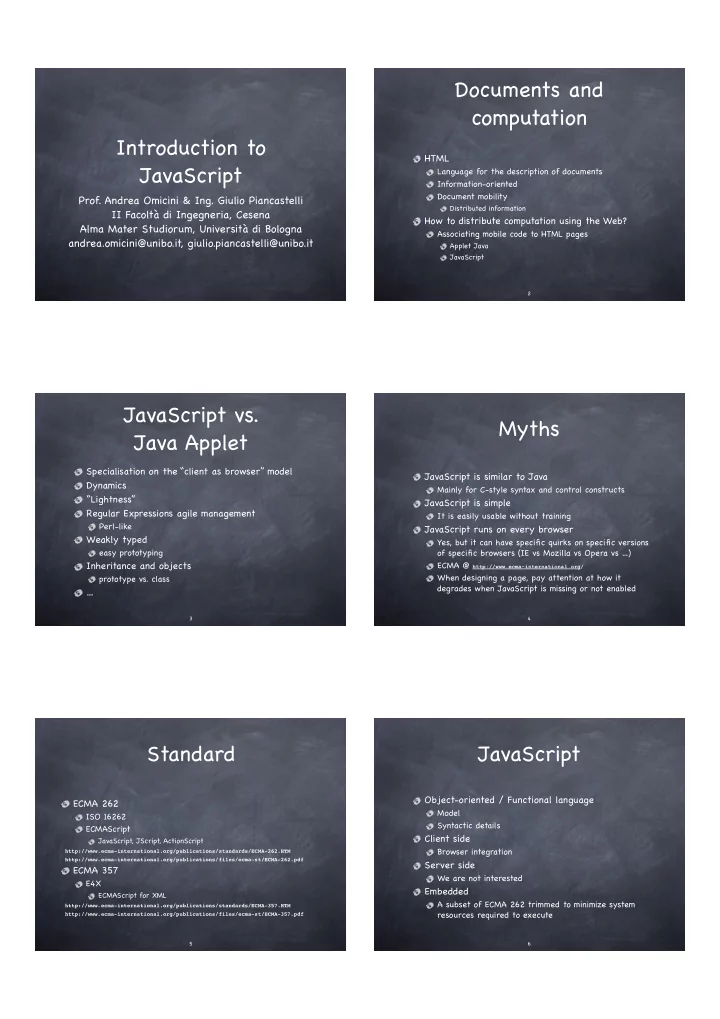
Documents and computation Introduction to HTML JavaScript - - PDF document

documents and computation introduction to
SMART_READER_LITE
LIVE PREVIEW

Documents and computation Introduction to HTML JavaScript - - PDF document

Documents and computation Introduction to HTML JavaScript Language for the description of documents Information-oriented Document mobility Prof. Andrea Omicini & Ing. Giulio Piancastelli Distributed information II Facolt di


slide-1
SLIDE 1

Introduction to JavaScript

  • Prof. Andrea Omicini & Ing. Giulio Piancastelli

II Facoltà di Ingegneria, Cesena Alma Mater Studiorum, Università di Bologna andrea.omicini@unibo.it, giulio.piancastelli@unibo.it

2

Documents and computation

HTML

Language for the description of documents Information-oriented Document mobility

Distributed information

How to distribute computation using the Web?

Associating mobile code to HTML pages

Applet Java JavaScript

3

JavaScript vs. Java Applet

Specialisation on the “client as browser” model Dynamics “Lightness” Regular Expressions agile management

Perl-like

Weakly typed

easy prototyping

Inheritance and objects

prototype vs. class

4

Myths

JavaScript is similar to Java

Mainly for C-style syntax and control constructs

JavaScript is simple

It is easily usable without training

JavaScript runs on every browser

Yes, but it can have specific quirks on specific versions

  • f specific browsers (IE vs Mozilla vs Opera vs …)

ECMA @ http://www.ecma-international.org/ When designing a page, pay attention at how it degrades when JavaScript is missing or not enabled

5

Standard

ECMA 262

ISO 16262 ECMAScript

JavaScript, JScript, ActionScript

http://www.ecma-international.org/publications/standards/ECMA-262.HTM http://www.ecma-international.org/publications/files/ecma-st/ECMA-262.pdf

ECMA 357

E4X

ECMAScript for XML

http://www.ecma-international.org/publications/standards/ECMA-357.HTM http://www.ecma-international.org/publications/files/ecma-st/ECMA-357.pdf 6

JavaScript

Object-oriented / Functional language

Model Syntactic details

Client side

Browser integration

Server side

We are not interested

Embedded

A subset of ECMA 262 trimmed to minimize system resources required to execute

slide-2
SLIDE 2

7

Example – XHTML

<?xml version="1.0" encoding="utf-8"?> <!DOCTYPE html PUBLIC "-//W3C//DTD XHTML 1.0 Transitional//EN" "http://www.w3.org/TR/xhtml1/DTD/xhtml1-transitional.dtd"> <html xmlns="http://www.w3.org/1999/xhtml" xml:lang="en"> <head> <meta http-equiv="content-type" content="text/html; charset=utf-8" /> <title>…</title> <link href ="style.css" rel="stylesheet" type="text/css" media="screen" /> <script type="text/javascript" src="command.js"></script> </head> <body class="papers"> … <form action="" method="get"> … <input type="button" value="BibTeX" class="bibBtn" onclick="showBib('volume');"> … 8

Example – JavaScript

absURL = "abs/"; bibURL = "bib/"; pdfURL = "pdf/"; function showAbs(key) {

  • abstractWin=window.open(absURL+key+".html","abstractWindow",

"resizable=yes,dependent=yes,height=150,width=600,location=no,menubar=no ,scrollbars=yes,status=no,toolbar=no");

  • abstractWin.focus();

} function showBib(key) {

  • bibtexWin=window.open(bibURL+key+".html","bibtexWindow",

"resizable=yes,dependent=yes,height=300,width=600,location=no,menubar=no ,scrollbars=yes,status=no,toolbar=no");

  • bibtexWin.focus();

} function showPDF(key) {

  • top.location.href=pdfURL+key+".pdf";

} … 9

What does JavaScript do?

Document content and presentation control

The document object DOM

Browser control

The window object

Form management

The Form, Button, … objects

User interaction

Events management Interaction state management

Cookies

10

Structure of the language

Case sensitive

It is a problem using HTML

Separators

Spaces, line breaks, tabs, …

Semicolon

Optional, but please use it

Comments

Similar to C, C++ e Java Use // for single line and /* … */ for multiline

Keywords

11

Variables and scope

Variables are dynamically typed

x = "hello"; typeof x // returns "string" x = 54; typeof x // returns "number" x = function(n) { return n * n }; typeof x // returns "function"

Scopes

Global, in the so-called global object Local, in the execution context (not in simple blocks)

Keyword var

Used to make variables visible only in their local scope

Web

documents and windows are new contexts in addition to “classic” scopes

12

Data types

Primitive types: number, string and boolean Arrays Functions Objects - both general and special, e.g.

window and document for browser intraction Data for dates and calendars RegExp, for regular expressions, excellent to manage text as user input

E4X adds XML-like data types

person = <person><name>James</name><surname>Bond</surname></person> typeof person // returns "xml" person.name // returns James, as an "xml" element, not a string

slide-3
SLIDE 3

13

Numbers

Integer and real numbers as IEEE 8 byte

Only double-precision numbers

The Math object

Library of mathematical functions

Special values

Infinity NaN …

14

Strings

No char type Quotes and double quotes

they are equal pay attention with (X)HTML

Concatenation

and many other “classic” operators Wrapper String

Virtual “library”, à la Java (static functions)

15

Boolean

false and true

As strings

Automatically converted in 0 and 1

Numbers Whenever needed…

16

Non-primitive types and references

References are shared when performing assignment between non-primitive types Example

var a = [1,2,3]; var b = a; a[0] = 99; alert(b);

what does that do?

Try it! (IE, Mozilla, Opera, Safari/Konqueror)

javascript: var a = [1,2,3]; var b = a; a[0] = 99; alert(b);

what is the output?

17

Arrays

As objects…

var arr = new Array(1,2,3,4,5);

Classic access

var four = arr[3]; var arr = [[2,3],[true,false],[“boh”,’mah’]];

Fragmented and dynamic

you can do everything you want…

Wrapper Array

18

Functions

First-class objects

can be passed as a parameter to other functions can be expressed as anonymous literal values

Represented as lexically scoped closures Examples

function square(x) {return x*x;} var square = new Function(“x”, “return x*x;”}; var square = function(x) {return x*x;};

Function objects and properties

The arguments object

caller and callee length and arity apply and call

slide-4
SLIDE 4

Higher-order programming

Higher-order programming is the collection of techniques available when using function values E.g. passing functions as arguments

function map(list, f) { var result = [] for (var i = 0; i < list.length; i++) result[i] = f(list[i]) return result } map([1, 2, 3], square) // returns [1, 4, 9]

E.g. returning functions as results

function acc(n) { return function(i) { return n += i } } a = acc(10); a(7); a(6); // returns 23

E.g. putting functions into data structures

19 20

Objects

Collections of properties (name-value pairs) The new operator is used to create objects

var paper = new Object();

Definition of / access to properties

paper.title = “Hello JavaScript”;

Enumeration

for (var property in paper) alert(property);

Methods are properties whose value is a function Prototypes

Not (only) classes and inheritance In the 3rd standard, class and prototype properties…

Prototypes

Prototypes are used to supply general properties to a kind of objects, simulating classes

function Circle(x, y, r) { this.x = x; this.y = y; this.r = r; } Circle.prototype.pi = 3.14159 Circle.prototype.area = function() { return this.pi * this.r * this.r } var c = new Circle(0.0, 0.0, 1.0) var a = c.area()

Prototypes are also used as a mechanism to support inheritance between classes of objects No linguistic support is offered to effectively promote encapsulation

21 22

Browser integration

The window object

Window as a global execution context

var foo and window.foo are the same

Client-side object hierarchy

The window object contains

document, location, frames[], forms[], …

Event model

Event managers associated to (X)HTML tags

23

The SCRIPT tag

<head> <script type="text/javascript" language="JavaScript"> <!-- hide to very old browsers javascript code // --> </script> <script type=”text/javascript” src=”outline.js”> </script> </head> <body> <script type=”text/javascript”> <!-- hide to very old browsers JavaScript code // --> </script> <noscript><p>No JavaScript for you...</p></noscript> </body> 24

Windows management

You can control almost everything…

but you need to study a little so it is better to start from existing examples…

A window objects hierarchy

screen, navigator, document, …

Example:

function showBib(key) { bibtexWin=window.open(bibURL+key+".html","bibtexWindow", "resizable=yes,dependent=yes,height=300,width=600,location=no,menubar=no,

  • scrollbars=yes,status=no,toolbar=no");
  • bibtexWin.focus();

} function showPDF(key) {

  • top.location.href=pdfURL+key+".pdf";

}

slide-5
SLIDE 5

25

DOM

The Document Object Model is a standard object model for representing HTML and XML documents

Vendor-specific extensions exist

JavaScript can manipulate the DOM by accessing its elements via a standard and well-defined API For example, HTML elements may be added...

header = document.createElement('h1') header.innerHTML = 'Document Title' document.getElementsByTagName('body')[0].appendChild(header)

...or CSS properties can be modified

headers = document.getElementsByTagName('h2') for (var i = 0; i < headers.length; i++) headers[i].style.color = 'red' 26

Events

Event managers

  • nChange, onClick, onMouseDown, onSubmit, …

The W3C has defined a set of common events to be shared by all browsers Managers as HTML attributes...

<form action="" method="get"> <input id="i1" type="button" value="BibTeX" class="bibBtn"

  • nclick="showStockValue();">

...or set by JavaScript, e.g.

window.onload = function() { document.getElementById("i1").onclick = showStockValue } 27

HTML and Forms

Every (X)HTML element can have an identifier

The id attribute (once called name)

The Form object

Modules as elements of document.forms[] Input elements as elements of document.forms

[].elements[]

Associative access using the name/id name

The onSubmit() and reset() methods

If onSubmit() returns false, data are not sent

A crystal-clear example of “distributed computation”…

28

Security

Implicit

No access to the local file system No direct network functions

Explicit

Restricted or privilege based functionality “From the same origin” rule Signed script

JavaScript 1.7

Latest JavaScript version, currently implemented

  • nly in Firefox 2

Enable it by writing

<script type="application/javascript;version=1.7">

Lots of new language features, e.g.

Generators

function range(begin, end) { for (var i = begin; i < end; ++i) { yield i; } }

List comprehension

var evens = [i for (i in range(0, 21)) if (i % 2)];

Destructuring assignment and multiple value returns

var a = 1; var b = 3; [a, b] = [b, a]; function f() { return [1, 2]; } [a, b] = f();

For further details, see

http://developer.mozilla.org/en/docs/New_in_JavaScript_1.7 29 30

JavaScript in a few hours?

Tutorial on the Internet

Course website

  • r http://www.google.it, search: JavaScript Tutorial

Example

http://www.pageresource.com/jscript/ tutorial page

Books

“JavaScript: The Definitive Guide” (David Flanagan, O’Reilly/Apogeo)

  • r anything you like…