Disk Drives and Geometry File Systems: Performance & Robustness - - PDF document

disk drives and geometry
SMART_READER_LITE
LIVE PREVIEW

Disk Drives and Geometry File Systems: Performance & Robustness - - PDF document

5/18/2018 Disk Drives and Geometry File Systems: Performance & Robustness 11G. File System Performance Spindle 10 heads 11H. File System Robustness 0 1 5 platters head 10 surfaces 11I. Check-sums positioning assembly 8 9 11J.


slide-1
SLIDE 1

5/18/2018 1

File Systems: Performance & Robustness

  • 11G. File System Performance
  • 11H. File System Robustness
  • 11I. Check-sums
  • 11J. Log-Structured File Systems

File Systems: Performance and Robustness 1

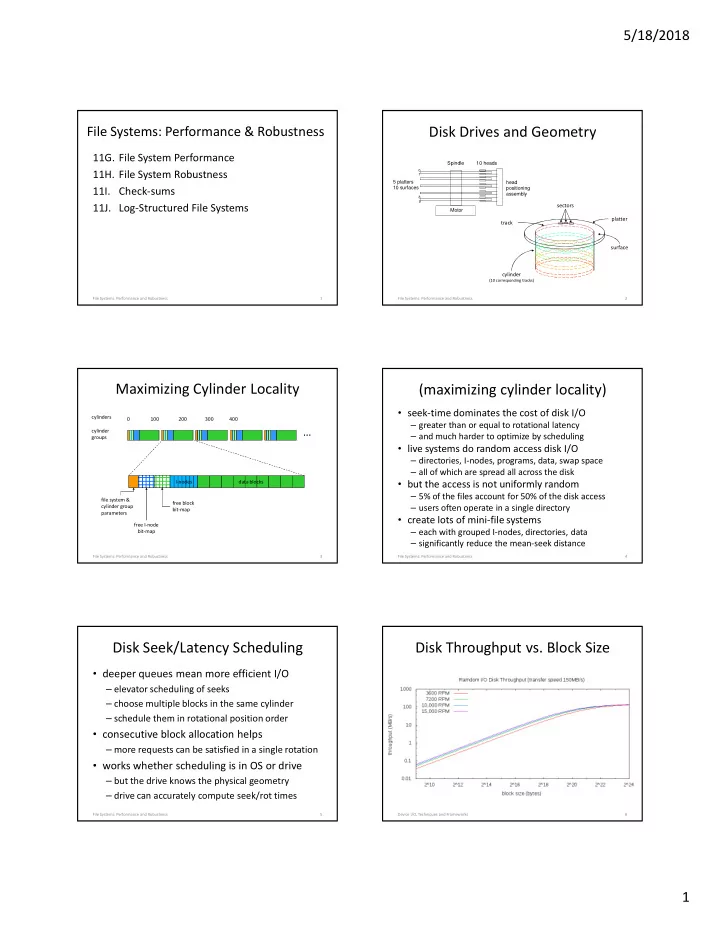
Disk Drives and Geometry

2 File Systems: Performance and Robustness

Spindle head positioning assembly 5 platters 10 surfaces 10 heads Motor

1 8 9

cylinder

(10 corresponding tracks)

platter surface track sectors

Maximizing Cylinder Locality

I-nodes data blocks file system & cylinder group parameters free block bit-map free I-node bit-map

cylinders cylinder groups 0 100 200 300 400

3 File Systems: Performance and Robustness

(maximizing cylinder locality)

  • seek-time dominates the cost of disk I/O

– greater than or equal to rotational latency – and much harder to optimize by scheduling

  • live systems do random access disk I/O

– directories, I-nodes, programs, data, swap space – all of which are spread all across the disk

  • but the access is not uniformly random

– 5% of the files account for 50% of the disk access – users often operate in a single directory

  • create lots of mini-file systems

– each with grouped I-nodes, directories, data – significantly reduce the mean-seek distance

File Systems: Performance and Robustness 4

Disk Seek/Latency Scheduling

  • deeper queues mean more efficient I/O

– elevator scheduling of seeks – choose multiple blocks in the same cylinder – schedule them in rotational position order

  • consecutive block allocation helps

– more requests can be satisfied in a single rotation

  • works whether scheduling is in OS or drive

– but the drive knows the physical geometry – drive can accurately compute seek/rot times

File Systems: Performance and Robustness 5

Disk Throughput vs. Block Size

Device I/O, Techniques and Frameworks 6

slide-2
SLIDE 2

5/18/2018 2

Allocation/Transfer Size

  • per operation overheads are high

– DMA startup, seek, rotation, interrupt service

  • larger transfer units more efficient

– amortize fixed per-op costs over more bytes/op – multi-megabyte transfers are very good

  • this requires space allocation units

– allocate space to files in much larger chunks – large fixed size chunks -> internal fragmentation – therefore we need variable partition allocation

File Systems: Performance and Robustness 7

Block Size vs. Internal Fragmentation

  • Large blocks are a performance win

– fewer next-block lookup operations – fewer, larger I/O operations

  • Internal fragmentation rises w/block sizes

– mean loss = block size / (2 * mean file size)

  • Can we get the best of both worlds?

– most blocks are very large – the last block is relatively small

File Systems: Performance and Robustness 8

Fragment Blocks

File Systems: Performance and Robustness 9

I-node 301 1000 1001 block 1000 block 1001 1020 block 1020

I=250, len=175 I=301, len=400 I=420, len=80

last fragment I 250 last fragment I 301 last fragment I 420

I/O Efficient Disk Allocation

  • allocate space in large, contiguous extents

– few seeks, large DMA transfers

  • variable partition disk allocation is difficult

– many file are allocated for a very long time – space utilization tends to be high (60-90%) – special fixed-size free-lists don’t work as well

  • external fragmentation eventually wins

– new files get smaller chunks, farther apart – file system performance degrades with age

File Systems: Performance and Robustness 10

Read Caching

  • disk I/O takes a very long time

– deep queues, large transfers improve efficiency – they do not make it significantly faster

  • we must eliminate much of our disk I/O

– maintain an in-memory cache – depend on locality, reuse of the same blocks – read-ahead (more data than requested) into cache – check cache before scheduling I/O

  • all writes must go through the cache

– ensure it is up-to-date

File Systems: Performance and Robustness 11

Read-Ahead

  • Request blocks before they are requested

– store them in cache until later – reduces wait time, may improve disk I/O

  • When does it make sense?

– when client specifically requests sequential access – when client seems to be reading sequentially

  • What are the risks?

– may waste disk access time reading unwanted blocks – may waste buffer space on unneeded blocks

slide-3
SLIDE 3

5/18/2018 3

Performance Gain vs. Cache Size

General Block Cache Special Purpose Cache cache size (bytes) performance

13 File Systems: Performance and Robustness

Special Purpose Caches

  • often block caching makes sense

– files that are regularly processed – indirect blocks that are regularly referenced

  • consider I-nodes (32 per 4K block)

– only recently used I-nodes likely to be re-used

  • consider directory entries (256 per 4K block)

– 1% of entries account for 99% of access

  • perhaps we should cache entire paths

File Systems: Performance and Robustness 14

Special Caches – doing the math

  • consider the hits per byte per second ratio

– e.g. 2 hits/4K block (.0005 hits/byte) – e.g. 1 hits/32 byte dcache entry (.03 hits/byte)

  • consider the savings from extra hits

– e.g. 50 block reads/second * 1.5ms/read = 75ms

  • consider the cost of the extra cache lookups

– e.g. 1000 lookup/s * 50ns per lookup = 50us

  • consider the cost of keeping cache up to date

– e.g. 100 upd/s * 150ns per upd = 15us

  • net benefit: 75ms – 65us = 74.935ms/s

File Systems: Performance and Robustness 15

When can we out-smart LRU?

  • it is hard to guess what programs will need
  • sometimes we know what we won’t re-read

– load module/DLL read into a shared segment – an audio/video frame that was just played – a file that was just deleted or overwritten – a diagnostic log file

  • dropping these files from the cache is a win

– allows a longer life to the data that remains there

File Systems: Performance and Robustness 16

Write-Back Cache

  • writes go into a write-back cache

– they will be flushed out to disk later

  • aggregate small writes into large writes

– if application does less than full block writes

  • eliminate moot writes

– if application subsequently rewrites same data – if application subsequently deletes the file

  • accumulate large batches of writes

– a deeper queue to enable better disk scheduling

File Systems: Performance and Robustness 17

Persistence vs Consistency

  • Posix Read-after-Write Consistency

– any read will see all prior writes – even if it is not the same open file instance

  • Flush-on-Close Persistence

– write(2) is not persistent until close(2) or fsync(2) – think of these as commit operations – close(2) might take a moderately long time

  • This is a compromise …

– strong consistency for multi-process applications – enhanced performance from write-back cache

File Systems: Performance and Robustness 18

slide-4
SLIDE 4

5/18/2018 4

File Systems - Device Failures

  • Unrecoverable Read Errors

– signal degrades beyond ECC ability to correct – background scrubbing can greatly reduce

  • mis-directed or incomplete writes

– detectable w/independent checksums

  • complete mechanical/electronic failures
  • all are correctable w/redundant copies

– mirroring, parity, or erasure coding – individual block or whole volume recovery

File Systems: Performance and Robustness 19

File Systems – System Failures

  • queued writes that don’t get completed

– client writes that will not be persisted – client creates that will not be persisted – partial multi-block file system updates

  • cause – power failures

– solution: NVRAM disk controllers – solution: Uninterruptable Power Supply – solution: super-caps and fast flush

  • cause – system crashes

File Systems: Performance and Robustness 20

Deferred Writes – worst case scenario

  • process allocates a new block to file A

– we get a new block (x) from the free list – we write out the updated I-node for file A – we defer free-list write-back (happens all the time)

  • the system crashes, and after it reboots

– a new process wants a new block for file B – we get block x from the (stale) free list

  • two different files now contain the same block

– when file A is written, file B gets corrupted – when file B is written, file A gets corrupted

21 File Systems: Performance and Robustness

File Systems: What can go wrong?

  • data loss

– file or data is no longer present – some/all of data cannot be correctly read back

  • file system corruption

– lost free space – references to non-existent files – corrupted free-list multiply allocates space – file contents over-written by something else – corrupted directories make files un-findable – corrupted I-nodes lose file info/pointers

File Systems: Performance and Robustness 22

Robustness – Ordered Writes

  • ordered writes can reduce potential damage
  • write out data before writing pointers to it

– unreferenced objects can be garbage collected – pointers to incorrect info are more serious

  • write out deallocations before allocations

– disassociate resources from old files ASAP – free list can be corrected by garbage collection – shared data is more serious than missing data

23 File Systems: Performance and Robustness

Robustness – Audit and Repair

  • design file system structures for audit and repair

– redundant information in multiple distinct places

  • maintain reference counts in each object
  • children have pointers back to their parents
  • transaction logs of all updates

– all resources can be garbage collected

  • discover and recover unreferenced objects
  • audit file system for correctness (prior to mount)

– all object well formatted – all references and free-lists correct and consistent

  • use redundant info to enable automatic repair

24 File Systems: Performance and Robustness

slide-5
SLIDE 5

5/18/2018 5

Practicality – Ordered Writes

  • greatly reduced I/O performance

– eliminates head/disk motion scheduling – eliminates accumulation of near-by operations – eliminates consolidation of updates to same block

  • may not be possible

– modern disk drives re-order queued requests

  • doesn’t actually solve the problem

– does not eliminate incomplete writes – it chooses minor problems over major ones

File Systems: Performance and Robustness 25

Practicality - Audit and Repair

  • integrity checking a file system after a crash

– verifying check-sums, reference counts, etc. – automatically correct any inconsistencies – a standard practice for many years (see fsck(8))

  • it is no longer practical

– check a 2TB FS at 100MB/second = 5.5 hours

  • we need more efficient partial write solutions

– file systems that are immune to them – file systems that enable very fast recovery

File Systems: Performance and Robustness 26

Journaling

  • create circular buffer journaling device

– journal writes are always sequential – journal writes can be batched (e.g. ops or time) – journal is relatively small, may use NVRAM

  • journal all intended file system updates

– I-node updates, block write/alloc/free

  • efficiently schedule actual file system updates

– write-back cache, batching, motion-scheduling

  • journal completions when real writes happen

File Systems: Performance and Robustness 27

Batched Journal Entries

  • operation is safe after journal entry persisted

– caller must wait for this to happen

  • small writes are still inefficient
  • accumulate batch until full or max wait time

File Systems: Performance and Robustness 28

writer: if there is no current in-memory journal page allocate a new page add my transaction to the current journal page if current journal page is now full do the write, await completion wake up processes waiting for this page else start timer, sleep until I/O is done flusher: while true sleep() if current-in-memory page is due close page to further updates do the write, await completion wake up processes waiting for page

Journal Recovery

  • journal is a circular buffer

– it can be recycled after old ops have completed – time-stamps distinguish new entries from old

  • after system restart

– review entire (relatively small) journal – note which ops are known to have completed – perform all writes not known to have completed

  • data and destination are both in the journal
  • all of these write operations are idempotent

– truncate journal and resume normal operation

File Systems: Performance and Robustness 29

Why Does Journaling Work?

  • journal writes much faster than data writes

– all journal writes are sequential – there is no competing head motion

  • in normal operation, journal is write-only

– file system never reads/processes the journal

  • scanning the journal on restart is very fast

– it is very small (compared to the file system) – it can read (sequentially) w/huge (efficient) reads – all recovery processing is done in memory

File Systems: Performance and Robustness 30

slide-6
SLIDE 6

5/18/2018 6

Meta-Data Only Journaling

  • Why journal meta-data

– it is small and random (very I/O inefficient) – it is integrity-critical (huge potential data loss)

  • Why not journal data

– it is often large and sequential (I/O efficient) – it would consume most of journal capacity/bw – it is less order sensitive (just precede meta-data)

  • Safe meta-data journaling

– allocate new space, write the data – then journal the meta-data updates

File Systems: Performance and Robustness 31

Check-sums

  • Parity … detecting single-bit errors

– one bit per block, odd number of 1-bits

  • Parity … restoring lost copy

– one block per N, XOR of the other N blocks

  • Error Correcting Codes

– detect double-bit errors, correct single-bit errors

  • Cryptographic Hash Functions

– very high probability of detecting any change

File Systems: Performance and Robustness 32

Simple Data Checksums

  • parity and ECC are stored with the data

– to identify and correct corrupted data – controller does encoding, verification, correction

  • very effective against single-bit errors

– which are common in storage and transmission

  • strategy: disk scrubbing

– slow background read of every block on the disk – if there is a single-bit error, ECC will correct it

  • before it can turn into a multi-bit error

File Systems: Performance and Robustness 33

Higher Level Checksums

  • store the checksum separate from the data

– it can still be used to detect/correct errors – it can also detect valid but wrong data

  • many levels at which to check-sum

– I-node stores a list of block check-sums

  • in de-dup file systems, check-sum is block identifier

– I-node stores check-sum for the entire file

  • if file is corrupted, go to a secondary copy

– hierarchical check-sums all the way up the tree

File Systems: Performance and Robustness 34

Delta Checksum Computation

  • a checksum of many blocks is expensive

– each block must be read and summed

  • updating any block requires a new checksum

– the dumb way

  • re-read and sum every block again

– the smart way

  • compute checksum(newBlock)-checksum(oldBlock)
  • add that to checksum(allBlocks)
  • choose checksum algorithm accordingly

File Systems: Performance and Robustness 35

Log Structured File Systems

  • the Journal is the file system

– all I-nodes and data updates written to the log – updates are Redirect-on-Write – in-memory index caches I-node locations

  • becoming a dominant architecture

– flash file systems – key/value stores

  • issues

– recovery time (to reconstruct index/cache) – log defragmentation and garbage collection

File Systems: Performance and Robustness 36

slide-7
SLIDE 7

5/18/2018 7

Writing/Reading a logging file system

  • All writes are appended to the end of the log

– simple and relatively efficient

  • I-nodes point at data segments in the log

– sequential writes may be contiguous in log – random updates will be spread all over the log

  • Updated I-nodes also added to end of the log
  • Managing Read Performance

– in memory index points to latest I-node versions – recent log segments are LRU cached in memory

File Systems: Performance and Robustness 37

Writes to a Logging File System

File Systems: Performance and Robustness 38

index i# 101 log

  • 1. append new write to log
  • 2. update I-node for new data
  • 3. append new I-node to log
  • 4. update index for new I-node

Managing Log Recovery Time

  • In-memory index is key to performance

– searching the log is prohibitively expensive

  • How do we reconstruct index on restart?

– rescanning entire log is prohibitively expensive

  • Periodically snapshot index to the log

– update a most-recent-index pointer

  • Recovery

– find and recover last index snapshot – replay all valid log entries after that point

File Systems: Performance and Robustness 39

Redirect on Write

  • many modern file systems now do this

– once written, blocks and I-nodes are immutable – add new info to the log, and update the index

  • the old I-nodes and data remain in the log

– if we have an old index, we can access them – clones, snapshots, time-travel are almost free

  • price is management and garbage collection

– we must inventory and manage old versions – we must eventually recycle old log entries

File Systems: Performance and Robustness 40

Log (De)Fragmentation

  • Eventually the log “wraps-around”

– unlike circular buffer, not all old entries are stale – some old data has not been updated/replaced – old log segments still contain (sparse) valid data

  • Log defragmentation

– use index to determine what entries still valid – re-copy valid entries to front of log, update index – after which old log segment can be recycled

  • same process for NAND flash erasure/wear leveling

File Systems: Performance and Robustness 41

Compaction and Defragmentation

  • file I/O is efficient if file extents are contiguous

– easy if free space is well distributed in large chunks

  • with use the free space becomes fragmented

– and file I/O involves more head motion

  • periodic in-place compaction and defragmentation

– move the most popular files to the inner-most cylinders – copy all files into contiguous extents – leave the free-list with large contiguous extents

  • has the potential to significantly speed up file I/O

42 File Systems: Performance and Robustness

slide-8
SLIDE 8

5/18/2018 8

Defragmentation - What

  • a variation of Garbage Collection

– we may actually know what is unused – we are searching for things to relocate and coalesce

  • Logging File Systems

– reclaim (now obsolete) space from back of log

  • Flash File Systems

– create completely free blocks to erase/recycle

  • most file systems

– coalesce contiguous free space for new files – recombine fragments created by random updates – cluster commonly used files together

File Systems: Performance and Robustness 43

De-Fragmentation - When

  • the fast and easy way … off-line

– back-up then entire file system to other media – reformat the entire file system – read the files back in, one-at-a-time

  • the slow and hard-way … live, in-place

– find a heavily fragmented area – copy all files in that group elsewhere – coalesce the newly freed space – copy files back into the defragmented space

File Systems: Performance and Robustness 44

Defragmentation - How

  • 1. identify stale records that can be recycled

– versions, reference counts, back-pointers, GC

  • 2. identify next block to be recycled

– most in need (oldest in log, most degraded data) – most profitable (free space ratio, most stable)

  • 3. recopy still valid data to a better location

– front of the log, contiguous space –

  • r perhaps just move it “out of the way”
  • 4. recycle the (now completely empty) block

– for flash, erase it, add it to the free list

File Systems: Performance and Robustness 45

Defragmentation – The Movie

File Systems: Performance and Robustness 46

Assignments

  • For Next Lecture:

– Reiher: Introduction to Security – Reiher: Authentication – Reiher: Access Control – Reiher: Cryptography

  • Lab

– Projects 3A (and immediately continue to) 3B

File Systems: Performance and Robustness 47

Supplementary Slides

48 File Systems: Performance and Robustness

slide-9
SLIDE 9

5/18/2018 9

Causes of File System Data Loss

  • OS or computer stops with writes still pending

– .1-100/year per system

  • defects in media render data unreadable

– .1 – 10/year per system

  • operator/system management error

– .01-.1/year per system

  • bugs in file system and system utilities

– .01-.05/year per system

  • catastrophic device failure

– .001-.01/year per system

49 File Systems: Performance and Robustness

Dealing with flaws in the media

  • don't use known bad sectors

– identify all known bad sectors (factory list, testing) – assign them to a "never use" list in file system – since they aren't free, they won't be used by files

  • deal promptly with newly discovered bad blocks

– Error Correction Coding (ECC) can recover lost data – most failures start with repeated "recoverable" errors – copy the data to another block ASAP – assign new block to file in place of failing block – assign failing block to the "never use" list

50 File Systems: Performance and Robustness

The ultimate fall-back – Back-ups

  • All files should be regularly backed up
  • Permits recovery from catastrophic failures
  • complete vs. incremental back-ups
  • desirable features

– ability to back-up a running file system – ability to restore individual files – Ability to back-up w/o human assistance

  • must be considered as part of file system

design

51 File Systems: Performance and Robustness