D ISTRIBUTED S YSTEMS [COMP9243] Lecture 10a: Cloud Computing Slide - - PowerPoint PPT Presentation

d istributed s ystems comp9243 lecture 10a cloud computing
SMART_READER_LITE
LIVE PREVIEW

D ISTRIBUTED S YSTEMS [COMP9243] Lecture 10a: Cloud Computing Slide - - PowerPoint PPT Presentation

D ISTRIBUTED S YSTEMS [COMP9243] Lecture 10a: Cloud Computing Slide 1 Slide 3 Why is it called Cloud ? services provided on virtualised resources What is Cloud Computing? virtual machines spawned on demand X as a Service


slide-1
SLIDE 1

Slide 1

DISTRIBUTED SYSTEMS [COMP9243] Lecture 10a: Cloud Computing

➀ What is Cloud Computing? ➁ X as a Service ➂ Key Challenges ➃ Developing for the Cloud

Slide 2

WHAT IS CLOUD COMPUTING?

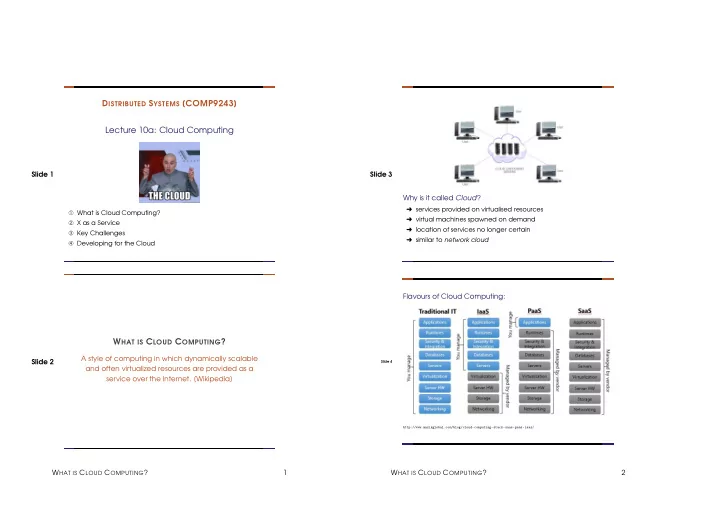
A style of computing in which dynamically scalable and often virtualized resources are provided as a service over the Internet. [Wikipedia] WHAT IS CLOUD COMPUTING? 1 Slide 3 Why is it called Cloud?

➜ services provided on virtualised resources ➜ virtual machines spawned on demand ➜ location of services no longer certain ➜ similar to network cloud

Slide 4

Flavours of Cloud Computing:

http://www.mazikglobal.com/blog/cloud-computing-stack-saas-paas-iaas/

WHAT IS CLOUD COMPUTING? 2

slide-2
SLIDE 2

Slide 5 Figure from Hiroshi Wada

Slide 6

KEY CHARACTERISTICS OF CLOUD COMPUTING

SP 800-145. The NIST Definition of Cloud Computing:

➀ On-demand, self-service

  • get resources (CPU, storage, bandwidth etc),
  • automated: as needed, right now!

➁ Network access

  • services accessible over the network, standard protocols

➂ Pooled resources

  • provider: multi-tenant pool of resources
  • dynamically assigned and reassigned per customer demand

➃ Elasticity

  • Scalability: rapidly adjust resource usage as needed

➄ Measured service

  • monitor resource usage
  • billing for resources used

BENEFITS 3 Slide 7

BENEFITS

Flexibility:

➜ Flexible provisioning ➜ Add machines on demand ➜ Add storage on demand

Effort:

➜ Low barrier to entry ➜ Initial effort: no need to spec and set up physical infrastructure ➜ Continuing effort: no need to maintain physical infrastructure

Slide 8 Cost:

➜ Low initial capital expenditure ➜ Avoid costs of over-provisioning for scalability ➜ Pay for what you use

in “Developing and Extending Applications for Windows Azure with Visual Studio”

BENEFITS 4

slide-3
SLIDE 3

Slide 9 Reliability:

➜ Redundancy ➜ Trust reliability of provider ➜ Data backups ➜ What happens when provider goes down? ➜ What about Security? Privacy?

Slide 10

Public vs Private Clouds?

Public: open services available to everyone Private: owned, operated, and available to specific organisation Is this still cloud computing? Hybrid: system uses some private cloud services and some public cloud services.

http://blog.nskinc.com/IT-Services-Boston/bid/32590/Private-Cloud-or-Public-Cloud

INFRASTRUCTURE AS A SERVICE: IAAS 5 Slide 11

INFRASTRUCTURE AS A SERVICE: IAAS

Service provider provides:

➜ Server and network hardware ➜ Virtual machines ➜ IP addresses ➜ Services to manage VMs (create, start, stop, migrate) ➜ Optional: storage, database, synchronisation, communication

Client provides:

➜ OS and OS environment ➜ Web server, DBMS, etc. ➜ Middleware ➜ Application software

Slide 12 Challenges – Client:

➜ Transparency (naming, redirection) ➜ Scalability: replication and load balancing decisions ➜ Synchronisation and coordination ➜ Security ➜ Fault tolerance ➜ Software maintenance and sys admin

Challenges – Provider:

➜ Hardware provisioning and maintenance ➜ Load management ➜ IP address management, DNS management ➜ Infrastructure fault tolerance ➜ Monitoring, logging, billing ➜ Storage

EXAMPLE 1: AMAZON WEB SERVICES (AWS) 6

slide-4
SLIDE 4

Slide 13

EXAMPLE 1: AMAZON WEB SERVICES (AWS)

➜ Elastic Compute Cloud (EC2) ➜ Simple Storage Solution (S3) ➜ Simple DB ➜ Simple Queue Service

http://vmtoday.com/2013/07/introduction-to-amazon-web-services-aws/

Slide 14 Elastic Compute Cloud (EC2):

➜ Instances: virtual cores, memory, storage

  • instance types (cpu,memory,net, storage options):
  • t, m, c, p, g, x, r, i, d
  • micro, small, medium, large, xlarge, ...

➜ Cost:

  • free tier: limited instances, free CPU hours
  • on-demand: $0.007 - $39 per hour
  • reserved: 1-3 years, discounted, fixed cost

➜ Launch Amazon Machine Image (AMI) on instances ➜ Preconfigured or custom images

USING EC2 7 Slide 15

USING EC2

Slide 16 USING EC2 8

slide-5
SLIDE 5

Slide 17 Slide 18 USING EC2 9 Slide 19 Slide 20 USING EC2 10

slide-6
SLIDE 6

Slide 21 Slide 22 USING EC2 11 Slide 23 Slide 24

RELIABILITY

http://docs.aws.amazon.com/AWSEC2/latest/UserGuide/using-regions-availability-zones.html

Regions and Availability Zones:

➜ 99.95% availability per service region ➜ Regions: geographically dispersed, independent ➜ Availability zones: contained in Regions ➜ Availability zones: isolated from failures in other zones, but connected

RELIABILITY 12

slide-7
SLIDE 7

Slide 25 Elastic IP addresses:

➜ IP address associated with account ➜ Dynamic remapping to specific instances

  • instance has private IP address and public IP address
  • Elastic IP can be mapped (and re-mapped) to private IP

Elastic Load Balancing:

➜ Distributes traffic across instances ➜ Monitors ’health’ of instances: customisable ➜ Routes to healthy instances

Slide 26 Auto Scaling:

➜ Automatically start or stop new instances ➜ User-defined conditions

  • manual (minimum group size), schedule
  • instance health, CloudWatch input

https://docs.aws.amazon.com/autoscaling/ec2/userguide/what-is-amazon-ec2-auto-scaling.html

RELIABILITY 13 Slide 27 Security:

➜ Infrastructure Security

  • Data centre physical security
  • Software and hardware maintenance
  • Monitoring and Testing (automatic and manual)

➜ Application Security

  • API access control (access keys)
  • Firewall settings for instances (security groups)
  • Virtual Private Cloud (VPC): private or public subnetworks
  • Encrypted storage support
  • Logging

Slide 28

STORAGE

Elastic Block Store:

➜ Network Attached Storage (NAS) (servers with disks) ➜ Block level storage volumes ➜ Mounted as block device (e.g. disk) on an instance ➜ Physical Servers and Disks shared by customers (no caching, competing for disk and net IO) ➜ Replicated in Availability zone ➜ Cost: per GB/per month

STORAGE 14

slide-8
SLIDE 8

Slide 29 Simple Storage Service (S3):

➜ Buckets: store objects

  • Can be placed in specific regions

➜ Objects: data and metadata

  • metadata: key-value pairs describing the object
  • identified by key (unique within a bucket)
  • versioned

➜ Consistency:

  • highly replicated
  • eventual consistency, no locking
  • atomic object update

➜ Access control

Slide 30 Snapshots:

➜ Point in time copy of EBS volume ➜ Stored in S3 ➜ Differential ➜ Can be used to bootstrap image

Simple Database Service (SimpleDB):

➜ Non-relational database: key-value ➜ Partitioned into domains ➜ Consistency

  • highly replicated
  • eventual consistency

➜ Typical uses: logging, indexing S3 data ➜ Erlang! ➜ Replaced by DynamoDB

COMMUNICATION 15 Slide 31

COMMUNICATION

Simple Queue Service (SQS):

➜ Message-queue oriented communication service ➜ Persistent, asynchronous messaging ➜ At-least once delivery guarantee ➜ No ordering guarantee ➜ Access control

https://docs.aws.amazon.com/AWSSimpleQueueService/latest/SQSDeveloperGuide/

Slide 32

PLATFORM AS A SERVICE

Service provider provides:

➜ Hardware infrastructure ➜ OS and platform software (middleware) ➜ Distributed storage management ➜ Load balancing, replication, migration ➜ Management and Monitoring services

Client provides:

➜ Application

PLATFORM AS A SERVICE 16

slide-9
SLIDE 9

Slide 33 Challenges – Client:

➜ Learn new API and environment ➜ Follow API ➜ Optimise to limits of API and platform ➜ Security for own app

Challenges – Provider:

➜ Transparency (naming, redirection) ➜ Scalability: replication and load balancing decisions ➜ Synchronisation and coordination ➜ Security ➜ Fault tolerance ➜ Monitoring ➜ Software maintenance and sys admin

Slide 34

EXAMPLE 2: APP ENGINE

➜ Various development languages (Python, Java, PHP , Go) ➜ ... and runtime environments ➜ Storage based on Big Table ➜ Optimisation via Memcache ➜ Lots of APIs ➜ Per use billing ➜ Transparent scaling

EXAMPLE 2: APP ENGINE 17 Slide 35 Slide 36 EXAMPLE 2: APP ENGINE 18

slide-10
SLIDE 10

Slide 37 Slide 38 SOFTWARE AS A SERVICE 19 Slide 39

SOFTWARE AS A SERVICE

Service provider provides:

➜ Hardware infrastructure ➜ OS and platform software (middleware) ➜ Distributed storage management ➜ Load balancing, replication, migration ➜ Management and Monitoring services ➜ Application

Client provides:

➜ Data

Slide 40 Challenges – Client:

➜ Learn new application ➜ Deal with potential restrictions

  • Web interface, restricted functionality
  • No offline access, no local storage

Challenges – Provider:

➜ Transparency (naming, redirection) ➜ Scalability: replication and load balancing decisions ➜ Synchronisation and coordination ➜ Security ➜ Fault tolerance ➜ Monitoring ➜ Software maintenance and sys admin ➜ Application development and maintenance

KEY CHALLENGES OF CLOUD COMPUTING 20

slide-11
SLIDE 11

Slide 41

KEY CHALLENGES OF CLOUD COMPUTING

Scalability:

➜ Datacentre vs Global ➜ Partitioning

  • Services and Data

➜ Replication

Consistency:

➜ Dealing with consequences of CAP Theorem ➜ Dealing with un-usability of eventual consistency Slide 42

Reliability:

➜ SLA (Service Level Agreement): guarantees given by provider

  • How reliable are the guarantees?
  • What is the consequence if they aren’t met?

➜ Redundancy and Replication

  • within same provider (e.g. Availability Zones, Regions, etc.)
  • migration across providers

➜ Geographically distributed architecture

KEY CHALLENGES OF CLOUD COMPUTING 21 Slide 43

➜ Design for failure: Chaos Monkey

  • test how well system deals with failure
  • regularly and randomly kill system services

Slide 44 Security and Privacy:

➜ External threats

  • Denial of Service
  • Infrastructure or platform service compromise
  • SaaS compromise: data theft

➜ Co-located threats: other customers

  • Isolation: but, covert channels, bugs in isolation

➜ Privacy: data collected by providers

  • IaaS and PaaS providers: encryption only helps a bit
  • SaaS providers: at mercy of service provider
  • Governments and others: where is your data stored or

processed? Which laws apply?

DEVELOPING FOR THE CLOUD 22

slide-12
SLIDE 12

Slide 45

DEVELOPING FOR THE CLOUD

Examples from Amazon: http://aws.amazon.com/architecture/ DEVELOPING FOR THE CLOUD 23