CSS Rule Selector body { font-family: Tahoma, Arial, sans-serif; - - PowerPoint PPT Presentation

css rule
SMART_READER_LITE
LIVE PREVIEW

CSS Rule Selector body { font-family: Tahoma, Arial, sans-serif; - - PowerPoint PPT Presentation

CSS Rule Selector body { font-family: Tahoma, Arial, sans-serif; Declaration color: black; background: white; Block margin: 8px; } Value Attribute Name CS 142 Lecture Notes: CSS Slide 1 CSS Selectors CSS HTML Tag h1 {


slide-1
SLIDE 1

CS 142 Lecture Notes: CSS Slide 1
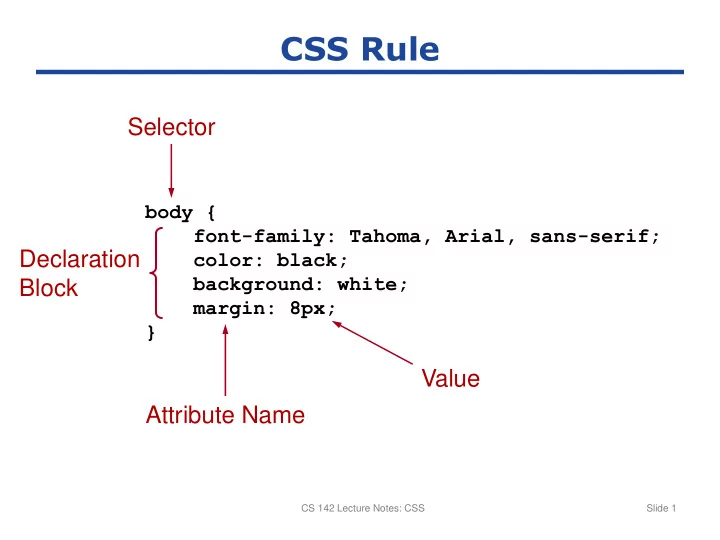
CSS Rule

body { font-family: Tahoma, Arial, sans-serif; color: black; background: white; margin: 8px; }

Selector Declaration Block Attribute Name Value

slide-2
SLIDE 2

CS 142 Lecture Notes: CSS Slide 2

CSS Selectors

CSS HTML

<h1>Today’s Specials</h1> h1 { color: red; } .large { font-size: 16pt; } p.large {...} #p20 { font-weight: bold; } <p class="large">... <p id="p20">... Tag name Class attribute Id attribute Tag and class table.items tr.header

slide-3
SLIDE 3

CS 142 Lecture Notes: CSS Slide 3

  • Predefined names:

white black red …

  • 8-bit hexadecimal intensities for red, green, blue:
  • 0-255 decimal intensities:
  • Percentage intensities:

CSS Color Specifiers

#ff0000

R G B

rgb(255,255,0)

R G B

rgb(80%,80%,100%)

R G B

slide-4
SLIDE 4

CS 142 Lecture Notes: CSS Slide 4

Padding

CSS Box Layers

Element Content Padding Margin Element’s background used in padding area Parent’s background used in margin area Border

slide-5
SLIDE 5

CS 142 Lecture Notes: CSS Slide 5

CSS Distances

2px pixels 1mm millimeters 2cm centimeters 0.2in inches 3pt printer’s points 2em, 4ex

  • ther printer’s units
slide-6
SLIDE 6

CS 142 Lecture Notes: CSS Slide 6

Adding Styles to HTML

<head> ... <link rel="stylesheet" type="text/css" href="myStyles.css" /> <style type="text/css"> body { font-family: Tahoma, Arial, sans-serif; ... } </style> </head> <body> ... <div style="padding:2px; ... "> ... </body>

Separate Stylesheet Page-Specific Styles Element-Specific Styles

slide-7
SLIDE 7

CS 142 Lecture Notes: CSS Slide 7

body { font-family: Tahoma, Arial, sans-serif; font-size: 13px; color: black; background: white; margin: 8px; } h1 { font-size: 19px; margin-top: 0px; margin-bottom: 5px; border-bottom: 1px solid black } .shaded { background: #d0d0ff; } <body> <h1>First Section Heading</h1> <p> Here is the first paragraph, containing text that really doesn't have any use

  • r meaning; it just prattles on and on,

with no end whatsoever, no point to make, really no purpose for existence at all. </p> <div class="shaded"> <h1>Another Section Heading</h1> <p> Another paragraph. </p> </div> </body>

CSS: HTML: