Creating georeferenced digital elevation models models from - - PowerPoint PPT Presentation

creating georeferenced digital elevation models
SMART_READER_LITE
LIVE PREVIEW

Creating georeferenced digital elevation models models from - - PowerPoint PPT Presentation

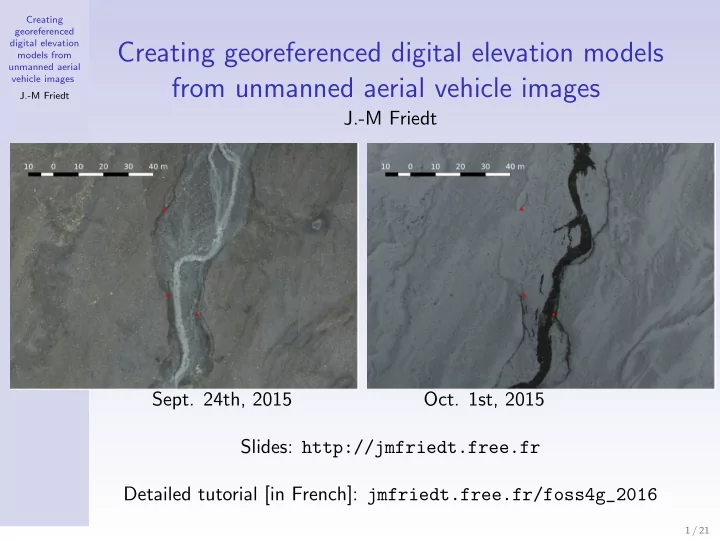
Creating georeferenced digital elevation Creating georeferenced digital elevation models models from unmanned aerial vehicle images from unmanned aerial vehicle images J.-M Friedt J.-M Friedt Sept. 24th, 2015 Oct. 1st, 2015 Slides:


slide-1
SLIDE 1

Creating georeferenced digital elevation models from unmanned aerial vehicle images J.-M Friedt

Creating georeferenced digital elevation models from unmanned aerial vehicle images

J.-M Friedt

  • Sept. 24th, 2015
  • Oct. 1st, 2015

Slides: http://jmfriedt.free.fr Detailed tutorial [in French]: jmfriedt.free.fr/foss4g_2016

1 / 21

slide-2
SLIDE 2

Creating georeferenced digital elevation models from unmanned aerial vehicle images J.-M Friedt

Why ?

Digital Elevation Models (DEMs) as a basic input for geographical information processing (flood, material transport, construction, landslide, glacier melt)

  • Global DEMs: ≥90 m (3”) spatial resolution
  • Low update rate (one DEM)

⇒ local (<10 km2 area) high resolution (<m) DEMs with short update interval (<week) + low equipment cost Challenge:

  • large number of images (600 to 1000/flight),
  • high resolution images (4000×3000 pixel, 5-6 MB/image),
  • huge datasets (>1 GB orthophoto, >500 MB GeoTIF DEM)

⇒ MicMac 1:

  • CLI software following Un*x philosophy (one tool for each task)...
  • well suited to handle a huge number of pictures without wasting

resources on a GUI: all command mm3d, -help argument ...

  • Ability to assess the result of each step (residue, convergence,

correlation map)

1https://github.com/micmacIGN

2 / 21

slide-3
SLIDE 3

Creating georeferenced digital elevation models from unmanned aerial vehicle images J.-M Friedt

Fly

  • Compliance with regulations (exam, flight authorization from

Civilian Aviation Authority, check if Defense Ministy want to be alerted, wildlife ...)

  • Plan flight: surface coverage of the picture ⇒ acquisition rate
  • Manual flight for following ground-based features+higher horizontal

speed,

  • ... or automated flight: at least 60% coverage along track (ideally

80%). Safety solution: COTS UAV DJI Phantom3{Professional, Advanced} (low cost, ease of deployment, 5×20 min autonomy)

100 m 94 o 100 × (94/4000 × π/180) = 4,1 cm 4000 pixels 3 / 21

slide-4
SLIDE 4

Creating georeferenced digital elevation models from unmanned aerial vehicle images J.-M Friedt

Fly

  • Compliance with regulations (exam, flight authorization from

Civilian Aviation Authority, check if Defense Ministy want to be alerted, wildlife ...)

  • Plan flight: surface coverage of the picture ⇒ acquisition rate
  • Manual flight for following ground-based features+higher horizontal

speed,

  • ... or automated flight: at least 60% coverage along track (ideally

80%). Safety solution: COTS UAV DJI Phantom3{Professional, Advanced} (low cost, ease of deployment, 5×20 min autonomy)

4 / 21

slide-5
SLIDE 5

Creating georeferenced digital elevation models from unmanned aerial vehicle images J.-M Friedt

Process: georeference pictures

  • Either pictures are readily georeferenced (accuracy ? lag between

position and timestamp ?) or ...

  • exiftool for geotagging from a NMEA file + picture directory

$ exiftool DSC04979.JPG | grep Origi Date/Time Original: 2016:10:17 21:16:21 $ exiftool -geosync=-0:08:30 -geotag=mylog.nmea . with config file ~/.ExifTool_config: %Image::ExifTool::UserDefined::Options = (CoordFormat => ’%.6f’, GeoMAxIntSecs=0,);

  • Input file (comment #, truncated UTM longitude-latitude-altitude-filename):

#F=X Y Z N 8322.32388327 9441.486585 227.52 DJI_0001.JPG 8328.218804119 9443.36958993 227.42 DJI_0002.JPG 8350.947655692 9450.63328708 227.32 DJI_0003.JPG ... mm3d OriConvert OriTxtInFile position_UTM33N.txt jmfgps MTD1=1 \ NameCple=FileImagesNeighbour.xml CalcV=1 ImC=DJI_0115.JPG NbImC=25

Ability to introduce a timelag between GPS timestamp & camera time 2

§13.3.4 of github.com/micmacIGN/Documentation/blob/master/DocMicMac.pdf

  • 2L. Girod, C. Nuth, A. K¨

a¨ ab, B. Etzelm¨ uller, J. Kohler, Terrain changes from images acquired on opportunistic flights by SFM photogrammetry, The Cryosphere Discuss., (2016) at http://www.the-cryosphere-discuss.net/tc-2016-228/

5 / 21

slide-6
SLIDE 6

Creating georeferenced digital elevation models from unmanned aerial vehicle images J.-M Friedt

Process: find tie points (using GPS location)

⇒ orientation directory: Ori-jmfgps

  • ≃20 min acquisition at 1 image/2 second≃600 pictures: all

combinations C 600

2

= 600·(600−1)

2

= 179700 pairs

  • Using GPS coordinates on 614 images, MicMac only attempts to

match relevant points on 10413 pairs.

mm3d Tapioca File "FileImagesNeighbour.xml" 1500 ExpTxt=1 # ASCII output

(1500=max analysis resolution≃picture width/3)

6 / 21

slide-7
SLIDE 7

Creating georeferenced digital elevation models from unmanned aerial vehicle images J.-M Friedt

Process: find tie points (using GPS location)

⇒ orientation directory: Ori-jmfgps

  • ≃20 min acquisition at 1 image/2 second≃600 pictures: all

combinations C 600

2

= 600·(600−1)

2

= 179700 pairs

  • Using GPS coordinates on 614 images, MicMac only attempts to

match relevant points on 10413 pairs.

mm3d Tapioca File "FileImagesNeighbour.xml" 1500 ExpTxt=1 # ASCII output

(1500=max analysis resolution≃picture width/3)

Homol/ output for arrows: 3762 tie points 7 / 21

slide-8
SLIDE 8

Creating georeferenced digital elevation models from unmanned aerial vehicle images J.-M Friedt

Process: find tie points (using GPS location)

⇒ orientation directory: Ori-jmfgps

  • ≃20 min acquisition at 1 image/2 second≃600 pictures: all

combinations C 600

2

= 600·(600−1)

2

= 179700 pairs

  • Using GPS coordinates on 614 images, MicMac only attempts to

match relevant points on 10413 pairs.

mm3d Tapioca File "FileImagesNeighbour.xml" 1500 ExpTxt=1 # ASCII output

(1500=max analysis resolution≃picture width/3)

Homol/ output for arrows: 3762 tie points 8 / 21

slide-9
SLIDE 9

Creating georeferenced digital elevation models from unmanned aerial vehicle images J.-M Friedt

Process: identify lens properties + locate camera

  • Subset of pictures (PATC) selected to identify lens properties –

sample provided by Tapioca

PATC="DJI_0282.JPG|DJI_0281.JPG|DJI_0283.JPG|DJI_0272.JPG|DJI_[...]" P=".*JPG"

  • Many lens models – the more free parameters, the better the model,

but the lower the chances of convergence

  • Apply lens model to all pictures to position camera in arbitrary

framework

$ mm3d Tapas -help Authorized models : RadialBasic RadialExtended Fraser FishEyeEqui AutoCal Figee HemiEqui RadialStd FraserBasic FishEyeBasic ... mm3d Tapas RadialStd "$PATC" Out=Cal mm3d Tapas AutoCal "$P" InCal=Cal Out=Init

... Add Pose = DSC_0277.JPG RES:[DSC_0265.JPG][C] ER2 3.24469 Nn 94.4646 Of 2204 Mul 216 Mul-NN 216 Time 0.078583 RES:[DSC_0266.JPG][C] ER2 11.4655 Nn 98.9231 Of 650 Mul 253 Mul-NN 252 Time 0.0230448 RES:[DSC_0267.JPG][C] ER2 1.60959 Nn 99.422 Of 865 Mul 397 Mul-NN 396 Time 0.031569 RES:[DSC_0268.JPG][C] ER2 1.1892 Nn 99.9177 Of 2430 Mul 674 Mul-NN 672 Time 0.094388 RES:[DSC_0269.JPG][C] ER2 1.30866 Nn 99.9593 Of 2457 Mul 686 Mul-NN 686 Time 0.0955091 ... RES:[DSC_0277.JPG][C] ER2 0.792649 Nn 98.5243 Of 2304 Mul 556 Mul-NN 545 Time 0.108456 RES:[DSC_0278.JPG][C] ER2 0.926287 Nn 98.259 Of 919 Mul 517 Mul-NN 510 Time 0.033983 RES:[DSC_0279.JPG][C] ER2 0.852054 Nn 98.1366 Of 1288 Mul 334 Mul-NN 332 Time 0.045424 RES:[DSC_0280.JPG][C] ER2 0.793246 Nn 98.5294 Of 1224 Mul 234 Mul-NN 233 Time 0.0424399 | | Residual = 0.87509 ;; Evol, Moy=2.07748e-11 ,Max=4.92559e-11 | | Worst, Res 1.05504 for DSC_0274.JPG, Perc 96.6154 for DSC_0266.JPG | | Cond , Aver 5.80123 Max 62.7957 Prop>100 0 BIGTIF suspended momentally

  • -- End Iter 9 STEP 3

9 / 21

slide-10
SLIDE 10

Creating georeferenced digital elevation models from unmanned aerial vehicle images J.-M Friedt

Process: switch to geo-referenced space and coarse pointcloud

CenterBascule "$P" Init jmfgps tmp # two Ori: GPS + camera orientation mm3d AperiCloud "$P" tmp

Camera position consistent 3 with flight path: we can continue processing.

notice skidoo tracks and constant altitude flight v.s varying topography

3distorsion due to lens calibration error: M.R. James & S. Robson, Mitigating

systematic error in topographic models derived from UAV and ground-based image networks, Earth Surface Processes and Landforms, 39, 1413–1420 (2014)

10 / 21

slide-11
SLIDE 11

Creating georeferenced digital elevation models from unmanned aerial vehicle images J.-M Friedt

Process: switch to geo-referenced space and coarse pointcloud

CenterBascule "$P" Init jmfgps tmp # two Ori: GPS + camera orientation mm3d AperiCloud "$P" tmp

Camera position consistent 3 with flight path: we can continue processing.

notice skidoo tracks and constant altitude flight v.s varying topography

3distorsion due to lens calibration error: M.R. James & S. Robson, Mitigating

systematic error in topographic models derived from UAV and ground-based image networks, Earth Surface Processes and Landforms, 39, 1413–1420 (2014)

11 / 21

slide-12
SLIDE 12

Creating georeferenced digital elevation models from unmanned aerial vehicle images J.-M Friedt

Process: dense pointcloud and

  • rthophoto

Based on previous orientation directory (Ori-tmp), generate

1 correlation maps Res/Cor* 2 georeferenced DEM Res/Z Num* 3 georeferenced orthophotos

Ortho-Res/Orth*mosaic* 4

4 dense pointcloud Res/*.ply

(meshlab or CloudCompare viewers)

mm3d Malt Ortho "$P" tmp "DirMEC=Res" \ ZoomF=4 ZoomI=32 AffineLast=false mm3d Tawny Ortho-Res/ RadiomEgal=0 Nuage2Ply Res/NuageImProf_STD-MALT_Etape_6.xml \ Attr="Ortho-Res/Orthophotomosaic.tif"

Convert the huge TIF to (lossy) PNG:

for i in Orth*/*osaic*.tif; \ do nom=‘echo $i|sed ’s/tif/png/g’‘;\ convert $i $nom;done

Correlation map 18520×13056 pixel orthophoto

4Older MicMac version: Nuage2Ply Res/NuageImProf STD-MALT Etape 6.xml

Attr="Ortho-Res/Ortho-Eg-Test-Redr.tif"

12 / 21
slide-13
SLIDE 13

Creating georeferenced digital elevation models from unmanned aerial vehicle images J.-M Friedt

Insertion in QGis

  • GeoTIF file: add offset to top-left corner in .tfw file
  • Raster calculator: convert pixel value to meters using the

information provided in Z Num6 DeZoom4 STD-MALT.xml:

<OrigineAlti>-43.34</OrigineAlti> <ResolutionAlti>0.22</ResolutionAlti>

13 / 21

slide-14
SLIDE 14

Creating georeferenced digital elevation models from unmanned aerial vehicle images J.-M Friedt

Insertion in QGis

  • GeoTIF file: add offset to top-left corner in .tfw file
  • Raster calculator: convert pixel value to meters using the

information provided in Z Num6 DeZoom4 STD-MALT.xml:

<OrigineAlti>-43.34</OrigineAlti> <ResolutionAlti>0.22</ResolutionAlti>

14 / 21

slide-15
SLIDE 15

Creating georeferenced digital elevation models from unmanned aerial vehicle images J.-M Friedt

Difference of DEMs: Ground Control Points and subtraction

  • Manually update GeoTIF top-left corner position (and pixel size ?)

to match GCP within region of interest,

  • Rasmover plugin for graphically moving a raster layer

⇒ collapse of 3-m deep canyon wall within 1-week of repeated DEM measurement, consistent with observations on the field

15 / 21

slide-16
SLIDE 16

Creating georeferenced digital elevation models from unmanned aerial vehicle images J.-M Friedt

Difference of DEMs: Ground Control Points and subtraction

  • Manually update GeoTIF top-left corner position (and pixel size ?)

to match GCP within region of interest,

  • Rasmover plugin for graphically moving a raster layer

⇒ collapse of 3-m deep canyon wall within 1-week of repeated DEM measurement, consistent with observations on the field

16 / 21

slide-17
SLIDE 17

Creating georeferenced digital elevation models from unmanned aerial vehicle images J.-M Friedt

Conclusion and perspectives

UAV pictures for MicMac:

  • Acquire azimutal pictures with

>60% overlap

  • Identify tie points, lens

properties & camera position

  • Coarse point cloud
  • Orthophoto, DEM and

correlation maps Final product example: Orthophoto March 9th 2016 see http://qgis.sequanux.org/femto.html for comparison of DEMs acquired on the same day or a month apart + IGN background image 5 . TODO: improved resolution with kinematic GPS ?

5J.-M Friedt, ´

  • E. Carry, Diss´

emination de donn´ ees g´ eor´ ef´ erenc´ ees – qgis-server et

  • penlayers, GNU/Linux Magazine France 200 (Jan. 2017), pp.12-23 [in French]

17 / 21

slide-18
SLIDE 18

Creating georeferenced digital elevation models from unmanned aerial vehicle images J.-M Friedt

Conclusion and perspectives

UAV pictures for MicMac:

  • Acquire azimutal pictures with

>60% overlap

  • Identify tie points, lens

properties & camera position

  • Coarse point cloud
  • Orthophoto, DEM and

correlation maps Final product example: Orthophoto April 24th 2016 see http://qgis.sequanux.org/femto.html for comparison of DEMs acquired on the same day or a month apart + IGN background image 5 . TODO: improved resolution with kinematic GPS ?

5J.-M Friedt, ´

  • E. Carry, Diss´

emination de donn´ ees g´ eor´ ef´ erenc´ ees – qgis-server et

  • penlayers, GNU/Linux Magazine France 200 (Jan. 2017), pp.12-23 [in French]

18 / 21

slide-19
SLIDE 19

Creating georeferenced digital elevation models from unmanned aerial vehicle images J.-M Friedt

Conclusion and perspectives

UAV pictures for MicMac:

  • Acquire azimutal pictures with

>60% overlap

  • Identify tie points, lens

properties & camera position

  • Coarse point cloud
  • Orthophoto, DEM and

correlation maps Final product example: Correlation map April 24th see http://qgis.sequanux.org/femto.html for comparison of DEMs acquired on the same day or a month apart + IGN background image 5 . TODO: improved resolution with kinematic GPS ?

5J.-M Friedt, ´

  • E. Carry, Diss´

emination de donn´ ees g´ eor´ ef´ erenc´ ees – qgis-server et

  • penlayers, GNU/Linux Magazine France 200 (Jan. 2017), pp.12-23 [in French]

19 / 21

slide-20
SLIDE 20

Creating georeferenced digital elevation models from unmanned aerial vehicle images J.-M Friedt

Conclusion and perspectives

UAV pictures for MicMac:

  • Acquire azimutal pictures with

>60% overlap

  • Identify tie points, lens

properties & camera position

  • Coarse point cloud
  • Orthophoto, DEM and

correlation maps Final product example: DEM March 9th 2016 see http://qgis.sequanux.org/femto.html for comparison of DEMs acquired on the same day or a month apart + IGN background image 5 . TODO: improved resolution with kinematic GPS ?

5J.-M Friedt, ´

  • E. Carry, Diss´

emination de donn´ ees g´ eor´ ef´ erenc´ ees – qgis-server et

  • penlayers, GNU/Linux Magazine France 200 (Jan. 2017), pp.12-23 [in French]

20 / 21

slide-21
SLIDE 21

Creating georeferenced digital elevation models from unmanned aerial vehicle images J.-M Friedt

Conclusion and perspectives

UAV pictures for MicMac:

  • Acquire azimutal pictures with

>60% overlap

  • Identify tie points, lens

properties & camera position

  • Coarse point cloud
  • Orthophoto, DEM and

correlation maps Final product example: DEM difference (notice cars) see http://qgis.sequanux.org/femto.html for comparison of DEMs acquired on the same day or a month apart + IGN background image 5 6. TODO: improved resolution with kinematic GPS ?

5J.-M Friedt, ´

  • E. Carry, Diss´

emination de donn´ ees g´ eor´ ef´ erenc´ ees – qgis-server et

  • penlayers, GNU/Linux Magazine France 200 (Jan. 2017), pp.12-23 [in French]

6J.-M Friedt, Utilisation de Micmac pour la g´

en´ eration de mod` ele num´ erique d’´ el´ evation par traitement d’images acquises par microdrone, GNU/Linux Magazine France 191 (Mar. 2016), pp.48-57 [in French]

21 / 21