CMPT-401: Course Information Instructor: Qiaosheng Shi Lectures: - - PDF document

cmpt 401 course information
SMART_READER_LITE
LIVE PREVIEW

CMPT-401: Course Information Instructor: Qiaosheng Shi Lectures: - - PDF document

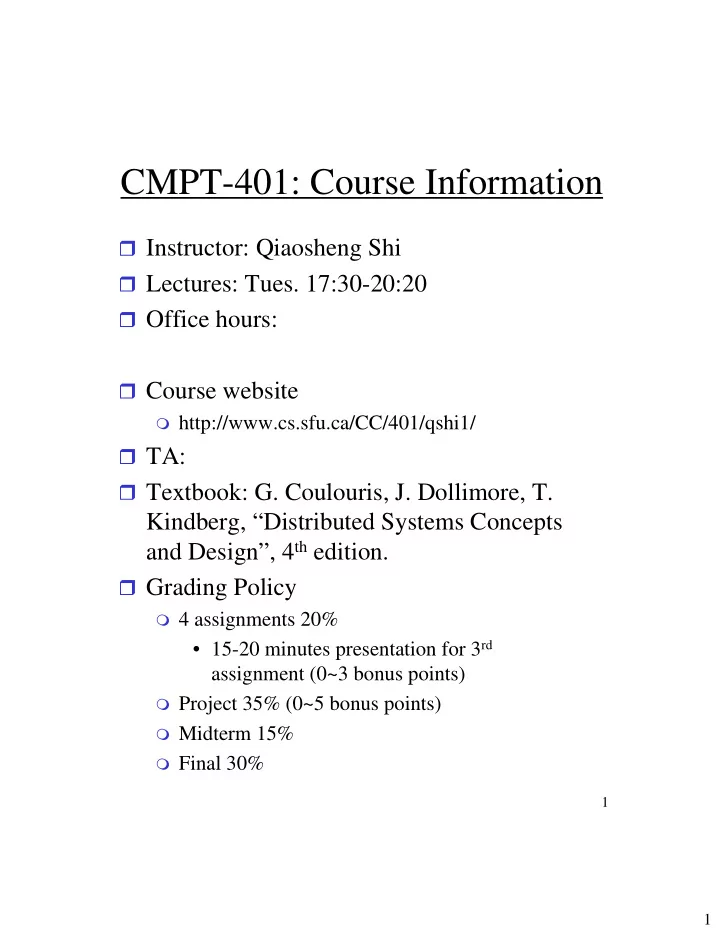
CMPT-401: Course Information Instructor: Qiaosheng Shi Lectures: Tues. 17:30-20:20 Office hours: Course website http://www.cs.sfu.ca/CC/401/qshi1/ TA: Textbook: G. Coulouris, J. Dollimore, T. Kindberg, Distributed


slide-1
SLIDE 1

1

1

CMPT-401: Course Information

Instructor: Qiaosheng Shi Lectures: Tues. 17:30-20:20 Office hours: Course website

http://www.cs.sfu.ca/CC/401/qshi1/

TA: Textbook: G. Coulouris, J. Dollimore, T.

Kindberg, “Distributed Systems Concepts and Design”, 4th edition.

Grading Policy

4 assignments 20%

  • 15-20 minutes presentation for 3rd

assignment (0~3 bonus points)

Project 35% (0~5 bonus points) Midterm 15% Final 30%

slide-2
SLIDE 2

2

2

CMPT-401: Course Information

Late Policy Teaching plan

Chapters 1-3 Lecture 1-2 Chapters 4-5 Lecture 3-4 Final exam Lecture 14 (Aug. 8) Review & project presentation Lecture 13 (Aug. 1) Chapter 19, … … Lecture 12 Homework 3 (15mins presentation) Lecture 10-11 (July 11) Chapter 9, 11, 13 Lecture 8-9 Midterm Lecture 7 (June 20) Chapter 7 Lecture 5-6

slide-3
SLIDE 3

3

3

Today’s topics

Chapter 1: Characterization of

Distributed Systems

Definition of distributed systems Examples Resource sharing and the Web Challenges

Chapter 2: System Models

Architectural models Fundamental models

slide-4
SLIDE 4

4

4

Distributed computing

Huge computation

requirement

117 Sun SparcStations to

draw 114,000 frames (77- minute). One computer would take 43 years of non- stop computing to do this! The film Toy Story

Huge waste of computing resources Sharing computing resources Restaurant Sharing information

Web services

slide-5
SLIDE 5

5

5

Definition of a Distributed System

Motivation

sharing resources: hardware, files,

databases, data objects, etc. A distributed system is:

a collection of independent computers

that appears to its users as a single coherent system.

a system of networked computers that

coordinate their activity only by message passing. Resources in a distributed system

encapsulated within computers accessed by communication. managed by a server program. local resources and remote resources

slide-6
SLIDE 6

6

6

Definition of a Distributed System

Distributed computing: “a science

which solves a large problem by giving small parts of the problem to many computers to solve and then combining the solutions for the parts into a solution for the problem.”

Distributed application: “an

application in which the processing and the data are divided among two

  • r more machines.”
slide-7
SLIDE 7

7

7

Characteristics of distributed systems

Concurrency No global clock

Distributed transaction

Independent failures

Network failure Computer failure

slide-8
SLIDE 8

8

8

Resource sharing and the web

Main motivation of DS: resource-sharing

hardware: processor, printer, disks software-defined entities: files, database, … Functionality: search engines

Service

manage a collection of related resources and

present their functionality to users and applications.

Access resources via a well-defined set of

  • perations.

Server: a running program that accepts requests from programs running on other computers to perform a service. Clients: the requesting processes.

slide-9
SLIDE 9

9

9

Client/server model

“invoke an operation” “remote invocation” Clients are active and servers are passive World Wide Web (3W), email and

networked printers

Caching technique vs. buffering

Server Client Client invocation result Server invocation result Process: Key: Computer:

slide-10
SLIDE 10

10

1

The WWW (World Wide Web)

An evolving system for publishing &

accessing resources & services across the Internet

Requires browsers, supported by

hypertext linking mechanism to related documents.

Open system

Many web browsers (IE, Netscape),

many platforms (cell phone, desktop), many types of services.

the types of resource that can be

published on it: pdf files, JPEG image, MPEG-1 video, MPEG-2 video, etc

Browser supports new content-

representation formats via plug-ins

slide-11
SLIDE 11

11

1 1

The WWW (World Wide Web)

Standard technological components:

HTML (HyperText Markup Language):

content format and web-page layout specifications

URL (Uniform Resource Locators):

resource location identifier (helps browsers to locate sites of resources):

HTTP (HyperText Transfer Protocol):

the ways in which client (i.e. broswers) interact with web servers.

slide-12
SLIDE 12

12

1 2

HTML (HyperText Markup Language)

publishing language of 3W. HTML 4.01 [Dec. 1999] a format based upon SGML.

Standard Generalized Markup Language, a

system for organizing and tagging elements of a document [ISO8879, 1986].

  • ne way of defining and interpreting tags

according to SGML rules: <p>, </p>

Plain text editor (i.e. NotePad), WYSIWYG

editor (i.e. FrontPage)

XML (eXtensible Markup

Language)

A simplified version of SGML More flexible and adaptable than HTML One topic for short presentation: Comparison of

SGML, HTML, XML, focus on XML.

slide-13
SLIDE 13

13

1 3

An example: HTML

<title>My first HTML document</title> ... … <h1>An important heading</h1> <h2>A slightly less important heading</h2> <p>A paragraph</p> This is a really <em>interesting</em> topic! <ul> <li>the first list item</li> <li>the second list item</li> </ul> <ol> <li>the first list item</li> <li>the second list item</li> </ol>

slide-14
SLIDE 14

14

1 4

URL (Uniform Resource Locators)

resource location identifier scheme:scheme-specific-identifier

http:// servername[:port][/pathname][?query][#fragment]

slide-15
SLIDE 15

15

1 5

HTTP (HyperText Transfer Protocol)

A request-reply protocol

‘404 Not Found’

Specify content types in request One resource per request Access control Dynamic pages

Interacting rather than retrieving. The result of the request depends on

user’s input.

CGI (Common Gateway Interface)

program. Downloaded code (mobile code)

runs inside the browser at user’s

computer

provides better-quality interaction Javascript, applet

slide-16
SLIDE 16

16

1 6

Challenges (or desired properties)

Openness Scalability Transparency Concurrency Heterogeneity

Networks, Computer hardware,

Operating systems

Programming languages Implementation

Solution: Middleware

Security Failure handling

slide-17
SLIDE 17

17

1 7

Security

Confidentiality

Protection against disclosure to

unauthorized individuals

Integrity

Protection against alteration or

corruption

Availability

Protection against interference with the

means to access the resources Encryption techniques, access

control techniques.

slide-18
SLIDE 18

18

1 8

Failure handling

Harder than local ones since they involve a

network, other computers and other processes.

Detecting, masking, tolerating, and

recovery

Redundancy:

There are at least two disjoint path between any

two routers in the Internet.

Data duplicate However, it comes up with new challenge: keep

replicas of rapidly changing data up-to-date without excessive loss of performance

slide-19
SLIDE 19

19

1 9

Architectural models

layered structure of distributed system

software

the main architectural models

Platform

Transparency??? Platform does not provide a view of a single coherent system.

slide-20
SLIDE 20

20

2

Solution: Middleware

Masking heterogeneity

provide a convenient programming model to

application programmers Offer a collection of services and provide

their interfaces to those services.

Application programming interfaces

(APIs)

Middleware models: to describe

distribution and communication

A simple model Remote Procedure Calls (RPCs) Object-oriented middleware products

  • Java RMI, CORBA
  • Web services (simple and effective model of

distributed documents: HTML)

slide-21
SLIDE 21

21

2 1

Limitations of middleware

Some functions require knowledge only

the applications have

Providing the function in the system is

impossible “End-to-end argument”

[Saltzer, Reed, Clarke 1984] Reasoning against low-level function

implementation

An incomplete version of the function may

sometimes be useful.

slide-22
SLIDE 22

22

2 2

End-to-end caretaking

Careful file transfer

To move file from A to B without damage Specific steps of transaction:

  • File transfer application on A reads file
  • Applications asks comm system for

transmission

  • Comm network transmits file from A to B
  • Comm system on B reads packets and

delivers them to file transfer application

  • n B
  • File transfer application on B writes file
slide-23
SLIDE 23

23

2 3

End-to-end caretaking

Threats to the transfer:

Reading incorrect data from the disk The software might make a mistake in

buffering and copying the data

Communication system Either A or B may crash

How to cope with these threats

Reinforce each of the steps along the way?

  • using duplicate copies, timeout and retry,

redundancy, crash recovery etc.

  • Uneconomical if all threats are low in probability

Alternative is “end-to-end check and retry”

  • Additional step to read file back into memory on

B, then calculate and send checksum to A; Retry from the beginning if checksums don’t match

slide-24
SLIDE 24

24

2 4

End-to-end caretaking

A guarantee of reliable data transmission

packet checksums, sequence number

checking, and so on

Only reduce the frequency of retries by the

file transfer application.

Does not reduce the work on the application

program to ensure reliability.

An “end-to-end” reliability guarantee is

needed Performance

Without reliable data transmission, the six

steps perform more poorly as the length of the file increases.

very bad performance because of frequent

retries

some effort to improve network reliability at

the lower levels can improve application performance a lot.

slide-25
SLIDE 25

25

2 5

End-to-end argument

Other example: delivery guarantee Suggestion:

Think twice before implementing a

functionality that you believe that is useful to an application at a lower layer

And if the application can implement a

functionality correctly, implement it a lower layer only as a performance enhancement.

slide-26
SLIDE 26

26

2 6

Client-server model

the most important and most widely used

model

Web, FTP, news, email, DNS

Figure: interaction between a client and a server Basic features

Clients and servers are functional modules with

well defined interfaces.

clients and servers do not reverse roles Message exchange (i.e. no global variables)

slide-27
SLIDE 27

27

2 7

Client-server group model

Interacting; Partition or replicate

resources: Web, DNS.

A cluster: search engines, online

stores

Server Server Server Service Client Client

slide-28
SLIDE 28

28

2 8

Proxy server and caches

Client Proxy Web server Web server server Client

Mobile code – downloaded code, such as

applet

push model – the server initiates the interaction a) client request results in the downloading of applet code Web server Client Web server Applet Applet code Client b) client interacts with the applet

slide-29
SLIDE 29

29

2 9

A running program that travels from

  • ne computer to another in a network

carrying out a task

Reduction in communication cost and

time

Examples:

Install and maintain software on the

computers

Compare the prices of products from a

number of vendors by visiting the site of each vendor and performing a series of database operations.

Mobile agents

An example: E-mail

slide-30
SLIDE 30

30

3

Design requirements

Performance issues

Responsiveness: timely and consistent

responses

Throughput: rate at which interaction work is

done

Load balancing: equal distribution of tasks and

resources, i.e. cluster server

Qulity of service Use of caching and replication

Web-caching protocol

Dependability issues