Clicker 1 What happens if a graphics object is used to draw a shape - - PowerPoint PPT Presentation

clicker 1
SMART_READER_LITE
LIVE PREVIEW

Clicker 1 What happens if a graphics object is used to draw a shape - - PowerPoint PPT Presentation

Clicker 1 What happens if a graphics object is used to draw a shape that exceeds the boundaries of the DrawingPanel? Topic 9 DrawingPanel p3 = new DrawingPanel(100, 100); Graphics g2 = p3.getGraphics(); More Graphics g2.fillRect(50, 50, 200,


slide-1
SLIDE 1

Topic 9 More Graphics

Based on slides bu Marty Stepp and Stuart Reges from http://www.buildingjavaprograms.com/

1

Clicker 1

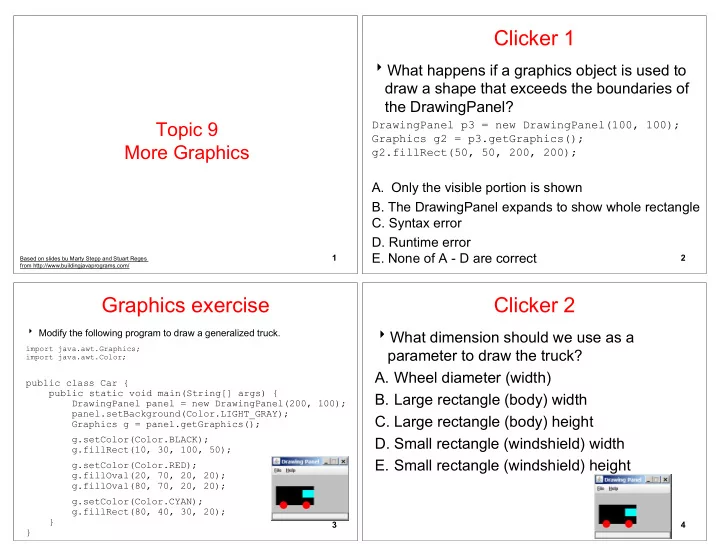
What happens if a graphics object is used to draw a shape that exceeds the boundaries of the DrawingPanel?

DrawingPanel p3 = new DrawingPanel(100, 100); Graphics g2 = p3.getGraphics(); g2.fillRect(50, 50, 200, 200);

  • A. Only the visible portion is shown
  • B. The DrawingPanel expands to show whole rectangle
  • C. Syntax error
  • D. Runtime error
  • E. None of A - D are correct

2

Graphics exercise

Modify the following program to draw a generalized truck.

import java.awt.Graphics; import java.awt.Color;

public class Car { public static void main(String[] args) { DrawingPanel panel = new DrawingPanel(200, 100); panel.setBackground(Color.LIGHT_GRAY); Graphics g = panel.getGraphics(); g.setColor(Color.BLACK); g.fillRect(10, 30, 100, 50); g.setColor(Color.RED); g.fillOval(20, 70, 20, 20); g.fillOval(80, 70, 20, 20); g.setColor(Color.CYAN); g.fillRect(80, 40, 30, 20); } }

3

Clicker 2

What dimension should we use as a parameter to draw the truck?

  • A. Wheel diameter (width)
  • B. Large rectangle (body) width
  • C. Large rectangle (body) height
  • D. Small rectangle (windshield) width
  • E. Small rectangle (windshield) height

4

slide-2
SLIDE 2

Parameterized Drawing

drawTruck0 -> hard coded location and size drawTruck1 -> parameterized location, hard coded size drawTruck2 -> parameterized location and size animate the truck using the sleep method from drawing panel

5

Any Mistakes?

Typically easy to spot significant logic errors in graphical output. Does the truck scale or do we have an abstract, deconstruction of a truck? "Truck, by CS312"

6

Parameterized figures

Modify the car-drawing method so that it can draw cars at different positions, as in the following image.

Top-left corners: (10, 30), (150, 10) Increase the drawing panel's size to 260x100 to fit.

7

Drawing with parameters

To draw in a method, you must pass Graphics g to it.

Otherwise, g is out of scope and cannot be used.

syntax (declaration):

public static void <name> (Graphics g, <parameters>) { <statement(s)> ; }

syntax (call):

<name> (g, <values>); 8

slide-3
SLIDE 3

Parameterized answer

import java.awt.*; public class Car3 { public static void main(String[] args) { DrawingPanel panel = new DrawingPanel(260, 100); panel.setBackground(Color.LIGHT_GRAY); Graphics g = panel.getGraphics(); drawCar(g, 10, 30); drawCar(g, 150, 10); } public static void drawCar(Graphics g, int x, int y) { g.setColor(Color.BLACK); g.fillRect(x, y, 100, 50); g.setColor(Color.RED); g.fillOval(x + 10, y + 40, 20, 20); g.fillOval(x + 70, y + 40, 20, 20); g.setColor(Color.CYAN); g.fillRect(x + 70, y + 10, 30, 20); } } 9

Java book figure

Write a program that draws the following figure:

drawing panel is size 200x150 book is at (20, 35), size 100x100 cyan background white "BJP" text at position (70, 55) stairs are (red=191, green=118, blue=73) each stair is 9px tall

1st stair is 10px wide 2nd stair is 20px wide ...

stairs are 10px apart (1 blank pixel between)

10

Java book solution

// Draws a Building Java Programs textbook with DrawingPanel. import java.awt.*; public class Book { public static void main(String[] args) { DrawingPanel panel = new DrawingPanel(200, 150); panel.setBackground(Color.WHITE); Graphics g = panel.getGraphics(); g.setColor(Color.CYAN); // cyan background g.fillRect(20, 35, 100, 100); g.setColor(Color.WHITE); // white "bjp" text g.drawString("BJP", 70, 55); g.setColor(new Color(191, 118, 73)); for (int i = 0; i < 10; i++) { // orange "bricks" g.fillRect(20, 35 + 10 * i, 10 + 10 * i, 9); } } } 11

Multiple Java books

Modify the Java book program so that it can draw books at different positions as shown below.

book top/left positions: (20, 35), (150, 70), (300, 10) drawing panel's new size: 450x180

12

slide-4
SLIDE 4

Multiple books solution

// Draws many BJP textbooks using parameters. import java.awt.*; public class Book2 { public static void main(String[] args) { DrawingPanel panel = new DrawingPanel(450, 180); panel.setBackground(Color.WHITE); Graphics g = panel.getGraphics(); // draw three books at different locations drawBook(g, 20, 35); drawBook(g, 150, 70); drawBook(g, 300, 10); } ... 13

Multiple books, cont'd.

... // Draws a BJP textbook at the given x/y position. public static void drawBook(Graphics g, int x, int y) { g.setColor(Color.CYAN); // cyan background g.fillRect(x, y, 100, 100); g.setColor(Color.WHITE); // white "bjp" text g.drawString("BJP", x + 50, y + 20); g.setColor(new Color(191, 118, 73)); for (int i = 0; i < 10; i++) { // orange "bricks" g.fillRect(x, y + 10 * i, 10 * (i + 1), 9); } } } 14

Resizable Java books

Modify the Java book program so that it can draw books at different sizes as shown below.

book sizes: 100x100, 60x60, 200x200 drawing panel's new size: 520x240

15

Resizable books solution

// Draws many sized BJP textbooks using parameters. import java.awt.*; public class Book3 { public static void main(String[] args) { DrawingPanel panel = new DrawingPanel(520, 240); panel.setBackground(Color.WHITE); Graphics g = panel.getGraphics(); // draw three books at different locations/sizes drawBook(g, 20, 35, 100); drawBook(g, 150, 70, 60); drawBook(g, 300, 10, 200); } ... 16

slide-5
SLIDE 5

Resizable solution, cont'd.

... // Draws a book of the given size at the given position.

public static void drawBook(Graphics g, int x, int y, int size) {

g.setColor(Color.CYAN); // cyan background g.fillRect(x, y, size, size); g.setColor(Color.WHITE); // white "bjp" text g.drawString("BJP", x + size/2, y + size/5); g.setColor(new Color(191, 118, 73)); for (int i = 0; i < 10; i++) { // orange "bricks" g.fillRect(x, // x y + size/10 * i, // y size/10 * (i + 1), // width size/10 - 1); // height } } } 17

Polygon

Objects that represent arbitrary shapes Add points to a Polygon using its addPoint(x, y) method.

Example:

DrawingPanel p = new DrawingPanel(100, 100); Graphics g = p.getGraphics(); g.setColor(Color.GREEN); Polygon poly = new Polygon(); poly.addPoint(10, 90); poly.addPoint(50, 10); poly.addPoint(90, 90); g.fillPolygon(poly);

18

DrawingPanel methods

panel.save(filename); Saves the image on the panel to the given file (String). panel.sleep(ms); Pauses the drawing for the given number of milliseconds.

19

Animation with sleep

DrawingPanel's sleep method pauses your program for a given number of milliseconds. You can use sleep to create simple animations.

DrawingPanel panel = new DrawingPanel(250, 200); Graphics g = panel.getGraphics(); g.setColor(Color.BLUE); for (int i = 1; i <= 10; i++) { g.fillOval(15 * i, 15 * i, 30, 30); panel.sleep(500); }

Try adding sleep commands to loops in past exercises in this chapter and watch the panel draw itself piece by piece.

20

slide-6
SLIDE 6

Animation exercise

Modify the previous program to draw a "moving" animated car.

21