Circuit elements in graphical form Emf Resistance Current source - - PowerPoint PPT Presentation

circuit elements in graphical form
SMART_READER_LITE
LIVE PREVIEW

Circuit elements in graphical form Emf Resistance Current source - - PowerPoint PPT Presentation

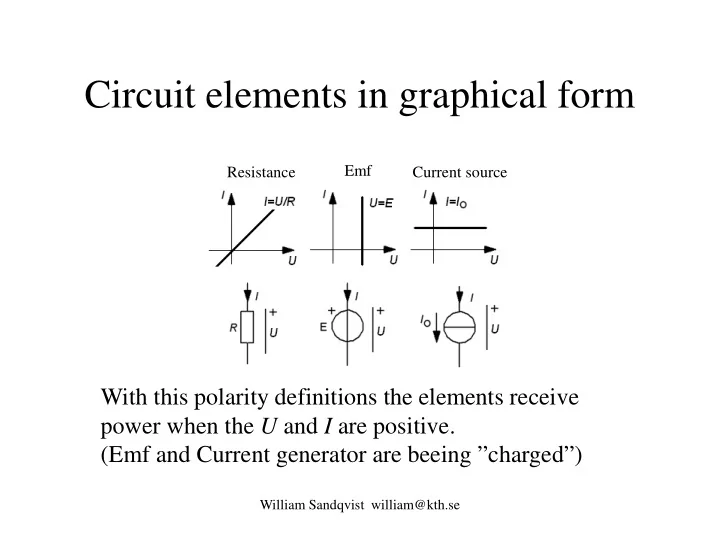
Circuit elements in graphical form Emf Resistance Current source With this polarity definitions the elements receive power when the U and I are positive. (Emf and Current generator are beeing charged) William Sandqvist william@kth.se


slide-1
SLIDE 1

William Sandqvist william@kth.se

Circuit elements in graphical form

With this polarity definitions the elements receive power when the U and I are positive. (Emf and Current generator are beeing ”charged”)

Resistance Emf Current source

slide-2
SLIDE 2

William Sandqvist william@kth.se

Two-terminal circuit with emf and resistance

U = E + R⋅I or I = ( U - E )/R When U > E will I be positive. The circuit receives power. When U < E will I be negative. The circuit delivers power.

slide-3
SLIDE 3

William Sandqvist william@kth.se

Two-terminal circuit with emf and resistance

slide-4
SLIDE 4

William Sandqvist william@kth.se

Two-terminal circuit with emf and resistance

slide-5
SLIDE 5

William Sandqvist william@kth.se

Two-terminal circuit with emf and resistance

Circuit delivers power. Then it is convenient to define the current in the opposite direction.

slide-6
SLIDE 6

William Sandqvist william@kth.se

(Current source and resistance)

I = U/R + I0 If U > 0 the circuit is recieving power. When U < 0 the circuit is delivering power.

slide-7
SLIDE 7

William Sandqvist william@kth.se

(Current source and resistance)

The circuit is delivering power. Then it is convenient to define the current in the opposite direction.

slide-8
SLIDE 8

William Sandqvist william@kth.se

slide-9
SLIDE 9

William Sandqvist william@kth.se

Measurements at the AD-Lab

At lab vi are loading two different two- terminal circuits with a variable resistor, 100 Ω … 1k Ω. We measure the associated values of voltage U, and current I (indirectly as voltage drop

  • ver a constant 100 Ω resistor) with two
  • f the AD-converter channels.

Measured values are stored in a file and presented with excel. Measuring equipment Variable resistor load

slide-10
SLIDE 10

Are 2-terminal equivalents true?

William Sandqvist william@kth.se

2 / || R R R RI = = 2 / E R R R E E = + =

?

Thevenin theorem says: Is this correct?

v

slide-11
SLIDE 11

Measurements on two-terminal circuits

AD AD

2 1

R R E

2 1

U ∝ I ∝ U ∝ I ∝

≡ ≡ Will it realy be the same?

2 / || R R R RI = =

William Sandqvist william@kth.se

Variable resistor load Rail splitter virtual ground

TLE2426

2

IN OUT

V V =

Variable resistor load

slide-12
SLIDE 12

Rail splitter virtual ground?

William Sandqvist william@kth.se

TLE2426

2

IN OUT

V V =

This circuit containes a control system which "tries" to keep the output voltage VOUT at half the input voltage VIN. What are the uses for a rail splitter circuit?

slide-13
SLIDE 13

Measuring a bipolar voltage

William Sandqvist william@kth.se

2 1 ∼

1024 512

+

  • +

Advalue signed long Advalue; Advalue = ADRESH*256; Advalue += ADRESL; Advalue -= 512; // -512...0...+512 If an alternating voltage is referred to E/2, the voltage can be measured with ± sign. AD

E

2 1

E

slide-14
SLIDE 14

AD with external reference?

  • If the AD-converter uses 2,5V reference (from the rail

splitter circuit) we will get better measuring accuracy!

William Sandqvist william@kth.se

U ∝ I ∝

REF +

2 1

AD U< 2,5 V then REF=2,5V is a better choice than REF=5V.

slide-15
SLIDE 15

2 1

U ∝ I ∝

REF +

R

2 1

= E

2 1

William Sandqvist william@kth.se

AD

AD with external reference?

U< 2,5 V then REF=2,5V is a better choice than REF=5V.

  • If the AD-converter uses 2,5V reference (from the rail

splitter circuit) we will get better measuring accuracy!

slide-16
SLIDE 16

Log measurement values to a text file

William Sandqvist william@kth.se

Start/Stop log to file data.txt Use PICKit2 UART tool for logging measurements in the file.

slide-17
SLIDE 17

Measured values to Excel

William Sandqvist william@kth.se

data.txt Open file data.txt in

  • Excel. The file's tab-

separated format is suitable for direct import with the wizard.

slide-18
SLIDE 18

Scatter plot in Excel

William Sandqvist william@kth.se

Mark data-columns and then click on Scatter in the Insert-menu.

slide-19
SLIDE 19

Trendline and Equation

William Sandqvist william@kth.se

Layout – Trendline – Moore Trendline Options Display Equation on Chart

slide-20
SLIDE 20

Two-terminal equivalents proved?

William Sandqvist william@kth.se

If it is identical equations for the two equivalents - surely two- terminal equivalents are probable, although not proven?

slide-21
SLIDE 21

William Sandqvist william@kth.se

slide-22
SLIDE 22

William Sandqvist william@kth.se

Simulate

RL value must be changed to a parameter {R_v}. The curly brackets around the variable name R_v means just parameter. We want to automatically simulate with different values of RL, eg. 100 200 500 700 1000 Ω.

slide-23
SLIDE 23

William Sandqvist william@kth.se

Simulate

Simulate. Problem with plot: X-axis becomes the parameter R_v, we want V(Out). Edit Text, to insert SPICE directive in schematic.

slide-24
SLIDE 24

William Sandqvist william@kth.se

Correct quantities in the plot

Mowe mouse pointer past the axis to show ruler symbol – Left click to change the x- axis r_v to V(Out). V(Out) Right click an chose Add

  • Trace. Add I(R3).
slide-25
SLIDE 25

William Sandqvist william@kth.se

The circuit with simulated load

No mA or Volts are shown – you have to make your

  • wn calculations on this circuit later …

I(R3) V(Out)

slide-26
SLIDE 26

William Sandqvist william@kth.se