Chapter 2 Software Unit 2.2 Operating System 2019-09-27 1. An - - PDF document

chapter 2 software unit 2 2 operating system 2019 09 27
SMART_READER_LITE
LIVE PREVIEW

Chapter 2 Software Unit 2.2 Operating System 2019-09-27 1. An - - PDF document

Chapter 2 Software Unit 2.2 Operating System 2019-09-27 1. An operating system (OS) is the software that manages the sharing of the resources of a computer. Operating system Sharing of


slide-1
SLIDE 1

Chapter 2 Software Unit 2.2 Operating System 备课时间:2019-09-27

词汇与词组

  • 1. An operating system (OS) is the software that manages the

sharing of the resources of a computer.

  • Operating system 操作系统
  • Sharing of resources ... 资源共享

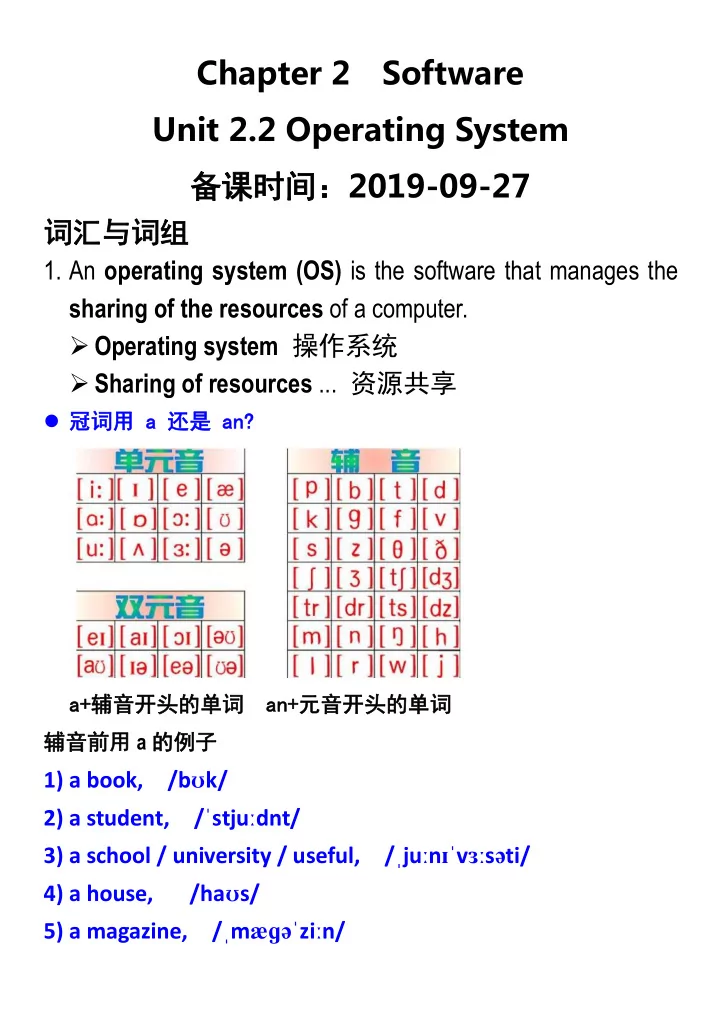
 冠词用 a 还是 an? a+辅音开头的单词 an+元音开头的单词 辅音前用 a 的例子

1) a book, /bʊk/ 2) a student, /ˈstjuːdnt/ 3) a school / university / useful, /ˌjuːnɪˈvɜːsəti/ 4) a house, /haʊs/ 5) a magazine, /ˌmæɡəˈziːn/

slide-2
SLIDE 2

元音前用 an 的例子

1) an egg, /eɡ/ 2) an apple, /ˈæpl/ 3) an object, /ˈɒbdʒɪkt/ 4) an idea, /aɪˈdɪə/ 5) an ugly thing, /ˈʌɡli/ 6) an hour / honest , /ˈaʊə(r)/ /ˈɒnɪst/ 7) an SOS, /'es 'əʊ 'es/

  • 2. An operating system processes raw system data and user

input, and responds by allocating and managing tasks and internal system resources as a service to users and programs

  • f the system.
  • Raw 原始的,未加工过的

raw material

  • Mature 成熟的

mature market economy

  • Developed 发达的;成熟的

developed country 发达国家 developing country 发展中国家

  • Adult 成年的;成熟的

adult education

slide-3
SLIDE 3
  • 3. At the foundation of all system software, an operating system

performs basic tasks such as controlling and allocating memory, prioritizing system requests, controlling input and

  • utput devices, facilitating networking and managing file

systems.

  • Prioritize

/praɪˈɒrətaɪz/ 按优先顺序列出, 确定 (任 务) 优先顺序;优先处理,优先考虑

  • Priority 优先级

Different task have different priority. 每个任务都有互不相同的优先级。

  • Facilitate

/fəˈsɪlɪteɪt/ 促进;辅助

  • Facility 设施;设备;便利;容易
  • 4. Most operating systems come with an application that

provides a user interface for managing the operating system, such as a command line interpreter or graphical user interface.

  • Come with 与...一起给出;伴随

1) Come Away With Me 远走高飞(Norah Jones) 2) Would you like to come with us? 你愿意和我们一起去吗?。

  • user interface 用户界面

1) The user interface of a particular piece of computer software is its presentation on the screen and ....

slide-4
SLIDE 4

2) Yes, it is a class, not an interface. 3) A class is a collection of fields and methods that operate

  • n fields. An interface has fully abstract methods i.e.

methods with nobody. 4) An interface is syntactically similar to the class but there is a major difference between class and interface that is a class can be instantiated, but an interface can never be instantiated.

  • command line interpreter 命令行解释器
slide-5
SLIDE 5
  • graphical user interface 图形用户界面
  • 5. As long as a Von Neumann architecture is used to build

computers, only one process per CPU can be run at a time.

  • Von Neumann architecture 冯诺依曼体系结构

1) A processing unit that contains an arithmetic logic unit and processor registers 2) A control unit that contains an instruction register and program counter 3) Memory that stores data and instructions 4) External mass storage 5) Input and output mechanisms

slide-6
SLIDE 6
  • 6. Modern operating systems enable concurrent execution of

many processes at once via multitasking even with one CPU.

  • Concurrent: existing, happening, or done at the same
  • time. 并发

1) In parallel computing, a computational task is typically broken down into several, often many, very similar sub-tasks that can be processed independently and whose results are combined afterwards, upon completion. 并行计算 2) In contrast, in concurrent computing, the various processes often do not address related tasks; when they do, as is typical in distributed computing, the separate tasks may have a varied nature and often require some inter-process communication during execution.

  • multitasking 多任务处理

1) Multitasking is the concurrent execution of multiple tasks (also known as processes) over a certain period of time. 2) New tasks can interrupt already started ones before they finish, instead of waiting for them to end. 3) As a result, a computer executes segments of multiple tasks in an interleaved manner, while the tasks share common processing resources such as central CPUs and main memory.

slide-7
SLIDE 7
  • 7. Since most computers contain one processor with one core,

multitasking is done by simply switching processes quickly.

  • Core 核心

A multi-core processor is a computer processor integrated circuit with two or more separate processing units, called cores, each of which reads and executes program instructions, as if the computer had several processors.

  • 8. Depending on the operating system, as more processes run,

either each time slice will become smaller or there will be longer delay before each process is given a chance to run.

  • time slice 时间片

1) The period of time for which a process is allowed to run in a preemptive multitasking system is generally called the time slice. 2) A scheduler is run once every time slice to choose the next process to run.

  • 9. Most operating systems allow a process to be assigned a

priority which affects its allocation of CPU time.

  • Assign 【动词】 分配;指派;赋值
  • Assignment 【名词】 分配;任务;作业;功课
slide-8
SLIDE 8
  • 10. In many systems there is a background process, such as

the System Idle Process in Windows, which will run when no

  • ther process is waiting for the CPU.
  • background 后台的
  • System Idle Process 系统空闲进程
  • idle 空闲的;懒惰的

An idle man only enjoys playing and pleasures. 一个懒惰的人只会玩耍和寻乐。 题鹤林寺僧舍——[唐] 李涉 终日昏昏醉梦间,忽闻春尽强登山。 因过竹院逢僧话,偷得浮生半日闲。 To Smell the Flowers 偷得浮生半日闲,轻松一下 11. This activity, usually referred to as virtual memory management, increases the amount of memory available for each process by making the disk storage seem like main memory.

  • Virtual memory management 虚拟内存管理
  • 12. There is a speed penalty associated with using disks or
  • ther slower storage as memory.
  • Penalty /ˈpenəlti/ 损失;罚款,罚金;处罚
  • penalty function 补偿函数
slide-9
SLIDE 9
  • associated 关联的;联合的
  • Associated Press 美国联合通讯社,

是由各成员单位 联合组成的合作型机构,简称美联社,是美国最大 的通讯社,也是世界上规模最大的新闻采访机构之 一。

  • 13. This can happen either because one process requires a

large amount of RAM or because two or more processes compete for a larger amount of memory than is available.

  • compete /kəmˈpiːt/

for 竞争 The world is a competitive world. We will have to compete for jobs, business, etc. 这是个竞争的世界。我们不得不在工作、事业等方 面竞争。

  • competitive /kəmˈpetətɪv/

竞争的

  • etc. 等等(et cetera,等于 and so on)
  • 14. This then leads to constant transfer of each process’s data

to slower storage.

  • lead to 导致;通向

Their disagreements lead to violence on the streets of

  • Gaza. 他们的分歧导致了加沙街头的暴力活动。
  • result in

导致;引起 The system will not be very scalable, which will result in a poor application.

slide-10
SLIDE 10
  • 15. Modern file systems comprise a hierarchy of directories.
  • Directory (文件)目录
  • 16. UNIX demarcates its path components with a slash (/), a

convention followed by operating systems that emulated it or at least its concept of hierarchical directories, such as Linux, Amiga OS and Mac OS X.

  • demarcate /ˈdiːmɑːkeɪt/ 标定

If you demarcate something, you establish its boundaries

  • r limits.
  • path component 路径成分
  • slash 斜杠(/)
  • backslash 反斜杠(\)
  • convention 约定;规约
  • emulate /ˈemjuleɪt/ 仿效
slide-11
SLIDE 11
  • 17. MS-DOS also emulated this feature, but had already also

adopted the CP/M convention of using slashes for additional

  • ptions to commands, so instead used the backslash(\) as its

component separator.

  • MS-DOS 微软磁盘操作系统

(Microsoft disk operating system)

  • CP/M, originally standing for Control Program/Monitor and

later Control Program for Microcomputers, is a mass-market operating system created in 1974 for Intel 8080/85-based microcomputers by Gary Kildall of Digital Research, Inc.

  • mass-market 面向大众的,大众市场的
  • Inc. = Incorporated, Corp. = Corporation 都指“股份有

限公司”

  • Co., Ltd. = Company Limited 指“有限责任公司”
slide-12
SLIDE 12
  • 18. Microsoft Windows continues with this convention;Versions
  • f Mac OS prior to OS X use a colon (:) for a path separator.

RISC OS uses a period (.).

  • Mac: Macintosh
  • OS X was originally built from NeXTSTEP, an operating

system designed by NeXT, which Apple acquired when Steve Jobs returned to Apple in 1997.

  • RISC OS is a computer operating system designed in

Cambridge, England by Acorn. First released in 1987, its

  • rigins can be traced back to the original team that

developed the Arm microprocessor.

  • RISC

Reduced instruction set computer

  • CISC

Complex instruction set computer

  • Acorn 计算机公司是现在著名的 ARM 公司的前身
  • Acorn 创立于 1978 年,公司位于英格兰的剑桥,它

在 80 年代 PC 革命初期的贡献,相当于美国的“苹 果公司”

  • 1991 年,Acorn 计算机公司剥离了 ARM 部门,成立

了 ARM 公司

slide-13
SLIDE 13
  • 19. UNIX and UNIX-like operating systems allow for any

character in file names other than the slash (including line feed (LF) and other control characters).

  • line feed (LF)

1) Text files created on DOS/Windows machines have different line endings than files created on Unix/Linux. 2) DOS uses carriage return and line feed ("\r\n") as a line ending, which UNIX uses just line feed ("\n").

  • control character: In computing and telecommunication, a

control character or non-printing character (NPC) is a code point (a number) in a character set, that does not represent a written symbol.

Keys Dec Hex

  • Abbr. Name

Type Description

[Ctrl] @ 00 NUL Null A control character used to accomplish media-fill or time-fill. Null characters may be inserted into or removed from a stream of data without affecting the information content of that stream. But then the addition or removal of these characters may affect the information layout and/or the control of equipment. [Ctrl] A 1 01 STX Start of Header TC A transmission control character used as the first character of a heading of an information message. [Ctrl] B 2 02 SOT Start of Text TC A transmission control character which precedes a text and which is used to terminate a heading. [Ctrl] C 3 03 ETX End of Text TC A transmission control character which terminates a text. [Ctrl] D 4 04 EOT End of Transmission TC A transmission control character used to indicate the conclusion

  • f the transmission of one or more texts..

[Ctrl] E 5 05 ENQ Enquiry TC A transmission control character used as a request for a response from a remote station; the response may include station identification and/or station status. When a "Who are you" function is required on the general switched transmission network, the first use of ENQ after the connection is established shall have the meaning "Who are you" (station identification). Subsequent use of ENQ may, or may not, include the function "Who are you", as determined by agreement. [Ctrl] F 6 06 ACK Acknowledge TC A transmission control character transmitted by a receiver as an affirmative response to the sender.

slide-14
SLIDE 14

[Ctrl] G 7 07 BEL Bell A control character that is used when there is a need to call for attention; it may control alarm or attention devices. [Ctrl] H 8 08 BS BackSpace FE A format effector which moves the active position one character position backwards on the same line. [Ctrl] I 9 09 HT Horizontal Tabulation FE A format effector which advances the active position to the next pre-determined character position on the same line. [Ctrl] J 10 0A LF Line Feed FE A format effector which advances the active position to the same character position of the next line. [Ctrl] K 11 0B VT Vertical Tabulation FE A format effector which advances the active position to the same character position on the next pre-determined line. [Ctrl] L 12 0C FF Form Feed FE A format effector which advances the active position to the same character position on a pre-determined line of the next form or page. [Ctrl] M 13 0D CR Carriage Return FE A format effector which moves the active position to the first character position on the same line. [Ctrl] N 14 0E SO Shift Out A control character which is used in conjunction with SHIFT IN and ESCAPE to extend the graphic character set of the code. It may alter the meaning of octets 33 - 126 (dec.). The effect of this character when using code extension techniques is described in International Standard ISO 2022. [Ctrl] O 15 0F SI Shift In A control character which is used in conjunction with SHIFT OUT and ESCAPE to extend the graphic character set of the code. It may reinstate the standard meanings of the octets which follow it. The effect of this character when using code extension techniques is described in International Standard ISO 2022. [Ctrl] P 16 10 DLE Data Link Escape TC A transmission control character which will change the meaning

  • f a limited number of contiguously following characters.

Its is used exclusively to provide supplementary data transmission control functions. Only graphic characters and transmission control characters can be used in DLE sequences. [Ctrl] Q 17 11 DC1 Device Control 1(XON) A device control character which is primarily intended for turning

  • n or starting an ancillary device.

If it is not required for this purpose, it may be used to restore a device to the basic mode of operation (see also DC2 and DC3), or for any other device control function not provided by other DCs. [Ctrl] R 18 12 DC2 Device Control 2 A device control character which is primarily intended for turning

  • n or starting an ancillary device.

If it is not required for this purpose, it may be used to set a device to a special mode of operation (in which case DC1 is used to restore normal operation), or for any other device control function not provided by other DCs. [Ctrl] S 19 13 DC3 Device Control 3(XOFF) A device control character which is primarily intended for turning

  • ff or stopping an ancillary device.

This function may be a secondary level stop, for example, wait, pause, stand-by or halt (in which case DC1 is used to restore
slide-15
SLIDE 15

normal operation). If it is not required for this purpose, it may be used for any other device control function not provided by other DCs. [Ctrl] T 20 14 DC4 Device Control 4 A device control character which is primarily intended for turning

  • ff, stopping or interrupting an ancillary device.

If it is not required for this purpose, it may be used for any other device control function not provided by other DCs. [Ctrl] U 21 15 NAK Negative acknowledge TC A transmission control character transmitted by a receiver as a negative response to the sender. [Ctrl] V 22 16 SYN Synchronous Idle TC A transmission control character used by a synchronous transmission system in the absence of any other character (idle condition) to provide a signal from which synchronism may be achieved or retained between data terminal equipment. [Ctrl] W 23 17 ETB End

  • f Transmission Block

TC A transmission control character used to indicate the end of a transmission block of data where data is divided into such blocks for transmission purposes. [Ctrl] X 24 18 CAN Cancel A character, or the first character of a sequence, indicating that the data preceding it is in error. As a result, this data is to be ignored. The specific meaning of this character must be defined for each application and/or between sender and recipient. [Ctrl] Y 25 19 EM End of Medium A control character that may be used to identify the physical end

  • f a medium, or the end of the used portion of a medium, or the

end of the wanted portion of data recoreded on a medium. The position of this character does not necessarily correspond to the physical end of the medium. [Ctrl] Z 26 1A SUB Substitute A control character used in the place of a character that has been found to be invalid or in error. SUB is intended to be introduced by automatic means. [Ctrl] [ 27 1B ESC Escape A control character which is used to provide additional control functions. It alters the meaning of a limited number of contiguously following bit combinations. The use of this character is specified in International Standard ISO 2022. [Ctrl] \ 28 1C FS File Separator IS A control character used to separate and qualify data logically; its specific meaning has to be specified for each application. If this character is used in hierarchical order, it delimits a data item called a file [Ctrl] ] 29 1D GS Group Separator IS A control character used to separate and qualify data logically; its specific meaning has to be specified for each application. If this character is used in hierarchical order, it delimits a data item called a group. [Ctrl] ^ 30 1E RS Record Separator IS A control character used to separate and qualify data logically; its specific meaning has to be specified for each application. If this character is used in hierarchical order, it delimits a data item called a record.

slide-16
SLIDE 16

[Ctrl] _ 31 1F US Unit Separator IS A control character used to separate and qualify data logically; its specific meaning has to be specified for each application. If this character is used in hierarchical order, it delimits a data item called a unit. 127 7F DEL Delete Delete

  • 20. UNIX file names are case sensitive, which allows multiple

files to be created with names that differ only in case.

  • case sensitive 大小写敏感的
  • Uppercase 大写的
  • Lowercase 小写的
  • case insensitive 大小写不敏感的
  • capital letter 大写字母

Your password must contain at least one capital letter. 您的密码必须至少包含一个大写字母。

  • 21. Windows also has a larger set of punctuation characters

that are not allowed in file names.

  • punctuation /ˌpʌŋktʃuˈeɪʃn/ 标点符号
  • 22. File systems may provide journaling, which provides safe

recovery in the event of a system crash.

  • journal 日志;期刊,杂志

The work is published this week in the journal Science. 这项工作发表在本周出版的"科学"杂志上。

slide-17
SLIDE 17

A journaling file system is a file system that keeps track of changes not yet committed to the file system's main part by recording the intentions of such changes in a data structure known as a "journal", which is usually a circular log.

  • Crash(机器、系统的)崩溃
  • 23. In the event of a crash, the system can recover to a

consistent state by replaying a portion of the journal.

  • consistent 一致的
  • Replay 重播;重演;重新执行
  • 24. In contrast, non-journaled file systems typically need to be

examined in their entirety by a utility such as fsck or chkdsk.

  • entirety

/ɪnˈtaɪərəti/ 整体; 全部

  • utility 实用工具
slide-18
SLIDE 18
  • fsck stands for "file system consistency check". On most

systems, fsck is run at boot time if certain conditions are

  • detected. Usually, these conditions are:

1) A file system is marked as "dirty" — its written state is inconsistent with data that was scheduled to be written;

  • r,

2) A file system has been mounted a set number of times without being checked.

  • The chkdsk command opens a utility that checks the

computer's hard drive status for any cross-linked files or

  • ther errors.
  • 25. Log-structured file systems and ZFS also differ from

traditional journaled file systems in that they avoid inconsistencies by always writing new copies of the data, eschewing in-place updates.

  • ZFS:Zettabyte File System

To put it another way, a single zettabyte equals 1,073,741,824 terabytes! 1TB=2^40 字节;1ZB=2^70 字节

  • eschew /ɪsˈtʃuː/ 避免
  • Log-structured file systems 日志结构文件系统
slide-19
SLIDE 19

LFS turns the entire file system into a log

  • 26. Many Linux distributions support some or all of ext2,

ext3, ...

  • Linux distribution : Linux 发行版,就是 Linux 核心再

加上外围的实用程序组成的一个大软件包而已, 其 中 Linux 代表操作系统内核

  • Linux 的发行版本 SUSE、RedHat、Fedora、Debian、

Ubuntu、CentOS、Gentoo

slide-20
SLIDE 20
  • 27. Most current operating systems are capable of using the

TCP/IP networking protocols.

  • TCP/IP 传 输 控 制 协 议 / 网 际 协 议

(Transmission Control Protocol / Internet Protocol)。 1) 供已连接因特网的计算机进行通信的通信协议。 2) 定义了电子设备 (比如计算机) 如何连入因特网, 以及数据如何在它们之间传输的标准。

  • 在 TCP/IP 中包含一系列用于处理数据通信的协

议: 1) TCP (传输控制协议) - 应用程序之间通信 2) UDP (用户数据包协议) - 应用程序之间的简单通 信 3) IP (网际协议) - 计算机之间的通信 4) ICMP (因特网消息控制协议) - 针对错误和状态 5) DHCP (动态主机配置协议) - 针对动态寻址

  • TCP/IP 意味着 TCP 和 IP 在一起协同工作。

1) TCP 负责应用软件(比如你的浏览器)和网络软 件之间的通信。 2) IP 负责计算机之间的通信。 3) TCP 负责将数据分割并装入 IP 包,然后在它们 到达的时候重新组合它们。 4) IP 负责将包发送至接受者。

  • Protocol A protocol is a set of rules for exchanging

information between computers.

slide-21
SLIDE 21
  • 28. Many operating systems also support one or more

vendor-specific legacy networking protocols as well.

  • vendor-specific 厂商特定的
  • Legacy 遗产;遗留的

a legacy system

  • 29. Many operating systems include some level of security.
  • Security 安全

The Security Commission investigates breaches

  • f

security. 安全委员会对违反安全规定的事项进行调查。

  • secure 安全的;无虑的;有把握的;稳当的

Analysis result shows that the mechanism is efficient and secure.分析结果表明,该机制是高效且安全的。

  • Safety is the state of being safe from harm or danger. 安

全; 平安 I tremble for your safety. 我很担心你的安全。

slide-22
SLIDE 22
  • 30. The operating systems provides access to a number of

resources, directly or indirectly, such as files on a local disk, privileged system calls, personal information about users...

  • a number of 许多,大量
  • privileged 特许的
  • 31. External security: a new request from outside the computer,

such as a login at a connected console or some kind of network connection.

  • Login 登录系统
  • Console 控制台
  • 32. To

establish identity there may be a process

  • f

authentication.

  • identity 身份(ID) Your identity is who you are.
  • Authentication 身份认证;证明;鉴定;证实

the process or action of verifying( 核 查 ) the identity of a user or process.

slide-23
SLIDE 23
  • 33. Often a username must be quoted, and each username

may have a password.

  • Quote 引用,用到 use
  • 34. In addition to the allow/disallow model of security, a system

with a high level of security will also offer auditing options.

  • In addition to : besides.
  • offer : provide
  • audit /ˈɔːdɪt/ 审计,稽查
  • 35. The United States Government Department of Defense

(DoD) created the Trusted Computer System Evaluation Criteria (TCSEC) which is a standard that sets basic requirements for assessing the effectiveness of security.

  • Department of Defense 国防部
  • Trusted Computer System Evaluation Criteria 可信计算

机系统评价标准

  • Requirement 需求
  • assess /əˈses/ When you assess a person, thing, or

situation, you consider them in order to make a judgment about them. 评估

  • effectiveness 有效性,效果

Sometimes you have to sacrifice efficiency for effectiveness. 有时候你需要牺牲效率来达到效果。

slide-24
SLIDE 24

有效果 vs 高效率  Effectiveness is about doing the right task, completing activities and achieving goals. 站好队,大方向没错。卧薪尝胆终成霸业

兵强者,攻其将;将智者,伐其情。将弱兵颓,其势 自萎。利用御寇,顺相保也。 兵强将智,不可以敌,势必事先。事之以土地,以增 其势,如六国之事秦:策之最下者也。事之以币帛,以 增其富,如宋之事辽金:策之下者也。惟事以美人,以 佚其志,以弱其体,以增其下之怨。如勾践以西施重宝 取悦夫差,乃可转败为胜。 《三十六计—美人计》

 Efficiency is about doing things in an optimal way, for example doing it the fastest or in the least expensive way. It could be the wrong thing, but it was done optimally. 可能南辕北辙?

魏王欲攻邯郸,季梁闻之,中道而反,衣焦不申,头 尘不去,往见王曰:“今者臣来,见人于大行。方北面 而持其驾,告臣曰:‘我欲之楚。’臣曰:‘君之楚, 将奚为北面?’曰:‘吾马良。’臣曰:‘马虽良,此非 楚之路也。’曰:‘吾用多。’臣曰:‘用虽多,此非 楚之路也。’曰:‘吾御者善。’此数者愈善,而离楚 愈远耳!” 今王动欲成霸王, 举欲信于天下。 恃王国之大, 兵之精锐,而攻邯郸,以广地尊名,王之动愈数,而离 王愈远耳。犹至楚而北行也。” 《战国策—魏四》