Chapter 1 Elementary Concepts Lines and Coordinates Device - - PDF document

chapter 1 elementary concepts
SMART_READER_LITE
LIVE PREVIEW

Chapter 1 Elementary Concepts Lines and Coordinates Device - - PDF document

Chapter 1 Elementary Concepts Lines and Coordinates Device Coordinates Logical Coordinates Converting Between Logical and Device Coordinates Mapping From Logical to Device Coordinates Anisotropic mapping Isotropic


slide-1
SLIDE 1

1

  • 2006 Wiley & Sons

Lines and Coordinates Device Coordinates Logical Coordinates Converting Between Logical and Device

Coordinates

Mapping From Logical to Device Coordinates

Anisotropic mapping Isotropic mapping

Chapter 1 Elementary Concepts

  • 2006 Wiley & Sons

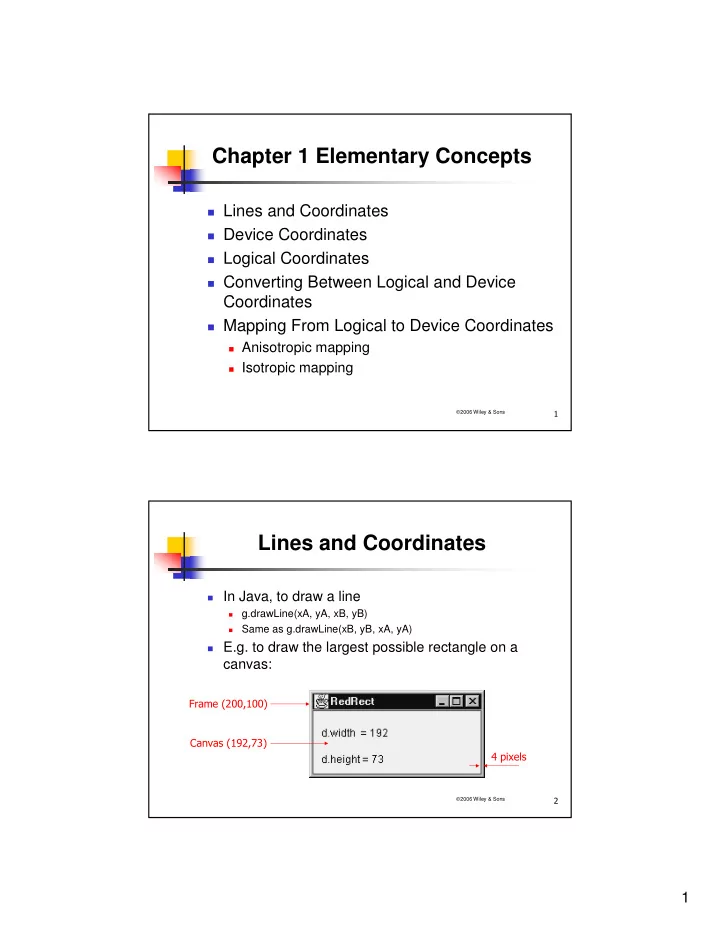
Lines and Coordinates

In Java, to draw a line

  • g.drawLine(xA, yA, xB, yB)
  • Same as g.drawLine(xB, yB, xA, yA)

E.g. to draw the largest possible rectangle on a

canvas:

slide-2
SLIDE 2

2

  • 2006 Wiley & Sons

Example: Red Rectangle

  • ……
  • class CvRedRect extends Canvas
  • { public void paint(Graphics g)
  • { Dimension d = getSize();
  • int maxX = d.width - 1, maxY = d.height - 1;
  • g.drawString("d.width = " + d.width, 10, 30);
  • g.drawString("d.height = " + d.height, 10, 60);
  • g.setColor(Color.red);
  • g.drawLine(0, 0, maxX, 0);

// Top edge

  • g.drawLine(maxX, 0, maxX, maxY);

// Right edge

  • g.drawLine(maxX, maxY, 0, maxY);

// Bottom edge

  • g.drawLine(0, maxY, 0, 0);

// Left edge

  • }
  • }

g.drawRect(0, 0, maxX, maxY);

  • 2006 Wiley & Sons

Device Coordinate System

  • The rectangle size drawn by
  • g.drawLine(x, y, maxX, maxY) is (maxX +1) by maxY + 1)
  • The smallest rectangle is a square 2 x 2, using
  • g.drawRect(x, y, 1, 1)
  • To draw one dot
  • g.drawLine(x, y, x, y)

1 2 3 4 5 6 7 1 2 3 d.width = 8 d.height = 4 x y

slide-3
SLIDE 3

3

  • 2006 Wiley & Sons

Device Coordinate System (cont’d)

To fill a rectangle of size w x h, use

g.fillRect(x, y,w,h)

g.drawRect(x, y,w,h) draws a slightly bigger

rectangle than by g.fillRect(x, y,w,h)

Filling problem: discrete nature

e.g. to fill a triangle half of a rectangle

A B C D

  • 2006 Wiley & Sons

Logical Coordinate System

To put origin at the left-bottom corner as in math:

y’ = maxY – y (x-axis is unchanged)

Logical Lower-case letters float Continuous Upward Device Upper-case letters integer Discrete Downward Coordinate System Convention Data Type Value Domain Positive y-axis

slide-4
SLIDE 4

4

  • 2006 Wiley & Sons

Converting Between Logical and Device Coordinates

Rounding:

Int iX(float x){return Math.round(x);} // L -> D Float fx(int x){return (float)x;} // D -> L E.g. iX(2.8) = 3, fx(3) = 3.0

Truncating:

Int iX(float x){return (int)x;} // L -> D Float fx(int x){return (float)x+0.5;} // D -> L E.g. iX(2.8) = 2, fx(2) = 2.5

For both above, |x-fx(iX(x))| ≤ 0.5

Max lost precision is 0.5

Rounding will be used throughout this book !

2006 Wiley & Sons

An Important Principle in Conversion

float

  • float

float

  • float
  • int

int int int float float float float

  • int

int int int Step i+1 computation is performed on FP result of Step i: Rather than (accumulating rounding off errors):

slide-5
SLIDE 5

5

  • 2006 Wiley & Sons

Mapping From Logical to Device Coordinates

Can we use int iX(float x){return Math.round(x);} to

map from logical coordinates 0.0 – 10.0 (real) to device coordinates 0 – 9 (integer)?

10 logical units 1 2 4 6 8 3 5 7 9 Logical x Pixel number X 2 4 6 8 10 1 3 5 7 9 9 ´ pixelWidth

  • 2006 Wiley & Sons

Mapping From Logical to Device Coordinates (cont’d)

So pixel width in terms of logical coordinates is

10/9 = 1.11.

Enhanced method is

Int iX(float){return Math.round(x/pixelWidth);}

In this example, 9 = number of pixels (10) –1

10 is width of logical interval, I.e. 0 ≤ x ≤ rWidth

It works similarly with vertical (y) coordinates (rHeight).

slide-6
SLIDE 6

6

  • 2006 Wiley & Sons

Anisotropic/Isotropic Mapping

Anisotropic mapping: pixelWidth ≠ pixelHeight

Unsuited for shapes like squares and circles

Isotropic mapping: pixelWidth = pixelHeight (pixelSize)

Int iX(float){return Math.round(x/pixelWidth);}

Usually we want the origin of the logical coordinates to

be in the center, so

  • 0.5 rWidth ≤ x < 0.5rWidth
  • 0.5 rHeight ≤ x < 0.5rHeight

Mapped to device coordinates 0 – maxX and 0 – maxY.

  • 2006 Wiley & Sons

Chapter 2 Applied Geometry

Vectors Dot (inner) Product Vector (cross) Product Determinants Orientation of 3 points Polygon Shapes Point-in-Polygon Test Point and Line Relationships Triangulation of Polygons

slide-7
SLIDE 7

7

  • 2006 Wiley & Sons

Vectors

Vector = length + direction of a line segment

Useful representation of real-world

measurements, e.g. velocity.

Not to be confused with Java vectors Length of u = |u|

  • u has the same length but opposite direction

" # $ %

  • &"#& &$%

'(

  • 2006 Wiley & Sons

Vector Addition

w = u + v is the diagonal of the parallelogram

formed by u and v

  • )
  • )
  • )
  • )
slide-8
SLIDE 8

8

  • 2006 Wiley & Sons

Multiplying a vector with a real number

C being a real number,

the length of vector cu is |c||u|

A vector of unit length is

called a unit vector

Right-handed

coordinate systems for 3D

i j k

  • x

y z

  • 2006 Wiley & Sons

Vector (cont’d)

Linear combination of i, j and k:

v = xi + yj + zk = OP x, y, and z are coordinates of P and called

elements or components of v, or simply

v = [x y z]

slide-9
SLIDE 9

9

  • 2006 Wiley & Sons

Dot Product (Inner Product)

Dot product of u and v, i.e. u·v, is a real

number

u·v =

( is the angle between u and v)

For unit vectors i, j and k:

i·i = j·j = k·k = 1 i·j = i·k = j·k = k·j = j·i = k·i = 0

  • =

= ≠ ≠

  • r v

u v and u cos | v || u | if if θ

!

2006 Wiley & Sons

Dot Product (cont’d)

Since u·u = |u|2, |u| = Properties of dot product:

c(ku·v) = ck(u·v) (cu + kv) · w = cu·w + kv·w u·v = v·u u·u = 0 only if u = 0

Dot product of u = [ux uy uz] and v = [vx vy vz] is

u·v = uxvx + uyvy + uzvz

| u u |

slide-10
SLIDE 10

10

  • 2006 Wiley & Sons

Vector Product (Cross Product)

Vector product of u and v, i.e. uxv, is a vector w w = 0 if u = cv, otherwise |w| =|u||v|sin

( is the angle between u and v)

|w| is the area size of the parallelogram formed by u

and v

Direction: right-handed screw rule

& **&****+ +

  • 2006 Wiley & Sons

Vector Product (cont’ed)

Properties:

(ku) v = k(u v) u (v + w) = u v + u w u v = - v u i i = j j = k k = 0 i j = k

j i = -k

j k = i

k j = -i

k i = j

i k = -j

slide-11
SLIDE 11

11

  • 2006 Wiley & Sons

Vector Product (cont’d)

u v = (u1i + u2j + u3k) (v1i + v2j + v3k)

= u1v1 (i i) ……

k j i v u

2 1 2 1 1 3 1 3 3 2 3 2

v v u u + v v u u + v v u u = ×

k j i v u

3 2 1 3 2 1

v v v u u u = ×

  • 2006 Wiley & Sons

Determinants

To solve two linear equations

we multiple the 1st equation by b2, 2nd by –b1, and then add them up to cancel y (similarly cancel x), obtain (if (a1b2 – a2b1) 0):

a x b y c a x b y c

1 1 1 2 2 2

+ = + =

  • 1

2 2 1 1 2 2 1 1 2 2 1 2 1 1 2

b a b a c a c a y b a b a c b c b x − − = − − =

slide-12
SLIDE 12

12

  • 2006 Wiley & Sons

Determinants (cont’d)

We can write

x D D y D D D = = ≠

1 2

( ) D a b a b =

1 1 2 2

D c b c b

1 1 1 2 2

= D a c a c

2 1 1 2 2

=

  • 2006 Wiley & Sons

Determinants (cont’d)

Properties

(1) (2) (3)

a b a b a a b b

1 1 2 2 1 2 1 2

=

a b c a b c a b c a b c a b c a b c

1 1 1 2 2 2 3 3 3 1 1 1 3 3 3 2 2 2

= −

ca b ca b c a a b b

1 1 2 2 1 2 1 2

=

slide-13
SLIDE 13

13

  • 2006 Wiley & Sons

Determinants (cont’d)

Properties

(4) (5)

a b c a b c a ka b kb c kc a b c a b c a b c

1 1 1 2 2 2 3 1 3 1 3 1 1 1 1 2 2 2 3 3 3

+ + + = a b c a b c a a b b c c

1 1 1 2 2 2 1 2 1 2 1 2

3 2 3 2 3 2 − − − =

  • 2006 Wiley & Sons

Orientation of 3 Points

A A B B C C

,- ,. ,&/'01(

slide-14
SLIDE 14

14

  • 2006 Wiley & Sons

Orientation of 3 Points (cont’d)

3D vector representation

C A B a b

&' &0 k k k j i b a ) (

1 2 2 1 2 1 2 1 2 1 2 1

b a b a b b a a b b a a − = = = × & ) ) &2 )2 )

  • <

= > − cw : line same the

  • n

: ccw us, to pointing thumb :

1 2 2 1

b a b a

!

2006 Wiley & Sons

Polygon Shapes

  • (34
  • 3

3 56(.!7 5$36(-!7

slide-15
SLIDE 15

15

  • 2006 Wiley & Sons

Given a polygon P,

Find a convex vertex in P by finding a vertex

with least x or y coordinate

Identify the triangle constructed by the found

convex vertex and its two neighboring vertices

Determine the order of the vertex sequence

Determining a Polygon’s Orientation

  • 2006 Wiley & Sons

A Useful Java Method

89 :3"9"92"9 :;<= <>2<4= <4= <4= <4>20<= <? @ <<<AA;''0>6-3/?.3/ @ 0;3'0/6

2

1 2 1 2 1 2 2 1

Area ABC ( ) ∆ = × = = − a b a a b b a b a b

slide-16
SLIDE 16

16

  • 2006 Wiley & Sons

Area of a Polygon

B3'0/ 1a1 = xA – xC, a2 = yA – yC, b1 = xB – xC, b2 = yB – yC

2

1 2 1 2 1 2 2 1

Area ABC ( ) ∆ = × = = − a b a a b b a b a b

= (xA – xC)(yB – yC) – (yA – yC)(xB – xC) = (xAyB – yAxB) + (xByC – yBxC) + (xCyA – yCxA)

2 Area(P ...P )

n i i i i n i

x y y x

− + = − +

  • 1

1 1 1

= ( )

1" /;12(C124(6

  • 2006 Wiley & Sons

Point-in-Triangle Test

P is inside a triangle ABC if orientations of ABP,

BCP, and CAP are the same as that of ABC.

B3'0/ <<89<'0

  • &13

Tools2D.area2(A, B, P) >= 0 && Tools2D.area2(B, C, P) >= 0 && Tools2D.area2(C, A, P) >= 0 Then P is inside ABC, or on an edge of it.

A B C P

slide-17
SLIDE 17

17

  • 2006 Wiley & Sons

Point-in-Polygon Test

3 intersections, so inside 4 intersections, so outside

  • 2006 Wiley & Sons

Point-in-Polygon Test

  • Special cases
  • An edge (i, i+1) is counted

if

  • yi ≤ yP < yi+1 or

yi+1 ≤ yP < yi

(a lower endpoint is counted

  • nce for each edge, but

upper endpoints are not counted)

  • insidePolygon (page 42)
  • The method can also be used to implement polygon-filling.
slide-18
SLIDE 18

18

  • 2006 Wiley & Sons

Point and Line Relationships

Testing whether a point P is on a line defined by A

and B:

if (Math.abs(Tools2D.area2(a, b, p)) < eps) eps – a small positive number for tolerance

Testing whether a point P is on a line segment AB:

If xA != xB AND xP in-between xA and xB AND

Math.abs(Tools2D.area2(a, b, p)) < eps

If xA == xB AND yP in-between yA and xyB AND

Math.abs(Tools2D.area2(a, b, p)) < eps

  • 2006 Wiley & Sons

Point and Line Relationships (cont’d)

Testing whether a point P is projected on a line

segment AB :

'0D '"& '0D '"&'0D'0 .'0D '".'0D'0

slide-19
SLIDE 19

19

  • 2006 Wiley & Sons

Triangulation of Polygons

Input: an array of N Pint2D objects representing

polygon vertices

Output: an array of N-2 Triangle objects

1.

Traverse polygon vertices in ccw order

2.

Work on every 3 successive vertices A, B and C, if B is a convex vertex, then

  • If ABC does not contain any of other vertices
  • Then cut ABC off the polygon

3.

Continue Step 1 with the remaining polygon

!

2006 Wiley & Sons

Triangulation of Polygons (cont’d)

  • ABC cannot be cut since it contains D
  • CDE cannot be cut since D is a reflex
  • BCD can be cut to generate new polygon ABDE
  • ……
slide-20
SLIDE 20

20

  • 2006 Wiley & Sons

Linear Transformations in 2D

Rotation Scaling Shearing

Translation Homogeneous Coordinates Inverse Transformations Composition of 2D Transformations Change in Coordinate System 3D Transformations

Rotation about a Coordinate Axis Rotation about an Arbitrary Axis

Chapter 3 Chapter 3 Chapter 3 Chapter 3 Geometrical Transformations Geometrical Transformations Geometrical Transformations Geometrical Transformations

  • 2006 Wiley & Sons

Linear Transformations in 2D

Rows of 2 x 2 matrix

are the images of unit vectors (1, 0) and (0, 1), i.e.

′ ′ +

  • x

x y x y = = 2

[ ] [ ]

′ ′

  • x

y x y = 2 1 1

′ ′

  • x

y x y = 2 1 1

[ ] [ ] [ ] [ ]

2 1 2 1 1 1 = = 1 1 1 2 1

  • 82E
slide-21
SLIDE 21

21

  • 2006 Wiley & Sons

Rotation

Rotate about O:

(cosγ, sin γ) is the image of (1, 0) (-sinγ, cosγ) is the image of (0, 1)

Rotate matrix:

[ ] [ ]

′ ′ −

  • x

y x y = cos sin sin cos ϕ ϕ ϕ ϕ (1, 0) (cos , sin ) (0, 1) (−sin , cos ) x y O

  • 2006 Wiley & Sons

Scaling

Scale with reference to O: Scaling matrix:

′ ′

  • x

s x y s y

x y

= =

[ ] [ ]

′ ′ =

  • x

y x y s s

x y

Special cases:

sx = 1, sy = –1

reflection about the x-axis

sx = –1, sy = 1

reflection about the y-axis

sx = sy = –1

reflection about O

slide-22
SLIDE 22

22

  • 2006 Wiley & Sons

Shearing

Along x-axis: Along y-axis:

[ ] [ ]

′ ′ =

  • x

y x y a 1 1

′ + ′

  • x

x ay y y = = [ ] [ ]

  • =

′ ′ 1 1 b y x y x

  • +

′ ′ y bx y x x = =

Useful for making a character italic

Shearing along y-axis Original object Shearing along x-axis

  • 2006 Wiley & Sons

Translation

Shifting all points in a constant distance

  • +

′ + ′ b y y a x x = =

[ ] [ ] [ ]

b a y x y x + = ′ ′

Non-linear since image of origin is (a, b), rather

than (0, 0)

slide-23
SLIDE 23

23

  • 2006 Wiley & Sons

Homogeneous Coordinates

To make all transformations as matrix multiplications in

  • rder to combine them, we introduce one more dimension

Each point has many

different homogeneous coordinates

E.g. (2, 3, 6) and (4, 6,

12) are the same point –

  • ne is multiple of the
  • ther

X Y W Plane W = 1

P

  • 2006 Wiley & Sons

Homogeneous Coordinates (cont’d)

Translation matrix can then be written as

[ ] [ ]

′ ′

  • x

y x y a b 1 1 1 1 1 =

All the previous linear transformations can be written

as 3 x 3 matrices for them to operate together

Rotation:

[ ] [ ]

′ ′ −

  • x

y x y 1 1 1 = cos sin sin cos ϕ ϕ ϕ ϕ

slide-24
SLIDE 24

24

  • 2006 Wiley & Sons

Inverse Transformations

For rotation matrix R, inverse rotation through -α

is

[ ] [ ]

′ ′

x y x y R =

1

where

R− − − − − −

  • 1 =

= cos( ) sin( ) sin( ) cos( ) cos sin sin cos ϕ ϕ ϕ ϕ ϕ ϕ ϕ ϕ

In general, if matrix A has an inverse A-1, then

AA–1 = A–1A = I

1 1 =

  • I

called identity matrix

!

2006 Wiley & Sons

Changing Coordinate System

An alternative but equivalent way of

transformation is to change coordinate system

E.g. x′ = x + a y′ = y + b

Same principle applies to other transformations y x a b O O′ y′ x′ P

slide-25
SLIDE 25

25

  • 2006 Wiley & Sons

3D Transformations

Rotation about a coordinate axis

Rx = 1 cos sin sin cos ϕ ϕ ϕ ϕ −

  • Ry =

cos sin sin cos ϕ ϕ ϕ ϕ 1 −

  • Rz =

cos sin sin cos ϕ ϕ ϕ ϕ 1 −

  • x

y z

  • 2006 Wiley & Sons

3D Transformations (cont’d)

Rotation about an arbitrary coordinate axis v

1.

Rotate about z-axis for ϕ

2.

Rotate about y-axis for θ Rz

  • 1

1 = cos sin sin cos θ θ θ θ Ry

  • 1

1 = cos sin sin cos ϕ ϕ ϕ ϕ

v O x v1 y v2 z v3

  • ϕ

θ

slide-26
SLIDE 26

26

  • 2006 Wiley & Sons

3D Transformations (cont’d)

Rotation about an arbitrary coordinate axis

3.

Perform rotation about v, now same as z-axis

Rv = cos sin sin cos α α α α 1 −

  • 4.

Rotate z-axis back to its original position (inverse of 1 and 2)

Ry = cos sin sin cos ϕ ϕ ϕ ϕ 1 −

  • Rz = −
  • cos

sin sin cos θ θ θ θ 1

Combined transformations: R = Rz

–1Ry –1RvRyRz

  • 2006 Wiley & Sons

3D Transformations (cont’d)

Rotation about an arbitrary coordinate axis v

from any point A(a1, a2, a3)

  • Translation involved, so use homogeneous coordinates

1.

Translate from A to O

T a a a

− − −

  • 1

1 2 3

1 1 1 1 =

R* =

r r r r r r r r r

11 12 13 21 22 23 31 32 33

1

  • 2.

Apply R in homo. coordinates, R*

3.

Translate from O back to A

So, generalized rotation matrix RGEN = T–1R*T

(for efficiency, RGEN is calculated beforehand, then many points could be rotated using RGEN )

T a a a = 1 1 1 1

1 2 3