Basics of Algorithmics in R a ) T R U E | F A L S E b ) - - PDF document

basics of algorithmics in r
SMART_READER_LITE
LIVE PREVIEW

Basics of Algorithmics in R a ) T R U E | F A L S E b ) - - PDF document

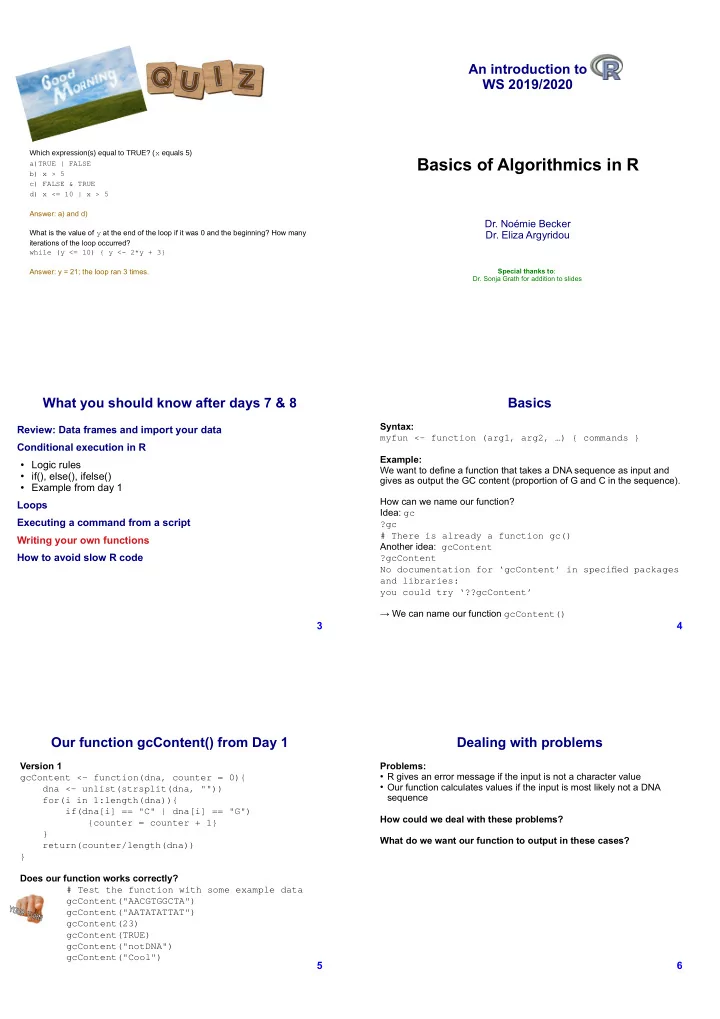
An introduction to WS 2019/2020 Which expression(s) equal to TRUE? ( x equals 5) Basics of Algorithmics in R a ) T R U E | F A L S E b ) x > 5 c ) F A L S E & T R U E d ) x < = 1 0 | x > 5


slide-1
SLIDE 1

Which expression(s) equal to TRUE? (x equals 5) a ) T R U E | F A L S E b ) x > 5 c ) F A L S E & T R U E d ) x < = 1 | x > 5 Answer: a) and d) What is the value of y at the end of the loop if it was 0 and the beginning? How many iterations of the loop occurred? while (y <= 10) { y <- 2*y + 3} Answer: y = 21; the loop ran 3 times.

An introduction to WS 2019/2020

  • Dr. Noémie Becker
  • Dr. Eliza Argyridou

Special thanks to:

  • Dr. Sonja Grath for addition to slides

Basics of Algorithmics in R

3

What you should know after days 7 & 8

Review: Data frames and import your data Conditional execution in R

  • Logic rules
  • if(), else(), ifelse()
  • Example from day 1

Loops Executing a command from a script Writing your own functions How to avoid slow R code 4

Basics

Syntax: m y f u n <

  • f

u n c t i

  • n

( a r g 1 , a r g 2 , … ) { c

  • m

m a n d s } Example: We want to define a function that takes a DNA sequence as input and gives as output the GC content (proportion of G and C in the sequence). How can we name our function? Idea: g c ? g c # T h e r e i s a l r e a d y a f u n c t i

  • n

g c ( ) Another idea: g c C

  • n

t e n t ? g c C

  • n

t e n t N

  • d
  • c

u m e n t a t i

  • n

f

  • r

‘ g c C

  • n

t e n t ’ i n s p e c i fj e d p a c k a g e s a n d l i b r a r i e s : y

  • u

c

  • u

l d t r y ‘ ? ? g c C

  • n

t e n t ’ → We can name our function g c C

  • n

t e n t ( )

5

Our function gcContent() from Day 1

Version 1 g c C

  • n

t e n t <

  • f

u n c t i

  • n

( d n a , c

  • u

n t e r = ) { d n a <

  • u

n l i s t ( s t r s p l i t ( d n a , " " ) ) f

  • r

( i i n 1 : l e n g t h ( d n a ) ) { i f ( d n a [ i ] = = " C " | d n a [ i ] = = " G " ) { c

  • u

n t e r = c

  • u

n t e r + 1 } } r e t u r n ( c

  • u

n t e r / l e n g t h ( d n a ) ) } Does our function works correctly? # T e s t t h e f u n c t i

  • n

w i t h s

  • m

e e x a m p l e d a t a g c C

  • n

t e n t ( " A A C G T G G C T A " ) g c C

  • n

t e n t ( " A A T A T A T T A T " ) g c C

  • n

t e n t ( 2 3 ) g c C

  • n

t e n t ( T R U E ) g c C

  • n

t e n t ( " n

  • t

D N A " ) g c C

  • n

t e n t ( " C

  • l

" ) YOUR TURN

6

Dealing with problems

Problems:

  • R gives an error message if the input is not a character value
  • Our function calculates values if the input is most likely not a DNA

sequence How could we deal with these problems? What do we want our function to output in these cases?

slide-2
SLIDE 2

7

Error and Warning

There are two types of error messages in R:

  • Error: Stops execution and returns no value
  • Warning message: Continues execution

Example: x <

  • s

u m ( " h e l l

  • "

) E r r

  • r

i n s u m ( " h e l l

  • "

) : i n v a l i d ' t y p e ' ( c h a r a c t e r )

  • f

a r g u m e n t x <

  • m

e a n ( " h e l l

  • "

) W a r n i n g m e s s a g e : I n m e a n . d e f a u l t ( " h e l l

  • "

) : a r g u m e n t i s n

  • t

n u m e r i c

  • r

l

  • g

i c a l : r e t u r n i n g N A

We can define such messages with the functions s t

  • p

( ) and w a r n i n g ( ) In our example:

  • (Specific) Error when argument is not character
  • Warning if character argument is not DNA

8

Dealing with non-character arguments

Version 2: g c C

  • n

t e n t <

  • f

u n c t i

  • n

( d n a , c

  • u

n t e r = ) { i f ( ! i s . c h a r a c t e r ( d n a ) ) { s t

  • p

( " T h e a r g u m e n t m u s t b e

  • f

t y p e c h a r a c t e r . " ) } d n a <

  • u

n l i s t ( s t r s p l i t ( d n a , " " ) ) f

  • r

( i i n 1 : l e n g t h ( d n a ) ) { i f ( d n a [ i ] = = " C " | d n a [ i ] = = " G " ) { c

  • u

n t e r = c

  • u

n t e r + 1 } } r e t u r n ( c

  • u

n t e r / l e n g t h ( d n a ) ) }

Self-defined error message

9

Dealing with input that is not DNA

  • We define as 'not DNA' any character different from A, C, G or T.
  • If the input contains any other character, we compute the value but throw

a warning. To solve this task, we can use the function g r e p ( ) as follows: g r e p ( " [ ^ A C G T ] " , " A A T G A C " ) I n t e g e r ( ) # l e n g t h i s g r e p ( " [ ^ A C G T ] " , " N A T G A C " ) [ 1 ] 1 # l e n g t h i s 1

10

Dealing with input that is not DNA

Version 3

g c C

  • n

t e n t <

  • f

u n c t i

  • n

( d n a , c

  • u

n t e r = ) { i f ( ! i s . c h a r a c t e r ( d n a ) ) { s t

  • p

( " T h e a r g u m e n t m u s t b e

  • f

t y p e c h a r a c t e r . " ) } i f ( l e n g t h ( g r e p ( " [ ^ A C G T ] " , d n a ) ) > ) { w a r n i n g ( " T h e i n p u t c

  • n

t a i n s c h a r a c t e r s

  • t

h e r t h a n A , C , G

  • r

T

  • v

a l u e s h

  • u

l d n

  • t

b e t r u s t e d ! " ) } d n a <

  • u

n l i s t ( s t r s p l i t ( d n a , " " ) ) f

  • r

( i i n 1 : l e n g t h ( d n a ) ) { i f ( d n a [ i ] = = " C " | d n a [ i ] = = " G " ) { c

  • u

n t e r = c

  • u

n t e r + 1 } } r e t u r n ( c

  • u

n t e r / l e n g t h ( d n a ) ) }

Self-defined warning message

11

Giving several arguments to a function

R functions can have several arguments. You can see them listed in the help page for the function. Example ? m e a n ( ) A frequent argument in R functions is na.rm. This argument (when set to TRUE) removes NA values from vectors. m e a n ( c ( 1 , 2 , N A ) ) [ 1 ] N A m e a n ( c ( 1 , 2 , N A ) , n a . r m = T R U E ) [ 1 ] 1 . 5 We now want to give our function another argument to output the AT content instead of the GC content. YOUR TURN

12

Giving several arguments to a function

Version 4

g c C

  • n

t e n t <

  • f

u n c t i

  • n

( d n a , c

  • u

n t e r = , A T ) { i f ( ! i s . c h a r a c t e r ( d n a ) ) { s t

  • p

( " T h e a r g u m e n t m u s t b e

  • f

t y p e c h a r a c t e r . " ) } i f ( l e n g t h ( g r e p ( " [ ^ A C G T ] " , d n a ) ) > ) { w a r n i n g ( " T h e i n p u t c

  • n

t a i n s c h a r a c t e r s

  • t

h e r t h a n A , C , G

  • r

T

  • v

a l u e s h

  • u

l d n

  • t

b e t r u s t e d ! " ) } d n a <

  • u

n l i s t ( s t r s p l i t ( d n a , " " ) ) f

  • r

( i i n 1 : l e n g t h ( d n a ) ) { i f ( d n a [ i ] = = " C " | d n a [ i ] = = " G " ) { c

  • u

n t e r = c

  • u

n t e r + 1 } } i f ( A T = = T R U E ) { r e t u r n ( 1

  • c
  • u

n t e r / l e n g t h ( d n a ) ) } e l s e { r e t u r n ( c

  • u

n t e r / l e n g t h ( d n a ) ) } }

slide-3
SLIDE 3

13

Giving several arguments to a function

Test: g c C

  • n

t e n t ( " A A C G T G T T T A " , A T = T R U E ) [ 1 ] . 7 g c C

  • n

t e n t ( " A A C G T G T T T A " ) E r r

  • r

i n g c C

  • n

t e n t ( " A A C G T G T T T A " ) : a r g u m e n t " A T " i s m i s s i n g , w i t h n

  • d

e f a u l t We should give the value F A L S E to the argument AT per default and the argument would only be changed if the user specifies A T = T R U E 14

Calculating GC/AT content – Final version

g c C

  • n

t e n t <

  • f

u n c t i

  • n

( d n a , c

  • u

n t e r = , A T = F A L S E ) { i f ( ! i s . c h a r a c t e r ( d n a ) ) { s t

  • p

( " T h e a r g u m e n t m u s t b e

  • f

t y p e c h a r a c t e r . " ) } i f ( l e n g t h ( g r e p ( " [ ^ A C G T ] " , d n a ) ) > ) { w a r n i n g ( " T h e i n p u t c

  • n

t a i n s c h a r a c t e r s

  • t

h e r t h a n A , C , G

  • r

T

  • v

a l u e s h

  • u

l d n

  • t

b e t r u s t e d ! " ) } d n a <

  • u

n l i s t ( s t r s p l i t ( d n a , " " ) ) f

  • r

( i i n 1 : l e n g t h ( d n a ) ) { i f ( d n a [ i ] = = " C " | d n a [ i ] = = " G " ) { c

  • u

n t e r = c

  • u

n t e r + 1 } } i f ( A T = = T R U E ) { r e t u r n ( 1

  • c
  • u

n t e r / l e n g t h ( d n a ) ) } e l s e { r e t u r n ( c

  • u

n t e r / l e n g t h ( d n a ) ) } }

15

Returning several values

If we want a function that returns several values (not only one), we can

  • utput a vector or a list.

Example: We define a function m i n m a x ( ) that determines the minimum and maximum of a given vector and returns these two values. m i n m a x <

  • f

u n c t i

  • n

( x ) { r e t u r n ( l i s t ( m i n i m u m = m i n ( x ) , m a x i m u m = m a x ( x ) ) ) } Test: x <

  • c

( 1 , 2 3 , 2 , 7 , ) m i n m a x ( x ) $ m i n i m u m [ 1 ] $ m a x i m u m [ 1 ] 2 3

16

Returning several values

What type of data does our function return? We can assign the result to a variable to investigate this question further. m y R e s u l t <

  • m

i n m a x ( x ) t y p e

  • f

( m y R e s u l t ) [ 1 ] " l i s t " s t r ( m y R e s u l t ) L i s t

  • f

2 $ m i n : n u m $ m a x : n u m 2 3 How can we access the individual values of a list?

m y R e s u l t [ [ 1 ] ] [ 1 ] m y R e s u l t [ [ 2 ] ] [ 1 ] 2 3 m y R e s u l t $ m i n i m u m [ 1 ] m y R e s u l t $ m a x i m u m [ 1 ] 2 3

17 Almost all functions (e.g., t-test, linear regression, etc.) in R produce output that is stored in a list ...

Remember Lecture 3 – Data types and Structures

➔ We now have everything we need to know to access particular parts

  • f such an output ☺

18

Example: heartbeat.txt (exercise sheet 7)

# I m p

  • r

t t h e d a t a h e a r t b e a t s <

  • r

e a d . t a b l e ( " h e a r t b e a t s . t x t " , h e a d e r = T R U E ) # P e r f

  • r

m a n u n p a i r e d t

  • t

e s t t . t e s t ( h e a r t b e a t s $ w g h t i n c r [ h e a r t b e a t s $ t r e a t m e n t = = ] , h e a r t b e a t s $ w g h t i n c r [ h e a r t b e a t s $ t r e a t m e n t = = 1 ] )

W e l c h T w

  • S

a m p l e t

  • t

e s t d a t a : h e a r t b e a t s $ w g h t i n c r [ h e a r t b e a t s $ t r e a t m e n t = = ] a n d h e a r t b e a t s $ w g h t i n c r [ h e a r t b e a t s $ t r e a t m e n t = = 1 ] t =

  • 6

. 9 3 7 , d f = 2 6 . 3 , p

  • v

a l u e = 5 . 2 5 4 e

  • 1

1 a l t e r n a t i v e h y p

  • t

h e s i s : t r u e d i fg e r e n c e i n m e a n s i s n

  • t

e q u a l t

  • 9

5 p e r c e n t c

  • n

fj d e n c e i n t e r v a l :

  • 8

8 . 9 1 9 7 6

  • 4

9 . 5 3 4 7 8 s a m p l e e s t i m a t e s : m e a n

  • f

x m e a n

  • f

y

  • 3

1 . 7 2 7 2 7 3 7 . 5

  • We want to test for a difference in mean of weight increase for the two

groups.

  • The groups are composed of different individuals, therefore we can apply

an unpaired t-test (more on t-tests tomorrow).

slide-4
SLIDE 4

19

Example: heartbeat.txt (exercise sheet 7)

# P e r f

  • r

m a n u n p a i r e d t

  • t

e s t a n d s a v e t h e r e s u l t i n t

  • a

# v a r i a b l e t

  • i

n v e s t i g a t e i t f u r t h e r t _ t e s t _ r e s u l t <

  • t

. t e s t ( h e a r t b e a t s $ w g h t i n c r [ h e a r t b e a t s $ t r e a t m e n t = = ] , h e a r t b e a t s $ w g h t i n c r [ h e a r t b e a t s $ t r e a t m e n t = = 1 ] ) t y p e

  • f

( t _ t e s t _ r e s u l t ) [ 1 ] " l i s t " s t r ( t _ t e s t _ r e s u l t )

L i s t

  • f

9 $ s t a t i s t i c : N a m e d n u m

  • 6

. 9 3 . .

  • a

t t r ( * , " n a m e s " ) = c h r " t " $ p a r a m e t e r : N a m e d n u m 2 6 . .

  • a

t t r ( * , " n a m e s " ) = c h r " d f " $ p . v a l u e : n u m 5 . 2 5 e

  • 1

1 $ c

  • n

f . i n t : a t

  • m

i c [ 1 : 2 ]

  • 8

8 . 9

  • 4

9 . 5 . .

  • a

t t r ( * , " c

  • n

f . l e v e l " ) = n u m . 9 5 $ e s t i m a t e : N a m e d n u m [ 1 : 2 ]

  • 3

1 . 7 3 7 . 5 . .

  • a

t t r ( * , " n a m e s " ) = c h r [ 1 : 2 ] " m e a n

  • f

x " " m e a n

  • f

y " $ n u l l . v a l u e : N a m e d n u m . .

  • a

t t r ( * , " n a m e s " ) = c h r " d i fg e r e n c e i n m e a n s " $ a l t e r n a t i v e : c h r " t w

  • .

s i d e d " $ m e t h

  • d

: c h r " W e l c h T w

  • S

a m p l e t

  • t

e s t " $ d a t a . n a m e : c h r " h e a r t b e a t s $ w g h t i n c r [ h e a r t b e a t s $ t r e a t m e n t = = ] a n d h e a r t b e a t s $ w g h t i n c r [ h e a r t b e a t s $ t r e a t m e n t = = 1 ] "

  • a

t t r ( * , " c l a s s " ) = c h r " h t e s t "

Imagine we are interested in just the p value. How can we extract it? t _ t e s t _ r e s u l t [ [ 3 ] ] t _ t e s t _ r e s u l t $ p . v a l u e

20

What you should know after days 7 & 8

Review: Data frames and import your data Conditional execution in R

  • Logic rules
  • if(), else(), ifelse()
  • Example from day 1

Loops Executing a command from a script Writing your own functions How to avoid slow R code 21

How to avoid slow R code

  • R has to interpret your commands each time

you run a script and it takes time to determine the type of your variables.

  • So avoid using loops and calling functions

again and again if possible

  • When you use loops, avoid increasing the size
  • f an object (vector ...) at each iteration but

rather define it with full size before.

  • Think in whole objects such as vectors or lists

and apply operations to the whole object instead of looping through all elements.

22

Take-home message

  • Use the function function() to write your own functions in R.
  • You can specify as many arguments as you need and you can

choose their default value if needed.

  • Use warning() and stop() for issuing error messages.
  • Think about controlling the input from the user