Agenda Working with files and directories lseek stat, fstat, - - PDF document

agenda
SMART_READER_LITE
LIVE PREVIEW

Agenda Working with files and directories lseek stat, fstat, - - PDF document


slide-1
SLIDE 1
  • Working with Files and more

Agenda

  • Working with files and directories

– lseek – stat, fstat, lstat – access – umask – link, unlink, rename – symlink, readlink – mkdir, rmdir – chdir, fchdir, getcwd

  • Bibliography

– Stevens chapter 4 – man pages

File offset

  • Every open file has an associated “current file
  • ffset”
  • This is a nonnegative integer that measure the

number of bytes from the beginning of the file

  • Read and Write operations normally starts at the

current file offset and cause the offset to be incremented

  • By default the current file offset is set to 0 when

the file is opened (except when the O_APPEND

  • ption is used)

lseek() reposition read/write file offset

  • off_t lseek(int fildes, off_t offset, int whence)
  • whence can be

– SEEK_SET : the offset is set to offset bytes – SEEK_CUR : the offset is set to its current location plus offset butes – SEEK_END : the offset is set to the size of the file plus offset bytes

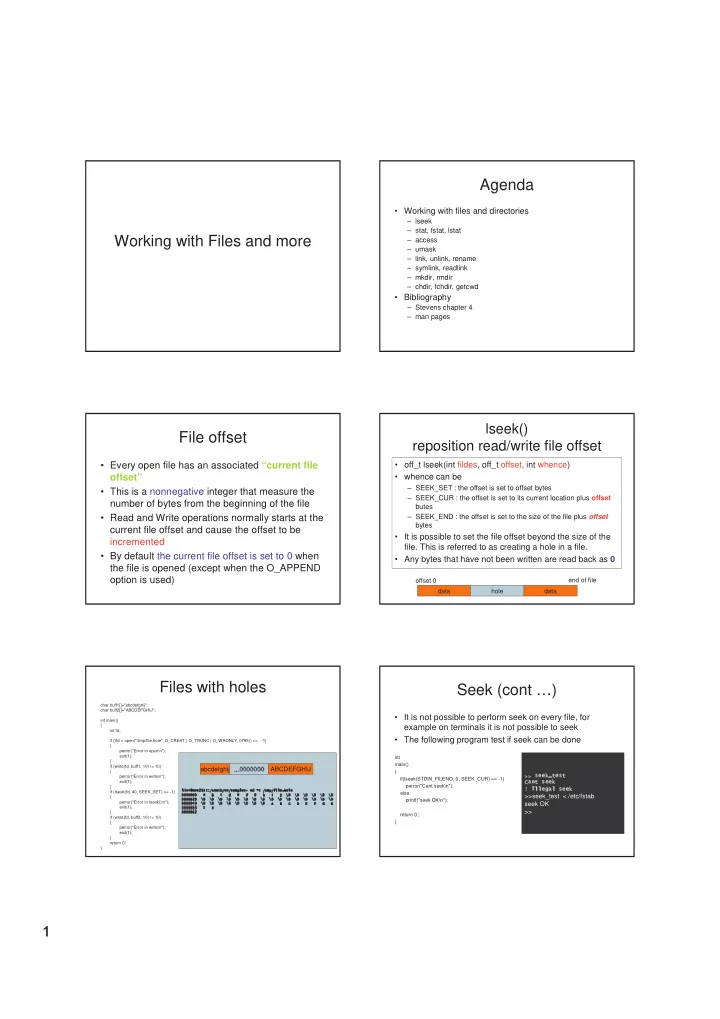
  • It is possible to set the file offset beyond the size of the
  • file. This is referred to as creating a hole in a file.
  • Any bytes that have not been written are read back as 0

data hole data

  • ffset 0

end of file

Files with holes

char buff1[]="abcdefghij"; char buff2[]="ABCDEFGHIJ"; int main() { int fd; if ((fd = open("/tmp/file.hole", O_CREAT | O_TRUNC | O_WRONLY, 0755)) ==

  • 1)

{ perror("Error in open\n"); exit(1); } if (write(fd, buff1, 10) != 10) { perror("Error in write\n"); exit(1); } if (lseek(fd, 40, SEEK_SET) == -1) { perror("Error in lseek()\n"); exit(1); } if (write(fd, buff2, 10) != 10) { perror("Error in write\n"); exit(1); } return 0; }

✁ ✂ ✄ ☎ ✆ ✝ ✄ ✞ ✟ ✠ ✡ ☛ ☞ ✌ ✍ ✎ ✏ ✑ ✒ ✌ ✄ ✞ ✌ ✞ ✏ ✝ ✓ ✁ ✎ ✞ ✔✕✄ ✖ ✁ ✂ ✄ ☎ ✆ ✝ ✄ ✞ ✟ ✠ ✡ ☛ ☞ ✌ ✍ ✎ ✏ ✑ ✒ ✌ ✄ ✞ ✌ ✞ ✏ ✝ ✓ ✁ ✎ ✞ ✔✕✄ ✖ ✁ ✂ ✄ ☎ ✆ ✝ ✄ ✞ ✟ ✠ ✡ ☛ ☞ ✌ ✍ ✎ ✏ ✑ ✒ ✌ ✄ ✞ ✌ ✞ ✏ ✝ ✓ ✁ ✎ ✞ ✔✕✄ ✖ ✁ ✂ ✄ ☎ ✆ ✝ ✄ ✞ ✟ ✠ ✡ ☛ ☞ ✌ ✍ ✎ ✏ ✑ ✒ ✌ ✄ ✞ ✌ ✞ ✏ ✝ ✓ ✁ ✎ ✞ ✔✕✄ ✖✘✗ ✗ ✗ ✗ ✑✙✌ ✍ ✝ ✓ ✌ ✚ ✂ ✁ ✎ ✛ ✒ ✄ ✁ ✎ ✑✙✌ ✍ ✝ ✓ ✌ ✚ ✂ ✁ ✎ ✛ ✒ ✄ ✁ ✎ ✑✙✌ ✍ ✝ ✓ ✌ ✚ ✂ ✁ ✎ ✛ ✒ ✄ ✁ ✎ ✑✙✌ ✍ ✝ ✓ ✌ ✚ ✂ ✁ ✎ ✛ ✒ ✄ ✁ ✎ ✜ ✜ ✜ ✜ ✜ ✜ ✜ ✏✣✢✤✑✤✖✥✎✥✚✤✦✣✒✥✂★✧ ✜ ✜ ✜ ✜ ✜ ✜ ✜ ✏✣✢✤✑✤✖✥✎✥✚✤✦✣✒✥✂★✧ ✜ ✜ ✜ ✜ ✜ ✜ ✜ ✏✣✢✤✑✤✖✥✎✥✚✤✦✣✒✥✂★✧ ✜ ✜ ✜ ✜ ✜ ✜ ✜ ✏✣✢✤✑✤✖✥✎✥✚✤✦✣✒✥✂★✧✪✩ ✩ ✩ ✩ ✜ ✜ ✜ ✜ ✩ ✩ ✩ ✩ ✜ ✜ ✜ ✜ ✩ ✩ ✩ ✩ ✜ ✜ ✜ ✜ ✩ ✩ ✩ ✩ ✜ ✜ ✜ ✜ ✩ ✩ ✩ ✩ ✜ ✜ ✜ ✜ ✩ ✩ ✩ ✩ ✜ ✜ ✜ ✜ ✜ ✜ ✜ ✜ ✜ ✟ ✜ ✜ ✜ ✜ ✜ ✜ ✟ ✜ ✜ ✜ ✜ ✜ ✜ ✟ ✜ ✜ ✜ ✜ ✜ ✜ ✟ ✜ ✩ ✩ ✩ ✩ ✜ ✜ ✜ ✜ ✩ ✩ ✩ ✩ ✜ ✜ ✜ ✜ ✩ ✩ ✩ ✩ ✜ ✜ ✜ ✜ ✩ ✩ ✩ ✩ ✜ ✜ ✜ ✜ ✩ ✩ ✩ ✩ ✜ ✜ ✜ ✜ ✩ ✩ ✩ ✩ ✜ ✜ ✜ ✜ ✩ ✩ ✩ ✩ ✜ ✜ ✜ ✜ ✩ ✩ ✩ ✩ ✜ ✜ ✜ ✜ ✩ ✩ ✩ ✩ ✜ ✜ ✜ ✜ ✩ ✩ ✩ ✩ ✜ ✜ ✜ ✜ ✩ ✩ ✩ ✩ ✜ ✜ ✜ ✜ ✩ ✩ ✩ ✩ ✜ ✜ ✜ ✜ ✩ ✩ ✩ ✩ ✜ ✜ ✜ ✜ ✩ ✩ ✩ ✩ ✜ ✜ ✜ ✜ ✩ ✩ ✩ ✩ ✜ ✜ ✜ ✜ ✩ ✩ ✩ ✩ ✜ ✜ ✜ ✜ ✜ ✜ ✜ ✜ ✜ ✡ ✜ ✜ ✜ ✜ ✜ ✜ ✡ ✜ ✜ ✜ ✜ ✜ ✜ ✡ ✜ ✜ ✜ ✜ ✜ ✜ ✡ ✜ ✩ ✩ ✩ ✩ ✜ ✜ ✜ ✜ ✩ ✩ ✩ ✩ ✜ ✜ ✜ ✜ ✩ ✩ ✩ ✩ ✜ ✜ ✜ ✜ ✩ ✩ ✩ ✩ ✜ ✜ ✜ ✜ ✩ ✩ ✩ ✩ ✜ ✜ ✜ ✜ ✩ ✩ ✩ ✩ ✜ ✜ ✜ ✜ ✩ ✩ ✩ ✩ ✜ ✜ ✜ ✜ ✩ ✩ ✩ ✩ ✜✤✫✣✬✤✭✥✮✥✯✥✰★✱✥✲ ✜✤✫✣✬✤✭✥✮✥✯✥✰★✱✥✲ ✜✤✫✣✬✤✭✥✮✥✯✥✰★✱✥✲ ✜✤✫✣✬✤✭✥✮✥✯✥✰★✱✥✲ ✜ ✜ ✜ ✜ ✜ ✳ ✜✥✴✥✵ ✜ ✜ ✜ ✜ ✜ ✳ ✜✥✴✥✵ ✜ ✜ ✜ ✜ ✜ ✳ ✜✥✴✥✵ ✜ ✜ ✜ ✜ ✜ ✳ ✜✥✴✥✵ ✜ ✜ ✜ ✜ ✜ ✳ ✟ ✜ ✜ ✜ ✜ ✜ ✳ ✟ ✜ ✜ ✜ ✜ ✜ ✳ ✟ ✜ ✜ ✜ ✜ ✜ ✳ ✟

abcdefghij

✶✷✶✷✶✸✶✷✶✸✶✷✶ ✹ ✹ ✹

ABCDEFGHIJ

Seek (cont …)

  • It is not possible to perform seek on every file, for

example on terminals it is not possible to seek

  • The following program test if seek can be done

int main() { if(lseek(STDIN_FILENO, 0, SEEK_CUR) == -1) perror("Cant seek\n"); else printf("seek OK\n"); return 0; }

✺ ✺✼✻ ✽ ✽✿✾ ❀✿❁ ✽✸✻ ❁ ❂✷❃✸❄ ❁❅✻ ✽ ✽✿✾ ❆❈❇ ❉✷❉ ✽✷❊ ❃ ❉❋✻ ✽✷✽✸✾

>>seek_test < /etc/fstab seek OK >>

slide-2
SLIDE 2
  • stat(), fstat() and lstat()

file information

  • int stat(const char *file_name, struct stat *buf);
  • int fstat(int filedes, struct stat *buf);
  • int lstat(const char *file_name, struct stat *buf);
✁ ✂ ✄ ☎ ✆ ✂✝✁ ✂ ✞ ✂ ✟ ✠ ✡ ☛ ☞ ✂ ✁ ✂ ☞ ✠ ✡ ☛✍✌✏✎ ✑✒✠ ✡ ☛ ✓ ✆ ✡✒✑ ✎ ✓ ✔ ✕ ☞ ✂ ✁ ✂ ☞ ✓ ✔ ✕✍✌✏✎ ✑✒✓ ✔ ✕ ✠ ✡✒✑ ✎ ✖ ✕ ✠ ✡ ☞ ✂ ✁ ✂ ☞ ✖ ✕ ✠ ✡✍✌✗✎ ✑✒✘ ✄ ✕ ✂ ✡ ✆ ✂ ✓ ✕ ✔✙✑ ✎ ✔ ✚ ✓ ✔ ✛ ☞ ✂ ✁ ✂ ☞✜✔ ✚ ✓ ✔ ✛✜✌✢✎ ✑✝✔ ☎ ✖ ✣ ✡ ✄ ✕ ✤✝✥ ✞✜✄ ✠✒✚ ✓ ✔ ✛ ✁ ✑ ✎ ☎ ✓ ✠ ☞ ✂ ✁ ✂ ☞ ☎ ✓ ✠✦✌✏✎ ✑ ☎ ✁ ✡ ✄★✧ ✩ ✕ ✤✙✕ ✪ ✔ ✡ ✄ ✑ ✎ ✫ ✓ ✠ ☞ ✂ ✁ ✂ ☞ ✫ ✓ ✠✦✌✏✎ ✑ ✫ ✄ ✕ ☎ ✘ ✧ ✩ ✕ ✤✙✕ ✪✜✔ ✡ ✄ ✑ ✎ ✠ ✡ ☛ ☞ ✂ ✁ ✂ ☞ ✄ ✠ ✡ ☛✬✌✗✎ ✑✒✠ ✡ ☛ ✓ ✆ ✡ ✂ ✭ ✘ ✡✯✮ ✓ ✤✙✓ ✔ ✕ ✠ ✡✒✠ ✡ ☛ ✓ ✆ ✡ ✰✒✑ ✎ ✕ ✤ ✤ ☞ ✂ ✁ ✂ ☞ ✁ ✓ ✱ ✡✍✌✗✎ ✑ ✂ ✕ ✂ ✞ ✚ ✁ ✓ ✱ ✡✍✲✳✓ ✔ ✣ ✭ ✂ ✡ ✁ ✑ ✎ ☎ ✔ ✁ ✓ ✫ ✔ ✡ ✠✒✚ ✕ ✔ ✫✝✁ ✂ ☞ ✣ ✚ ✛ ✁ ✓ ✱ ✡✦✌✴✎ ✑ ✣ ✚ ✕ ✆ ✛ ✁ ✓ ✱ ✡✒✤ ✕ ✄ ✤ ✓ ✚ ✡ ✁ ✭ ✁ ✂ ✡ ✖✝✧ ✎ ✵✝✑ ✎ ☎ ✔ ✁ ✓ ✫ ✔ ✡ ✠✒✚ ✕ ✔ ✫✝✁ ✂ ☞ ✣ ✚ ✕ ✆ ✛ ✁ ✌✶✎ ✑✝✔ ☎ ✖ ✣ ✡ ✄ ✕ ✤ ✣ ✚ ✕ ✆ ✛ ✁✙✞ ✚ ✚ ✕ ✆ ✞ ✂ ✡ ✠✒✑ ✎ ✂ ✓ ✖ ✡ ☞ ✂ ✁ ✂ ☞ ✞ ✂ ✓ ✖ ✡✦✌✢✎ ✑ ✂ ✓ ✖ ✡✙✕ ✤✒✚ ✞ ✁ ✂✒✞ ✆ ✆ ✡ ✁ ✁ ✑ ✎ ✂ ✓ ✖ ✡ ☞ ✂ ✁ ✂ ☞ ✖ ✂ ✓ ✖ ✡✦✌✢✎ ✑ ✂ ✓ ✖ ✡✙✕ ✤✒✚ ✞ ✁ ✂✙✖ ✕ ✠ ✓ ✤ ✓ ✆ ✞ ✂ ✓ ✕ ✔✙✑ ✎ ✂ ✓ ✖ ✡ ☞ ✂ ✁ ✂ ☞ ✆ ✂ ✓ ✖ ✡✦✌✢✎ ✑ ✂ ✓ ✖ ✡✙✕ ✤✒✚ ✞ ✁ ✂✒✆ ✥ ✞ ✔ ✫ ✡✒✑ ✎ ✷✜✌

stat() fstat() and lstat() (continued)

  • stat() return information about the named file
  • fstat() return information about an open file
  • lstat() return information about the symbolic link,

not the file referenced by the symbolic link

File types

  • Regular file : The most common type of file, there is no

distinction to the Unix kernel whether the data is text or binary

  • Directory file : A file that contains the names of other files

and pointers to information on these files

  • Character special file : A type of file used for certain

types of devices

  • Block special file : A type of file used for disk devices
  • FIFO : A type of file used for interprocess communication

between processes (also known as named pipe)

  • Socket : A type of file used for network communication

between processes

  • Symbolic link : A type of file that points to another file

File types (cont…)

  • The type of a file is encoded in the st_mode

member of the stat structure

  • The following macros can be used to determine

the file type:

– S_ISREG(m) is it a regular file? – S_ISDIR(m) directory? – S_ISCHR(m) character device? – S_ISBLK(m) block device? – S_ISFIFO(m) fifo? – S_ISLNK(m) symbolic link? (Not in POSIX.1-1996.) – S_ISSOCK(m) socket? (Not in POSIX.1-1996.)

Set-User-ID and Set-Group-ID

  • Every process has six IDs associated with it
✸✺✹✜✻✍✼✬✽✿✾❁❀✍✻❂✹❄❃✍❅ ❆❈❇✍❉❊❆❂✻✴✹✜✻✍✼✬✽✬✽✜❋●✼❈✹ ✻ ✸✺✹✜✻✍✼✬✽❊❍■✹ ❉✬✾✬❏✿❃✍❅ ✸✴✻✬❑✬❑✍✻✬▲✦▼❁◆✦❖❁✻✿✾❁❀✍✻❂✹❄❃✍❅ ✾❁❀✍✻✦P◗❑✍❉❈✹❊❑✍◆✬✽✍✻✿✼✬▲✍▲✬✻❁❀✍❀ ✸✴✻✬❑✬❑✍✻✬▲✦▼❁◆✦❖❁✻❊❍■✹ ❉✬✾✬❏ ✸❘❀✦✼✍❖❁✻✍P●❀✍✻✦▼❂❙✦✾❁❀✍✻❂✹✦❙✦❃✍❅ ❀✦✼✍❖❁✻✍P◗❚✜❋✴✻✜❯❂✻✍▲◗❑✍✾✍❱✬▲✍▼✬◆✍❉✬❱ ✸❘❀✦✼✍❖❁✻✍P●❀✍✻✦▼❂❙✜❲❳✹ ❉✬✾✬❏✬❙✍❃✦❅
  • Normally the effective user id equal the real user id
  • Every file has an owner, the owner is specified by the st_uid

member

  • There is a capability to set a special flag in the file’s mode word

(st_mode) that says “when the file is executed set the effective uid of the process to the owner of the file”

Set-User-ID (cont..)

  • This feature is useful when we want a user to execute a certain

program in super-user permission

  • For example passwd is a set-uid file
✚ ✓ ✕ ✄ ❨ ✖ ✕ ✁ ❩ ❬ ❭✬❪ ❫ ✎ ✂ ✡ ✞ ✆ ✥ ✎ ✕ ✁ ✎ ✁ ✞ ✖ ✘ ✚ ✡ ✁ ❴ ✚ ✁✒❵ ✚ ✞ ✎ ☎ ✁ ✄ ✎ ✣ ✓ ✔ ✎ ✘ ✞ ✁ ✁ ✪ ✠ ❵ ✄ ❵ ❛ ❛ ❛ ❛ ❵ ❵ ❜ ❵ ❵ ❜❝❬❞✄ ✕ ✕ ✂❡✄ ✕ ✕ ✂ ❬ ❢ ❭ ❣ ❤❥✐ ☎ ✫❦❣❧❩ ♠ ♠ ❬ ✎ ☎ ✁ ✄ ✎ ✣ ✓ ✔ ✎ ✘ ✞ ✁ ✁ ✪ ✠ ✑
  • The set-user-id (set-group-id) bit are contained in the st_mode

member of the stat structure

  • The constant S_ISUID (S_ISGID) can be used to test this bit
slide-3
SLIDE 3
  • File Access Permissions
  • The st_mode also encode the

file permissions bits

  • from the shell the command

chmod can be used to change file permissions

  • whenever we want to open any

type of file by name, we must have execute permissions on the directories in the name

  • we cannot create a new file in

a directory unless we have write and execute permissions in the directory

  • to delete a file we need write

and execute permission in the directory

Other execute S_IXOTH Other write S_IWOTH Other read S_IROTH Group execute S_IXGRP Group write S_IWGRP Group read S_IRGRP User execute S_IXUSR User write S_IWUSR User read S_IRUSR Meaning st_mode mask

access()

  • int access(const char *pathname, int mode);
  • access checks whether the process would be allowed to

read, write, execute the file or test for existence

  • mode is a mask of one or more of:

– R_OK test for read permission – W_OK test for write permission – X_OK test for execute permission – F_OK test for existence of file

  • The check is done with the process’s real uid and gid,

rather then with the effective id’s. This is to allow set-UID programs to easily determine the invoking user authority

umask()

  • mode_t umask(mode_t cmask);
  • Every process has a file mode creation mask
  • The umask() function set the file mode creation mask for

the process and return the previous value

  • The file mode creation mask is used whenever the

process creates a new file or a new directory

  • recall that the open() functions get a mode argument
  • Any bits that are on in the file mode creation mask are

turned off in the file’s mode

File system structure

partition partition partition disk drive directory blocks and data blocks file system boot block super block i-list i-node i-node

✁✂✁✂✁

i-node i-node

File System structure (cont…)

i-list

data block data block directory block directory block

i-node i-node i-node i-node

f i r s t d a t a b l

  • c

k first data block

i-node number file name i-node number file name

Hard Links

  • i-nodes are fixed-length entries that contain most of the

information about a file

  • directory entry contain the i-node number and the file-

name

  • we can see 2 directory entries that point to the same i-

node entry. This is a hard link

  • from the shell the command “ln” can be used to create

hard links

  • Every i-node has a link-count, which is the number of

directory entries that point to this i-node

  • Only when the link count reach 0 the file can be deleted
  • What is the initial link-count of a new empty directory??
slide-4
SLIDE 4
  • link(), unlink() and rename()
  • int link(const char *oldpath, const char *newpath);
  • int unlink(const char *pathname);
  • int rename(const char *oldpath, const char *newpath);
  • link() create a new directory entry that point to the same inode
  • ldpath is pointing
  • The creation of the directory entry and the increment of the link

count must be atomic why??

  • unlink() remove a directory entry and decrement the i-node link

count

  • If the link count reach 0 the i-node is removed
  • not exactly, only when no process holds the file open that file can be

removed

Temporary files

  • A process can open a temporary file, unlink it and continue to work

with it.

  • The files data will be removed only when the process exit
  • This feature can be used by programs to assure that temporary files

won’t be left around in case the program crashes

✤ ✠✂✁✒✕ ✘ ✡ ✔ ✮ ✄ ✎ ✂ ✖ ✘ ✎ ✂ ✖ ✘ ☞ ✤ ✓ ✚ ✡ ✄ ✲ ✵ ☞ ☎ ✩ ✆ ☎✞✝■✵ ☞ ✟ ☎ ✠ ✐ ✡ ✝ ✵ ☞ ✡ ☎ ☛ ☞ ✟✍✲ ♠ ❣ ✌ ✌ ✰✍✌ ✓ ✤ ✮ ✤ ✠✂✁ ✁ ❵ ❬ ✰ ✍ ✎ ✍ ☞ ✠ ☎ ☎ ✵ ☎ ✮ ✄ ✠ ✄ ✄ ✕ ✄ ✓ ✔❥✕ ✘ ✡ ✔ ✏ ✔ ✄ ✰✍✌ ✓ ✤ ✮ ☎ ✔ ✚ ✓ ✔ ✛ ✮ ✄ ✎ ✂ ✖ ✘ ✎ ✂ ✖ ✘ ☞ ✤ ✓ ✚ ✡ ✄ ✰✂✁ ✁ ❵ ❬ ✰ ✍ ✎ ✍ ☞ ✠ ☎ ☎ ✵ ☎ ✮ ✄ ✠ ✄ ✄ ✕ ✄ ✓ ✔ ☎ ✔ ✚ ✓ ✔ ✛ ✄ ✰✍✌ ✂ ✥ ✡✒✘ ✄ ✕ ✫ ✄ ✞ ✖✝✆ ✕ ✔ ✂ ✓ ✔ ☎ ✡ ✂ ✕✙✪ ✕ ✄ ✛★✪ ✓ ✂ ✥ ✂ ✥ ✡✒✤ ✓ ✚ ✡ ✑ ✑ ✑

Symbolic Links

  • Hard links have several limitations

– hard links can not exists across file systems – Only the super user can create hard links to directories (in Linux even this is not possible)

  • A symbolic link is an indirect pointer to a file
  • When using functions that refer to files by name we

always need to know whether the function follow a symbolic link or not (written in the function manually)

/tmp/big_file The file content

Symbolic Links (cont…)

  • Functions that follow symbolic links

– access(), chdir(), exec(), link(), open(), stat() …

  • Functions that does not follow symbolic links

– chown(), lstat(), rename(), unlink()

  • Symbolic links can exists to files that do not

– ln –s /no/such/file myfile (this is legal)

  • Symbolic links can point to directories and create loops

– mkdir foo – touch foo/a – ln –s ../foo foo/testdir

foo testdir a

Symbolic links (cont …)

  • int symlink(const char *oldpath, const char *newpath);
  • symlink() is used to create symbolic links
  • It is not required that oldpath exists when the symbolic

link is created

  • Also oldpath and newpath need not reside in the same

file system

  • int readlink(const char *path, char *buf, size_t bufsiz);
  • Since open follow symbolic links we need a way to open

the link itself and read the name in the link

  • The function combine open(), read() and close()

File Times

  • Tree time fields are maintained for each file
  • c

chmod Last-change time of i-node status st_ctime default write Last-modification time of file data st_mtime

  • u

read Last-access time of file data st_atime ls option Example Description Field

  • Note the deference between ctime and mtime
  • Which time field access() and stat() change???
slide-5
SLIDE 5
  • utime()
  • int utime(const char *filename, struct utimbuf *buf);
  • struct utimbuf {

time_t actime; /* access time */ time_t modtime; /* modification time */ };

  • utime() change the access and modification time of a file
  • If buf is NULL the time is set to the current time
  • There is no way to change ctime

mkdir() and rmdir()

  • int mkdir(const char *pathname, mode_t mode);
  • mkdir() created new empty directory
  • . and .. are automatically added to the new dir
  • int rmdir(const char *pathname);
  • An empty directory is deleted with rmdir()

chdir(), fchdir() and getcwd()

  • Every process has a current working directory
  • This directory is where the search for all relative

pathnames starts

– A relative path name is a path name that do not start with a “/”

  • We can change the current working directory using

– int chdir(const char *pathname) – int fchdir(int filedes);

  • We can get the current working directory using

– char *getcwd(char *buf, size_t size);

statfs() and fstatfs()

  • int statfs(const char *path, struct statfs *buf);
  • int fstatfs(int fd, struct statfs *buf);
  • Those functions return information about the file system
❁✂✁ ✄ ☎ ❁❅✻ ❁ ❃ ❁✝✆✷✻✟✞ ❉ ✠ ❄ ❊✡✆ ❀✸❁ ☛✌☞ ✽✎✍✑✏✌✒ ❁ ☛✌☞ ✽✓✠✝✆✟✆✝✔✷❉ ✽✸✻ ☛✿✻ ❁ ✽ ✕✗✖ ✻ ✽ ✽✟✘ ✽✷❉ ✠ ✙✂✚✟✒ ✏ ❉ ✠ ❄ ❊✡✆ ❀✂✘✷✻ ✔ ✛✷✽✜✍✢✏✌✒✣✠✂☞ ❁✌✔ ✕ ❃ ❉❋❁✂✁ ❃✷❄ ✻ ✆✷✽✤✁✣✘ ❉ ✠✌☎✸✾ ✻ ✔ ✛ ✽✟✒ ✏ ❉ ✠ ❄ ❊✡✆ ❀✂✘✷❉ ✠✂☎✸✾ ✻✜✍✥✏✌✒ ❁ ✠✷❁ ❃ ❉✓✦ ❃ ❁ ❃ ✘✷❉ ✠✂☎✸✾ ✻✧✔ ❄ ✆✝✔✷❉ ✽❅✻ ☛✸✻ ❁ ✽ ✕★✒ ✏ ❉ ✠ ❄ ❊✡✆ ❀✂✘ ✆✂✁ ✽✷✽✜✍✢✏✌✒✓✆✤✁ ✽✷✽✟✘ ❉ ✠✂☎✷✾ ✻✧✔ ❄ ✆✷✻✧✒ ✏ ❉ ✠ ❄ ❊✡✆ ❀✂✘ ❃ ✩✸❃ ✔ ❉✜✍✥✏✌✒✓✆✤✁ ✽✷✽✟✘ ❉ ✠✂☎✷✾ ✻ ❃ ✩✸❃ ✔ ❉ ❁ ✠ ❄ ✠ ❄ ✪ ✻ ✄✝☞ ✽✤✁ ✄✷✻ ✽✤✁✣✒ ✏ ❉ ✠ ❄ ❊✡✆ ❀✌✆✌✔ ❉ ✽✸✻✫✍✢✏✌✒ ❁ ✠✷❁ ❃ ❉✓✆✌✔✷❉ ✽ ❄ ✠✝✦✷✽✸✻✧✔ ❄ ✆✌✔ ❉ ✽❅✻ ☛✿✻ ❁✷✽ ✕★✒ ✏ ❉ ✠ ❄ ❊✡✆ ❀✌✆✝✆✂✁ ✽✷✽✜✍✢✏✌✒✓✆✤✁ ✽✷✽✧✆✝✔✷❉ ✽ ❄ ✠✌✦ ✽✸✻✧✔ ❄ ✆✷✻✧✒ ✏ ✆✸✻ ✔ ✦ ❀✿❁✬✆ ❀✌✆✸✻ ✔ ✦✎✍✑✏✌✒✓✆✌✔ ❉ ✽❅✻ ☛✿✻ ❁ ✽ ✕★✔ ✦★✒ ✏ ❉ ✠ ❄ ❊✡✆ ❀ ❄ ❃ ✕✸✽✸❉ ✽ ❄ ✍✭✏✌✒✣✕ ❃ ✮ ✔ ✕✂✄ ✕ ❉ ✽ ❄ ❊✷❁✝✯✓✠✝✆✧✆✌✔ ❉ ✽ ❄ ❃ ✕✸✽✷✻✧✒ ✏ ❉ ✠ ❄ ❊✡✆ ❀✿✻✝☞ ❃ ✁ ✽✜✰ ✱ ✲✜✍✳✏✌✒❋✻✝☞ ❃ ✁ ✽✧✆ ✠✫✁✪❉ ❃ ❁ ✽✤✁✣✒ ✏ ✴ ✍