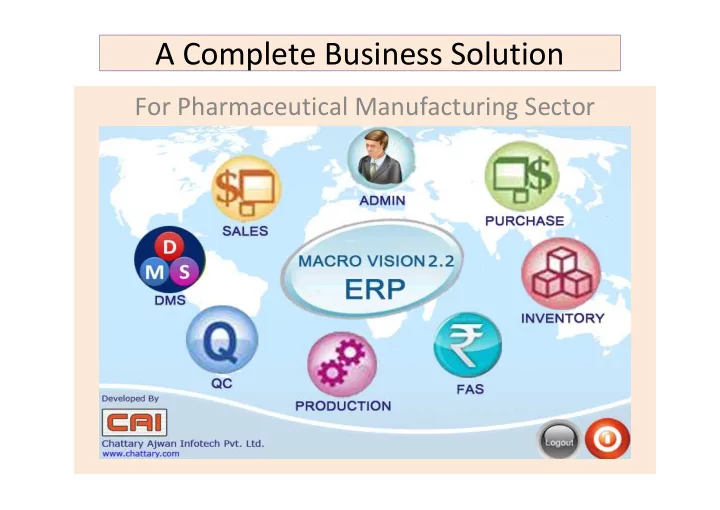
A Complete Business Solution For Pharmaceutical Manufacturing Sector - - PowerPoint PPT Presentation

a complete business solution
SMART_READER_LITE
LIVE PREVIEW

A Complete Business Solution For Pharmaceutical Manufacturing Sector - - PowerPoint PPT Presentation

A Complete Business Solution For Pharmaceutical Manufacturing Sector Enterprise Software Solutions Our Capabilities Our expertise Enterprise Resource Process Re- Planning engineering. Customer Organizational Relation Corporate


slide-1
SLIDE 1

A Complete Business Solution

For Pharmaceutical Manufacturing Sector

slide-2
SLIDE 2

Enterprise Software Solutions

Our Capabilities Our expertise

Corporate Structure

Enterprise Resource Planning Customer Relation Management & Supply Chain Management Human Vision Automation Solutions

Process Re- engineering. Organizational Productivity Enhancement Product-centric and Service Oriented.

slide-3
SLIDE 3

“We” are Synchronized

Need of an Integrated end to end solution. In-adequacy in Existing systems (if any) Necessity of

  • ptimization and

increase productivity

Your Requirements

We Study your practices We help you to identify the best practices We offer the best practices in Solution

Our Contribution

slide-4
SLIDE 4

Business Supporting System Accounting and Finance Control Sales and Business Development Production Planning Procurement and Inventory Management Manufacturing Quality Assurance and Quality Control

Single platform Single view

slide-5
SLIDE 5

Induce Intelligence to Business

SUPPORTING SYSTEMS Analytics Regulatory and Daily Reporting Function / Context / Role based Instant Information ‘As & when’ / Ad-hoc information / Summary gathering

Pro-active Plan of actions (Task & Workflow Management) Corporate Performance Optimization

slide-6
SLIDE 6

Development, Delivery and Support

  • Implementation
  • Support

Existing Process study Opportun ity to introduce Best Practices Gap Analysis & Customiz ation Data preparati

  • n

Testing, Training Go Live Online Support On site for 6 months Manuals & Training Aids Group user training SEssion Enhancement, New requirement

slide-7
SLIDE 7

Identify Demand, Arrange Material

  • Review of Client orders to be

executed

  • Plan Dispatch
  • Complete Dispatch
  • Compliance to Statutory norms
  • Conformance to Client demands
  • Manage Receivables
  • Consolidate Orders
  • Identify Stock & ROL
  • Calculate Total requirement
  • Match with quantity available
  • Auto Create Indents for Procurement
  • Identify the commitment dates of Order

fulfillment

  • Initiate Production planning
  • Receive Material
  • Generate Labels for Quarantine
  • Auto intimation to Q.C. for testing.
  • Transfer required Material (As per

Batch Size) to Production.

  • Stock management through

Barcode System

  • Create Indents
  • Send Inquiries to Vendors
  • Register Quotations
  • Compare Quotations and

Review system suggestions

  • Create PO
  • Follow up on Committed

POs

Procurement Planning & Execution Inventory Manageme nt & Control Sales Order Consolidation / Demand forecasting Production Planning

slide-8
SLIDE 8

Manage Production & Supply Products

  • Response to Inquiry
  • Commit dispatch date
  • Packing and dispatch

instructions along with Order

  • Review Commitment and

schedule dispatch

  • Arrange despatch
  • Statutory and customer

specific documentation

  • Production Cost calculation.
  • Product – Finish Item

Standard Cost from RM, Process, Resources cost as per BOM & Process Card

  • Batch wise Actual Costing.
  • Sampling categorization
  • Sample received : ork

serial number wise tracking.

  • Sample type wise test

parameters.

  • Instruction remarks for

each sample.

  • Sample status in Dash

board for each user.

  • Daily / Periodical Production

planning

  • Work Order Creation
  • Job work Planning
  • Job work Issue Out & Receipt
  • Batch Start & Creation
  • Daily production and process done

entry

  • Production Approval

Production Execution Quality Control Order processing and Dispatch Productio n Costing

slide-9
SLIDE 9

‘Pharma Specific’ requirements are taken Care

Material Level

  • COMPONENT TYPE – ACTIVE / INACTIVE
  • EXPIRY MONTH
  • RETEST MONTH – USED FOR STABILITY
  • SAMPLE QTY
  • RETAIN QTY - USED FOR STABILITY

STORE INDENT : Quantity will be (auto) calculated based on Component Type and Standard Overage %. PROCESS GROUP MASTER : Per Unit Required Quantity Auto calculation based on Overage % with Active / Inactive Component Type and Weight Compensation. This will be calculated based on Batch Quantity. QC PARAMETER : Potentiality % Parameter can be defined in Parameter Master. QC DONE ENTRY : Enter the Actual potentiality % at the time of QC Done for the specific Potentiality required Parameter. STABILITY RETEST SCHEDULE : Stability Re-test check Entry form for each batch of each Finished Product. PENDING STABILITY : Can Generate Sample for Stability Checking auto and through manual form as well.

slide-10
SLIDE 10

‘Pharma Specific’ Compliance Requirements

  • System can be validated for Electronic Records and Documents. (CFR 21

Part 11)

  • Document Tractability
  • Traceability matrix simplifies the process of proving if and where the

requirements or specifications are tested.

  • An aid to efficient test specification design.
  • Any time record - what is done and when it is done.
  • Gives complete end to end view of a drug history and root cause analysis.

(CFR 21 Part 211)

  • Strong presence of documentation as a pre-requisite to achieve GxP.
  • Documentation for achieving CAPA (Corrective Action – Preventive Action)

schedules.

  • It acts a ‘Ready Reckoner’
  • Met key requirement for any compliance audits.
slide-11
SLIDE 11

Application Scope I

Functions & Features

  • Identify Market Demand /

Process Customer Order

  • Production and Procurement

Planning

  • Procurement Execution
  • Receive Material from

Suppliers / Vendors

  • Ensure Quality of received

Material

  • Manage / Control Inventory
  • f all Category Items
  • Issue Material for

Consumption / Production

Controls

  • Demand forecasting

aligned with Past performances

slide-12
SLIDE 12

Application Scope II – Production / Manufacturing

Functions

  • Daily / Periodical Production planning
  • Work Order Creation
  • Job work Planning
  • Job work Issue Out & Receipt
  • Batch Start/ Creation
  • Daily production / process done entry
  • Production Approval
  • Transfer Finished Goods ready for

Dispatch to

  • FG Godown / Stores
  • Excise Documentation and Reporting

Controls

  • Material Issue as per BOM &

Master Process Card

  • Quality Check / assurance at

various stages

  • Adherence to Good

manufacturing Practices

  • Adherence to Good Material

Handling Practices

slide-13
SLIDE 13

Application Scope III- Product to Market

Functions

  • Review of Client orders to be

executed

  • Plan Dispatch
  • Complete Dispatch
  • Compliance to Statutory norms
  • Conformance to Client demands
  • Manage Receivables

Controls

  • Customer Credit Control
  • Material dispatch based on

parameters in Sales Order

  • Configurable Levy parameters

Customer wise / Customer group wise

  • Multiple price list – customer

category wise.

slide-14
SLIDE 14

MACRO VISION

ERP For Process Industry Manufacturer

Purchase & Inventory Management

Indent Inquiry Quotation Quotation Comparison Purchase Order GRN Purchase Invoice Purchase Return

Sales Management

Sales Inquiry Sales Quotation Sales Order Packing Slip Sales Invoice Sales Return Export Management

Finance Management

Budget Cash Payment & Cash Receipt Bank Payment & Bank Receipt TDS Entry & Report Excise Entry & Reports Service Tax & Vat Report Export Documentation Import Documentation

Production Management

BOM/Formula Master Process Card Master Production & Procurement Planning Packing Planning Work order Planning Batch Costing Job Work Management ( IN & OUT)

QC Management

Sample Management ( IN & OUT ) Dashboard user wise SOP bind with Parameters COA Configuration & Printing QC Costing Stability Module

HRMS Solution

Time Office Management Payroll Management Personnel Management ESS ( Employee Self Service) MSS ( Manager Self Service )

Workflow ManagementDocument Management

slide-15
SLIDE 15

Procurement

Functions

  • Create Indents / Requisitions
  • Send Inquiries to Vendors
  • Register received Quotations
  • Compare Quotations and Review system suggestions
  • Create Purchase Orders
  • Follow up on Committed Purchase Orders

Controls

  • Purchase as per Indented and Approved Quantity
  • With the help of information of Approved Vendors
  • Multiple layers of Approval for purchases – Value based / Material / Location based
  • Compare Quotations and Review system suggestions
  • Create Purchase Orders
  • Follow up on Committed Purchase Orders
  • Supplier history (Occurrences & Adherence to Schedule)
  • Performance reports (Quality and Volume)
  • Item wise / service wise supplier
  • Previous purchase history
  • Minimum / maximum stock level
  • Item wise consumption pattern
  • Item wise, value wise different approval authority
  • Purchase rate Contract for faster purchase cycle
slide-16
SLIDE 16

Inventory Management & Controls

Functions & Features

  • Receive Material (GRN)
  • Generate Labels for Quarantine
  • Auto intimation to Q.C. for testing.
  • Documentation on stock receipts as per

statutory formats / procedures.

  • Monitor timely completion of material testing

for early issue for Production.

  • Transfer required Material (As per Batch Size) to

Production.

  • Stock manage through Barcode System
  • A.R. No wise Material Selection with QC

parameter visibility

  • Product wise Batch wise Inventory Tracking
  • Non Moving / Expire Materials – Product

Inventory Control

  • Product / Material Category wise Stock

statements

  • Product / Material Category wise online Stock

Status

  • Re-order for Product / material procurement

based on Stock level

  • Inventory valuation periodically and ratio

analysis

Controls

  • Issue of materials based on approved

requisition which are compared with master for Materials

  • Each item is configured with ROL /

Minimum / Maximum stock quantities

slide-17
SLIDE 17

Production Planning & Execution

Planning Identify material availability Establish Priority for production batch Schedule production

Execution Batch wise Issue Material for Production Monitor Quality of batch at each Production stage Approved Product Transfer to FG Store

slide-18
SLIDE 18

Production Planning & Execution

Functions & Features

  • Planning
  • Identify material availability
  • Establish Priority for production

batch

  • Schedule production
  • Execution
  • Batch wise Issue Material for

Production

  • Monitor Quality of batch at each

Production stage

  • Approved Product Transfer to FG

Store.

Controls

  • Product wise Bill of Material; Multiple

BOM for one Item & Configurable Packing BOM .

  • Process Master linked with Machine

and Manpower Usage.

  • Process configured with activities and

input Item

  • Stage wise Resource Consumption for

standard process cost calculation in Process Card.

  • Default Process Card can be defined for

Costing calculation.

  • Finish product indent will be generated

by sales department based on sales Order or Sales Forecasting.

  • Store Department can generate Indent

for Production based on Minimum level

  • f Inventory.
  • Production order can be generated final

production planning with scheduling.

slide-19
SLIDE 19

Quality Assurance & Control Quality Assurance & Control

Maintenance and review

  • f SOP, Testing

Parameters Standards Establishing Material / Product wise testing Master details Up keeping, calibration of instruments Up keeping and maintenanc e of Samples

Take Samples from each Material / Batch Execute Test activity & Capture test results Analysis of Testing results Material / Batch wise Check Stability

  • f Each

Batch / Material

slide-20
SLIDE 20

Quality Assurance & Control

Functions

  • Maintenance and review of SOP, Testing

Parameters Standards

  • Establishing Material / Product wise testing

Master details

  • Up keeping, calibration of instruments
  • Up keeping and maintenance of Samples
  • Sampling categorization
  • Sample received – Sample number – Work

serial number wise tracking.

  • Sample type wise test parameters fixing. Lab

selection for work allocation.

  • Instruction remarks can be entered for the

sample, which will be seen by each tester (Chemist).

  • Sample status in Dash board for each user-

Tester, lab in charge and QC Manager.

  • User specific (Lab Chemist / Manager) Dash

Board and Parameter wise work pending and work done entries.

  • Sample wise - Test certificate generation

Control

  • Material / Finished Product wise test specifications for

various Standardads (like IP, BP, FDA etc)

  • Standard Operating Procedures (SOP).
  • Technical Documents, Product Specs as per Customer

requirement, etc.. are integrated parts of System

  • Test Parameter master : Standard value, Deviation, Range

Min & Max value, Observations, etc., can be defined.

  • Document can be attached for Parameter or for SOP linked

with parameter.

  • Cost of Parameter testing and time required for testing for

each parameter.

  • Item group wise specifications.
  • Standard sample management with specifications and test

values.

  • Reading entries and pre-defined Calculations.
  • Process linking for each parameter for work flow

management.

  • Item wise Specifications- with change management.
  • Tester wise Test parameter linking for work distribution.
  • Sample type – First test, Re-test for RM, Intermediate, FG.
  • Test Certificates (TC) or Certificate of analysis (COA) Standard

work sheets.

  • Configuration for COA
  • Test Instruments – Linked with testing. Calibration schedule

management.

  • Multiple Lab (Units) – test instruments, Testers (Chemist) &

Test parameter linking.

slide-21
SLIDE 21

Production execution

Daily / Periodical Production planning Work Order Creation Job work Planning Job work Issue Out & Receipt Batch Start/ Creation Daily production / process done entry Production Approval

slide-22
SLIDE 22

Functions

  • Work Order generation (based on sales order or Sales

Forecasting)

  • Daily Production allocation (Batch start)
  • Production allocation stage wise – plant wise scheduling.
  • Work order wise – product wise Batch wise Production entries.
  • Process wise – input Item wise Comparison report with

deviation.

  • Multiple Output / bi- Product Production entry. Wastage/ scrap

can be entered.

  • Start time –end time entries, Machine number (Line number) &

Operator name entry.

  • Material produced can be rejected by production department or

it can be taken out of work order to use in other work order.

  • Sample out for quality check by production personals for the

batch / stage.

  • Packing of Loose Item to different packing size.
  • Job work - Service work order (work on customer’s Material).
  • Job work Issue Out and Received back , Process done , cost of

process – Batch wise vendor wise control.

Controls

  • Testing done value of QC will be seen
  • nline to the concern person for that batch.
  • Process wise standard Value and actual

value entered at the time of production.

  • Consumption of Consumable Items for

each Machine. Inventory control for consumed Item

  • Production approval after final QC report.
  • Lot tracking from ingredients through

intermediates to finish

  • Pick list, Issue to production floor for work
  • rder wise, goods Batch wise and stage wise

Raw material consumption & Costing.

Production execution

slide-23
SLIDE 23

Pricing and Costing

Product Costing

  • Multiple sales types can be

defined.

  • Sales Type wise - Sr. number ,

prefix , common Serial number

  • f multiple sales type, account

code linking, Item Group, Location, Division and Printing format can be configured.

  • Sales type wise Tax structure

to have better control and reduce user’s mistakes.

  • Division wise, location wise –

different user’s rights.

Production Cost Calculation

  • Product – Finish Item Standard Cost

from Raw material purchase cost, Process cost, resources like Labor , Power, fuel, consumables etc. mentioned in Bill of material and Process Card and standard QC cost considered.

  • Batch wise Costing , actual cost

Calculation from Batch production actual Raw material used , Process cost and resource cost actual used and QC done cost incurred.

slide-24
SLIDE 24

Sales Order Processing

Receipt Enquiry Send Technical & Commercial Proposal Provide Samples Receive Confirmed Order Plan Execution

  • f Order

Upon Production Completion intimation, Plan Dispatch Schedule Execute Dispatch Customer wise / Product wise Pending Dispatch analysis and planning

slide-25
SLIDE 25

Financial Controls & Accounting

Chart of accounts, N-Level Account grouping. Grouping can be done for Revenue accounts, Direct and Indirect Expense accounts, Cash and Bank accounts, Supplier and Customer accounts and Control accounts. Multiple division accounting – system will handle auto reverse entries for cross division entries. Division wise users rights - to control entries by authorized users .Users Can have multiple division’s entry rights. Multiple levels of cost centers can be defined to have expense bifurcations. Only allowed cost Center will appear for selection, at the time of expense voucher entries. Reference accounts can be defined for additional level of analysis. Reference accounts can be Common for group of accounts. Multiple currencies for each transaction. Currency Gain & loss at the time of transactions. Multiple Transaction Types for almost all Transactions. Different transaction serial number With different Prefix and transaction type wise different approval authorities can be defined. Approvals for each transactions-

slide-26
SLIDE 26

TAX / VAT / Levies & Statutory Reporting

  • Tax structure - Type of Tax with calculation method and effective dates.
  • Government Statutory Reports and Forms for Excise, VAT, Service tax, etc,.
  • Configurable TDS deduction structure (Deduction while transaction, on specific account).
  • TDS payment Challan and other reports will be generated.
  • Form 16 and 16 A& TDS Statutory Reports- 26 Q & 27 Q, TDS deduction reports, Party TDS

Report.

  • Excise Charges in Sales. Excise Payment in Purchases.
  • Statutory Excise, Service Tax, Sales Tax, Purchase Tax and Customs reports and Data migration

for e-filing.

  • Excise sett offs for input and output Tax – Reports.
  • Excise calculation option on MRP, if applicable.
  • Service tax Charges in Sales & Service tax Payment in Purchases.
  • Service tax sett offs for input and output Tax – Reports.
  • Service Bill Register, Service Tax Payment Register, Service Tax “Service tax Category Wise”,

Service tax Credit - “Service tax Credit Wise”, Service Tax Pending - “Service tax Credit Wise”

  • VAT Charges in Sales; VAT Payment in Purchases; VAT sett offs for input and output Tax –

Reports.

  • Form 201 A,B,C & Summary, VAT wise Sales Detail Report, VAT wise Purchase Detail Report,

Local Purchase Report, Import, OGS, Tax Free Purchase report, Local Sales Report, Export Sales report, ODS Sales report

slide-27
SLIDE 27

Implementation Plan

Phase I - Existin g Proces s Study

  • Get details from Team

leaders

  • Get details from Team

members

  • Study / Scanning Reports
  • Study / Scanning Manual /

XLS / Word documents

  • Scanning Auditors' / CA's

reports

  • Walkthrough of existing

Software and outputs

slide-28
SLIDE 28

GAP analysis & Customization Plan

  • Solution

mappin g

  • Require

ment Finalizat ion

GAP analysis documentation with Solution

  • Customi

zation

  • f

solution

  • Customi

zation

  • Review

with Client

Customization plan

slide-29
SLIDE 29

Installation, User training and User Testing

Checking Existing Hardware setup, including testing connectivity between locations Installation User training User Testing Modification and Corrections Retest by User

slide-30
SLIDE 30

Data importing and Trial Run

Master Data Import Open transactions Import Balances Import Test Data Identifying and finalizing Enhancements Incorporating Enhancement Requirements

slide-31
SLIDE 31

Set up the Final and Tested system

Installation of Final system Testing systems by engineer Testing by User Removing junk data from Live Database Verification of Data Test and verify reports Compliance verification by users / auditors / external agencies

slide-32
SLIDE 32

Go live and Support

Go live Post ‘Go live’ support requirements and Planning

slide-33
SLIDE 33

Road ahead for your business growth

slide-34
SLIDE 34

Chattary Ajwan InfoTech Pvt. Ltd. (CAI India), Ahmedabad