6. Operatoren You understand the structure of a floating point number - - PowerPoint PPT Presentation

6 operatoren
SMART_READER_LITE
LIVE PREVIEW

6. Operatoren You understand the structure of a floating point number - - PowerPoint PPT Presentation

Educational Objectives You know where you can find a table with all operators in it 6. Operatoren You understand the structure of a floating point number system You can compute the binary representation of a floating Tabular overview of all


slide-1
SLIDE 1

Educational Objectives

You know where you can find a table with all operators in it You understand the structure of a floating point number system You can compute the binary representation of a floating point number You know the most imporant control flow stuctures and you can use them in the right situation You understand the visibility of variables and you can show the scope of a variable

141

  • 6. Operatoren

Tabular overview of all relevant operators

142

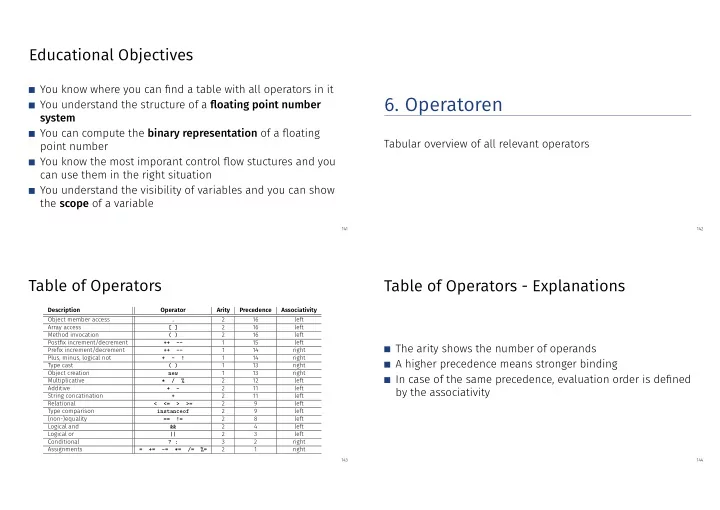
Table of Operators

Description Operator Arity Precedence Associativity Object member access . 2 16 left Array access [ ] 2 16 left Method invocation ( ) 2 16 left Postfix increment/decrement ++

  • 1

15 left Prefix increment/decrement ++

  • 1

14 right Plus, minus, logical not +

  • !

1 14 right Type cast ( ) 1 13 right Object creation new 1 13 right Multiplicative * / % 2 12 left Additive +

  • 2

11 left String concatination + 2 11 left Relational < <= > >= 2 9 left Type comparison instanceof 2 9 left (non-)equality == != 2 8 left Logical and && 2 4 left Logical or || 2 3 left Conditional ? : 3 2 right Assignments = +=

  • =

*= /= %= 2 1 right

143

Table of Operators - Explanations

The arity shows the number of operands A higher precedence means stronger binding In case of the same precedence, evaluation order is defined by the associativity

144

slide-2
SLIDE 2
  • 7. Floating Point Numbers

Floating Point Number Systems; IEEE Standard;

145

We remember from last time

public class Main { public static void main(String[] args) { Out.print("First number =? "); float n1 = In.readFloat(); Out.print("Second number =? "); float n2 = In.readFloat(); Out.print("Their difference =? "); float d = In.readFloat(); Out.print("computed difference - input difference = "); Out.println(n1-n2-d); } } input 1.1 input 1.0 input 0.1

  • utput 2.2351742E-8

What is going on here?

146

Why is this happening?

Not all real numbers can be represented Rounding errors can propagate and amplify throughout program execution = ⇒ We want to understand why this is happening!

147

Floating Point Number Representation

represented with Basis β: ± d0•d1 . . . dp−1 × βe,

Example β = 10 Representations of the decimal number 0.24 2.4 · 10−1

  • r

0.24 · 100

  • r

0.042 · 101

  • r

. . . Example β = 2 Representations of the binary number 0.11 1.1 · 2−1

  • r

0.11 · 20

  • r

0.011 · 21

  • r

. . .

148

slide-3
SLIDE 3

Caution: Holes in Value Range!

Example: β = 2, 2 decimal places, only positive numbers

d0•d1d2 e = −2 e = −1 e = 0 e = 1 e = 2 1.002 0.25 0.5 1 2 4 1.012 0.3125 0.625 1.25 2.5 5 1.102 0.375 0.75 1.5 3 6 1.112 0.4375 0.875 1.75 3.5 7

8 1.00 · 2−2 = 1

4

1.11 · 22 = 7

149

Binary and Decimal Systems

Internally the computer computes with β = 2 (binary system) Literals and inputs have β = 10 (decimal system) = ⇒ Inputs have to be converted!

150

Note

The following content in the floating point numbers chapter serves to better understand the topic, but won’t be checked in the exam.

151

Conversion Decimal → Binary

Angenommen, 0 < x < 2. Hence: x′ = b−1•b−2b−3b−4 . . . = 2 · (x − b0) Step 1 (for x): Compute b0: b0 =

  

1, if x ≥ 1 0, otherwise Step 2 (for x): Compute b−1, b−2, . . .: Go to step 1 (for x′ = 2 · (x − b0))

153

slide-4
SLIDE 4

Binary representation of 1.1

x bi x − bi 2(x − bi) 1.1 b0 = 1 0.1 0.2 0.2 b−1 = 0 0.2 0.4 0.4 b−2 = 0 0.4 0.8 0.8 b−3 = 0 0.8 1.6 1.6 b−4 = 1 0.6 1.2 1.2 b−5 = 1 0.2 0.4 ⇒ 1.00011, periodic, not finite

154

Binary Number Representations of 1.1 and 0.1

are not finite, there are errors when converting into a (finite) binary floating point system. 1.1f and 0.1f do not equal 1.1 and 0.1, but slightly inaccurate approximation of these numbers. 1.1 = 1.1000000000000000888178 . . . 1.1f = 1.1000000238418 . . .

155

Computing with Floating Point Numbers

Example β = 2, p = 4 (4 digits precision):

1.111 · 2−2 + 1.011 · 2−1 = 1.001 · 20

  • 1. adjust exponents by denormalizing of one number 2. binary addition of

the mantissa 3. renormalize 4. round to p significant places, if necessary

156

The IEEE Standard 754 for float

1 sign bit 23 bit for the mantissa (leading bit is 1 and is not stored) 8 bit for the exponent (256 possible values)(254 possible exponents, 2 special values: 0, ∞,...) ⇒ 32 bit overal.

157

slide-5
SLIDE 5

32-bit Representation of a Floating Point Number

31 30 29 28 27 26 25 24 23 1 2 3 4 5 6 7 8 9 10 11 12 13 14 15 16 17 18 19 20 21 22

± Exponent Mantisse 2−126, . . . , 2127 ± 0, ∞, . . . 1.00000000000000000000000 . . . 1.11111111111111111111111

158

The IEEE Standard 754 for double

1 sign bit 52 bit for the mantissa (leading bit is 1 and is not stored) 11 bit for the exponent (2046 possible exponents, 2 special values: 0, ∞,...) ⇒ 64 bit overal.

159

  • 8. Control Structures

Selection Statements, Iteration Statements, Termination, Blocks, Visibility, Local Variables, Switch Statement

160

Statements

A statement is ... comparable with a sentence in natural language a complete execution unit always finished with a semicolon f = 9f * celsius / 5 + 32 ;

161

slide-6
SLIDE 6

Statement types

Valid statements are:

Declaration statement Assignments Increment/decrement expressions Method calls Object-creation expressions Null statement

float aValue; aValue = 8933.234; aValue++; Out.println(aValue); new Student(); ;

162

Blocks

A block is ... a group of statements allowed wherever statements are allowed Represented by curly braces

{ statement1 statement2 . . . }

163

Control Flow

up to now linear (from top to bottom) For interesting programs we need “branches” and “jumps”

Computation of 1 + 2 + ... + n. Eingabe n i := 1; s := 0 i ≤ n? s := s + i; i := i+ 1 Ausgabe s ja nein

164

Selection Statements

implement branches if statement if-else statement

165

slide-7
SLIDE 7

if-Statement

if ( condition ) statement int a = In.readInt(); if (a % 2 == 0) { Out.println("even"); } If condition is true then statement is executed statement: arbitrary statement (body of the if-Statement) condition: expression of type boolean

166

if-else-statement

if ( condition ) statement1 else statement2 int a = In.readInt(); if (a % 2 == 0){ Out.println("even"); } else { Out.println("odd"); } If condition is true then statement1 is executed, oth- erwise statement2 is exe- cuted. condition: expression of type boolean statement1: body of the if-branch statement2: body of the else-branch

167

Layout!

int a = In.readInt(); if (a % 2 == 0){ Out.println("even"); } else { Out.println("odd"); }

Indentation Indentation

168

Iteration Statements

implement “loops” for-statement while-statement do-statement

169

slide-8
SLIDE 8

Example: Compute 1 + 2 + ... + n

// input Out.print("Compute the sum 1+...+n for n=?"); int n = In.readInt(); // computation of sum_{i=1}^n i int s = 0; for (int i = 1; i <= n; ++i){ s += i; } // output Out.println("1+...+" + n + " = " + s);

170

for-Statement: Syntax

for ( init ; condition ; expression ) statement init: expression statement, declaration statement, null statement condition: expression of type boolean expression: any expression statement : any statement (body of the for-statement)

171

for-Statement: semantics

for ( init ; condition ; expression ) statement init is executed condition is evaluated

true: Iteration starts statement is executed expression is executed false: for-statement is ended.

172

Example: Harmonic Numbers

The n-the harmonic number is Hn =

n

  • i=1

1 i ≈ ln n. This sum can be computed in forward or backward direction, which mathematically is clearly equivalent

173

slide-9
SLIDE 9

Example: Harmonic Numbers

Out.print("Compute H_n for n =? "); int n = In.readInt(); float fs = 0; for (int i = 1; i <= n; ++i){ fs += 1.0f / i; } Out.println("Forward sum = " + fs); float bs = 0; for (int i = n; i >= 1; --i){ bs += 1.0f / i; } Out.println("Backward sum = " + bs);

174

Example: Harmonic Numbers

Results: Compute H_n for n =? 10000000 Forward sum = 15.4037 Backward sum = 16.686 Compute H_n for n =? 100000000 Forward sum = 15.4037 Backward sum = 18.8079

175

Example: Harmonic Numbers

Observation: The forward sum stops growing at some point and is getting “really” wrong. The backward sum reasonably approximates Hn. Explanation: For 1 + 1/2 + 1/3 + · · · the late terms are too small to actually contribute Floating Point Rule 2

176

Example: Prime Number Test

Def.: a natural number n ≥ 2 is a prime number, if no d ∈ {2, . . . , n − 1} divides n . A loop that can test this: int d; for (d=2; n%d != 0; ++d) { }

177

slide-10
SLIDE 10

Example: Termination

int d; for (d=2; n%d != 0; ++d) { } Progress: Initial value d=2, then plus 1 in every iteration (++d) Exit: n%d != 0 evaluates to true as soon as a divisor is found — at the latest, once d == n Progress guarantees that the exit condition will be reached

178

Example: Correctness

int d; for (d=2; n%d != 0; ++d) { } // for n >= 2 Every potential divisor 2 <= d <= n will be tested. If the loop terminates with d == n then and only then is n prime.

179

Endless Loops

Endless loops are easy to generate: for ( ; ; ) ;

Die empty condition is true. Die empty expression has no effect. Die null statement has no effect.

... but can in general not be automatically detected. for ( e; v; e) r;

180

Halting Problem

Undecidability of the Halting Problem There is no Java program that can determine for each Java- Program P and each input I if the program P terminates with the input I. This means that the correctness of programs can in general not be automatically checked.3

3Alan Turing, 1936. Theoretical quesitons of this kind were the main motivation for

Alan Turing to construct a computing machine.

181

slide-11
SLIDE 11

Example: The Collatz-Sequence (n ∈ ◆)

n0 = n ni =

    

ni−1 2 , falls ni−1 gerade 3ni−1 + 1 , falls ni−1 ungerade , i ≥ 1. n=5: 5, 16, 8, 4, 2, 1, 4, 2, 1, ... (Repetition bei 1)

182

The Collatz-Sequence in Java

// Input Out.println("Compute Collatz sequence, n =? "); int n = In.readInt(); // Iteration while (n > 1) { // stop when 1 reached if (n % 2 == 0) { // n is even n = n / 2; } else { // n is odd n = 3 * n + 1; } Out.print(n + " "); }

183

Die Collatz-Folge in Java

n = 27: 82, 41, 124, 62, 31, 94, 47, 142, 71, 214, 107, 322, 161, 484, 242, 121, 364, 182, 91, 274, 137, 412, 206, 103, 310, 155, 466, 233, 700, 350, 175, 526, 263, 790, 395, 1186, 593, 1780, 890, 445, 1336, 668, 334, 167, 502, 251, 754, 377, 1132, 566, 283, 850, 425, 1276, 638, 319, 958, 479, 1438, 719, 2158, 1079, 3238, 1619, 4858, 2429, 7288, 3644, 1822, 911, 2734, 1367, 4102, 2051, 6154, 3077, 9232, 4616, 2308, 1154, 577, 1732, 866, 433, 1300, 650, 325, 976, 488, 244, 122, 61, 184, 92, 46, 23, 70, 35, 106, 53, 160, 80, 40, 20, 10, 5, 16, 8, 4, 2, 1

184

The Collatz-Sequence

Does 1 occur for each n? It is conjectured, but nobody can prove it! If not, then the while-statement for computing the Collatz-sequence can theoretically be an endless loop for some n.

185

slide-12
SLIDE 12

while-statement: why?

In a for-statement, the expression often provides the progress (“counting loop”) for (int i = 1; i <= n; ++i){ s += i; } If the progress is not as simple, while can be more readable.

186

while-Statement: Semantics

while ( condition ) statement condition is evaluated

true: iteration starts statement is executed false: while-statement ends.

187

while Statement

while ( condition ) statement statement: arbitrary statement, body of the while statement. condition: expression of type boolean.

188

while Statement

while ( condition ) statement is equivalent to for ( ; condition ; ) statement

189

slide-13
SLIDE 13

Example: Mini-Calculator

int a; // next input value int s = 0; // sum of values so far do { Out.print("next number =? "); a = In.readInt(); s += a; Out.println("sum = " + s); } while (a != 0);

190

do Statement

do statement while ( condition ) statement: arbitrary statement, body of the do statement. condition: expression of type boolean.

191

do Statement

do statement while ( condition ) is equivalent to statement while( condition ) statement

192

do-Statement: Semantics

do statement while ( condition ) Iteration starts

statement is executed.

condition is evaluated

true: iteration begins false: do-statement ends.

193

slide-14
SLIDE 14

Blocks

Example: body of the main function

public static void main(String[] args) { ... }

Example: loop body

for (int i = 1; i <= n; ++i) { s += i; Out.println("partial sum is " + s); }

194

Visibility

Declaration in a block is not “visible” outside of the block.

public static void main(String[] args) { { int i = 2; } Out.println(i); // Fehler: undeklarierter Name }

block main block „Blickrichtung”

195

Control Statement defines Block

In this regard, statements behave like blocks.

public static void main(String[] args) { { for (int i = 0; i < 10; ++i){ s += i; } Out.println(i); // Fehler: undeklarierter Name }

block

196

Scope of a Declaration

scope: from declaration until end of the part that contains the declaration. in the block { ... int i = 2; ... } in function body void main(String[] args) { ... int i = 2; ... } in control statement for ( int i = 0; i < 10; ++i) {s += i; ... }

scope scope scope

197

slide-15
SLIDE 15

Automatic Memory Lifetime

Local Variables (declaration in block) are (re-)created each time their declaration are reached

memory address is assigned (allocation) potential initialization is executed

are deallocated at the end of their declarative region (memory is released, address becomes invalid)

198

Local Variables

public static void main(String[] args) { int i = 5; for (int j = 0; j < 5; ++j) { Out.println(++i); // outputs 6, 7, 8, 9, 10 int k = 2; Out.println(--k); // outputs 1, 1, 1, 1, 1 } }

Local variables (declaration in a block) have automatic lifetime.

199

Conclusion

Selection (conditional branches)

if and if-else-statement

Iteration (conditional jumps)

for-statement while-statement do-statement

Blocks and scope of declarations

200

Equivalence of Iteration Statements

We have seen: while and do can be simulated with for It even holds: The three iteration statements provide the same “expressiveness” (lecture notes)

201

slide-16
SLIDE 16

The “right” Iteration Statement

Goals: readability, conciseness, in particular few statements few lines of code simple control flow simple expressions Often not all goals can be achieved together.

202

Example: Odd Numbers in {0, . . . , 100}

First (correct) attempt: for (int i = 0; i < 100; ++i) { if (i % 2 == 0){ continue; } Out.println(i); }

203

Example: Odd Numbers in {0, . . . , 100}

Less statements, less lines: for (int i = 0; i < 100; ++i) { if (i % 2 != 0){ Out.println(i); } }

204

Example: Odd Numbers in {0, . . . , 100}

Less statements, simpler control flow: for (int i = 1; i < 100; i += 2) { Out.println(i); } This is the “right” iteration statement!

205

slide-17
SLIDE 17

... one more thing ...

206

The switch-Statement

switch (expression) statement

expression: Expression, convertible to integral type statement : arbitrary statemet, in which case and default-lables are permitted, break has a special meaning.

int note; ... switch (note) { case 6: Out.print("super!"); break; case 5: Out.print("gut!"); break; case 4: Out.print("ok!"); break; default: Out.print("schade."); }

207

Semantics of the switch-statement

switch (expression) statement condition is evaluated. If statement contains a case-label with (constant) value of condition, then jump there

  • therwise jump to the default-lable, if available. If not,

jump over statement. The break statement ends the switch-statement.

208

Kontrollfluss switch in general

If breakis missing, continue with the next case. 7: Keine Note! 6: bestanden! 5: bestanden! 4: bestanden! 3: oops! 2: ooops! 1: oooops! 0: Keine Note!

switch (note) { case 6: case 5: case 4: Out.print("bestanden!"); break; case 1: Out.print("o"); case 2: Out.print("o"); case 3: Out.print("oops!"); break; default: Out.print("Keine Note!"); }

209

slide-18
SLIDE 18

Recapitulation: Control-Flow Statements

The following slides visualize the various control-flow state- ments.

210

Definition: Control Flow

Order of the (repeated) execution of statements

211

Control Flow

generally from top to bottom... ...except in selection and iteration statements condition statement

true

false if ( condition ) statement

212

Control Flow if else

condition statement1 statement2

true

false if ( condition ) statement1 else statement2

213

slide-19
SLIDE 19

Control Flow for

for ( init statement condition ; expression ) statement init-statement condition statement expression

true

false

214

Control Flow while

while ( condition ) statement condition statement

true

false

215

Control Flow do while

do statement while ( condition ) condition statement

false

true

216

Control Flow switch

switch statement

case case default break break

217