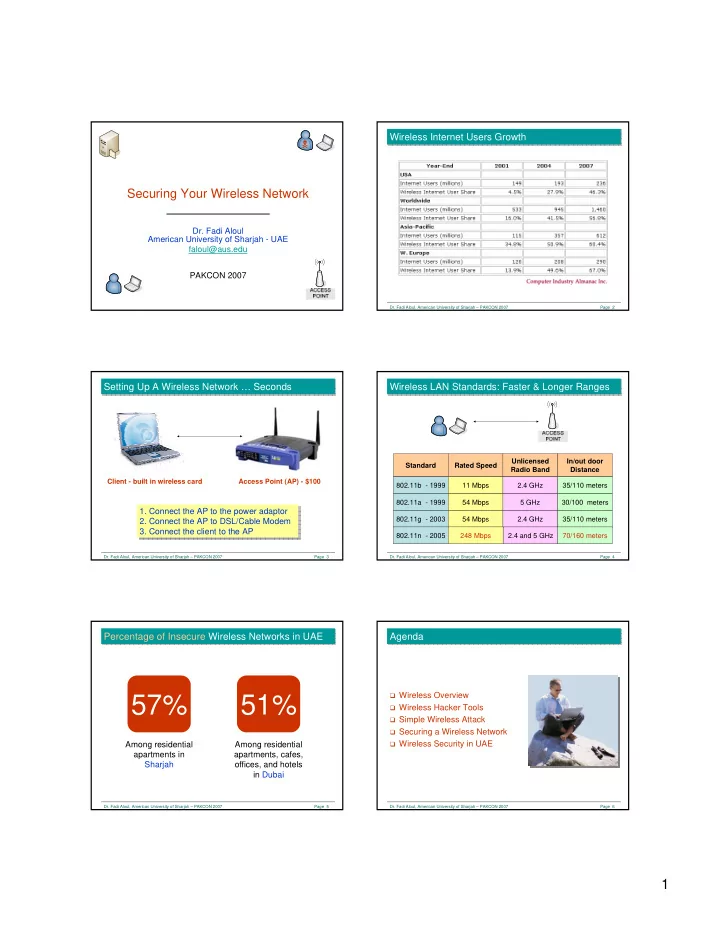
57% 51% Wireless Hacker Tools Simple Wireless Attack Securing a - - PDF document

57 51
SMART_READER_LITE
LIVE PREVIEW

57% 51% Wireless Hacker Tools Simple Wireless Attack Securing a - - PDF document

Wireless Internet Users Growth Wireless Internet Users Growth Securing Your Wireless Network Dr. Fadi Aloul American University of Sharjah - UAE faloul@aus.edu PAKCON 2007 Dr. Fadi Aloul, American University of Sharjah PAKCON 2007


slide-1
SLIDE 1

1

Securing Your Wireless Network

  • Dr. Fadi Aloul

American University of Sharjah - UAE faloul@aus.edu PAKCON 2007

  • Dr. Fadi Aloul, American University of Sharjah – PAKCON 2007

Page 2

Wireless Internet Users Growth Wireless Internet Users Growth

  • Dr. Fadi Aloul, American University of Sharjah – PAKCON 2007

Page 3

Setting Up A Wireless Network … Seconds Setting Up A Wireless Network … Seconds

Access Point (AP) - $100 Client - built in wireless card

  • 1. Connect the AP to the power adaptor
  • 2. Connect the AP to DSL/Cable Modem
  • 3. Connect the client to the AP
  • 1. Connect the AP to the power adaptor
  • 2. Connect the AP to DSL/Cable Modem
  • 3. Connect the client to the AP
  • Dr. Fadi Aloul, American University of Sharjah – PAKCON 2007

Page 4

Wireless LAN Standards: Faster & Longer Ranges Wireless LAN Standards: Faster & Longer Ranges

Standard Rated Speed Unlicensed Radio Band In/out door Distance 802.11b - 1999 11 Mbps 2.4 GHz 35/110 meters 802.11a - 1999 54 Mbps 5 GHz 30/100 meters 802.11g - 2003 54 Mbps 2.4 GHz 35/110 meters 802.11n - 2005 248 Mbps 2.4 and 5 GHz 70/160 meters

  • Dr. Fadi Aloul, American University of Sharjah – PAKCON 2007

Page 5

Percentage of Insecure Wireless Networks in UAE Percentage of Insecure Wireless Networks in UAE

57%

Among residential apartments in Sharjah

51%

Among residential apartments, cafes,

  • ffices, and hotels

in Dubai

  • Dr. Fadi Aloul, American University of Sharjah – PAKCON 2007

Page 6

Agenda Agenda

Wireless Overview Wireless Hacker Tools Simple Wireless Attack Securing a Wireless Network Wireless Security in UAE

slide-2
SLIDE 2

2

  • Dr. Fadi Aloul, American University of Sharjah – PAKCON 2007

Page 7

Wireless Overview

  • Dr. Fadi Aloul, American University of Sharjah – PAKCON 2007

Page 8

Simple Wireless Network Simple Wireless Network

Service set identifier (SSID)

  • Unique 32-char identifier that wireless

networking devices use to establish and maintain wireless connectivity

  • SSID sent in ‘beacon frames’ every few seconds

(in plain text)!

  • Default SSID’s are well known

(Linksys AP’s default to linksys, CISCO defaults to tsunami, etc)

  • Dr. Fadi Aloul, American University of Sharjah – PAKCON 2007

Page 9

Simple Wireless Network Simple Wireless Network

  • Dr. Fadi Aloul, American University of Sharjah – PAKCON 2007

Page 10

Wireless Hacker Tools

  • Dr. Fadi Aloul, American University of Sharjah – PAKCON 2007

Page 11

Wireless Hacker Tools Wireless Hacker Tools

Hardware Omni directional high-gain antenna - $100

  • General purpose surveying and war driving

Directional high-gain antenna - $100

  • Picks up weak signals many kilometers away

Laptop - $500

  • Dr. Fadi Aloul, American University of Sharjah – PAKCON 2007

Page 12

Wireless Hacker Tools Wireless Hacker Tools

Software Netstumbler, Kismet

  • Detect wireless networks

Ethereal

  • Sniff the network

Airsnort

  • Crack WEP encryption keys

Backtrack Bootable Linux CD with many security auditing tools – Free! http://www.remote-exploit.org/backtrack.html Backtrack Bootable Linux CD with many security auditing tools – Free! http://www.remote-exploit.org/backtrack.html

slide-3
SLIDE 3

3

  • Dr. Fadi Aloul, American University of Sharjah – PAKCON 2007

Page 13

Simple Wireless Attack

  • Dr. Fadi Aloul, American University of Sharjah – PAKCON 2007

Page 14

Simple Wireless Attack Simple Wireless Attack

  • 1. Detect a wireless network
  • 1. Detect a wireless network
  • Dr. Fadi Aloul, American University of Sharjah – PAKCON 2007

Page 15

War Driving War Driving

Sniff all 802.11 (wireless) traffic on the run Sniff all 802.11 (wireless) traffic on the run

  • Dr. Fadi Aloul, American University of Sharjah – PAKCON 2007

Page 16

War Driving War Driving

Wireless networks can be detected using: Beacon Sniffers monitor ‘beacon frames’ put out by APs

Will not hear from APs with disabled SSID broadcasting Records: Signal Strength; MAC Address; SSID; Channel details e.g. NetStumbler

  • Dr. Fadi Aloul, American University of Sharjah – PAKCON 2007

Page 17

War Driving War Driving

Wireless networks can be detected using: Passive Sniffers monitor exchanged packets between

clients and AP and extract the SSID

Each packet has the AP SSID in plain text e.g. Kismet and Airmagnet

  • Dr. Fadi Aloul, American University of Sharjah – PAKCON 2007

Page 18

Tool: NetStumbler Tool: NetStumbler

slide-4
SLIDE 4

4

  • Dr. Fadi Aloul, American University of Sharjah – PAKCON 2007

Page 19

Tool: Kismet Tool: Kismet

  • Dr. Fadi Aloul, American University of Sharjah – PAKCON 2007

Page 20

War Chalking War Chalking

Labeling a network to help other war drivers identify the open wireless network Labeling a network to help other war drivers identify the open wireless network

  • Dr. Fadi Aloul, American University of Sharjah – PAKCON 2007

Page 21

War Chalking War Chalking

Open Network 802.11b Access Point 2.0 Mb/s Bandwidth SSID tsunami

  • Dr. Fadi Aloul, American University of Sharjah – PAKCON 2007

Page 22

War Chalking War Chalking

  • Dr. Fadi Aloul, American University of Sharjah – PAKCON 2007

Page 23

Simple Wireless Attack Simple Wireless Attack

  • 2. Use a Sniffer to log transmitted packets
  • 2. Use a Sniffer to log transmitted packets
  • Dr. Fadi Aloul, American University of Sharjah – PAKCON 2007

Page 24

Simple Wireless Attack Simple Wireless Attack

Run AirSnort for a few hours. It will find the Encryption Key

  • 3. Encrypted Network? - Break WEP Encryption Keys
  • 3. Encrypted Network? - Break WEP Encryption Keys
slide-5
SLIDE 5

5

  • Dr. Fadi Aloul, American University of Sharjah – PAKCON 2007

Page 25

Simple Wireless Attack Simple Wireless Attack

  • 4. Access the internet for free ☺
  • 4. Access the internet for free ☺
  • Dr. Fadi Aloul, American University of Sharjah – PAKCON 2007

Page 26

Securing a Wireless Network

  • Dr. Fadi Aloul, American University of Sharjah – PAKCON 2007

Page 27

1) Change & Hide SSID Name 1) Change & Hide SSID Name

Default SSID reveals AP brand name, change it! No obvious SSID names, e.g. address or company name Makes it difficult to detect the presence of an AP or its brand Passive sniffers detect APs with disabled SSID broadcasting Once detected, hackers can connect If AP brand is detected, hacker can run exploits or use default password

  • Dr. Fadi Aloul, American University of Sharjah – PAKCON 2007

Page 28

1) Change & Hide SSID Name 1) Change & Hide SSID Name

  • Dr. Fadi Aloul, American University of Sharjah – PAKCON 2007

Page 29

2) Change Default AP Administrator Password 2) Change Default AP Administrator Password

Websites list default AP administrative passwords If hacker connects to AP configuration page, he/she owns the AP!

  • Dr. Fadi Aloul, American University of Sharjah – PAKCON 2007

Page 30

2) Change Default AP Administrator Password 2) Change Default AP Administrator Password

slide-6
SLIDE 6

6

  • Dr. Fadi Aloul, American University of Sharjah – PAKCON 2007

Page 31

3) MAC Filtering 3) MAC Filtering

Restrict users with allowed MAC addresses to connect to the AP Allow access by wireless cards with authorized MAC addresses only Hard to manage in large organizations MAC addresses are transmitted in clear text Easy to capture Easy to spoof MAC address on hacker machine (e.g. SMAC)

  • Dr. Fadi Aloul, American University of Sharjah – PAKCON 2007

Page 32

3) MAC Filtering 3) MAC Filtering

  • Dr. Fadi Aloul, American University of Sharjah – PAKCON 2007

Page 33

4) Control Your AP Broadcast Area 4) Control Your AP Broadcast Area

Adjust signal strength and direction Place AP far away from exterior walls and windows Add window coverings or wall paintings to reduce the wireless signal Use directional antenna Antenna placement and signal suppression doesn’t encrypt data Hackers use advanced antennas that pick up a weak signal from several kilometers away Lowering the signal hurts legitimate users a lot more than it hurts the hackers

  • No signal
  • Dr. Fadi Aloul, American University of Sharjah – PAKCON 2007

Page 34

5) Enable Encryption 5) Enable Encryption

  • WEP encrypts messages exchanged between client and AP

WEP uses 40-bit RC4 encryption key WEP key shared among all users Each packet includes a 24-bit initialization vector (IV) – (i.e. 16,777,216 possible IV’s) WEP combines the IV with the 40-bit key to encrypt data WEP keys can be cracked after collecting enough packets (Airsnort) IV is the weakness; Increasing WEP key length is useless

Encrypted ????

  • Dr. Fadi Aloul, American University of Sharjah – PAKCON 2007

Page 35

5) Enable Encryption 5) Enable Encryption

  • WPA encrypts messages exchanged between client and AP

WPA can be configured to use a pre-shared key among all users WPA uses 128-bit RC4 key and 48-bit IV WPA uses TKIP which dynamically changes keys during a session WPA2 uses AES encryption – Solid algorithm WPA pre-shared keys can be cracked if they are simple WPA2 not supported by all wireless network cards or APs

Encrypted ????

  • Dr. Fadi Aloul, American University of Sharjah – PAKCON 2007

Page 36

5) Enable Encryption 5) Enable Encryption

slide-7
SLIDE 7

7

  • Dr. Fadi Aloul, American University of Sharjah – PAKCON 2007

Page 37

6) Disable DHCP? 6) Disable DHCP?

Force the use of static IP addresses (or limit DHCP users)

IP is sent over air in plain text; Hacker can detect it and use it

  • Dr. Fadi Aloul, American University of Sharjah – PAKCON 2007

Page 38

7) Lock Each AP From Physical Attacks 7) Lock Each AP From Physical Attacks

APs can have reset buttons; make sure not accessible by hackers

  • Dr. Fadi Aloul, American University of Sharjah – PAKCON 2007

Page 39

8) Employ a Virtual Private Network (VPN) 8) Employ a Virtual Private Network (VPN)

  • Encrypts messages exchanged between client and VPN server

Low administration requirements of APs - No need for MAC filtering or WPA encryption Deployed by enterprise networks VPN software must be installed on every client Client may need to re-login when roaming between wireless networks

Encrypted ???? E n c r y p t e d

VPN Server

  • Dr. Fadi Aloul, American University of Sharjah – PAKCON 2007

Page 40

Quiz – How to Effectively Secure Your Wireless Network? Quiz – How to Effectively Secure Your Wireless Network? 9 8 7 6 5 4 3 2 1 Use a VPN Lock each AP from physical attacks Disable DHCP Enable WPA encryption (not WEP) Control AP broadcasting Enable MAC filtering Change AP password Change SSID Disable SSID broadcasting Effective? Method

  • Dr. Fadi Aloul, American University of Sharjah – PAKCON 2007

Page 41

Wireless Security in UAE

  • Dr. Fadi Aloul, American University of Sharjah – PAKCON 2007

Page 42

Wireless Security in UAE Wireless Security in UAE

slide-8
SLIDE 8

8

  • Dr. Fadi Aloul, American University of Sharjah – PAKCON 2007

Page 43

Wireless Network Security in Sharjah Wireless Network Security in Sharjah Khalid-Buhaira Area

Area covered

25 Km

Area includes

Homes and offices

# Detected APs

2032

Channel distribution

11: 79% 6: 10.6%

  • Dr. Fadi Aloul, American University of Sharjah – PAKCON 2007

Page 44

Wireless Network Security in Dubai Wireless Network Security in Dubai Sheikh Zayed Road + Dubai Internet City

Area covered

20 Km

Area includes

Homes, hotels,

cafes, and offices

# Detected APs

1587 + 271

Channel distribution

11: 68% 6: 17.3%

  • Dr. Fadi Aloul, American University of Sharjah – PAKCON 2007

Page 45

Wireless Statistics in UAE Wireless Statistics in UAE

683 (34%) 367 (18%) 187 (9%) 795 (39%) 2032 Sharjah 806 (43%) 584 (31%) 105 (6%) 363 (20%) 1858 Dubai WEP no WEP WEP no WEP # APs Non-Default SSID Default SSID

  • Dr. Fadi Aloul, American University of Sharjah – PAKCON 2007

Page 46

Wireless Statistics in Sharjah Wireless Statistics in Sharjah

Khalid Buhaira 870 (43%) 2032 Total 683 (65%) 1050 non-default 11 (32%) 34 (Other) 1 (17%) 6 USR9106 6 (67%) 9 3Com 2 (8%) 25 Default 17 (65%) 26 USR9108 10 (33%) 30 DLINK_WIRELESS 50 (33%) 152 Linksys 90 (13%) 700 speedstream WEP enabled (%) # APs SSID

  • Dr. Fadi Aloul, American University of Sharjah – PAKCON 2007

Page 47

Wireless Statistics in Dubai Wireless Statistics in Dubai

684 (59%) 1169 non-default 774 (49%) 1587 Total 5 (23%) 22 (Other) 2 (18%) 11 DLINK_WIRELES 4 (33%) 12 USR9108 3 (21%) 14 3Com 3 (14%) 22 USR9106 6 (26%) 23 belkin54g 7 (18%) 40 default 21 (16%) 133 speedstream 39 (28%) 141 linksys Sheikh Zayed Road WEP enabled (%) # APs SSID 137 (51%) 271 Total 122 (55%) 221 non-default 3 (33%) 9 (Other) 2 (50%) 4 default 0 (0%) 5 USR9106 3 (50%) 6 3Com 2 (17%) 12 speedstream 5 (36%) 14 linksys Dubai Internet City WEP enabled (%) # APs SSID

  • Dr. Fadi Aloul, American University of Sharjah – PAKCON 2007

Page 48

Revealing SSID Names … Revealing SSID Names …

Information included:

Company names Hotel names Telephone numbers Home addresses User Names

10% of all detected SSID names included private information 10% of all detected SSID names included private information

slide-9
SLIDE 9

9

  • Dr. Fadi Aloul, American University of Sharjah – PAKCON 2007

Page 49

Summary … Summary …

All wireless networks should be considered insecure Setting up wireless networks is simple Protecting wireless networks is also simple Advanced wireless security solutions, such as WPA,

should be enforced

Education is necessary among wireless

internet users