??? 5 Environment Diagrams Assignment Statements Environment - - PDF document

5 environment diagrams assignment statements environment
SMART_READER_LITE
LIVE PREVIEW

??? 5 Environment Diagrams Assignment Statements Environment - - PDF document

Announcements Starting next week, submitting labs & attending section will provide a midterm safety net Homework 1 is due next Wednesday 1/28 All homework is graded on effort; you must make progress on each problem to earn 2/2


slide-1
SLIDE 1

61A Lecture 2

Friday, January 23, 2015

Announcements

  • Starting next week, submitting labs & attending section will provide a midterm safety net
  • Homework 1 is due next Wednesday 1/28

§All homework is graded on effort; you must make progress on each problem to earn 2/2 §Homework Party on Tuesday 1/27 5-6:30pm in 2050 VLSB

  • Quiz 1 released next Wednesday 1/28 is due next Thursday 1/29 (graded on correctness)
  • Ask questions about lab and homework assignments in office hours! (cs61a.org/weekly.html)

§2 locations in Bechtel Engineering Center (Map: http://goo.gl/dAcHXf) §11-2 & 3-5 on Monday, 11-6 on Tuesday & Thursday, 11-2 & 3-4 on Wednesday, 11-1 on Friday

  • You need to register a class account (Lab 0); that's how we track assignments

§Please register even if you're on the waitlist or applying for concurrent enrollment

2

Names, Assignment, and User-Defined Functions

(Demo)

Types of Expressions

Primitive expressions: Call expressions: 2 add 'hello' max ( 2 , 3 ) Operator Operand Operand max(min(pow(3, 5), -4), min(1, -2)) Number or Numeral Name String

4

An operand can also be a call expression

Discussion Question 1

What is the value of the final expression in this sequence? >>> f = min >>> f = max >>> g, h = min, max >>> max = g >>> max(f(2, g(h(1, 5), 3)), 4)

???

5

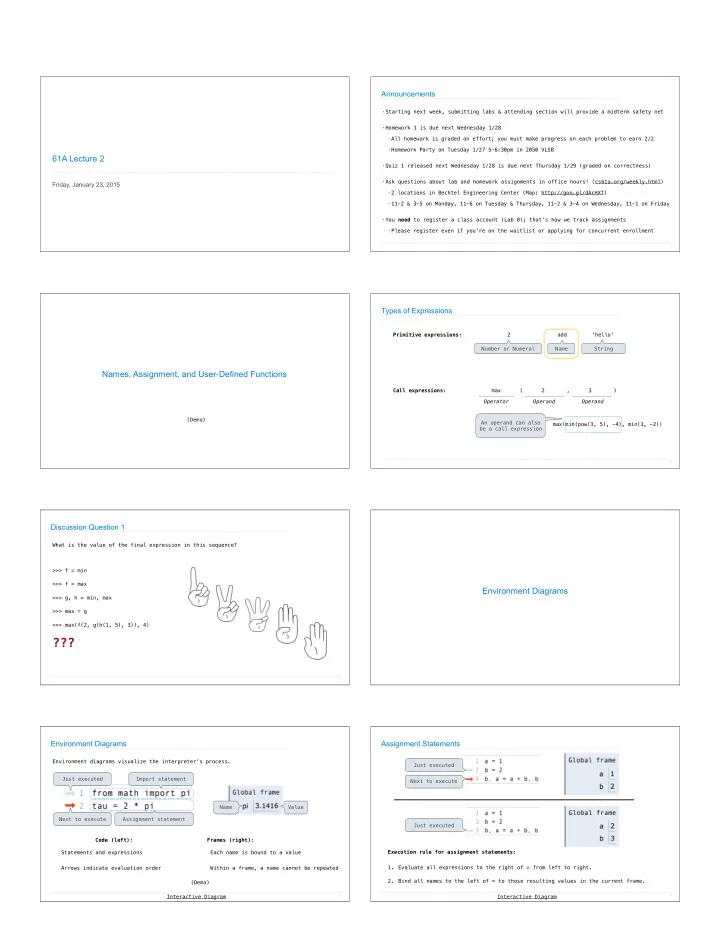
Environment Diagrams

Environment Diagrams

(Demo) Name Value Import statement Each name is bound to a value Within a frame, a name cannot be repeated Statements and expressions Arrows indicate evaluation order Frames (right): Code (left): Environment diagrams visualize the interpreter’s process.

7

Just executed Next to execute Assignment statement Interactive Diagram

Assignment Statements

Execution rule for assignment statements:

  • 1. Evaluate all expressions to the right of = from left to right.
  • 2. Bind all names to the left of = to those resulting values in the current frame.

8

Just executed Just executed Next to execute Interactive Diagram

slide-2
SLIDE 2

Discussion Question 1 Solution

9

func min(...) 4 3 f(2, g(h(1, 5), 3)) 3 g(h(1, 5), 3) 3 func max(...) 2 3 h(1, 5) func min(...) 5 5 func max(...) 1

3

(Demo) Interactive Diagram

Defining Functions

Defining Functions

Assignment is a simple means of abstraction: binds names to values Function definition is a more powerful means of abstraction: binds names to expressions <name>(<formal parameters>): return <return expression> >>> def Execution procedure for def statements:

  • 1. Create a function with signature <name>(<formal parameters>)
  • 2. Set the body of that function to be everything indented after the first line
  • 3. Bind <name> to that function in the current frame

Function signature indicates how many arguments a function takes Function body defines the computation performed when the function is applied

11

Calling User-Defined Functions

Procedure for calling/applying user-defined functions (version 1):

  • 1. Add a local frame, forming a new environment
  • 2. Bind the function's formal parameters to its arguments in that frame
  • 3. Execute the body of the function in that new environment

Local frame Original name of function called Formal parameter bound to argument Return value
 (not a binding!) Built-in function User-defined function

12

Interactive Diagram

Calling User-Defined Functions

A function’s signature has all the information needed to create a local frame

13

Procedure for calling/applying user-defined functions (version 1):

  • 1. Add a local frame, forming a new environment
  • 2. Bind the function's formal parameters to its arguments in that frame
  • 3. Execute the body of the function in that new environment

Interactive Diagram

Looking Up Names In Environments

Every expression is evaluated in the context of an environment. So far, the current environment is either:

  • The global frame alone, or
  • A local frame, followed by the global frame.

Most important two things I’ll say all day: An environment is a sequence of frames. A name evaluates to the value bound to that name in the earliest frame of the current environment in which that name is found. E.g., to look up some name in the body of the square function:

  • Look for that name in the local frame.
  • If not found, look for it in the global frame.


(Built-in names like “max” are in the global frame too, 
 but we don’t draw them in environment diagrams.) (Demo)

14

Print and None

(Demo)

None Indicates that Nothing is Returned

The special value None represents nothing in Python A function that does not explicitly return a value will return None Careful: None is not displayed by the interpreter as the value of an expression

16

>>> def does_not_square(x): ... x * x ... >>> does_not_square(4) >>> sixteen = does_not_square(4) >>> sixteen + 4 Traceback (most recent call last): File "<stdin>", line 1, in <module> TypeError: unsupported operand type(s) for +: 'NoneType' and 'int' The name sixteen is now bound to the value None No return None value is not displayed

slide-3
SLIDE 3

abs

Pure Functions & Non-Pure Functions

  • 2

2

  • 2

None print Python displays the output “-2” 2, 100 1267650600228229401496703205376 pow Pure Functions just return values Non-Pure Functions have side effects Argument Return value A side effect isn't a value; it's anything that happens as a consequence of calling a function Returns None!

17

2 Arguments

Nested Expressions with Print

None print(print(1), print(2)) func print(...) print(...): 1 None display “1” print(...): 2 None display “2” print(...): None, None None display “None None” print(1) func print(...) 1 None print(2) 2 None

18

Does not get displayed func print(...)