3. Integers // Input std::cout << "Temperature in - - PowerPoint PPT Presentation

3 integers
SMART_READER_LITE
LIVE PREVIEW

3. Integers // Input std::cout << "Temperature in - - PowerPoint PPT Presentation

Celsius to Fahrenheit // Program: fahrenheit.cpp // Convert temperatures from Celsius to Fahrenheit. #include <iostream> int main() { 3. Integers // Input std::cout << "Temperature in degrees Celsius =? "; int celsius;


slide-1
SLIDE 1
  • 3. Integers

Evaluation of Arithmetic Expressions, Associativity and Precedence, Arithmetic Operators, Domain of Types int, unsigned int

110

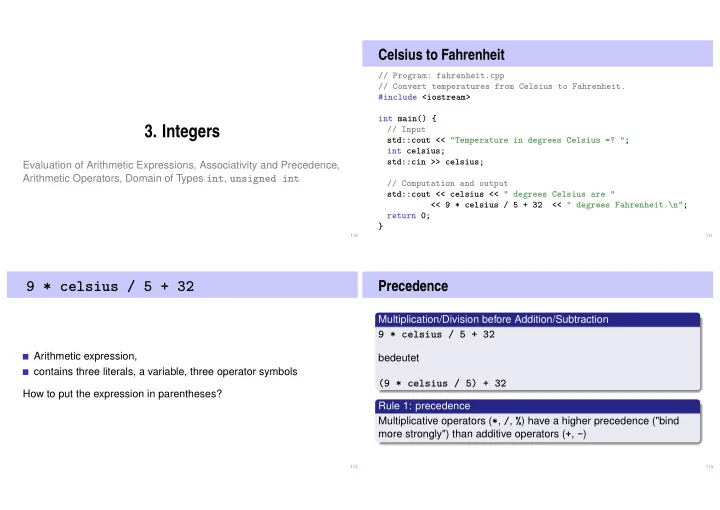
Celsius to Fahrenheit

// Program: fahrenheit.cpp // Convert temperatures from Celsius to Fahrenheit. #include <iostream> int main() { // Input std::cout << "Temperature in degrees Celsius =? "; int celsius; std::cin >> celsius; // Computation and output std::cout << celsius << " degrees Celsius are " << 9 * celsius / 5 + 32 << " degrees Fahrenheit.\n"; return 0; }

111

9 * celsius / 5 + 32

Arithmetic expression, contains three literals, a variable, three operator symbols How to put the expression in parentheses?

112

Precedence

Multiplication/Division before Addition/Subtraction

9 * celsius / 5 + 32

bedeutet

(9 * celsius / 5) + 32

Rule 1: precedence Multiplicative operators (*, /, %) have a higher precedence ("bind more strongly") than additive operators (+, -)

113

slide-2
SLIDE 2

Associativity

From left to right

9 * celsius / 5 + 32

bedeutet

((9 * celsius) / 5) + 32

Rule 2: Associativity Arithmetic operators (*, /, %, +, -) are left associative: operators of same precedence evaluate from left to right

114

Arity

Rule 3: Arity Unary operators +, - first, then binary operators +, -.

  • 3 - 4

means

(-3) - 4

115

Parentheses

Any expression can be put in parentheses by means of associativities precedences arities (number of operands)

  • f the operands in an unambiguous way (Details in the lecture

notes).

116

Expression Trees

Parentheses yield the expression tree

(((9 * celsius) / 5) + 32)

+ / * 9 celsius 5 32

117

slide-3
SLIDE 3

Evaluation Order

"From top to bottom" in the expression tree

9 * celsius / 5 + 32

+ / * 9 celsius 5 32

118

Evaluation Order

Order is not determined uniquely:

9 * celsius / 5 + 32

+ / * 9 celsius 5 32

119

Expression Trees – Notation

Common notation: root on top

9 * celsius / 5 + 32

+ / * 9 celsius 5 32

120

Evaluation Order – more formally

Valid order: any node is evaluated after its children

E K1 K2

In C++, the valid order to be used is not defined.

"Good expression": any valid evaluation order leads to the same result. Example for a "bad expression": (a+b)*(a++)

121

slide-4
SLIDE 4

Evaluation order

Guideline Avoid modifying variables that are used in the same expression more than once.

122

Arithmetic operations

Symbol Arity Precedence Associativity Unary + + 1 16 right Negation

  • 1

16 right Multiplication * 2 14 left Division / 2 14 left Modulus % 2 14 links Addition + 2 13 left Subtraction

  • 2

13 left

All operators: [R-value ×] R-value → R-value

123

Assignment expression – in more detail

Already known: a = b means Assignment of b (R-value) to a (L-value). Returns: L-value What does a = b = c mean? Answer: assignment is right-associative

a = b = c ⇐ ⇒ a = (b = c)

Example multiple assignment:

a = b = 0 = ⇒ b=0; a=0

124

Division and Modulus

Operator / implements integer division

5 / 2 has value 2

In fahrenheit.cpp

9 * celsius / 5 + 32

15 degrees Celsius are 59 degrees Fahrenheit

Mathematically equivalent. . . but not in C++!

9 / 5 * celsius + 32

15 degrees Celsius are 47 degrees Fahrenheit

125

slide-5
SLIDE 5

Division and Modulus

Modulus-operator computes the rest of the integer division

5 / 2

has value 2,

5 % 2

has value 1. It holds that:

(a / b) * b + a % b

has the value of a.

126

Increment and decrement

Increment / Decrement a number by one is a frequent operation works like this for an L-value:

expr = expr + 1.

Disadvantages relatively long expr is evaluated twice (effects!)

127

In-/Decrement Operators

Post-Increment expr++ Value of expr is increased by one, the old value of expr is returned (as R-value) Pre-increment ++expr Value of expr is increased by one, the new value of expr is returned (as L-value) Post-Dekrement expr-- Value of expr is decreased by one, the old value of expr is returned (as R-value) Prä-Dekrement

  • -expr

Value of expr is increased by one, the new value of expr is returned (as L-value)

128

In-/decrement Operators

use arity prec assoz L-/R-value Post-increment expr++ 1 17 left L-value → R-value Pre-increment ++expr 1 16 right L-value → L-value Post-decrement expr-- 1 17 left L-value → R-value Pre-decrement

  • -expr

1 16 right L-value → L-value

129

slide-6
SLIDE 6

In-/Decrement Operators

Example

int a = 7; std::cout << ++a << "\n"; // 8 std::cout << a++ << "\n"; // 8 std::cout << a << "\n"; // 9

130

In-/Decrement Operators

Is the expression

++expr; ← we favour this

equivalent to

expr++;?

Yes, but Pre-increment can be more efficient (old value does not need to be saved) Post In-/Decrement are the only left-associative unary operators (not very intuitive)

131

C++ vs. ++C

Strictly speaking our language should be named ++C because it is an advancement of the language C while C++ returns the old C.

132

Arithmetic Assignments

a += b ⇔ a = a + b

analogously for -, *, / and %

133

slide-7
SLIDE 7

Arithmetic Assignments

Gebrauch Bedeutung

+= expr1 += expr2 expr1 = expr1 + expr2

  • =

expr1 -= expr2 expr1 = expr1 - expr2 *= expr1 *= expr2 expr1 = expr1 * expr2 /= expr1 /= expr2 expr1 = expr1 / expr2 %= expr1 %= expr2 expr1 = expr1 % expr2

Arithmetic expressions evaluate expr1 only once. Assignments have precedence 4 and are right-associative.

134

Binary Number Representations

Binary representation ("Bits" from {0, 1})

bnbn−1 . . . b1b0

corresponds to the number bn · 2n + · · · + b1 · 2 + b0 Example: 101011 corresponds to 43.

Most Significant Bit (MSB) Least Significant Bit (LSB)

135

Binary Numbers: Numbers of the Computer?

Truth: Computers calculate using binary numbers.

136

Binary Numbers: Numbers of the Computer?

Stereotype: computers are talking 0/1 gibberish

137

slide-8
SLIDE 8

Computing Tricks

Estimate the orders of magnitude of powers of two.3:

210 = 1024 = 1Ki ≈ 103. 220 = 1Mi ≈ 106, 230 = 1Gi ≈ 109, 232 = 4 · (1024)3 = 4Gi. 264 = 16Ei ≈ 16 · 1018.

3Decimal vs. binary units: MB - Megabyte vs. MiB - Megabibyte (etc.)

kilo (K, Ki) – mega (M, Mi) – giga (G, Gi) – tera(T, Ti) – peta(P , Pi) – exa (E, Ei)

138

Hexadecimal Numbers

Numbers with base 16

hnhn−1 . . . h1h0

corresponds to the number

hn · 16n + · · · + h1 · 16 + h0.

notation in C++: prefix 0x Example: 0xff corresponds to 255.

Hex Nibbles hex bin dec 0000 1 0001 1 2 0010 2 3 0011 3 4 0100 4 5 0101 5 6 0110 6 7 0111 7 8 1000 8 9 1001 9 a 1010 10 b 1011 11 c 1100 12 d 1101 13 e 1110 14 f 1111 15

139

Why Hexadecimal Numbers?

A Hex-Nibble requires exactly 4 bits. Numbers 1, 2, 4 and 8 represent bits 0, 1, 2 and 3. „compact representation of binary numbers”

32-bit numbers consist of eight hex-nibbles: 0x00000000 -- 0xffffffff .

0x400 = 1Ki = 1′024. 0x100000 = 1Mi = 1′048′576. 0x40000000 = 1Gi = 1′073.741, 824. 0x80000000: highest bit of a 32-bit number is set 0xffffffff: all bits of a 32-bit number are set

„0x8a20aaf0 is an address in the upper 2G of the 32-bit address space”

140

Example: Hex-Colors

#00FF00 r g b

141

slide-9
SLIDE 9

Why Hexadecimal Numbers?

“For programmers and technicians” (Excerpt of a user manual of the chess computers Mephisto II, 1981)

http://www.zanchetta.net/default.aspx?Categorie=ECHIQUIERS&Page=documentations 142

Why Hexadecimal Numbers?

The NZZ could have saved a lot of space ...

143

Domain of Type int

// Program: limits.cpp // Output the smallest and the largest value of type int. #include <iostream> #include <limits> int main() { std::cout << "Minimum int value is " << std::numeric_limits<int>::min() << ".\n" << "Maximum int value is " << std::numeric_limits<int>::max() << ".\n"; return 0; } For example Minimum int value is -2147483648. Maximum int value is 2147483647. Where do these numbers come from?

144

Domain of the Type int

Representation with B bits. Domain comprises the 2B integers:

{−2B−1, − 2B−1 + 1, . . . , −1, 0, 1, . . . , 2B−1 − 2, 2B−1 − 1}

On most platforms B = 32 For the type int C++ guarantees B ≥ 16 Background: Section 2.2.8 (Binary Representation) in the lecture notes. Where does this partitioning come from?

145

slide-10
SLIDE 10

Over- and Underflow

Arithmetic operations (+,-,*) can lead to numbers outside the valid domain. Results can be incorrect!

power8.cpp: 158 = −1732076671 power20.cpp: 320 = −808182895

There is no error message!

146

The Type unsigned int

Domain

{0, 1, . . . , 2B − 1}

All arithmetic operations exist also for unsigned int. Literals: 1u, 17u . . .

147

Mixed Expressions

Operators can have operands of different type (e.g. int and

unsigned int). 17 + 17u

Such mixed expressions are of the “more general” type

unsigned int. int-operands are converted to unsigned int.

148

Conversion

int Value

Sign

unsigned int Value x ≥ 0 x x < 0 x + 2B

Using two complements representation, nothing happens in- ternally

149

slide-11
SLIDE 11

Conversion “reversed”

The declaration

int a = 3u;

converts 3u to int. The value is preserved because it is in the domain of int; otherwise the result depends on the implementation.

150

Signed Number Representation

(Hopefully) clear by now: binary number representation without sign, e.g.

[b31b30 . . . b0]u

  • =

b31 · 231 + b30 · 230 + · · · + b0

Obviously required: use a bit for the sign. Looking for a consistent solution

The representation with sign should coincide with the unsigned solution as much as possible. Positive numbers should arithmetically be treated equal in both systems.

151

Computing with Binary Numbers (4 digits)

Simple Addition

2 0010 +3 +0011 5 0101

Simple Subtraction

5 0101 −3 −0011 2 0010

152

Computing with Binary Numbers (4 digits)

Addition with Overflow

7 0111 +9 +1001 16 (1)0000

Negative Numbers?

5 0101 +(−5) ???? (1)0000

153

slide-12
SLIDE 12

Computing with Binary Numbers (4 digits)

Simpler -1

1 0001 +(−1) 1111 (1)0000

Utilize this:

3 0011 +? +???? −1 1111

154

Computing with Binary Numbers (4 digits)

Invert!

3 0011 +(−4) +1100 −1 1111 = 2B − 1 a a +(−a − 1) ¯ a −1 1111 = 2B − 1

155

Computing with Binary Numbers (4 digits)

Negation: inversion and addition of 1

−a

  • =

¯ a + 1

Wrap around semantics (calculating modulo 2B

−a

  • =

2B − a

156

Why this works

Modulo arithmetics: Compute on a circle4

11 ≡ 23 ≡ −1 ≡ . . . mod 12

+

4 ≡ 16 ≡ . . . mod 12

=

3 ≡ 15 ≡ . . . mod 12

4The arithmetics also work with decimal numbers (and for multiplication). 157

slide-13
SLIDE 13

Negative Numbers (3 Digits)

a −a

000 000 1 001 111

  • 1

2 010 110

  • 2

3 011 101

  • 3

4 100 100

  • 4

5 101 6 110 7 111 The most significant bit decides about the sign.

158

Two’s Complement

Negation by bitwise negation and addition of 1

−2 = −[0010] = [1101] + [0001] = [1110]

Arithmetics of addition and subtraction identical to unsigned arithmetics

3 − 2 = 3 + (−2) = [0011] + [1110] = [0001]

Intuitive “wrap-around” conversion of negative numbers.

−n → 2B − n

Domain: −2B−1 . . . 2B−1 − 1

159