2 Axis CNC Plasma Cutter CNC CNC or computer numerical control is a - - PowerPoint PPT Presentation
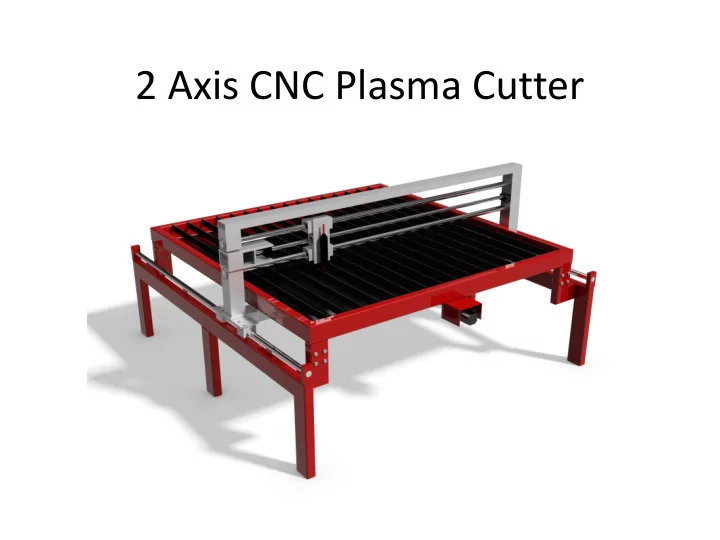
2 Axis CNC Plasma Cutter CNC CNC or computer numerical control is a way to control machine tools via a computer In this project I will be making a CNC 2 Axis platform for a plasma cutter CNC makes it possible to cut more complex
CNC
- CNC or computer numerical control is a way to
control machine tools via a computer
- In this project I will be making a CNC 2 Axis
platform for a plasma cutter
- CNC makes it possible to cut more complex
shapes
- Accuracy is better than with manual use of a
plasma torch
- Speed of operation is better than manual cutting
Why a CNC Plasma cutter ?
- This project is designed to be able to guide a
plasma cutting torch by using a CAD drawing
- f the part to be cut
- Having a CNC plasma cutter simplifies the
development and production of metal parts
- Eliminates expensive outsourcing of metal
parts cutting
- Quicker product development by being able to
produce prototype parts on site
Example uses
- I am currently developing for production a
weightlifiting machine which has a few parts that are cut with a CNC
Requirements
- To be usefull the machine must fulfill the following
requirements
- Move smoothly through it´s entire range of motion
- Follow the programmed path precisely, errors of more
than 1 mm would be unacceptable in many cases
- Be able to move at various speeds for cutting different
thicknesses and kinds of materials at different power levels
- Interface smoothly with the control computer
- Be able to support the weight of 20 mm steel plate
without significant deflection
Commercial CNC Machines
- Many versions of commercially available CNC
plasma cutters are available
- The main benefit of my system is the low cost
- f the design
- I used as simple a design as I thought was
possible while still reaching the design specs
- My machine is made in a modualar format
which means it is transportable with 2 people and a small van
Technology used
- To move the two axis which are perpendicular
to each other I needed motors and something to transfer their power into linear motion
- For the motors two options were available:
Stepper or Servo motors
- I chose to use stepper motors because of their
much lower cost
Stepper motors
- Stepper motors work by rotating the output shaft by a
known amount when it recieves a pulse from the driver electronics
- My chosen Steppers move 1.8° for each „step“ or 200
steps per revolution
- To operate the steppers I use amplifier electronics
known as stepper motor drivers to amplify the signal from the PC to be able to power the motors
- The motors I used have a stall torque of 4 Nm
- To connect the PC that runs the control program
(Mach3) to the electronics I use an interface card that connects to the parallel port
Mounting of electronics
Electronics schematic
Actuation - Ballscrews
- To move the axis of the machine I use two 1750 mm
long ballscrews with a lead of l=10mm per revolution giving a resolution of 0.05 mm
- Ballscrews use ball bearings that move along the
thread to transfer force much more efficiently. Their efficiency is between 𝜘 = .9 𝑏𝑜𝑒 𝜘 = .95
- Less motor power is required by using ballscrews and
little to no backlash should be present
- The stalling force of my machine is given by 𝐺 =
2𝜌𝜘𝑈 𝑚
=
2∗𝜌∗0.9∗4𝑂𝑛 10 𝑛𝑛
=2.26 kN
- This number is a theoretical upper limit, stepper motor
torque drops with increasing speed
Ballscrews cont.
[1]:Roton Products, Inc. Ballscrews and Ballnuts [Online]. Available: http://www.roton.com/page.aspx?id=28
Illustration of Ballnut and Ballscrew [1] I ordered my ballscrews online from china and have had trouble with the seller, they have not arrived which is the reason I did not finish the machine yet The photo above shows the inner workings of the ballnut and ballscrew system
Mechanics
- My goal for the mahine was to be able to cut parts from a
standard size of steel plate
- 1.5 m wide plates are very common so I chose that as my
working width
- To minimize cost I decided to use only one motor and drive screw
for each of the two axis
- At first I planed on driving the X axis asymmetrically from one
side
- This might have resulted in a moment that would have
introduced errors or even prevent the machine from running
Initial asymmetric design
Mechanics cont.
- I then decided to try to drive the X axis from it´s
center
- This required me to drop the drive screw below
the table
- The linear bearings and axles were dropped
below the working table as well to keep them in line with the force being applied
- To minimize deflection and vibration of the X axis
bearing axles I will support them along their length with thin steel plate
Mechanics cont.
- Since my machine uses bearings to constrain it´s
motion I considered Saint-Venant´s Principle [2]
- For both my X and Y axis I used two linear ball bearings
for each axle
- Since the distance between the two X axles was large I
mounted the bearing blocks with a space between them to gain a larger resistance to moments
[2]: A.H.Slocum. Fundamentals of Design. MIT, Cambridge, Massachusetts 2007
Dimensions
System control
- To control the system I use an old 1.6 GHz computer
running only Mach3 and Windows XP
- The computer interfaces with the system via a 25 pin
parallel port at 25 kHz
- To function, the software must have unhindered
control of the PC which required quite a bit of troubleshooting
- All unnecesary programs and services were uninstalled
- r deactivated
- Windows was configured to run in Standard PC mode
instead of the default ACPI mode
- After setup the motors run smoothly
Configuration
- Stepper motors use steps and the steps can be divided into
„microsteps“
- For my system I used half stepping so 2 pulses are required
to go one step or 1.8°
- Using the thread pitch of my ballscrews I calculated the
number of pulses per mm
- 2𝑞𝑣𝑚𝑡𝑓𝑡
𝑡𝑢𝑓𝑞 ∗200𝑡𝑢𝑓𝑞𝑡 𝑠𝑓𝑤
10𝑛𝑛
𝑠𝑓𝑤
= 40
𝑞𝑣𝑚𝑡𝑓𝑡 𝑛𝑛
- When my ballscrews arrive I will tune the acceleration and
maximum velocity of my axles in the software
- I am aiming for a maximum travel rate of between 8000
and 9000 mm/min
Software
- Original drawings can be made in most CAD
programs or vector drawing programs that can
- utput a .dxf file
- The .dxf file is imported to a program called
SheetCam that places the piercing points and adjusts for the thickness of the cut known as „kerf“ SheetCam then exports the file as G-Code
- The G-Code is then read by Mach3 which controls
the motors and machine via the parallel port
Current status – Requirements met
- Since the Ballscrews/Ballnuts and ballscrew-mounts
did not arrive on time I have not been able to complete the project
- The linear bearing system slides very smoothly and
shows no deflection when moved around rapidly
- The Motors, Electronic interface and Software all
function well
- The table and legs have been fabricated as well as
motor mounting plates and the ballscrew mounts
- The table is transportable via a small van
- The table is very solid and will be set up with
tensioning wire so it easily supports the required weight
Current state of CNC
Future development
- As soon as the ballscrews arrive I will complete the
assembly of the machine
- When the machine is assembled I can do the tuning of
the motors to set the acceleration and velocity
- For future improvement I am considering adding a
Torch Height Control System
- THC systems aid in getting a cleaner pierce and
improves the quality of the cut as well as extending the life of the plasma cutting tips
- The bottom of the table will be closed with sheet metal
- Rubber bellows will cover the bearing axles