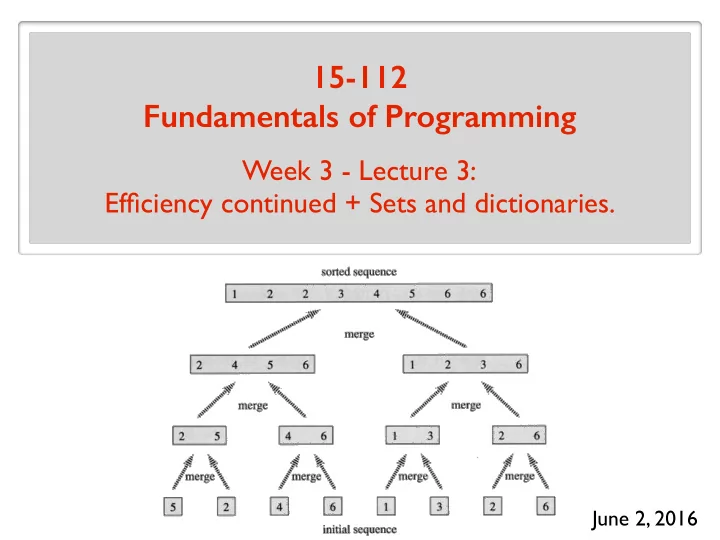
SLIDE 1
June 2, 2016
15-112 Fundamentals of Programming
Week 3 - Lecture 3: Efficiency continued + Sets and dictionaries.
SLIDE 2 Measuring running time
- for strings: = number of characters
N
- for lists: = number of elements
N
- for ints: = number of digits
N > Running time is a function of . N > Look at worst-case scenario/input of length . N > Count algorithmic steps. > Ignore constant factors. (e.g. ) N 2 ≈ 3N 2 How to properly measure running time (use big Oh notation) > Input length/size denoted by (and sometimes by ) N n
SLIDE 3 Review
Number of times you need to divide N by 2 to reach 1. What is the big Oh notation used for? Upper bound a function by ignoring:
- constant factors
- small N.
ignore small order additive terms. Give 2 definitions of log2 N The number k that satisfies . 2k = N
SLIDE 4 Review
Big-Oh is the right level of abstraction! “Sweet spot”
- coarse enough to suppress details like
programming language, compiler, architecture,…
- sharp enough to make comparisons between
different algorithmic approaches. is analogous to “too many significant figures”. 8N 2 − 3n + 84 O(N 2)
SLIDE 5
Review
1010n3 is O(n3)? n10000 is O(1.1n)? n is O(n2)? n3 is O(2n)? 100n log2 n is O(n)? 1000 log2 n is O(√n)? 1000 log2 n is O(n0.00000001)? Yes Yes Yes Yes No Yes Yes Does the base of the log matter?
When we ask “what is the running time…” you must give the tight bound!
logb n = logc n logc b
constant
SLIDE 6
Review
Constant:
O(1)
Logarithmic:
O(log n)
Square-root:
O(√n) = O(n0.5)
Linear:
O(n)
Loglinear:
O(n log n)
Quadratic:
O(n2)
Exponential:
O(kn)
Polynomial:
O(nk)
SLIDE 7
Review
log n <<< √n << n < n log n << n2 << n3 <<< 2n <<< 3n
SLIDE 8
Review
Running time of Bubble Sort: Running time of Selection Sort: Why is Bubble Sort slower than Selection Sort in practice? Running time of Linear Search: Running time of Binary Search: O(N) O(log N) O(N 2) O(N 2)
SLIDE 9
Review: selection sort code
2 8 7 99 4 5
start len(a) - 1
Find the min position from start to len(a) - 1
min position
Swap elements in min position and start Increment start Repeat Selection sort snapshot:
SLIDE 10
Review: selection sort code
2 8 7 99 4 5
start len(a) - 1
Find the min position from start to len(a) - 1
min position
Swap elements in min position and start for start = 0 to len(a)-1: Selection sort snapshot:
SLIDE 11
Review: selection sort code
def selectionSort(a): Find the min position from start to len(a) - 1 Swap elements in min position and start
2 8 7 99 4 5
start len(a) - 1 min position for start = 0 to len(a)-1: for start in range(len(a)): currentMinIndex = start for i in range(start, len(a)): if(a[i] < a[currentMinIndex]): currentMinIndex = i (a[currentMinIndex], a[start]) = (a[start], a[currentMinIndex])
SLIDE 12
Review: bubble sort code
repeat until no more swaps: for i = 0 to end: if a[i] > a[i+1], swap a[i] and a[i+1] decrement end Bubble sort snapshot 4 7 5 8 99 2
end a[i] a[i+1]
SLIDE 13
Review: bubble sort code
4 7 5 8 99 2
end a[i] a[i+1] repeat until no more swaps: for i = 0 to end: if a[i] > a[i+1], swap a[i] and a[i+1] decrement end def bubbleSort(a): swapped = True end = len(a)-1 while(swapped): swapped = False for i in range(end): if(a[i] > a[i+1]): (a[i], a[i+1]) = (a[i+1], a[i]) swapped = True end -= 1
SLIDE 14
Review
You have an algorithm with running time . O(N) If we double the input size, by what factor does the running time increase? If we quadruple the input size, by what factor does the running time increase? If we double the input size, by what factor does the running time increase? If we quadruple the input size, by what factor does the running time increase? You have an algorithm with running time . O(N 2)
SLIDE 15 Review
Give an example of an algorithm that requires exponential time. Exhaustive search for the Subset Sum Problem. Can you find a polynomial time algorithm for Subset Sum? To search for an element in a list, it is better to:
- sort the list, then do binary search, or
- do a linear search?
SLIDE 16
The Plan > Measuring running time when the input is an int > Merge sort > Efficient data structures: sets and dictionaries
SLIDE 17
Merge Sort: Merge
Merge The key subroutine/helper function: merge(a, b) Input: two sorted lists a and b Output: a and b merged into a single list, all sorted. Turns out we can do this pretty efficiently. And that turns out to be quite useful!
SLIDE 18
Merge Sort: Merge Algorithm
Merge 8 9 11 1 3 12 4 16 15 a = b = c = Main idea: min(c) = min(min(a), min(b))
SLIDE 19
Merge Sort: Merge Algorithm
Merge 8 9 11 1 3 12 4 16 15 a = b = c = Main idea: min(c) = min(min(a), min(b)) 1
SLIDE 20
Merge Sort: Merge Algorithm
Merge 8 9 11 1 3 12 4 16 15 a = b = c = Main idea: min(c) = min(min(a), min(b)) 1
SLIDE 21
Merge Sort: Merge Algorithm
Merge 8 9 11 1 3 12 4 16 15 a = b = c = Main idea: min(c) = min(min(a), min(b)) 1 3
SLIDE 22
Merge Sort: Merge Algorithm
Merge 8 9 11 1 3 12 4 16 15 a = b = c = Main idea: min(c) = min(min(a), min(b)) 1 3
SLIDE 23
Merge Sort: Merge Algorithm
Merge 8 9 11 1 3 12 4 16 15 a = b = c = Main idea: min(c) = min(min(a), min(b)) 1 3 4
SLIDE 24
Merge Sort: Merge Algorithm
Merge 8 9 11 1 3 12 4 16 15 a = b = c = Main idea: min(c) = min(min(a), min(b)) 1 3 4
SLIDE 25
Merge Sort: Merge Algorithm
Merge 8 9 11 1 3 12 4 16 15 a = b = c = Main idea: min(c) = min(min(a), min(b)) 1 3 4 8
SLIDE 26
Merge Sort: Merge Algorithm
Merge 8 9 11 1 3 12 4 16 15 a = b = c = Main idea: min(c) = min(min(a), min(b)) 1 3 4 8
SLIDE 27
Merge Sort: Merge Algorithm
Merge 8 9 11 1 3 12 4 16 15 a = b = c = Main idea: min(c) = min(min(a), min(b)) 1 3 4 8 9
SLIDE 28
Merge Sort: Merge Algorithm
Merge 8 9 11 1 3 12 4 16 15 a = b = c = Main idea: min(c) = min(min(a), min(b)) 1 3 4 8 9
SLIDE 29
Merge Sort: Merge Algorithm
Merge 8 9 11 1 3 12 4 16 15 a = b = c = Main idea: min(c) = min(min(a), min(b)) 1 3 4 8 9 11
SLIDE 30
Merge Sort: Merge Algorithm
Merge 8 9 11 1 3 12 4 16 15 a = b = c = Main idea: min(c) = min(min(a), min(b)) 1 3 4 8 9 11
SLIDE 31
Merge Sort: Merge Algorithm
Merge 8 9 11 1 3 12 4 16 15 a = b = c = Main idea: min(c) = min(min(a), min(b)) 1 3 4 8 9 11 12
SLIDE 32
Merge Sort: Merge Algorithm
Merge 8 9 11 1 3 12 4 16 15 a = b = c = Main idea: min(c) = min(min(a), min(b)) 1 3 4 8 9 11 12
SLIDE 33
Merge Sort: Merge Algorithm
Merge 8 9 11 1 3 12 4 16 15 a = b = c = Main idea: min(c) = min(min(a), min(b)) 1 3 4 8 9 11 12 15
SLIDE 34
Merge Sort: Merge Algorithm
Merge 8 9 11 1 3 12 4 16 15 a = b = c = Main idea: min(c) = min(min(a), min(b)) 1 3 4 8 9 11 12 15
SLIDE 35
Merge Sort: Merge Algorithm
Merge 8 9 11 1 3 12 4 16 15 a = b = c = Main idea: min(c) = min(min(a), min(b)) 1 3 4 8 9 11 12 15 16
SLIDE 36
Merge Sort: Merge Algorithm
Merge 8 9 11 1 3 12 4 16 15 a = b = c = Main idea: min(c) = min(min(a), min(b)) 1 3 4 8 9 11 12 15 16
SLIDE 37
Merge Sort: Merge Running Time
Merge 8 9 11 1 3 12 4 16 15 a = b = c = Running time? 1 3 4 8 9 11 12 15 16 N = len(a) + len(b) O(N) # steps:
SLIDE 38
Merge Sort: Algorithm
merge merge merge merge merge merge Merge Sort
SLIDE 39
Merge Sort: Running Time
Total: O(N log N) O(N) O(N) O(N) O(log N) levels
SLIDE 40
The Plan > Measuring running time when the input is an int > Merge sort > Efficient data structures: sets and dictionaries
SLIDE 41
Integer inputs
def isPrime(n): if (n < 2): return False for factor in range(2, n): if (n % factor == 0): return False return True
Simplifying assumption in 15-112: Arithmetic operations take constant time.
SLIDE 42
Integer inputs
def isPrime(n): if (n < 2): return False for factor in range(2, n): if (n % factor == 0): return False return True
What is the input length? = number of digits in n ~ log10 n
SLIDE 43
Integer Inputs
def isPrime(m): if (m < 2): return False for factor in range(2, m): if (m % factor == 0): return False return True
What is the input length? = number of digits in m ~ log10 m What is the running time? (actually because it is in binary)
log2 m
So N ∼ log2 m O(m) O(2N) = i.e., m ∼ 2N
SLIDE 44
Integer Inputs
def fasterIsPrime(m): if (m < 2): return False maxFactor = int(round(m**0.5)) for factor in range(3, maxFactor+1): if (m % factor == 0): return False return True
What is the running time? O(2N/2)
SLIDE 45
Not feasible when . N = 2048
isPrime
Amazing result from 2002: There is a polynomial-time algorithm for primality testing. Agrawal, Kayal, Saxena undergraduate students at the time However, best known implementation is ~ time. O(N 6)
SLIDE 46
isPrime
So that’s not what we use in practice. The running time is ~ . O(N 2) It is a randomized algorithm with a tiny error probability. 1/2300 (say ) Everyone uses the Miller-Rabin algorithm (1975).
CMU Professor
SLIDE 47
The Plan > Measuring running time when the input is an int > Merge sort > Efficient data structures: sets and dictionaries
SLIDE 48
Tangent
Can we cheat exponential time?
SLIDE 49 What is a data structure?
A data structure allows you to store and maintain a collection of data. It should support basic operations like:
- add an element to the data structure
- remove an element from the data structure
- find an element in the data structure
…
SLIDE 50 What is a data structure?
A list is a data structure. It supports basic operations:
- append( )
- remove( )
- in operator, index( )
… O(1) O(N) O(N) One could potentially come up with a different structure which has different running times for basic operations.
SLIDE 51
Motivating example
Sorting a list of numbers. What if I know all the numbers are less than 1 million. … m 1 Put number m at index m. Create a list of size 1 million. Solution: What is the running time for searching for an element? O(1)
SLIDE 52
Motivating example
The sweet idea: Connecting value to index. … m 1
SLIDE 53
Motivating example
What if the numbers are not bounded by a million? What if you want to store strings rather than numbers? Questions
SLIDE 54
Extending the sweet idea
Storing a collection of strings? … Start with a certain size list (e.g. 100) s h(s) Pick a function h that maps strings to numbers. h is called a hash function. Store s at index h(s) mod (size of list) s mod (size of list)
SLIDE 55
Extending the sweet idea
Potential Problems Collision: two strings map to the same index List fills up Fixes The hash function should be “random” so that the likelihood of collision is not high. When buckets get large (say more than 10), resize and rehash: pick a larger list, rehash everything Store multiple values at one index (bucket) (e.g. use 2d list) HASH TABLE
SLIDE 56
Extending the sweet idea
What did we gain: Basic operations add, remove, find/search super fast (sometimes (infrequently) we need to resize/rehash) What did we lose: No order No mutable elements Repetitions are not good
SLIDE 57
Sets
SLIDE 58 Introducing sets
- supports basic operations like:
s.add(x), s.remove(x), s.union(t), s.intersection(t) x in s Sets:
- a non-sequential (unordered) collection of objects
- no repetitions allowed
- look up by object’s value
- immutable elements
- finding a value is super efficient
SLIDE 59
Creating a set
s = set([2, 4, 8]) s = set([“hello”, 2, True, 3.14]) s = set([2, 2, 4, 8]) s = set([2, 4, [8]]) # Error
(sets are mutable, but its elements must be immutable.)
s = set(“hello”) s = set((2, 4, 8)) s = set(range(10)) s = set() # {8, 2, 4} # {“hello”, True, 2, 3.14} # {8, 2, 4} # {‘e’, ‘h’, ‘l’, ‘o’} # {8, 2, 4} # {0, 1, 2, 3, 4, 5, 6, 7, 8, 9}
SLIDE 60
Set methods
s.copy() s.union(t), s.intersection(t), s.difference(t), s.symmetric_difference(t) s.add(x), s.remove(x), s.discard(x)
Returns a new set (non-destructive): Modifies s (destructive):
s.pop(), s.clear() s.update(t), s.intersection_update(t), s.difference_update(t), s.symmetric_difference_update(t)
Other:
s.issubset(t), s.issuperset(t) s t s t
SLIDE 61
The advantage over lists
s = set() for x in range(10000): s.add(x) print(5000 in s) print(-1 not in s) s.remove(100) # Super fast # Super fast # Super fast
Essentially O(1)
SLIDE 62
Example: checking for duplicates
Given a list, want to check if there is any element appearing more than once.
SLIDE 63
Dictionaries (Maps)
SLIDE 64 Dictionaries / maps
Lists:
- a sequential collection of objects
Dictionaries:
- a non-sequential (unordered) collection of objects
- a more flexible look up by keys
- can do look up by index (the position in the collection)
SLIDE 65
Dictionaries / maps
“slkj2” “4@4s” “as43” “9idj” 1 2 3 4
List
a = [None]*5 a[0] = “slkj2” a[1] = “4@4s” a[2] = “as43” a[3] = “9idj” a[4] = “9idj”
keys values
SLIDE 66 Dictionaries / maps
d = dict() d[“alice”] = “slkj2” d[“bob”] = “4@4s” d[“charlie”] = “as43” d[“david”] = “9idj” d[“eve”] = “9idj”
keys values
“alice” “bob” “charlie” “david” “eve” “slkj2” “4@4s” “as43” “9idj”
HASH TABLE
- hash using the key
- store (key, value) pair
- unordered
- values are mutable
- keys form a set
(immutable, no repetition)
Properties:
SLIDE 67
Dictionaries / maps
users = dict() users[“alice”] = “sl@3” users[“bob”] = “#$ks” users[“charlie”] = “slk92” users = {“alice”: “sl@3”, “bob”: “#$ks”, “charlie”: “slk92”} users = [(“alice”, “sl@3”), (“bob”, “#$ks”), (“charlie”, “#242”)] users = dict(users)
Creating dictionaries
SLIDE 68
Dictionaries / maps
for key in users: print(key, d[key]) print(users[“frank”]) print(users.get(“frank”)) print(users.get(“frank”, 0)) Error # prints None # prints 0 users = {“alice”: “sl@3”, “bob”: “#$ks”, “charlie”: “slk92”}
SLIDE 69 Example: Find most frequent element
Input: a list of integers Output: the most frequent element in the list 1 2 3 count elements
Exercise: Write the code.