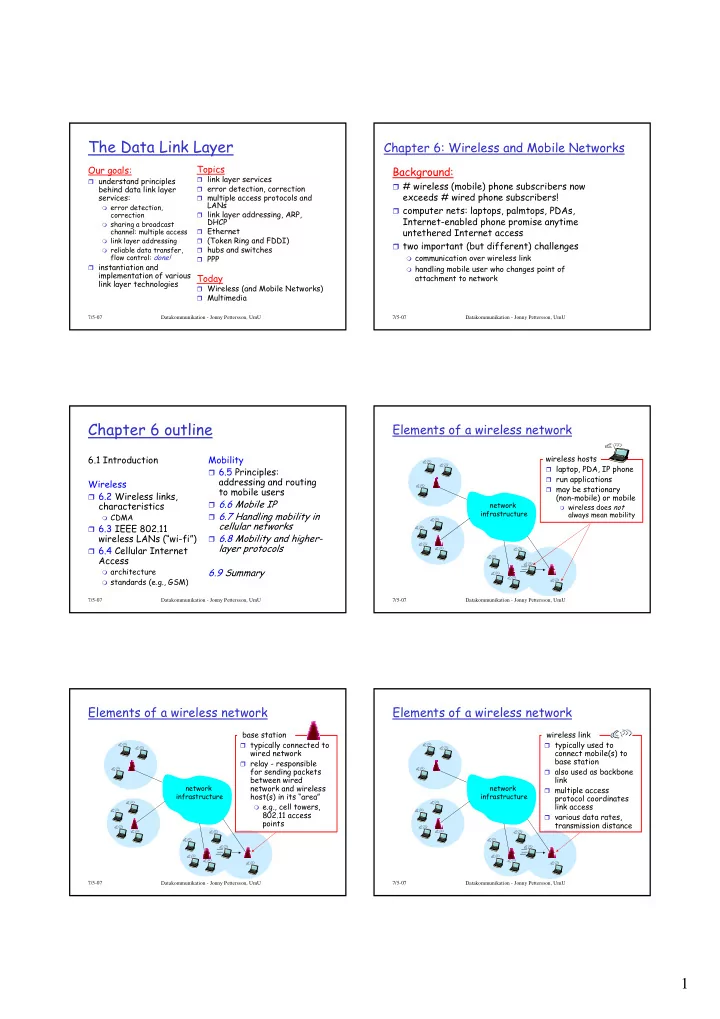
1 Characteristics of selected wireless link Elements of a wireless - - PDF document

1
SMART_READER_LITE
LIVE PREVIEW

1 Characteristics of selected wireless link Elements of a wireless - - PDF document

The Data Link Layer Chapter 6: Wireless and Mobile Networks Our goals: Topics Background: link layer services understand principles # wireless (mobile) phone subscribers now behind data link layer error detection, correction


slide-1
SLIDE 1

1

7/5-07 Datakommunikation - Jonny Pettersson, UmU

The Data Link Layer

Our goals:

understand principles

behind data link layer services:

error detection,

correction

sharing a broadcast

channel: multiple access

link layer addressing reliable data transfer,

flow control: done! instantiation and

implementation of various link layer technologies

Topics

link layer services error detection, correction multiple access protocols and

LANs

link layer addressing, ARP,

DHCP

Ethernet (Token Ring and FDDI) hubs and switches PPP

Today

Wireless (and Mobile Networks) Multimedia

7/5-07 Datakommunikation - Jonny Pettersson, UmU

Chapter 6: Wireless and Mobile Networks

Background:

# wireless (mobile) phone subscribers now

exceeds # wired phone subscribers!

computer nets: laptops, palmtops, PDAs,

Internet-enabled phone promise anytime untethered Internet access

two important (but different) challenges

communication over wireless link handling mobile user who changes point of

attachment to network

7/5-07 Datakommunikation - Jonny Pettersson, UmU

Chapter 6 outline

6.1 Introduction Wireless

6.2 Wireless links,

characteristics

CDMA

6.3 IEEE 802.11

wireless LANs (“wi-fi”)

6.4 Cellular Internet

Access

architecture standards (e.g., GSM)

Mobility

6.5 Principles:

addressing and routing to mobile users

6.6 Mobile IP 6.7 Handling mobility in

cellular networks

6.8 Mobility and higher-

layer protocols 6.9 Summary

7/5-07 Datakommunikation - Jonny Pettersson, UmU

Elements of a wireless network

network infrastructure

wireless hosts

laptop, PDA, IP phone run applications may be stationary

(non-mobile) or mobile

wireless does not

always mean mobility

7/5-07 Datakommunikation - Jonny Pettersson, UmU

Elements of a wireless network

network infrastructure

base station

typically connected to

wired network

relay - responsible

for sending packets between wired network and wireless host(s) in its “area”

e.g., cell towers,

802.11 access points

7/5-07 Datakommunikation - Jonny Pettersson, UmU

Elements of a wireless network

network infrastructure

wireless link

typically used to

connect mobile(s) to base station

also used as backbone

link

multiple access

protocol coordinates link access

various data rates,

transmission distance

slide-2
SLIDE 2

2

7/5-07 Datakommunikation - Jonny Pettersson, UmU

Characteristics of selected wireless link standards

384 Kbps 56 Kbps 54 Mbps 5-11 Mbps 1 Mbps 802.15

802.11b 802.11{a,g} IS-95 CDMA, GSM UMTS/WCDMA, CDMA2000

.11 p-to-p link

2G 3G Indoor

10 – 30m

Outdoor

50 – 200m

Mid range

  • utdoor

200m – 4Km

Long range

  • utdoor

5Km – 20Km

7/5-07 Datakommunikation - Jonny Pettersson, UmU

Elements of a wireless network

network infrastructure

infrastructure mode

base station connects

mobiles into wired network

handoff: mobile

changes base station providing connection into wired network

7/5-07 Datakommunikation - Jonny Pettersson, UmU

Elements of a wireless network

Ad hoc mode

no base stations nodes can only

transmit to other nodes within link coverage

nodes organize

themselves into a network: route among themselves

7/5-07 Datakommunikation - Jonny Pettersson, UmU

Wireless Link Characteristics

Differences from wired link ….

decreased signal strength: radio signal

attenuates as it propagates through matter (path loss)

interference from other sources: standardized

wireless network frequencies (e.g., 2.4 GHz) shared by other devices (e.g., phone); devices (motors) interfere as well

multipath propagation: radio signal reflects off

  • bjects ground, arriving at destination at

slightly different times …. make communication across (even a point to point) wireless link much more “difficult”

7/5-07 Datakommunikation - Jonny Pettersson, UmU

Wireless network characteristics

Multiple wireless senders and receivers create additional problems (beyond multiple access):

A B C

Hidden terminal problem

B, A hear each other B, C hear each other A, C can not hear each other

means A, C unaware of their interference at B

A B C

A’s signal strength

space

C’s signal strength

Signal fading:

B, A hear each other B, C hear each other A, C can not hear each other

interferring at B

7/5-07 Datakommunikation - Jonny Pettersson, UmU

Code Division Multiple Access (CDMA)

used in several wireless broadcast channels

(cellular, satellite, etc) standards

unique “code” assigned to each user; i.e., code set

partitioning

all users share same frequency, but each user has

  • wn “chipping” sequence (i.e., code) to encode data

encoded signal = (original data) X (chipping

sequence)

decoding: inner-product of encoded signal and

chipping sequence

allows multiple users to “coexist” and transmit

simultaneously with minimal interference (if codes are “orthogonal”)

slide-3
SLIDE 3

3

7/5-07 Datakommunikation - Jonny Pettersson, UmU

CDMA Encode/Decode

slot 1 slot 0

d1 = -1

1 1 1 1 1

  • 1
  • 1
  • 1
  • Zi,m= di.cm

d0 = 1

1 1 1 1 1

  • 1
  • 1
  • 1
  • 1 1 1

1 1

  • 1
  • 1
  • 1
  • 1 1 1

1 1

  • 1
  • 1
  • 1
  • slot 0

channel

  • utput

slot 1 channel

  • utput

channel output Zi,m sender

code data bits

slot 1 slot 0

d1 = -1 d0 = 1

1 1 1 1 1

  • 1
  • 1
  • 1
  • 1 1 1

1 1

  • 1
  • 1
  • 1
  • 1 1 1

1 1

  • 1
  • 1
  • 1
  • 1 1 1

1 1

  • 1
  • 1
  • 1
  • slot 0

channel

  • utput

slot 1 channel

  • utput

receiver

code received input Di = Σ Zi,m.cm

m=1 M

M

7/5-07

CDMA: two-sender interference

7/5-07 Datakommunikation - Jonny Pettersson, UmU

IEEE 802.11 Wireless LAN

802.11b

2.4-2.485 GHz unlicensed

radio spectrum

up to 11 Mbps widely deployed, using

base stations 802.11a

5.1-5.8 GHz range up to 54 Mbps

802.11g

2.4-2.485 GHz range up to 54 Mbps

+ more…

All use CSMA/CA for

multiple access

All have base-station

and ad-hoc network versions

7/5-07 Datakommunikation - Jonny Pettersson, UmU

802.11 LAN architecture

wireless host communicates

with base station

base station = access

point (AP)

Basic Service Set (BSS)

(aka “cell”) in infrastructure mode contains:

wireless hosts access point (AP): base

station

ad hoc mode: hosts only

BSS 1 BSS 2 Internet hub, switch

  • r router

AP AP

7/5-07 Datakommunikation - Jonny Pettersson, UmU

IEEE 802.11: multiple access

avoid collisions: 2+ nodes transmitting at same time 802.11: CSMA - sense before transmitting

don’t collide with ongoing transmission by other node

802.11: no collision detection!

difficult to receive (sense collisions) when transmitting due

to weak received signals (fading)

can’t sense all collisions in any case: hidden terminal, fading goal: avoid collisions: CSMA/C(ollision)A(voidance)

A B C A B C

A’s signal strength

space

C’s signal strength 7/5-07 Datakommunikation - Jonny Pettersson, UmU

IEEE 802.11 MAC Protocol: CSMA/CA

802.11 sender 1 if sense channel idle for DIFS then

transmit entire frame (no CD) 2 if sense channel busy then start random backoff time timer counts down while channel idle transmit when timer expires if no ACK, increase random backoff interval, repeat 2

802.11 receiver

  • if frame received OK

return ACK after SIFS (ACK needed due to hidden terminal problem)

sender receiver

DIFS

data

SIFS

ACK

slide-4
SLIDE 4

4

7/5-07 Datakommunikation - Jonny Pettersson, UmU

Avoiding collisions (more)

idea: allow sender to “reserve” channel rather than random

access of data frames: avoid collisions of long data frames

sender first transmits small request-to-send (RTS) packets

to BS using CSMA

RTSs may still collide with each other (but they’re short)

BS broadcasts clear-to-send CTS in response to RTS RTS heard by all nodes

sender transmits data frame

  • ther stations defer transmissions

Avoid data frame collisions completely using small reservation packets!

7/5-07 Datakommunikation - Jonny Pettersson, UmU

Collision Avoidance: RTS-CTS exchange

AP A B time RTS(A) RTS(B) RTS(A) C T S ( A ) CTS(A) DATA (A) A C K ( A ) ACK(A) reservation collision defer

7/5-07 Datakommunikation - Jonny Pettersson, UmU

M radius of coverage S S S P P P P M S

Master device Slave device Parked device (inactive)

P

802.15: personal area network

less than 10 m diameter replacement for cables

(mouse, keyboard, headphones)

ad hoc: no infrastructure master/slaves:

slaves request permission to

send (to master)

master grants requests

802.15: evolved from

Bluetooth specification

2.4-2.5 GHz radio band up to 721 kbps 7/5-07 Datakommunikation - Jonny Pettersson, UmU Mobile Switching Center Public telephone network, and Internet Mobile Switching Center

Components of cellular network architecture

connects cells to wide area net manages call setup handles mobility

MSC

covers geographical

region

base station (BS)

analogous to 802.11 AP

mobile users attach

to network through BS

air-interface:

physical and link layer protocol between mobile and BS

cell wired network

7/5-07 Datakommunikation - Jonny Pettersson, UmU

Cellular networks: the first hop

Two techniques for sharing mobile-to-BS radio spectrum

combined FDMA/TDMA:

divide spectrum in frequency channels, divide each channel into time slots

CDMA: code division

multiple access

frequency bands time slots

7/5-07 Datakommunikation - Jonny Pettersson, UmU

Cellular standards: brief survey

2G systems: voice channels

IS-136 TDMA: combined FDMA/TDMA (north

america)

GSM (global system for mobile communications):

combined FDMA/TDMA

most widely deployed

IS-95 CDMA: code division multiple access

IS-136 GSM IS-95 G P R S E D G E CDMA-2000 UMTS T D M A / F D M A Don’t drown in a bowl

  • f alphabet soup: use this

for reference only

slide-5
SLIDE 5

5

7/5-07 Datakommunikation - Jonny Pettersson, UmU

Cellular standards: brief survey

2.5 G systems: voice and data channels

for those who can’t wait for 3G service: 2G extensions general packet radio service (GPRS)

evolved from GSM data sent on multiple channels (if available)

enhanced data rates for global evolution (EDGE)

also evolved from GSM, using enhanced modulation data rates up to 384K

CDMA-2000 (phase 1)

data rates up to 144K evolved from IS-95 7/5-07 Datakommunikation - Jonny Pettersson, UmU

Cellular standards: brief survey

3G systems: voice/data

Universal Mobile Telecommunications Service (UMTS)

GSM next step, but using CDMA

CDMA-2000

7/5-07 Datakommunikation - Jonny Pettersson, UmU

What is mobility?

spectrum of mobility, from the network perspective:

no mobility high mobility

mobile wireless user, using same access point mobile user, passing through multiple access point while maintaining ongoing connections (like cell

phone)

mobile user, connecting/ disconnecting from network using DHCP.

7/5-07 Datakommunikation - Jonny Pettersson, UmU

Mobility: Vocabulary

home network: permanent “home” of mobile

(e.g., 128.119.40/24)

Permanent address: address in home network, can always be used to reach mobile

e.g., 128.119.40.186

home agent: entity that will perform mobility functions on behalf of mobile, when mobile is remote

wide area network

correspondent 7/5-07 Datakommunikation - Jonny Pettersson, UmU

Mobility: approaches

Let routing handle it: routers advertise permanent

address of mobile-nodes-in-residence via usual routing table exchange.

routing tables indicate where each mobile located no changes to end-systems

Let end-systems handle it:

indirect routing: communication from

correspondent to mobile goes through home agent, then forwarded to remote

direct routing: correspondent gets foreign

address of mobile, sends directly to mobile

7/5-07 Datakommunikation - Jonny Pettersson, UmU

Mobility: approaches

Let routing handle it: routers advertise permanent

address of mobile-nodes-in-residence via usual routing table exchange.

routing tables indicate where each mobile located no changes to end-systems

Let end-systems handle it:

indirect routing: communication from

correspondent to mobile goes through home agent, then forwarded to remote

direct routing: correspondent gets foreign

address of mobile, sends directly to mobile

not scalable to millions of mobiles

slide-6
SLIDE 6

6

7/5-07 Datakommunikation - Jonny Pettersson, UmU

Mobility: registration

End result:

Foreign agent knows about mobile Home agent knows location of mobile

wide area network

home network visited network

1

mobile contacts foreign agent on entering visited network

2

foreign agent contacts home agent home: “this mobile is resident in my network”

7/5-07 Datakommunikation - Jonny Pettersson, UmU

Chapter 6 Summary

Wireless

wireless links:

capacity, distance channel impairments CDMA

IEEE 802.11 (“wi-fi”)

CSMA/CA reflects

wireless channel characteristics cellular access

architecture standards (e.g., GSM,

CDMA-2000, UMTS)

Mobility

principles: addressing,

routing to mobile users

home, visited networks direct, indirect routing care-of-addresses 7/5-07 Datakommunikation - Jonny Pettersson, UmU

TCP/IP

Application TCP

Connection oriented

UDP

Best effort

IP

Best effort Forwarding Routing

Link

Ethernet, token ring,

wireless, ... Physical Applikation UDP TCP IP Kopplingsnivån Fysiska nivån

7/5-07 Datakommunikation - Jonny Pettersson, UmU

Multimedia, Quality of Service: What is it?

Multimedia applications: network audio and video (“continuous media”) network provides application with level of performance needed for application to function.

QoS

7/5-07 Datakommunikation - Jonny Pettersson, UmU

Multimedia Networking

Principles

Classify multimedia

applications

Identify the network

services the apps need

Making the best of

best effort service

Mechanisms for

providing QoS Protocols and Architectures

Specific protocols

for best-effort

Architectures for

QoS Today

Multimedia Networking Applications Streaming stored audio and video

Next time

Real-time Multimedia: Internet Phone

study

Protocols for Real-Time Interactive

Applications - RTP,RTCP,SIP

Distributing Multimedia: content

distribution networks

Beyond Best Effort Scheduling and Policing Mechanisms Integrated Services and

Differentiated Services

RSVP

7/5-07 Datakommunikation - Jonny Pettersson, UmU

MM Networking Applications

Fundamental characteristics:

Typically delay sensitive

tolerant: infrequent end-

to-end delay

delay jitter

But losses cause minor

but delay tolerant glitches

Antithesis of data,

which are loss intolerant. Classes of MM applications: 1) Streaming stored audio and video 2) Streaming live audio and video 3) Real-time interactive audio and video Jitter is the variability

  • f packet delays within

the same packet stream

slide-7
SLIDE 7

7

7/5-07 Datakommunikation - Jonny Pettersson, UmU

Streaming Stored Multimedia

Streaming:

media stored at source transmitted to client streaming: client playout begins

before all data has arrived

7/5-07 Datakommunikation - Jonny Pettersson, UmU

Streaming Stored Multimedia: What is it?

  • 1. video

recorded

  • 2. video

sent

  • 3. video received,

played out at client C u m u l a t i v e d a t a streaming: at this time, client playing out early part of video, while server still sending later part of video network delay time

7/5-07 Datakommunikation - Jonny Pettersson, UmU

Streaming Stored Multimedia: Interactivity

VCR-like functionality: client can

pause, rewind, FF, push slider bar

10 sec initial delay OK 1-2 sec until command effect OK RTSP (Real-Time Streaming Protocol)

  • ften used (more later)

timing constraint for still-to-be

transmitted data: in time for playout

7/5-07 Datakommunikation - Jonny Pettersson, UmU

Streaming Live Multimedia

Examples:

Internet radio talk show Live sporting event

Streaming

playback buffer playback can lag tens of seconds after

transmission

still have timing constraint

Interactivity

fast forward impossible rewind, pause possible!

7/5-07 Datakommunikation - Jonny Pettersson, UmU

Interactive, Real-Time Multimedia

end-end delay requirements:

audio: < 150 msec good, < 400 msec OK video: < 150 msec acceptable

session initialization

how does callee advertise its IP address, port

number, encoding algorithms?

applications: IP telephony, video

conference, distributed interactive worlds

7/5-07 Datakommunikation - Jonny Pettersson, UmU

Multimedia Over Today’s Internet

TCP/UDP/IP: “best-effort service”

no guarantees on delay, loss

Today’s Internet multimedia applications use application-level techniques to mitigate (as best possible) effects of delay, loss But you said multimedia apps requires QoS and level of performance to be effective!

? ? ? ? ? ? ? ? ? ? ?

slide-8
SLIDE 8

8

7/5-07 Datakommunikation - Jonny Pettersson, UmU

How should the Internet evolve to better support multimedia?

Integrated services philosophy:

Fundamental changes in

Internet so that apps can reserve end-to-end bandwidth

Requires new, complex

software in hosts & routers Laissez-faire

no major changes more bandwidth when

needed

content distribution,

application-layer multicast

application layer

Differentiated services philosophy:

Fewer changes to Internet

infrastructure, yet provide 1st and 2nd class service.

What’s your opinion?

7/5-07 Datakommunikation - Jonny Pettersson, UmU

A few words about audio compression

Analog signal sampled

at constant rate

telephone: 8,000

samples/sec

CD music: 44,100

samples/sec Each sample quantized,

i.e., rounded

e.g., 28=256 possible

quantized values Each quantized value

represented by bits

8 bits for 256 values

Example: 8,000

samples/sec, 256 quantized values --> 64,000 bps

Receiver converts it

back to analog signal:

some quality reduction

Example rates

CD: 1.411 Mbps MP3: 96, 128, 160 kbps Internet telephony:

5.3 - 13 kbps

7/5-07 Datakommunikation - Jonny Pettersson, UmU

A few words about video compression

Video is a sequence

  • f images displayed

at constant rate

Digital image is an

array of pixels

Each pixel

represented by bits

Redundancy

spatial temporal

Examples:

MPEG 1 (CD-ROM)

1.5 Mbps

MPEG2 (DVD) 3-6

Mbps

MPEG4 (often used

in Internet, < 1 Mbps)

7/5-07 Datakommunikation - Jonny Pettersson, UmU

Streaming Stored Multimedia

Application-level streaming techniques for making the best out of best effort service:

client side buffering use of UDP versus TCP multiple encodings of

multimedia

jitter removal decompression error concealment graphical user interface

w/ controls for interactivity

Media Player

7/5-07 Datakommunikation - Jonny Pettersson, UmU

Internet multimedia: simplest approach

audio, video not streamed:

no, “pipelining,” long delays until playout! audio or video stored in file files transferred as HTTP object

received in entirety at client then passed to player

7/5-07 Datakommunikation - Jonny Pettersson, UmU

Internet multimedia: streaming approach

browser GETs metafile browser launches player, passing metafile player contacts server server streams audio/video to player

slide-9
SLIDE 9

9

7/5-07 Datakommunikation - Jonny Pettersson, UmU

Streaming from a streaming server

This architecture allows for non-HTTP protocol between

server and media player

Can also use UDP instead of TCP.

7/5-07 Datakommunikation - Jonny Pettersson, UmU

constant bit rate video transmission C u m u l a t i v e d a t a time variable network delay client video reception constant bit rate video playout at client client playout delay

buffered video

Streaming Multimedia: Client Buffering

Client-side buffering, playout delay compensate

for network-added delay, delay jitter

7/5-07 Datakommunikation - Jonny Pettersson, UmU

Streaming Multimedia: Client Buffering

Client-side buffering, playout delay compensate

for network-added delay, delay jitter

buffered video variable fill rate, x(t) constant drain rate, d

7/5-07 Datakommunikation - Jonny Pettersson, UmU

Streaming Multimedia: UDP or TCP?

UDP

server sends at rate appropriate for client (oblivious to

network congestion !)

  • ften: send rate = encoding rate = constant rate

then, fill rate = constant rate - packet loss

short playout delay (2-5 seconds) to compensate for network

delay jitter

error recover: time permitting

TCP

send at maximum possible rate under TCP fill rate fluctuates due to TCP congestion control larger playout delay: smooth TCP delivery rate HTTP/TCP passes more easily through firewalls

7/5-07 Datakommunikation - Jonny Pettersson, UmU

Streaming Multimedia: client rate(s)

Q: how to handle different client receive rate capabilities?

28.8 Kbps dialup 100Mbps Ethernet

A: server stores, transmits multiple copies

  • f video, encoded at different rates

1.5 Mbps encoding 28.8 Kbps encoding

7/5-07 Datakommunikation - Jonny Pettersson, UmU

User Control of Streaming Media: RTSP

HTTP

Does not target multimedia

content

No commands for fast

forward, etc. RTSP: RFC 2326

Client-server application

layer protocol

For user to control display:

rewind, fast forward, pause, resume, repositioning, etc…

Uses a meta file Out-of-band protocol

What it doesn’t do:

does not define how

audio/video is encapsulated for streaming over network

does not restrict how

streamed media is transported; it can be transported over UDP or TCP

does not specify how the

media player buffers audio/video

slide-10
SLIDE 10

10

7/5-07 Datakommunikation - Jonny Pettersson, UmU

Metafile Example

<title>Twister</title> <session> <group language=en lipsync> <switch> <track type=audio e="PCMU/8000/1" src = "rtsp://audio.example.com/twister/audio.en/lofi"> <track type=audio e="DVI4/16000/2" pt="90 DVI4/8000/1" src="rtsp://audio.example.com/twister/audio.en/hifi"> </switch> <track type="video/jpeg" src="rtsp://video.example.com/twister/video"> </group> </session>

7/5-07 Datakommunikation - Jonny Pettersson, UmU

RTSP Operation

7/5-07 Datakommunikation - Jonny Pettersson, UmU

RTSP Exchange Example

C: SETUP rtsp://audio.example.com/twister/audio RTSP/1.0 Transport: rtp/udp; compression; port=3056; mode=PLAY S: RTSP/1.0 200 1 OK Session 4231 C: PLAY rtsp://audio.example.com/twister/audio.en/lofi RTSP/1.0 Session: 4231 Range: npt=0- C: PAUSE rtsp://audio.example.com/twister/audio.en/lofi RTSP/1.0 Session: 4231 Range: npt=37 C: TEARDOWN rtsp://audio.example.com/twister/audio.en/lofi RTSP/1.0 Session: 4231 S: 200 3 OK

7/5-07 Datakommunikation - Jonny Pettersson, UmU

Multimedia Networking

Principles

Classify multimedia

applications

Identify the network

services the apps need

Making the best of

best effort service

Mechanisms for

providing QoS Protocols and Architectures

Specific protocols

for best-effort

Architectures for

QoS Today

Multimedia Networking Applications Streaming stored audio and video

Next time

Real-time Multimedia: Internet Phone

study

Protocols for Real-Time Interactive

Applications - RTP,RTCP,SIP

Distributing Multimedia: content

distribution networks

Beyond Best Effort Scheduling and Policing Mechanisms Integrated Services and

Differentiated Services

RSVP