1 Design guidelines Moving data from disk to cache Protect file - - PDF document

1
SMART_READER_LITE
LIVE PREVIEW

1 Design guidelines Moving data from disk to cache Protect file - - PDF document

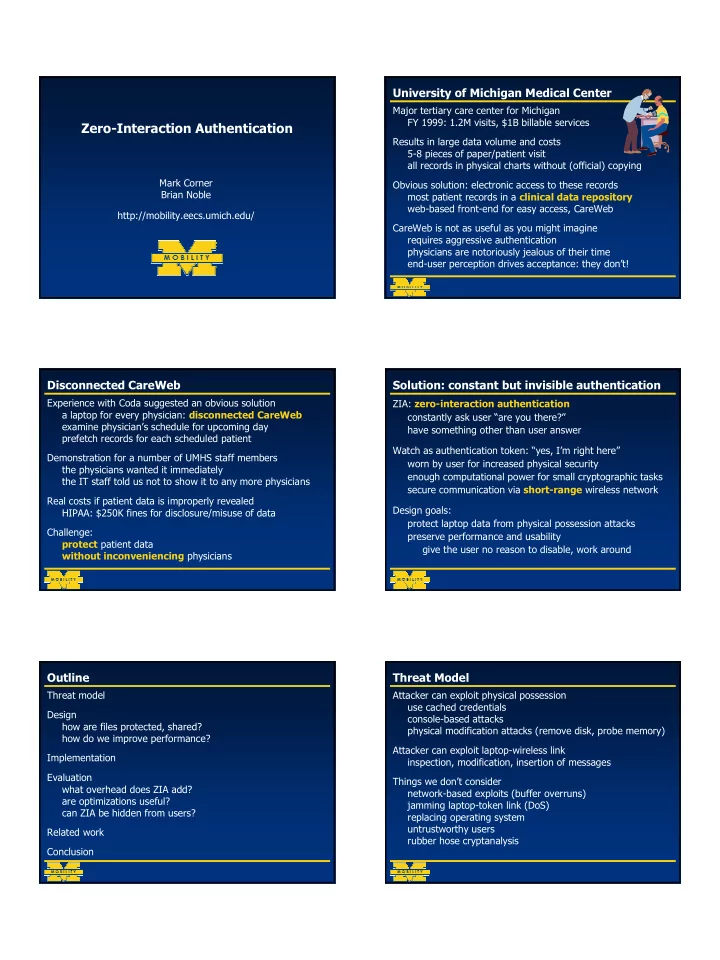
University of Michigan Medical Center Major tertiary care center for Michigan FY 1999: 1.2M visits, $1B billable services Zero-Interaction Authentication Results in large data volume and costs 5-8 pieces of paper/patient visit all records in


slide-1
SLIDE 1

1

Zero-Interaction Authentication

Mark Corner Brian Noble http://mobility.eecs.umich.edu/ Major tertiary care center for Michigan FY 1999: 1.2M visits, $1B billable services Results in large data volume and costs 5-8 pieces of paper/patient visit all records in physical charts without (official) copying Obvious solution: electronic access to these records most patient records in a clinical data repository web-based front-end for easy access, CareWeb CareWeb is not as useful as you might imagine requires aggressive authentication physicians are notoriously jealous of their time end-user perception drives acceptance: they don’t!

University of Michigan Medical Center Disconnected CareWeb

Experience with Coda suggested an obvious solution a laptop for every physician: disconnected CareWeb examine physician’s schedule for upcoming day prefetch records for each scheduled patient Demonstration for a number of UMHS staff members the physicians wanted it immediately the IT staff told us not to show it to any more physicians Real costs if patient data is improperly revealed HIPAA: $250K fines for disclosure/misuse of data Challenge: protect patient data without inconveniencing physicians

Solution: constant but invisible authentication

ZIA: zero-interaction authentication constantly ask user “are you there?” have something other than user answer Watch as authentication token: “yes, I’m right here” worn by user for increased physical security enough computational power for small cryptographic tasks secure communication via short-range wireless network Design goals: protect laptop data from physical possession attacks preserve performance and usability give the user no reason to disable, work around

Outline

Threat model Design how are files protected, shared? how do we improve performance? Implementation Evaluation what overhead does ZIA add? are optimizations useful? can ZIA be hidden from users? Related work Conclusion

Threat Model

Attacker can exploit physical possession use cached credentials console-based attacks physical modification attacks (remove disk, probe memory) Attacker can exploit laptop-wireless link inspection, modification, insertion of messages Things we don’t consider network-based exploits (buffer overruns) jamming laptop-token link (DoS) replacing operating system untrustworthy users rubber hose cryptanalysis

slide-2
SLIDE 2

2

Design guidelines

Protect file system data all data on disk encrypted ensure user is present for each decryption Can’t contact token on every decryption adds (short) latency to (many) operations Take advantage of caching already used in file systems data on-disk: encrypted for safety data in cache: decrypted for performance token’s keys required for decrypting files Take advantage of fact that people move slowly

  • nly check “often enough” to notice user departure

Moving data from disk to cache

Tokens cannot decrypt file contents directly small, battery-powered: limited computation connected to laptop via wireless link latency comparable to disk, bandwidth much less Instead, store file encrypting key on disk, itself encrypted key encrypting key never leaves token

File Key File

Laptop Token

Moving data from disk to cache

Tokens cannot decrypt file contents directly small, battery-powered: limited computation connected to laptop via wireless link latency comparable to disk, bandwidth much less Instead, store file encrypting key on disk, itself encrypted key encrypting key never leaves token

File Key File

Laptop Token

Key-Encrypting Key File Key

Moving data from disk to cache

Tokens cannot decrypt file contents directly small, battery-powered: limited computation connected to laptop via wireless link latency comparable to disk, bandwidth much less Instead, store file encrypting key on disk, itself encrypted key encrypting key never leaves token

File Key File Key-Encrypting Key

Laptop Token

Key-Encrypting Key File Key Key-Encrypting Key File Key

Moving data from disk to cache

Tokens cannot decrypt file contents directly small, battery-powered: limited computation connected to laptop via wireless link latency comparable to disk, bandwidth much less Instead, store file encrypting key on disk, itself encrypted key encrypting key never leaves token

File Key File Key-Encrypting Key

Laptop Token

Key-Encrypting Key File Key File Key Key-Encrypting Key File Key

Moving data from disk to cache

Tokens cannot decrypt file contents directly small, battery-powered: limited computation connected to laptop via wireless link latency comparable to disk, bandwidth much less Instead, store file encrypting key on disk, itself encrypted key encrypting key never leaves token

File Key File Key-Encrypting Key

Laptop Token

Key-Encrypting Key File Key File Key Key-Encrypting Key File Key Session Encryption
slide-3
SLIDE 3

3

Key-encrypting keys are capabilities

File encrypted by some key, E E is on disk, encrypted with another key, O O is known only to authentication token may also choose to escrow O as a matter of policy Sharing accommodated by additional encrypted versions of E UNIX protection model: owner, group, and world E encrypted by owner key O, group key G each user’s token holds their O, and all applicable Gs members of same group share copies of G Can have per-machine world keys, too

Handle keys efficiently

Key acquisition time can be expensive network round trip + processing time many milliseconds can’t add this to every disk operation! Two mechanisms mitigate this problem

  • verlap key acquisition with disk operations

cache decrypted keys, exploiting locality Neither mechanism helps with file creation is an asynchronous write: no overlap is a new file: no cached key

  • bservation: you don’t need any particular key

prefetch a stash of “fresh” keys

Assign keys per directory

What is the right granularity for file keys? small grain limits damage of key exposure large grain increases effectiveness of caching We chose per-directory keys to exploit access patterns files in same directory tend to be used together acquisition time amortized across a directory Directory keys stored in the directory they encrypt

Maintain performance, retain correctness

Optimizations reduce laptop/token interactions but, still need to ask “are you there?” frequently! Add periodic polling exchange encrypted nonces: challenge/response

  • nce per second, because people are slow

When user is away, protect file system data must be fast enough to foil theft When user returns, restore machine to pre-departure state user should see no performance penalty on return

Make protection fast and invisible

Key question: what to do with cached data on departure? One alternative: flush on departure, read on arrival flush is fast: write dirty pages, bzero cache recovery is slow: read entire file cache from disk Instead, we encrypt on departure, decrypt on arrival protection is a bit slower, but fast enough recovery is much faster: no disk operations This retains current file cache behavior unused file blocks can be flushed when idle encrypted file blocks are treated identically

Implementation

Implementation is split into two parts in-kernel file system support authentication system and token In-kernel support (Linux) provides cryptographic I/O manages keys polls for token Authentication system client running in user-space on the user’s laptop server running on token (Linux or WinCE) communicate via a secure channel

slide-4
SLIDE 4

4

Implementation

Disk

Laptop

VFS Page Cache ZIA Underlying FS Key Cache

Authentication Client Authentication Server

Token

Implemented in-kernel as a stackable file system Uses FiST toolkit (Columbia) Rijndael used for encryption

Evaluation overview

Several important questions what overhead does ZIA impose? how long does it take to secure the cache? how long does it take to restore the cache? Prototype System client system: IBM Thinkpad 570 token: Compaq iPAQ 3650 connected by 802.11 network in 1Mb/s mode

Evaluation: Andrew Benchmark

Determine file system overhead Modified Andrew Benchmark copy and compile Apache source code 7.4 MB source only 9.7 MB source plus objects Compare ZIA against three file systems Ext2fs: file system “at the bottom” Base: null stacking layer implemented in FiST Cryptfs: FiST’s cryptographic file system (+Rijndael)

Modified Andrew Benchmark results

9.32%

57.54 (0.20)

ZIA 9.28%

57.52 (0.18)

Cryptfs 0.24%

52.76 (0.22)

Base

  • 52.63 (0.30)

Ext2fs Overhead (vs. Ext2fs) Time, sec File System

ZIA is indistinguishable from Cryptfs

Benefit of optimizations

  • ptimizations are critical

9.32% 57.54 (0.20) ZIA 340.86% 232.04 (3.40) No prefetching No caching

  • 52.63 (0.30)

Ext2fs

Turn off prefetching, caching to see how useful they are

Stress tests

Andrew benchmark obligatory, but not necessarily good

  • ften measures the speed of your compiler

Three benchmarks stress high-overhead operations 1) create many directories 2) scan those directories 3) bulk copy: 40MB Pine source

slide-5
SLIDE 5

5

Creating directories

Fresh key prefetching minimizes overhead

5.9% 10.25 (0.09) ZIA 2.17% 9.88 (0.14) Cryptfs

  • 0.15%

9.66 (0.13) Base

  • 9.67 (0.23)

Ext2fs Over Ext2fs Time, sec File System

Reading directories

Directory reads expose full key acquisition costs

91.24% 29.76 (3.33) ZIA

  • 0.94%

15.41 (1.07) Cryptfs 1.04% 15.72 (1.16) Base+

  • 15.56 (1.25)

Ext2fs Over Ext2fs Time, sec File System

Copying large trees

Bulk data costs dominated by cryptography and stacking overhead

121.38% 43.56 (1.13) ZIA 117.57% 42.81 (1.34) Cryptfs 57.78% 31.05 (0.68) Base

  • 19.68 (0.28)

Ext2fs Over Ext2fs Time, sec File System

Time to secure/restore the file system

All data must be encrypted when user leaves All data must be decrypted when user returns Benchmark: copy various trees into ZIA disable token, measure time to safety enable token, measure time to recovery

Time to protect/recover the file system

1 2 3 4 5 6 7 5 10 15 20 25 30 35 Page Cache Size (MB) Time (s)

recovery time (get keys, decrypt) protection time (encrypt)

Related work

Many examples of cryptographic file systems CFS (Matt Blaze), Cryptfs (Erez Zadok), EFS (Win2k) all suffer from the problem of “implied consent”

  • nce you log in, the file system can forevermore decrypt

Win2k asks you to authenticate more frequently inconvenient: anecdotally, it is often disabled Can use a smart card to hold keys (Blaze) rather than in-kernel smart card left in the machine: still has “implied consent” Some examples of hardware tokens for proximity detection Landwehr ’97, Ensure Technologies all advisory; tokens are not capabilities laptop capable of acting, could be forced to

slide-6
SLIDE 6

6

Next Steps (a.k.a. Mark’s Thesis)

Underlying principle authentication is traditionally a persistent property what are the implications of making it transient? Protect applications (brute force) treat VM images like files encrypt paging space (Provos) encrypt in-memory pages on departure, decrypt on return Expose to applications API for transient authentication services security-conscious applications manage their own state

Conclusions

Your machine has the long-term authority to act as you Zero-Interaction Authentication user retains long-term authority to decrypt laptop holds only transient authority defends against physical possession attacks There is no reason to turn it off does not change user behavior does not noticeably impact performance Protects and restores machine quickly entire buffer cache within six seconds