1 Numeric types Characters Integer types: char s name comes from - - PDF document

1
SMART_READER_LITE
LIVE PREVIEW

1 Numeric types Characters Integer types: char s name comes from - - PDF document

A history of C in one slide First developed in the early 1970s for Unix Originally by Dennis Richie, descended from BCPL and B Made Unix one of the first OSes not written in assembly Defined in a book by Kernighan and Richie


slide-1
SLIDE 1

1

1

C Language Basics

CSci 2021: Machine Architecture and Organization January 24th-29th, 2020 Slides and Instructor: Stephen McCamant

3

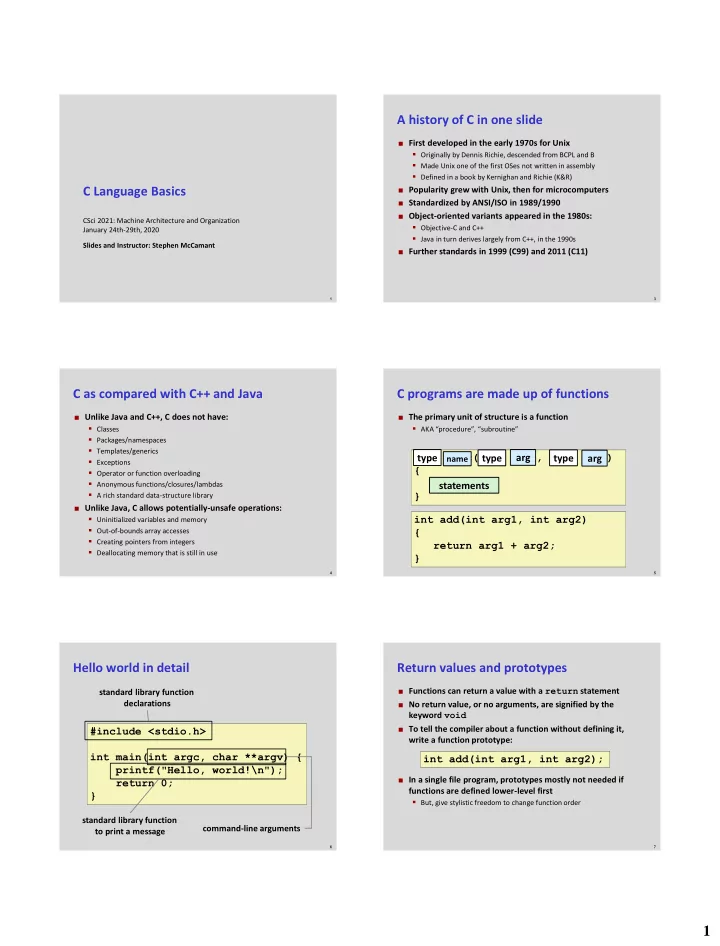
A history of C in one slide

 First developed in the early 1970s for Unix

  • Originally by Dennis Richie, descended from BCPL and B
  • Made Unix one of the first OSes not written in assembly
  • Defined in a book by Kernighan and Richie (K&R)

 Popularity grew with Unix, then for microcomputers  Standardized by ANSI/ISO in 1989/1990  Object-oriented variants appeared in the 1980s:

  • Objective-C and C++
  • Java in turn derives largely from C++, in the 1990s

 Further standards in 1999 (C99) and 2011 (C11)

4

C as compared with C++ and Java

 Unlike Java and C++, C does not have:

  • Classes
  • Packages/namespaces
  • Templates/generics
  • Exceptions
  • Operator or function overloading
  • Anonymous functions/closures/lambdas
  • A rich standard data-structure library

 Unlike Java, C allows potentially-unsafe operations:

  • Uninitialized variables and memory
  • Out-of-bounds array accesses
  • Creating pointers from integers
  • Deallocating memory that is still in use

5

C programs are made up of functions

 The primary unit of structure is a function

  • AKA “procedure”, “subroutine”

type func(type arg1, type arg2) { statements } type type type

name

arg arg statements int add(int arg1, int arg2) { return arg1 + arg2; }

6

Hello world in detail

#include <stdio.h> int main(int argc, char **argv) { printf("Hello, world!\n"); return 0; }

standard library function to print a message command-line arguments standard library function declarations

7

Return values and prototypes

 Functions can return a value with a return statement  No return value, or no arguments, are signified by the

keyword void

 To tell the compiler about a function without defining it,

write a function prototype:

 In a single file program, prototypes mostly not needed if

functions are defined lower-level first

  • But, give stylistic freedom to change function order

int add(int arg1, int arg2);

slide-2
SLIDE 2

2

8

 Integer types:  “unsigned” variants cannot be negative  Common floating point types:

  • float: usually 32 bits
  • double: usually 64 bits

Numeric types

Type name Common minimum size char 8 bits short 16 bits int 32 bits long 32 bits – for us, 64 bits long long 64 bits

9

Characters

 char’s name comes from representing characters  Actually three types:

  • signed char, -128 to 127
  • unsigned char, 0 to 255
  • char, might be either signed or unsigned

 On almost all systems, values 0-127 represent ASCII

  • US-standardized code for roman alphabet, numbers, symbols, etc.

 Wider variety of standards for meanings of 128-255

  • Windows-1252, Latin-1: add accented letters and a few symbols
  • UTF-8: multiple bytes represent >100,000 Unicode characters

 Escape sequences starting with \ for hard-to-type ones:

  • E.g., '\n' for newline, '\0' for character zero

10

Declaration, initialization, assignment

 A new variable is introduced with a declaration:  Optionally, give it a value by including an initialization:  An assignment statement changes the value of an

already-declared variable:

int weight, height; int score = 100; score = score - 5;

12

Type conversion and casts

 Values are automatically converted between numeric

types, sometimes with strange effects:

 The act of converting can be written explicitly as a cast

  • peration:

long x = 1000000; char c = x; /* c is now 64 */ long x = 1000000; char c = (char)x; /* c is now 64 */

13

Local, global, and static

 A variable defined inside a function (local) is usually:

  • Created once per call to the function
  • Visible only inside the function

 Variable can be declared outside any function, global:

  • Exists during the whole program
  • Visible in any (later) function

 If a local variable is declared with keyword static:

  • One version for the whole execution
  • Still visible only inside the function
  • E.g., useful for counter function

14

Arithmetic operators

 C has the standard math operators:

  • +, - (both unary and binary)
  • *, multiplication
  • /, integer or floating-point division
  • %, integer division remainder

 Precedence rules define the default grouping

  • E.g., 1 + 2 * 3 is 1 + (2 * 3) i.e. 7, not 9

 When in doubt, use parentheses

  • Rules are mostly, but not always, what you’d expect
slide-3
SLIDE 3

3

15

Assignment abbreviations

 Unary ++ and -- add or subtract 1, respectively

  • E.g., c++ is short for c = c + 1
  • Also called increment and decrement

 Putting a = after an operator makes an update operator

  • E.g., c += 10 is short for c = c + 10

 You can string together multiple assignment left-hand

sides

  • assignment_grade = course_grade = 0;

16

Comparisons and logic

 Numbers can be compared with the usual operators:

  • <, >
  • <=, >= mean ≤, ≥
  • ==, != mean =, ≠; note double equals

 Integers used for logic (no separate Boolean type):

  • 0 represents false
  • any non-zero interpreted as true, produced as 1
  • (C99 defines <stdbool.h>, hasn’t caught on)

 Logic operators:

  • && for and, || for or, ! for not
  • (d != 0) && (n / d < 10) is safe (“short-circuiting”)

17

Arrays in C

 Arrays are the key building block for large data structures  C arrays have limited features, allowing for simple

compilation strategies

  • Local and global arrays can only have fixed size
  • At runtime, no way to ask how long an array is
  • No bounds checking
  • First index is always 0

 Implementation is just a sequence of adjacent values  C arrays are closely related with C’s pointers

18

Array syntax

 Syntax is based on square brackets [] as a suffix  On a type, inside brackets is the size  On a value, inside brackets is the index

  • Can appear on left or right side of assignment
  • Note, 0-based means index always less than size

double point[3] = {1.0, 1.0, 0.0}; point[0] = -2.0; double dist = sqrt(point[0]*point[0] + point[1]*point[1] + point[2]*point[2]);

19

Multidimensional arrays

 Repeat sets of brackets for tables with more numeric

indexes

 E.g., chess board:  Note, not commas  Again, only usable when the dimensions are fixed

char board[8][8]; board[0][0] = 'r';

20

Pointer basics

 A pointer is a value that stores the location of another

value

  • As we’ll later see in detail, it’s implemented as a memory address

 The type of a pointer variable keeps track of the type of

what it can point to

  • E.g., pointer-to-char, pointer-to-int

 Type declaration syntax puts a * before the variable

name:

int num, *num_ptr;

slide-4
SLIDE 4

4

21

Basic pointer operations

 & creates a pointer

  • If x is an int variable, &x is an int pointer, pointing at x

 * gets what the pointer points to

  • If ip is an int pointer, *ip is the int it points at
  • Also called “following” or “dereferencing”

 Multiple levels are possible

int i = 5; int *ip = &i; int **ipp = &ip; (**ipp)++; /* i and **ipp are now 6 */

“Declaration resembles use”

22

Pointer arithmetic

 Adding an integer to a pointer advances it by that number

  • f objects

 If p is an int *, p + 1 is a pointer to the int next to it

  • Type indicates how much to move
  • Programmer’s responsibility to know there is an int there

 p[i] is equivalent to *(p + i)  Thus, a pointer is roughly equivalent to an array of

unknown size

 Array converted into pointer in most places it appears

  • E.g. in function argument type, int x[] and int *x are

equivalent

23

Strings are arrays of characters

 String length is unknown at compile time

  • Thus, type is char *

 Length of string indicated by \0 character after contents

  • “Null termination”
  • Many C programs don’t cope well with \0 characters in their input

void caesar_string(char *s, int amt) { int i; for (i = 0; s[i] != '\0'; i++) { s[i] = rotate(s[i], amt); } }

24

String constants

 Put text inside double quote marks: "string"

  • Can also include escape sequences
  • Usually put \n at end of lines to be printed

 Normally string constants are read-only

  • Type is const char *

 Can be used to initialize a modifiable character array

char a[] = "hi!"; /* size 4, including \0 */ char a[3] = "hi!"; /* size 3, no \0 */

25

Basics of printf

 Standard library function for formatted output  First argument, format string, may contain format

specifiers starting with %

  • Generally, each corresponds to a later argument

 Most basic format specifiers:

  • %d: signed int, printed in decimal
  • %g: double, in scientific notation if needed
  • %s: char *, interpreted as string

printf("One %s one is %d\n", "plus", 1 + 1); /* One plus one is 2 */

26

if and if-else statements

 Basic way to make decisions. if does either something,

  • r nothing:

 if-else does one thing if true, other if false

if (x % 2 == 0) printf("x is even\n"); if (x % 2 == 0) printf("x is even\n"); else printf("x is odd\n");

slide-5
SLIDE 5

5

27

Blocks and indentation

 Use curly braces to group multiple statements, e.g. inside

an if statement

  • Without braces, only one statement inside if

 Can declare variables inside a block, not visible outside  Safer to use braces than not: they make grouping clear,

like parentheses

  • Example “dangling else” ambiguity: else after nested ifs

 It is conventional to use indentation to show nesting level

  • But compiler completely ignores whitespace
  • Many opinions and arguments about where to put braces relative

to indentation

28

while and for loops

 A while loop repeats a statement/block as many times

as a condition is true (can be 0 times)

 A for loop groups a while with two other statements,

commonly assignment and update of the same variable while (x > 0) { x--; } /* x is now 0 or negative */ for (A; B; C) D; /* is equivalent to: */ A; while (B) { D; C }

29

Leaving in the middle of a loop

 A break statement jumps to the end of the innermost

enclosing loop

 A continue statement jumps to the next iteration of a

loop

  • For a for loop, the increment part is executed

 A return statement ends the entire function  There is also a goto statement, but don’t use it

  • One arguable application: jumping out of an outer loop

31

Debugging and debuggers

 You have probably already had the experience of making

a mistake in a program

 Speaking roughly, “debugging” is the process:

  • After you know that your code is wrong
  • But before you know how it is wrong

 Some kinds of debugging that don’t need much tool

support:

  • Code review
  • Rubber duck debugging
  • Printf debugging

32

Debugging in the development cycle

Add functionality Edit Compile Test Debug

33

What is a debugger for?

 Not to fix your bugs for you, alas

  • Computers aren’t that smart yet

 Instead, helps you examine your program’s execution in

more detail

  • See what is happening if something is obviously wrong
  • Walk through normal execution, to compare with your

expectations

 Standard practice is source-level debugging

  • I.e., the debugger shows your program in terms of its source code
  • For binaries, made possible by debugging information (enabled

with compiler option -g)

slide-6
SLIDE 6

6

34

The GNU debugger GDB

 Standard command-line, source and binary-level

debugger on Linux

 Start up with gdb ./my_program  Supply program arguments to the GDB run command

  • Abbreviated just r

 Or, use gdb --args ./my_program arg1 arg2

  • This mode doesn’t work for redirection (shell <, >)

 Today: using GDB as a source-level debugger

35

break, step, next, continue

 Normally, GDB will execute your program normally  To get it to stop to let you look around, turn on a

breakpoint with the command break (b)

  • Argument can be function name, file and line number, others

 When the breakpoint is reached, your program will stop

and you can give GDB commands

 Run the program for one line with step (s)

  • Variant next (n) does not go into other functions

 To go back to full-speed execution, use continue (c)

36

print

 The most important command for examining program

state is print (p)

  • The argument is a source-level (i.e., C) expression

 Some features to know about

  • Can do arithmetic
  • Can refer to any variable in scope
  • Can call functions
  • Can do assignments
  • p/x prints in hexadecimal (other formats also available)

37

Crashes, interrupts, and backtrace

 GDB will automatically stop if the program runs into a

crash like a segfault (technically: a Unix signal)

 To stop in the middle of execution, type Ctrl-C

  • Good for debugging infinite loops

 The command backtrace (bt) summarizes all the

currently executing functions

  • Similar to what Java and Python print for an unhandled exception

38

Watchpoints

 A watchpoint is sort of like a breakpoint, but based on

data

 The command watch takes an argument like print  A watchpoint stops execution when that value changes  Useful for tracking down problems caused to pointers  If you use a source-level expression, you’ll usually get a

software watchpoint, which is slow

  • Later, we’ll see hardware watchpoints

39

Pass by value

 The parameters to a C function are always just copies of

values from the caller

  • Called “pass by value”

 I.e., they are local variables; changing them has no effect

  • utside the function

int global; void f(int a, int b) { a++; /* does not change global */ b--; /* does not change 2 + 2 */ } void g(void) { f(global, 2 + 2); }

slide-7
SLIDE 7

7

40

Recursion

 A function can call itself, directly or indirectly  Each instance has its own copy of local variables

  • Used to implement algorithms like quicksort, parsing

 Can also be used as an alternative form of loop

  • Not as common in C as in functional languages

 Each instance usually uses some memory

  • Deep recursion is not too common in C

41

Simulating pass by reference

 What if you want a function to modify caller’s variables?

  • Called “pass by reference”

 Simulated in C by passing explicit pointers  Commonly used instead of multiple return values

  • Pointer parameters classified as “in”, “out”, “in/out”

void increment_by(int *ip, int amt) { *ip += amt; } void f(void) { int x; increment_by(&x, 5); }

42

Structures

 Data type that groups multiple named values  Fields accessed with the . operator  Compared to OO languages, like objects but without

methods, inheritance, or visibility restrictions struct student { char *name; int grade; }; struct student jane; jane.name = "Jane"; jane.grade = 100;

43

Pointers to structures

 In more complex situations, you often want to refer to

structs with pointers

 sp->f is short for (*sp).f  Note for Java users: Java object (references) are like

structure pointers

  • Even though pointer aspect is not explicit in syntax
  • E.g., two variables can refer to the same object
  • Despite the symbol, Java’s . is like C’s ->

void mark_off(struct student *sp) { sp->grade += 10; }

44

Allocating structures

 If structs are like objects, what’s the equivalent of new?  Malloc is a basic routine for dynamically allocating

memory

  • Argument is size in bytes
  • Return value has type void *, automatically converted
  • Contents can be anything, you must initialize

 For now, learn as an idiom; we’ll see more details later

  • Use with arrays
  • Changing size with realloc
  • Returning memory with free (don’t need to do this in Proj 1)

struct student *sp = malloc(sizeof(struct student));

45

Null pointers

 Pointers have a special value that means not pointing at

anything

  • Often used to represent endpoints or empty data structures

 Integer 0 converted to pointer, also NULL macro

  • On most systems, internal representation is 0

 A null pointer counts as false, any other pointer is true  Dereferencing a null pointer usually causes a segfault

  • So you need to check first
slide-8
SLIDE 8

8

46

Pointer and sharing pitfalls

 Passing a pointer to data is usually faster than copying it

  • Only one copy of data exists; it is shared by different users

 But, sharing can also lead to unexpected behavior

  • E.g., data changing when you do not expect it to

 Pointer to a local variable is valid only until its function

finishes

  • Attempts to access later may cause a crash

 Sometimes you do want to make a copy of data

  • Allocate a new struct/array and copy contents over
  • strdup is a convenience function for duplicating a null-

terminated string

47

Example: linked list length

 Can iterate over a singly-linked list with a for loop:

struct list_node { struct list_node *next; int value; }; int length(struct list_node *root) { struct list_node *p; int i = 0; for (p = root; p; p = p->next) i++; return i; }

49

A few more fun operators

 The “ternary” operator ?: is like an if-then-else  The comma , evaluates two expressions and returns the

right-hand one

  • Useful for putting multiple assignments in a for loop header

 ++ and -- can also be prefixes, and return a value

  • Prefix versions like ++x first update, then return new value, “pre-

increment”

  • Postfix versions like x++ update, but return old value, “post-

increment”

 Overusing these operators can make code hard to read

printf("Found %d object%s\n", n, ((n == 1) ? "" : "s"));

50

typedef

 Used to create a type name that is a synonym for another

type

  • Syntax is like that of a variable declaration

 Commonly used to save typing “struct”:

typedef char zipcode[5]; zipcode umn = "55455"; typedef struct list_node node; node table[100];

51

switch statement

 Used for making a choice based on several integer values

switch ('a' + (letter % 26)) { case 'a': case 'e': case 'i': case 'o': case 'u': printf("Vowel\n"); break; case 'y': printf("Maybe y\n"); break; default: printf("Consonant\n") break; }

52

The C standard library

 Every C implementation implements a large number of

common routines

  • Load the declarations with an appropriate #include
  • stdio.h: printf, scanf, fopen, fclose, fread, fwrite
  • stdlib.h: malloc, exit, NULL, atoi, qsort
  • math.h: sqrt, sin, pow
  • string.h: strlen, strcpy, memcpy
  • assert.h: assert
  • ctype.h: isalpha, isspace

 Still limited compared to Java, C++, or Python

  • Some interfaces have old/poor designs (e.g., gets)
  • Lacking general-purpose data structures
  • Other stuff also in a typical OS-specific C library / C runtime
slide-9
SLIDE 9

9

53

The C preprocessor

 The first step of compiling C code is text-level processing

  • Also available as a separate tool, cpp on Unix

 Preprocessor directives are lines that start with #  #include reads in another file

  • Typically a header (.h) file that contains declarations
  • <> for system headers, "" for program headers

 #define creates a macro

  • Synonym for a value that is substituted in later
  • Simple uses similar to typedef or const variable

#define TABLE_SIZE 1000 int table[TABLE_SIZE];

54

Conditional compilation

 Use macros and simple arithmetic to decide what code to

use

 #if 0 / #endif can “comment-out” code containing

comments #ifdef __i386__ typedef long long int64; #elif defined(__amd64__) typedef long int64; #else #error "No known 64-bit type" #endif

55

Function-like macros

 Macros can also define simple computations

  • Implemented by textual substitution

 A number of pitfalls to be aware of:

  • Should have parentheses around outside, and each argument
  • Multiple lines need \ continuation
  • Variables can cause name clashes
  • Multiple side-effects possible with ,
  • Statement needs do { … } while (0)

 Often better to use a real function, compiler can inline

#define MAX(x, y) \ ((x) > (y) ? (x) : (y))