
SLIDE 1
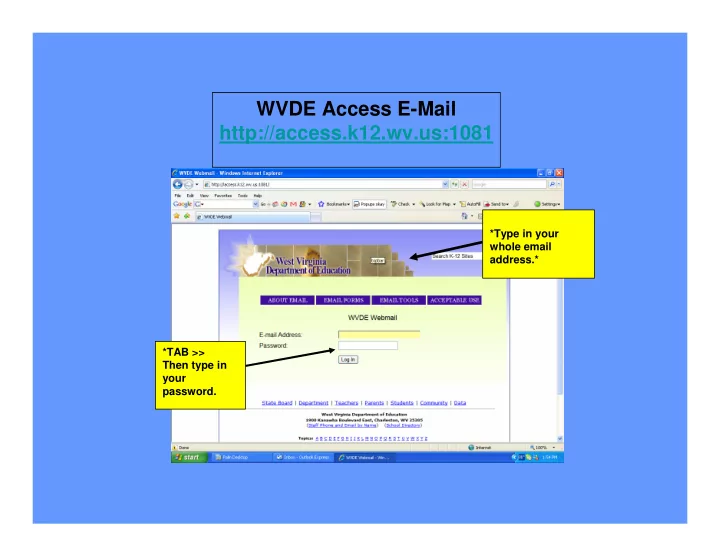
*Type in your whole email address.* *TAB >> Then type in your password.
WVDE Access E-Mail http://access.k12.wv.us:1081
WVDE Access E-Mail http://access.k12.wv.us:1081 *Type in your - - PowerPoint PPT Presentation
WVDE Access E-Mail http://access.k12.wv.us:1081 *Type in your whole email address.* *TAB >> Then type in your password. This is your HOME/INBOX page. I have a new message! Address book Trash can Help option Log Out of program
*Type in your whole email address.* *TAB >> Then type in your password.
WVDE Access E-Mail http://access.k12.wv.us:1081
I have a new message! This is your HOME/INBOX page.
Write a NEW Email to someone Trash can Address book Help option Log Out of program Get NEW Mail/Refresh
Enter email of person who you want to email. Enter a subject of what email is concerning Type your email here. Click Cancel to quit or SEND to Email
Address Tab New person
New Window will pop-up! Enter their information and click OK
You can check in the boxes who you would like the email to go to. Then click COMPOSE and it will place the emails in for you. To: (person you are emailing) Cc: (carbon-copy, send also too….) Bcc: (blind carbon-copy, send to ….. but no one else knows)
Options Tab Personal Information Password reset Settings Appearance Vacation Message Log Out
Finding other teacher accounts
Log in like you would your email. Same user and password, you only have to put in your user ID here, not the entire email
Type in name of who you are looking for. First and last. OR just last. Click Find a User.
Results. You will be given the beginning User ID. You will place their User ID in front of the same email that you have. XXXXXXXX@access.k12.wv.us
Thank you! Vickie Witt