Why Is This Important? DB performance depends on time it takes to - - PDF document

why is this important
SMART_READER_LITE
LIVE PREVIEW

Why Is This Important? DB performance depends on time it takes to - - PDF document

Why Is This Important? DB performance depends on time it takes to get the data from storage system and time to process Overview of Storage and Indexing Choosing the right index for faster access can speed up queries significantly


slide-1
SLIDE 1

1

Overview of Storage and Indexing

Chapter 8

2

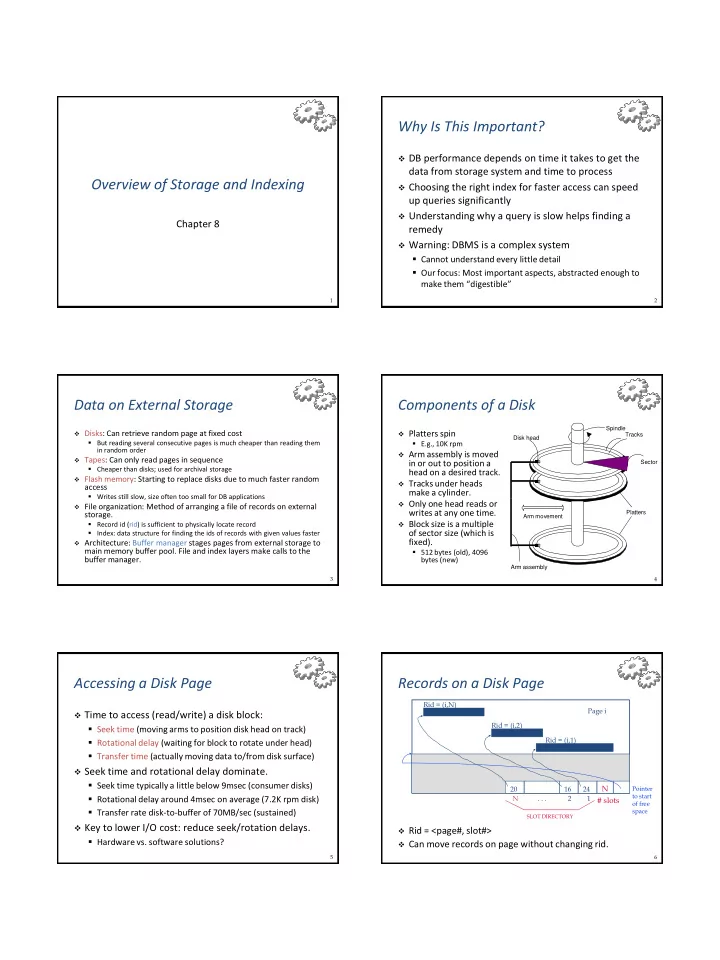
Why Is This Important?

 DB performance depends on time it takes to get the

data from storage system and time to process

 Choosing the right index for faster access can speed

up queries significantly

 Understanding why a query is slow helps finding a

remedy

 Warning: DBMS is a complex system

  • Cannot understand every little detail
  • Our focus: Most important aspects, abstracted enough to

make them “digestible”

3

Data on External Storage

 Disks: Can retrieve random page at fixed cost

  • But reading several consecutive pages is much cheaper than reading them

in random order

 Tapes: Can only read pages in sequence

  • Cheaper than disks; used for archival storage

 Flash memory: Starting to replace disks due to much faster random

access

  • Writes still slow, size often too small for DB applications

 File organization: Method of arranging a file of records on external

storage.

  • Record id (rid) is sufficient to physically locate record
  • Index: data structure for finding the ids of records with given values faster

 Architecture: Buffer manager stages pages from external storage to

main memory buffer pool. File and index layers make calls to the buffer manager.

4

Components of a Disk

 Platters spin

  • E.g., 10K rpm

 Arm assembly is moved

in or out to position a head on a desired track.

 Tracks under heads

make a cylinder.

 Only one head reads or

writes at any one time.

 Block size is a multiple

  • f sector size (which is

fixed).

  • 512 bytes (old), 4096

bytes (new)

Platters Spindle Disk head Arm movement Arm assembly Tracks Sector 5

Accessing a Disk Page

 Time to access (read/write) a disk block:

  • Seek time (moving arms to position disk head on track)
  • Rotational delay (waiting for block to rotate under head)
  • Transfer time (actually moving data to/from disk surface)

 Seek time and rotational delay dominate.

  • Seek time typically a little below 9msec (consumer disks)
  • Rotational delay around 4msec on average (7.2K rpm disk)
  • Transfer rate disk-to-buffer of 70MB/sec (sustained)

 Key to lower I/O cost: reduce seek/rotation delays.

  • Hardware vs. software solutions?

6

Records on a Disk Page

 Rid = <page#, slot#>  Can move records on page without changing rid. Page i Rid = (i,N) Rid = (i,2) Rid = (i,1)

Pointer to start

  • f free

space

SLOT DIRECTORY

N . . . 2 1 20 16 24

N # slots

slide-2
SLIDE 2

7

Possible File Organizations

 Heap (random order) files

  • Suitable when typical access is a file scan retrieving all

records.

 Sorted Files

  • Best if records must be retrieved in some order, or only a

`range’ of records is needed.

 Indexes = data structures to organize records via

trees or hashing.

  • Like sorted files, they speed up searches for a subset of

records, based on values in certain (“search key”) fields

  • Updates are much faster than in sorted files.

8

Indexes

 An index on a file speeds up selections on the search

key fields for the index.

  • Any subset of the fields of a relation can be the search key

for an index on the relation.

  • Search key is not the same as key (minimal set of fields

that uniquely identify a record in a relation).

 An index contains a collection of data entries, and

supports efficient retrieval of all data entries k* with a given key value k.

  • Given data entry k*, we can find record with key k in at

most one disk I/O. (Details soon…)

9

B+ Tree Indexes

 Balanced index: all root-to-leaf paths have same length

  • For n data entries, tree has height log n

 Leaf pages contain data entries, and are chained (prev & next) 

Non-leaf pages have index entries; only used to direct searches:

P0 K 1 P 1 K 2 P 2 K m P m

index entry

Non-leaf Pages Pages (Sorted by search key) Leaf 10

Example B+ Tree

 Find 28*? 29*? All > 15* and < 30*  Insert/delete: Find data entry in leaf, then change it.

Need to adjust parent sometimes.

  • And change sometimes propagates up the tree

2* 3* Root

17

30 14* 16* 33* 34* 38* 39* 13 5 7* 5* 8* 22* 24* 27 27* 29*

Entries <= 17 Entries > 17 Note how data entries in leaf level are sorted

11

Hash-Based Indexes

 Good for equality selections.  Index is a collection of buckets.

  • Bucket = primary page plus zero or more overflow pages.
  • Buckets contain data entries.

 Hashing function h: h(r) = bucket in which (data

entry for) record r belongs.

  • h looks at the search key fields of r.
  • No need for “index entries” in this scheme.

12

Static Hashing

 # primary pages fixed, allocated sequentially, never de-

allocated; overflow pages if needed.

 h(k) mod N = bucket to which data entry with key k

  • belongs. (N = # of buckets)
  • h(key) = (a * key + b) usually works well

h(key) mod N h key

Primary bucket pages Overflow pages

1 N-1

slide-3
SLIDE 3

13

Alternatives for Data Entry k* in Index

 In a data entry k* we can store:

1. Data record with key value k, or 2. <k, rid of data record with search key value k>, or 3. <k, list of rids of data records with search key k>

 Choice of alternative for data entries is orthogonal to

the indexing technique used to locate data entries with a given key value k.

  • Typically, index contains auxiliary information that directs

searches to the desired data entries

14

Alternative 1 for Data Entries

 Actual data record stored in index

  • Index structure is a file organization for data records

(instead of a Heap file or sorted file).

 At most one index on a given collection of data

records can use Alternative 1.

  • Otherwise, data records are duplicated, leading to

redundant storage and potential inconsistency.

 If data records are very large, # of pages containing

data entries is high. Implies size of auxiliary information in the index is also large, typically.

15

Alternatives 2 and 3 for Data Entries

 Data entries typically much smaller than data

  • records. So, better than Alternative 1 with large data

records, especially if search keys are small.

  • Portion of index structure used to direct search, which

depends on size of data entries, is much smaller than with Alternative 1.

 Alternative 3 more compact than Alternative 2, but

leads to variable-sized data entries even if search keys are of fixed length.

 Extra cost for accessing data records in another file

  • Index only return rids

16

Index Classification

 Primary vs. secondary: If search key contains primary

key, then called primary index.

  • Unique index: Search key contains a candidate key.

 Clustered vs. unclustered: If order of data records is the

same as, or `close to’, order of data entries, then called clustered index.

  • Alternative 1 implies clustered
  • In practice, clustered also implies Alternative 1 (since sorted files are

rare).

  • A file can be clustered on at most one search key.
  • Cost of retrieving data records through index varies greatly

based on whether index is clustered or not.

17

Clustered vs. Unclustered Index

 Suppose Alternative 2 is used for data entries, and that the

data records are stored in a Heap file.

  • To build clustered index, first sort the Heap file (with some free space
  • n each page for future inserts).
  • Overflow pages may be needed for inserts. (Thus, order of data

records is `close to’, but not identical to, the sort order.)

Index entries Data entries direct search for (Index File) (Data file) Data Records data entries Data entries Data Records

CLUSTERED UNCLUSTERED 18

Cost Model for Our Analysis

 We ignore CPU costs, for simplicity:

  • B: The number of data pages (“blocks”)
  • R: Number of records per page
  • D: (Average) time to read or write a single disk page

 Measuring number of page I/O’s ignores gains of

pre-fetching a sequence of pages; thus, even I/O cost is only approximated.

 Average-case analysis; based on several simplifying

assumptions.

Good enough to show the overall trends!

slide-4
SLIDE 4

19

Comparing File Organizations

 Heap files (random order; insert at eof)  Sorted files, sorted on attributes <age, sal>  Clustered B+ tree file, Alternative 1, search key <age,

sal>

 Heap file with unclustered B + tree index on search

key <age, sal>

 Heap file with unclustered hash index on search key

<age, sal>

20

Operations to Compare

 Scan: Fetch all records from disk  Equality search  Range selection  Insert a record  Delete a record

21

Assumptions in Our Analysis

 Heap Files:

  • Equality selection on key; exactly one match.

 Sorted Files:

  • Files compacted after deletions.

 Indexes:

  • Alternatives 2, 3: data entry size = 10% of record size
  • Tree: 67% occupancy (this is typical).
  • Implies file size = 1.5 data size
  • Hash: No overflow buckets.
  • 80% page occupancy => File size = 1.25 data size

22

Assumptions (contd.)

 Scans:

  • Leaf levels of a tree-index are chained.
  • Index data-entries plus actual file scanned for unclustered

indexes.

 Range searches:

  • We use tree indexes to restrict the set of data records

fetched, but ignore hash indexes.

23

I/O Cost of Operations

Scan Equality Range Insert Delete Heap file BD 0.5BD BD 2D Search + D Sorted file BD D log2B D(log2B + #pgs w. match recs) Search + BD Search + BD Clustered index 1.5BD DlogF1.5B D(logF 1.5B + #pgs w. match recs) Search + D Search + D Unclustered tree index + Heap file BD(R+0.15) D(1+logF 0.15B) D(logF 0.15B + #pgs w. match recs) Search + 3D Search + 3D Unclustered hash index + Heap file BD(R+0.125) 2D BD 4D 4D

Several assumptions underlie these (rough) estimates!

25

Choice of Indexes

 What indexes should we create?

  • Which relations should have indexes?
  • What field(s) should be the search key?
  • Should we build several indexes?

 For each index, what kind of an index should it be?

  • Clustered?
  • Hash or tree?
slide-5
SLIDE 5

26

Choice of Indexes (Contd.)

 One approach: Consider the most important queries

in turn. Consider the best plan using the current indexes, and see if a better plan is possible with an additional index. If so, create it.

  • Must understand how a DBMS evaluates queries and

creates query evaluation plans.

 Before creating an index, must also consider the

impact on updates in the workload.

  • Trade-off: Indexes can make queries go faster, updates
  • slower. Require disk space, too.

27

Index Selection Guidelines

 Attributes in WHERE clause are candidates for index keys.

  • Exact match condition suggests hash index.
  • Range query suggests tree index.
  • Clustering is especially useful for range queries; can also help on equality

queries if there are many duplicates.  Multi-attribute search keys should be considered when a

WHERE clause contains several conditions.

  • Order of attributes is important for range queries.
  • Such indexes can sometimes enable index-only strategies for

important queries: when only indexed attributes are needed.

  • For index-only strategies, clustering is not important.

 Try to choose indexes that benefit many queries.  Since only one index can be clustered per relation, choose it

based on important queries that would benefit the most from clustering.

28

Examples of Clustered Indexes

 B+ tree index on E.age can be

used to get qualifying tuples.

  • How selective is the condition?
  • Is the index clustered?

 Consider the GROUP BY query.

  • If many tuples have E.age > 10,

using E.age index and sorting the retrieved tuples may be costly.

  • Clustered E.dno index may be

better!

 Equality queries and duplicates:

  • Clustering on E.hobby helps!

SELECT E.dno FROM Emp E WHERE E.age>40 SELECT E.dno, COUNT (*) FROM Emp E WHERE E.age>10 GROUP BY E.dno SELECT E.dno FROM Emp E WHERE E.hobby=Stamps

29

Indexes with Composite Search Keys

 Composite Search Keys: Search

  • n a combination of fields.
  • Equality query: Every field value

is equal to a constant. E.g. wrt <sal,age> index:

  • age=20 and sal =75
  • Range query: Some field value is

not a constant. E.g.:

  • age =20; or age=20 and sal > 10

 Data entries in index sorted by

search key to support range queries.

  • Lexicographic order, or
  • Spatial order.

sue 13 75 bob cal joe 12 10 20 80 11 12 name age sal <sal, age> <age, sal> <age> <sal> 12,20 12,10 11,80 13,75 20,12 10,12 75,13 80,11 11 12 12 13 10 20 75 80

Data records sorted by name Data entries in index sorted by <sal,age> Data entries sorted by <sal>

Examples of composite key indexes using lexicographic order.

30

Composite Search Keys

 To retrieve Emp records with age=30 AND sal=4000,

an index on <age,sal> would be better than an index

  • n age alone or an index on sal.
  • Choice of index key orthogonal to clustering etc.

 If condition is 20<age<30 AND 3000<sal<5000:

  • Clustered tree index on <age,sal> or <sal,age> is best.

 If condition is age=30 AND 3000<sal<5000:

  • Clustered <age,sal> index much better than <sal,age>

index.

 Composite indexes are larger, updated more often.

31

Index-Only Plans

 Some queries

can be answered without retrieving any tuples from

  • ne or more
  • f the

relations involved, if a suitable index is available.

SELECT E.dno, COUNT(*) FROM Emp E GROUP BY E.dno SELECT E.dno, MIN(E.sal) FROM Emp E GROUP BY E.dno SELECT AVG(E.sal) FROM Emp E WHERE E.age=25 AND

E.sal BETWEEN 3000 AND 5000 <E.dno> <E.dno,E.sal> Tree index! <E.age,E.sal>

  • r

<E.sal,E.age> Tree index!

slide-6
SLIDE 6

34

Summary

 Many alternative file organizations exist, each

appropriate in some situation.

 If selection queries are frequent, sorting the file or

building an index is important.

  • Hash-based indexes only good for equality search.
  • Sorted files and tree-based indexes best for range search;

also good for equality search.

  • Files rarely kept sorted in practice; B+ tree index is better.

 Index is a collection of data entries plus a way to

quickly find entries with given key values.

35

Summary (Contd.)

 Data entries can be actual data records, <key, rid>

pairs, or <key, rid-list> pairs.

  • Choice orthogonal to indexing technique used to locate

data entries with a given key value.

 Can have several indexes on a given file of data

records, each with a different search key.

 Indexes can be classified as clustered vs. unclustered

and primary vs. secondary.

  • Differences have important consequences for

utility/performance.

36

Summary (Contd.)

 Understanding the nature of the workload and

performance goals essential to developing a good design.

  • What are the important queries and updates?
  • What attributes and relations are involved?

 Indexes must be chosen to speed up important queries

(and perhaps some updates).

  • Index maintenance overhead on updates to key fields.
  • Choose indexes that can help many queries, if possible.
  • Build indexes to support index-only strategies.
  • Clustering is an important decision; only one index on a given

relation can be clustered!

  • Order of fields in composite index key can be important.