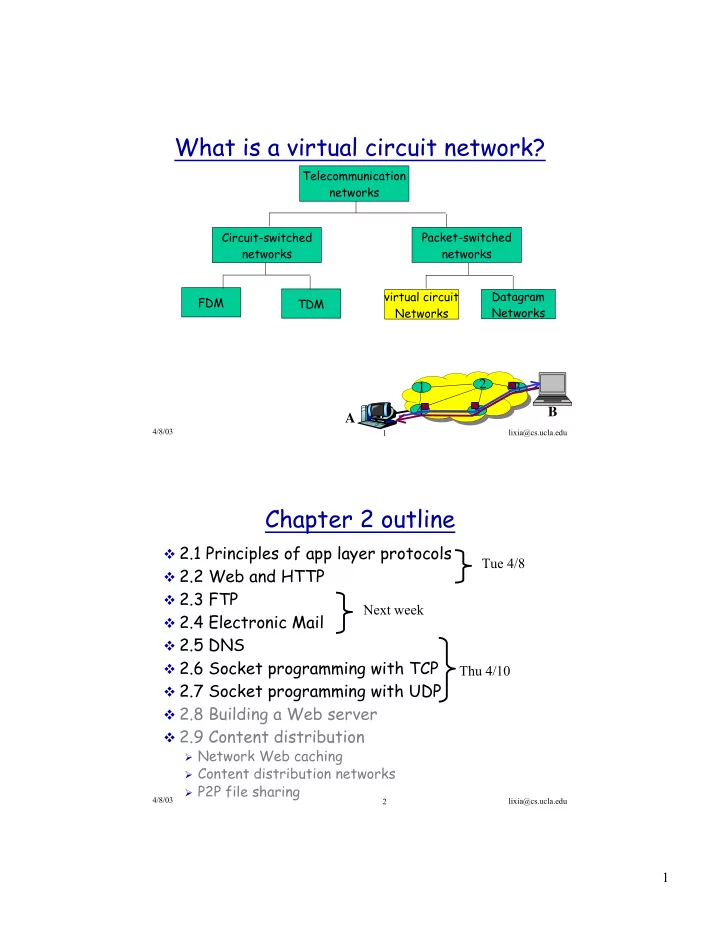
What is a virtual circuit network? Telecommunication networks - - PDF document

what is a virtual circuit network
SMART_READER_LITE
LIVE PREVIEW

What is a virtual circuit network? Telecommunication networks - - PDF document

What is a virtual circuit network? Telecommunication networks Circuit-switched Packet-switched networks networks virtual circuit Datagram FDM TDM Networks Networks 2 1 3 4 5 B A 4/8/03 lixia@cs.ucla.edu 1 Chapter 2 outline v


slide-1
SLIDE 1

1

4/8/03 lixia@cs.ucla.edu 1

Telecommunication networks Circuit-switched networks FDM TDM Packet-switched networks virtual circuit Networks Datagram Networks

What is a virtual circuit network?

1 4 5 3 2 A B

4/8/03 lixia@cs.ucla.edu 2

Chapter 2 outline

v 2.1 Principles of app layer protocols v 2.2 Web and HTTP v 2.3 FTP v 2.4 Electronic Mail v 2.5 DNS v 2.6 Socket programming with TCP v 2.7 Socket programming with UDP v 2.8 Building a Web server v 2.9 Content distribution

ÿ Network Web caching ÿ Content distribution networks ÿ P2P file sharing

Tue 4/8 Thu 4/10 Next week

slide-2
SLIDE 2

2

4/8/03 lixia@cs.ucla.edu 3

Applications and application-layer protocols

v Application v Application-layer protocols v Client: v Server Q: how does one process “identify” the other process with which it wants to communicate?

application transport network data link physical application transport network data link physical

reply request

4/8/03 lixia@cs.ucla.edu 4

Network applications: some jargons

v Process: program running within a host. v two processes within the same host communicate using

interprocess communication (defined by operating system)

v Processes running in different hosts communicate through

an application-layer protocol

v user agent: software process.

ÿ Web:browser ÿ E-mail: mail reader

v API: Application Programming Interface

ÿ defines interface between application and transport layer

v socket: Internet API

ÿ two processes communicate by sending data into socket, reading

data out of socket

slide-3
SLIDE 3

3

4/8/03 lixia@cs.ucla.edu 5

Internet transport protocols services

TCP service

v connection-oriented: setup

connection between client and server first

v reliable data delivery

between the two ends

v flow control: sender won’t

  • verwhelm receiver

v congestion control:

throttle sender when network overloaded

v does not provide:

ÿ Timing ÿ bandwidth guarantees

UDP service

v unreliable data transfer

between sending and receiving process

v does not provide:

ÿ connection setup ÿ Reliability ÿ flow control ÿ congestion control ÿ timing, or ÿ bandwidth guarantee

4/8/03 lixia@cs.ucla.edu 6

World Wide Web

v Web page v Object: HTML file, JPEG image, Java applet, audio file,… v Each object is addressable by a URL (Universal resource

locator ) app://host_name:port#/path_and_file_name ex: http://www.cs.ucla.edu/classes/spring03/cs118/slides.html

v Web browser: User agent for Web v Web server:

slide-4
SLIDE 4

4

4/8/03 lixia@cs.ucla.edu 7

The Web and http protocol

http: hypertext transfer protocol

v client/server model

ÿ client: browser that

requests, receives, “displays” Web objects

ÿ server: Web server

sends objects in response to requests

v http1.0: RFC 1945 v http1.1: RFC 2068

PC running Explorer Server running NCSA Web server Mac running Navigator http request http request http response h t t p r e s p

  • n

s e

4/8/03 lixia@cs.ucla.edu 8

The http protocol: more

Use TCP transport service http is “stateless”

v server maintains no

information about past client requests

Protocols that maintain “state” are more complex! past history (state) must be maintained if server/client crashes, their views of “state” may be inconsistent, must be reconciled aside

slide-5
SLIDE 5

5

4/8/03 lixia@cs.ucla.edu 9

http example (cont.)

fetch www.someSchool.edu/someDepartment/home.index

  • 1a. http client initiates TCP

connection to http server (process) at www.SomeSchool.edu

  • 2. http client sends http

request message (containing URL) into TCP connection socket

  • 1b. http server at host

www.someSchool.edu waiting for TCP connection at port 80. “accepts” connection

  • 3. http server receives request,

forms response msg containing requested object (someDepartment/home.index), sends message into socket

time (contains text, references to 10 jpeg images)

  • 4. http server closes TCP conn.
  • 5. http client receives response

message containing html file, displays html. Parsing html file, finds 10 referenced jpeg objects

  • 6. Steps 1-5 repeated for each of 10 jpeg objects

4/8/03 lixia@cs.ucla.edu 10

Non-persistent, persistent connections

Non-persistent

v http/1.0: server parses

request, responds, closes TCP connection

v 2 RTTs to fetch object

ÿ TCP connection ÿ object

request/transfer

v many browsers open

multiple parallel connections

Persistent

v default for htp/1.1 v on same TCP connection:

server parses request, responds, parses new request,..

v client sends requests for

all referenced objects as soon as it receives base HTML.

v fewer RTTs

slide-6
SLIDE 6

6

4/8/03 lixia@cs.ucla.edu 11

http message format: request

v two types of http messages: request, response v http request message:

ÿ ASCII (human-readable format)

GET /somedir/page.html HTTP/1.0 User-agent: Mozilla/4.0 Accept: text/html, image/gif,image/jpeg Accept-language:fr (extra carriage return, line feed) request line (GET, POST, HEAD commands) header lines Carriage return, line feed indicates end

  • f message

4/8/03 lixia@cs.ucla.edu 12

http request message: general format

slide-7
SLIDE 7

7

4/8/03 lixia@cs.ucla.edu 13

http message format: response

HTTP/1.0 200 OK Date: Thu, 06 Aug 1998 12:00:15 GMT Server: Apache/1.3.0 (Unix) Last-Modified: Mon, 22 Jun 1998 …... Content-Length: 6821 Content-Type: text/html data data data data data ... status line (protocol status code status phrase) header lines data, e.g., requested html file

4/8/03 lixia@cs.ucla.edu 14

http response status codes

200 OK 301 Moved Permanently 400 Bad Request 404 Not Found 505 HTTP Version Not Supported

In first line in server->client response message. A few sample codes:

slide-8
SLIDE 8

8

4/8/03 lixia@cs.ucla.edu 15

User-server interaction: authentication

control access to the content

v authorization credentials:

typically name, password

v stateless: client must

present authorization in each request

ÿ authorization: header line in

each request

ÿ if no authorization: header,

server refuses access client server

usual http request msg 401: authorization req. WWW authenticate: usual http request msg + Authorization: <cred> usual http response msg usual http request msg + Authorization: <cred> usual http response msg

time

4/8/03 lixia@cs.ucla.edu 16

Cookies: keeping “state”

Many major Web sites use cookies Four components:

1) cookie header line in the HTTP response message 2) cookie header line in HTTP request message 3) cookie file kept on user’s host and managed by user’s browser 4) back-end database at Web site

Example:

ÿ Susan access Internet

always from same PC

slide-9
SLIDE 9

9

4/8/03 lixia@cs.ucla.edu 17

Cookies: keeping “state” (cont.)

client server

usual http request msg usual http response +

Set-cookie: 1678

usual http request msg

cookie: 1678

usual http response msg usual http request msg

cookie: 1678

usual http response msg

cookie- specific action cookie- spectific action server creates ID 1678 for user

entry in backend database access access Cookie file amazon: 1678 ebay: 8734 Cookie file ebay: 8734 Cookie file amazon: 1678 ebay: 8734

  • ne week later:

4/8/03 lixia@cs.ucla.edu 18

client server

http request msg

If-modified-since: <date>

http response

HTTP/1.0 304 Not Modified

  • bject

not modified

http request msg

If-modified-since: <date>

http response

HTTP/1.1 200 OK

<data>

  • bject

modified

Conditional GET: client-side caching

v Goal: don’t send object

if client has up-to-date cached version

slide-10
SLIDE 10

10

4/8/03 lixia@cs.ucla.edu 19

Socket programming

Socket API:

a host-local, application-created/owned, OS-controlled interface (a “door”) into which application process can both send and receive messages to/from another (remote or local) application process

socket

controlled by application developer controlled by

  • perating

system

process socket process socket

internet Create socket Establish connection Send/recv data close the socket

4/8/03 lixia@cs.ucla.edu 20

Socket functional calls

v socket (): Create a socket v bind(): bind a socket to a local IP address and port # v listen(): passively waiting for connections v connect(): initiating connection to another socket v accept(): accept a new connection v Write(): write data to a socket v Read(): read data from a socket v sendto(): send a datagram to another UDP socket v recvfrom(): read a datagram from a UDP socket v close(): close a socket (tear down the connection)

slide-11
SLIDE 11

11

4/8/03 lixia@cs.ucla.edu 21

Socket programming with TCP

Client must contact server

v server process must

first be running

v server must have

created socket (door) that welcomes client’s contact Client contacts server by:

v creating client-local

TCP socket

v specifying IP address,

port number of server process

v When client creates

socket: client TCP establishes connection to server TCP

v When contacted by client,

server TCP creates new socket for server process to communicate with client

ÿ allows server to talk

with multiple clients

TCP provides reliable, in-order transfer of bytes (“pipe”) between client and server application viewpoint

4/8/03 lixia@cs.ucla.edu 22

Socket-programming using TCP

TCP service: reliable byte stream transfer

process TCP with buffers, variables socket

controlled by application developer controlled by

  • perating

system

process TCP with buffers, variables socket

internet

client server

socket( ) bind( ) connect( ) socket( ) bind( ) listen( ) accept( ) send( ) recv( ) close( ) close( ) recv( ) send( ) TCP conn. request TCP ACK

slide-12
SLIDE 12

12

4/8/03 lixia@cs.ucla.edu 23

Client/server socket interaction: TCP

wait for incoming connection request connectionSocket = welcomeSocket.accept() create socket, port=x, for incoming request: welcomeSocket = ServerSocket() create socket, connect to hostid, port=x clientSocket = Socket() close connectionSocket read reply from clientSocket close clientSocket

Server (running on hostid) Client

send request using clientSocket read request from connectionSocket write reply to connectionSocket

TCP connection setup

4/8/03 lixia@cs.ucla.edu 24

Socket-programming using UDP

UDP service: unreliable transfer of data blocks from one process to another

process UDP with buffers, variables socket

controlled by application developer controlled by

  • perating

system

process UDP with buffers, variables socket

controlled by application developer controlled by

  • perating

system

internet

vno handshaking vsender explicitly attaches IP address and port of destination vtransmitted data may be received with bit error, out of order, or lost

application viewpoint UDP provides unreliable transfer

  • f groups of bytes (“datagrams”)

between client and server

slide-13
SLIDE 13

13

4/8/03 lixia@cs.ucla.edu 25

Client/server socket interaction: UDP

close clientSocket

Server (running on hostid)

read reply from clientSocket create socket, clientSocket = DatagramSocket()

Client

Create, address (hostid, port=x, send datagram request using clientSocket create socket, port=x, for incoming request: serverSocket = DatagramSocket() read request from serverSocket write reply to serverSocket specifying client host address, port umber 4/8/03 lixia@cs.ucla.edu 26

Domain Name System

edu com gov

  • rg

us uk fr mit ucla xerox dec nasa nsf acm ieee cs seas cad ... ..... ..... .....

root

TLD (top level domains)

Foo Bar

slide-14
SLIDE 14

14

4/8/03 lixia@cs.ucla.edu 27

DNS: Root name servers

v 13 root name servers

worldwide

ÿ holding identical DNS

database v Your DNS query goes to a

local DNS server, for names it cannot resolve, it contact one of the root servers

v root name server:

ÿ If it knows the exact

answer, reply

ÿ Otherwise reply with

the pointer to another name server

4/8/03 lixia@cs.ucla.edu 28

DNS as a distributed database

v entire DNS name space is divided to a hierarchy

  • f zones

ÿ zone: a continuous sub-space in the DNS name tree ÿ a zone may contain domains at different levels

v each zone is controlled by an organization v Each zone has its own name server(s) .edu

ucla.edu cs.ucla.edu foo.cs.ucla.edu

root

slide-15
SLIDE 15

15

4/8/03 lixia@cs.ucla.edu 29 cs.ucla.edu

ucla.edu

What's in the zone's master file:

1.

data that defines the top node of the zone

ÿ

including a list all the servers for the zone 2.

authoritative data for all nodes in the zone

ÿ

all RRs for all of the nodes from the top node to leaf nodes(that are outside of any subzone) 3.

data that describes delegated subzones

ÿ

Domain name, owner, etc 4.

“glue data”: IP address(es) for subzone's name server(s)

4/8/03 lixia@cs.ucla.edu 30

DNS example

requesting host

kiwi.cs.ucla.edu gaia.cs.umass.edu

root name server local name server

131.179.32.16

1 2 3 4 5 6

authoritative name server dns.cs.umass.edu intermediate name server dns.umass.edu

7 8

host kiwi.cs.ucla.edu wants IP address of gaia.cs.umass.edu

  • 1. Contacts its local DNS server,

131.179.32.16 (dns.cs.ucla.edu)

  • 2. dns.cs.ucla.edu contacts root

name server, if necessary

  • 3. root name server contacts umass name

server, dns.umass.edu, if necessary

  • 4. dns.umass.edu contacts the

authoritative name server, dns.cs.umass.edu, if necessary

slide-16
SLIDE 16

16

4/8/03 lixia@cs.ucla.edu 31

DNS: iterated queries

recursive query:

v

puts burden of name resolution

  • n contacted name server

v

heavy load?

iterated query:

v

contacted server replies with name of server to contact

v

“I don’t know this name, but ask this server”

requesting host

kiwi.cs.ucla.edu gaia.cs.umass.edu

root name server local name server

131.179.32.16

1 2 3 4 6 7

authoritative name server dns.cs.umass.edu intermediate name server dns.umass.edu

5 8

4/8/03 lixia@cs.ucla.edu 32

DNS Performance

vVirtual each and all Internet applications

invoke DNS lookup

vuse both replication and caching to improve

performance

ÿ Each domain has one or more secondary servers ÿ servers cache recent query results

ß buffer recently resolved names and addresses till their “time-to-live” expires

slide-17
SLIDE 17

17

4/8/03 lixia@cs.ucla.edu 33

DNS records

DNS: distributed db storing resource records (RR)

v Type=NS

ÿ name is domain (e.g. foo.com) ÿ value is IP address of

authoritative name server for this domain

RR format: (name, value, type, ttl)

Type=A name is hostname value is IP address Type=CNAME name is an alias name for some “canonical” (the real) name value is canonical name Type=MX value is hostname of mailserver associated with name

4/8/03 lixia@cs.ucla.edu 34

DNS protocol, messages

Name, type fields for a query RRs in response to query records for authoritative servers additional “helpful” info that may be used DNS protocol : query and reply messages, use same message format

msg header

identification: 16 bit # for query, reply to query uses same # flags: query or reply

recursion desired recursion available reply is authoritative

slide-18
SLIDE 18

18

4/8/03 lixia@cs.ucla.edu 35

How to use DNS in practice?

Two popular programs you can use:

v “host” – look up host names using domain servers

ÿ Command: host [-l] [-v] [-w] [-r] [-d] [-t query type] host [server] ÿ Manual page: man host

v “nslookup” – query Internet name servers interactively

ÿ Command: nslookup [-options…] [host-to-find | –[server] ] ÿ Manual page: man nslookup