
Welcome to the RGP of Toronto network webinar!
The presentation will begin in a few moments. Here are some setup tips:
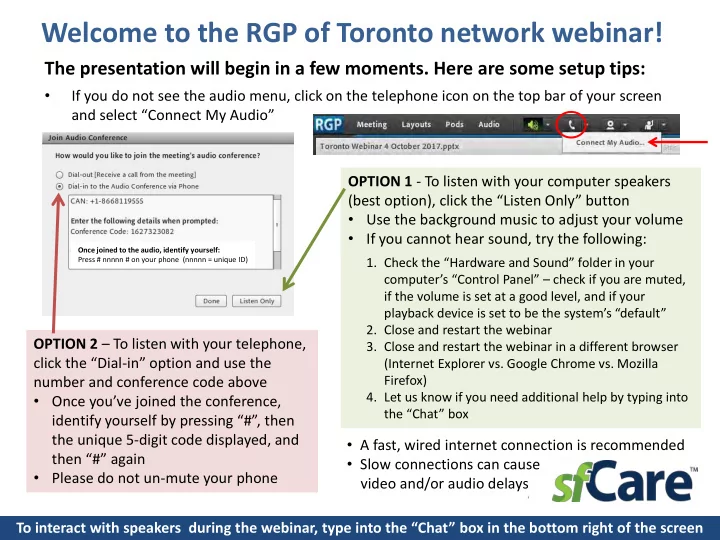
- If you do not see the audio menu, click on the telephone icon on the top bar of your screen
and select “Connect My Audio” To interact with speakers during the webinar, type into the “Chat” box in the bottom right of the screen OPTION 1 - To listen with your computer speakers (best option), click the “Listen Only” button
- Use the background music to adjust your volume
- If you cannot hear sound, try the following:
- 1. Check the “Hardware and Sound” folder in your
computer’s “Control Panel” – check if you are muted, if the volume is set at a good level, and if your playback device is set to be the system’s “default”
- 2. Close and restart the webinar
- 3. Close and restart the webinar in a different browser
(Internet Explorer vs. Google Chrome vs. Mozilla Firefox)
- 4. Let us know if you need additional help by typing into
the “Chat” box
OPTION 2 – To listen with your telephone, click the “Dial-in” option and use the number and conference code above
- Once you’ve joined the conference,
identify yourself by pressing “#”, then the unique 5-digit code displayed, and then “#” again
- Please do not un-mute your phone
- A fast, wired internet connection is recommended
- Slow connections can cause
video and/or audio delays
Once joined to the audio, identify yourself: Press # nnnnn # on your phone (nnnnn = unique ID)