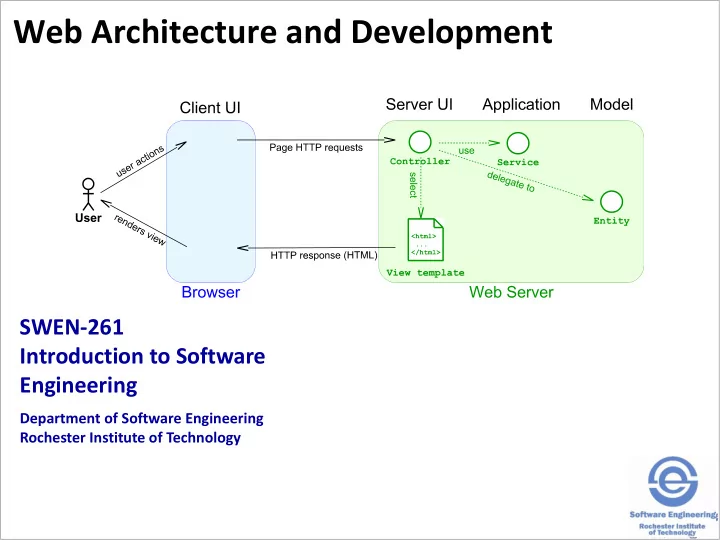
Web Architecture and Development SWEN-261 Introduction to Software - - PowerPoint PPT Presentation

web architecture and development
SMART_READER_LITE
LIVE PREVIEW

Web Architecture and Development SWEN-261 Introduction to Software - - PowerPoint PPT Presentation

Web Architecture and Development SWEN-261 Introduction to Software Engineering Department of Software Engineering Rochester Institute of Technology HTTP is the protocol of the world-wide-web. The Hypertext Transfer Protocol (HTTP) was

slide-1
SLIDE 1

SWEN-261 Introduction to Software Engineering

Department of Software Engineering Rochester Institute of Technology

Web Architecture and Development

slide-2
SLIDE 2

HTTP is the protocol of the world-wide-web.

2

The Hypertext Transfer Protocol (HTTP) was designed to exchange hypertext documents. Hypertext Markup Language (HTML) is the standard format of these documents.

slide-3
SLIDE 3

HTTP has a standard set of verbs.

  • GET retrieves resources.
  • There are several others: POST, PUT, DELETE

and more

3

slide-4
SLIDE 4

HTML is a standard document format.

  • Base structure:

<!DOCTYPE html> <html> <head><!-- page metadata --></head> <body><!-- page content --></body> </html>

  • HTML5 includes many element types including:
  • Content: h1-h5, p, img, a, div/span, many more…
  • Lists: ul, ol, li
  • Forms: form, input, button, select/option …
  • Tables: table, thead, tbody, tr, th/td …

4

slide-5
SLIDE 5

Web 1.0 applications create "forms" within documents.

  • Example simple web form:

<form action='hello' method='POST'> <label for='name'>Name:</label> <input name='name' placeholder='Enter a name' /> <button type='submit'>Say hello</button> </form>

  • The POST HTTP verb sends form data to the

action URL.

5

slide-6
SLIDE 6

The web server handles each HTTP request.

  • A web server must have two types of components:
  • HTTP route handler (aka a UI controller)
  • HTML view templates (aka a UI view)
  • This is an application of the Separation of

Concerns principle.

  • Consider a trivial Hello World web app:

6

slide-7
SLIDE 7

This app happens to need a View and a route Controller for each verb-URL pair.

7

The vm is the map of named attributes passed to the view template.

slide-8
SLIDE 8

The structure of a Spark web application.

  • Spark is a Java-based, web micro-framework
  • It handles HTTP requests
  • It delegates the HTML generation to a template

engine

  • Here's the configuration code for the HelloApp

import static spark.Spark.*; import spark.TemplateEngine; import spark.template.freemarker.FreeMarkerEngine; public class HelloApp { public static void main(String[] args) { final TemplateEngine templateEngine = new FreeMarkerEngine(); get("/", new GetHomeRoute(templateEngine)); post("/hello", new PostHelloRoute(templateEngine)); } }

8

slide-9
SLIDE 9

import java.util.HashMap; import java.util.Map; import spark.*; public class GetHomeRoute implements Route { private final TemplateEngine templateEngine; // constructor not shown public Object handle(Request request, Response response) { final Map<String, Object> vm = new HashMap<>(); vm.put("pageTitle", "Home"); return templateEngine.render(new ModelAndView(vm, "home.ftl")); } }

Here's an example Spark route controller.

9

The View-Model is a Java map of name/value pairs called attributes. This is the name of the FreeMarker template file. We use the convention to name route controllers as VerbUrlRoute.

slide-10
SLIDE 10

Here's the model of the example Spark controller.

10

This is our class. Everything else is part of the Spark framework.

slide-11
SLIDE 11
  • A FreeMarker resource is a text file with HTML

plus special tags for additional rendering logic.

<!DOCTYPE html> <head> </head> <body> <h1>HelloApp: ${pageTitle}</h1> <p>Say hello to someone...</p> <form action='hello' method='POST'> <label for='name'>Name:</label> <input name='name' placeholder='Enter a name...' /> <button type='submit'>Say hello</button> </form> </body> </html>

  • View logic includes conditionals and loops.

Here's an example FreeMarker view template.

11

This is the key for an attribute in the View-Model map object.

slide-12
SLIDE 12

Most webapps need to connect all of a single user's requests together.

12

slide-13
SLIDE 13

Web application frameworks provide an HTTP cookie that identifies the user.

13

The response to a user's first request gets a session cookie. The browser sends the session cookie on all following requests.

slide-14
SLIDE 14

To support keeping track of the names the Hello Post controller must store the name in the session.

  • Here's the code

public class PostHelloRoute implements Route { private final TemplateEngine templateEngine; // constructor not shown public Object handle(Request request, Response response) { final String name = request.queryParams("name"); storeName(name, request.session()); final Map<String, Object> vm = new HashMap<>(); vm.put("pageTitle", "Greeting"); vm.put("name", name); return tempEngine.render(new ModelAndView(vm, "greeting.ftl")); } private void storeName(String name, Session session) { // on next slide } }

14

Note the use of a private helper method to make the code more readable.

slide-15
SLIDE 15

You can define attributes in the Session object which can hold any object with any name.

  • Here's the code to store the list of names:

public class PostHelloRoute implements Route { public Object handle(Request request, Response response) { // code on previous slide } private void storeName(String name, Session session) { List<String> names = session.attribute("names"); if (names == null) { // Initialize it names = new ArrayList<>(); session.attribute("names", names); } names.add(name); }

  • Limit how many attributes you put in the session.
  • Pick meaningful attribute names.

15

slide-16
SLIDE 16

Now that we've stored the list of names in the session let's see how to use it.

  • Here are the changes to the GetHomeRoute:

public class GetHomeRoute implements Route { public Object handle(Request request, Response response) { final Session session = request.session(); final Map<String, Object> vm = new HashMap<>(); vm.put("pageTitle", "Home"); vm.put("names", session.attribute("names")); return tempEngine.render(new ModelAndView(vm, "home_v2.ftl")); } }

  • Change to the Home view:

<#if names??> <ol> <#list names as n> <li>${n}</li> </#list> </ol> </#if>

16

slide-17
SLIDE 17

The Session object is like a Java Map object; it can store any number of named elements.

  • The Java Map API:
  • The put(key, value) method stores an element.
  • The get(key) method retrieves an element, or null if

no element is found

  • The Spark Session API:
  • The attribute(name, value) method stores an

element.

  • The attribute(name) method retrieves an element,
  • r null if no element is found
  • Use the Session object sparingly.

17

slide-18
SLIDE 18

Web 1.0 is server-oriented, while Web 2.0 is client-

  • riented.
  • Web 1.0 is a vision of web development in which

the server generates the view (the HTML).

  • Web 2.0 is a vision in which the client is

responsible for generating the view.

  • This is done with manipulation of a Document Object

Model (DOM).

  • And with Ajax calls to the server to exchange data
  • A hybrid approach is also possible.
  • The term project uses a hybrid approach
  • You will need to understand how to build Ajax route

handlers in Spark

18

slide-19
SLIDE 19

Ajax is a technique for the browser to call the server without rendering a new page.

19

slide-20
SLIDE 20

Gson can parse the JSON strings in a client Ajax call to Java objects.

  • An Ajax Route to insert a new Customer entity:

public class PostCustomerRoute implements Route { private final Gson gson; // constructor not shown public Object handle(Request request, Response response) { final String customerJSON = request.body(); final Customer customer = gson.fromJson(customerJSON, Customer.class); // TODO: add database insert code return "Customer saved."; } }

20

This is will parse the received JSON request stored in customerJSON and return a Customer object with its attributes that match by name with attributes in the JSON request initialized to the value associated with the matching JSON attribute. This object will be injected into the instantiated route object when it is constructed.

slide-21
SLIDE 21

The response to the Ajax call requires the route to convert a Java object into a JSON string.

  • Gson is a Google library for JSON
  • An Ajax Route:

public class GetCustomerRoute implements Route { private final Gson gson; // constructor not shown public Object handle(Request request, Response response) { // TODO: add database lookup code return gson.toJson(new Customer(47, "Fred")); } // JSON would be: {id:47, name:"Fred"} }

  • How this route is configured:

public class AjaxSampleApp { public static void main(String[] args) { final Gson gson = new Gson(); get("/customer", new GetCustomerRoute(gson)); } }

21

This is will generate a JSON response instead of the HTML.

slide-22
SLIDE 22

Remember the architecture for the term project

22

Client UI Application Model

HTML, CSS & JavaScript Java Web server (Jetty) Any OS and HW Any Browser Any OS/HW

Server UI

Spark & FreeMarker

Frameworks Platform OS/Hardware Network Connection

This is where you put the HTTP request handlers and view generation templates.

slide-23
SLIDE 23

Now you have seen examples of Server UI components: views and controllers

23

Client UI Application Model

HTML, CSS & JavaScript Java Web server (Jetty) Any OS and HW Any Browser Any OS/HW

Server UI

Spark & FreeMarker

Frameworks Platform OS/Hardware Network Connection

slide-24
SLIDE 24

These are the responsibilities of UI components.

  • UI Views
  • Provide an interface to the user
  • Present information to the user in a variety of ways
  • Provide a mechanism for user to input data and

requests

  • UI Controllers
  • Control the views based on the state of the

application

  • Query the Application and Model tiers as necessary

to get information to present to the user

  • Perform simple input validation and data conversion

based on input modality, e.g. String to Object

  • Initiate processing of user requests/commands

possibly providing data the user entered

  • Perform data conversion for display by views

24

slide-25
SLIDE 25

Maven is a build tool for Java applications.

  • There have been many build tools over the years:

UNIX make, Ant, Maven and Gradle.

  • Maven provides these build services:
  • Compile sources files
  • Download third-party libraries (such as Spark)
  • Assemble all files into an archive (JAR or WAR, etc)
  • Run test suite
  • Execute programs
  • Generate project reports

25

slide-26
SLIDE 26

Maven provides a default project structure.

  • The source code is in:
  • src/main/java : holds your Java code
  • src/main/resources : holds all non-Java web

resources files and FreeMarker templates

  • The test code is in:
  • src/test/java : holds your Java test code
  • The build area is in the target directory.
  • The pom.xml file provides the Project Object

Model

  • A description of your project
  • The third-party libraries to be included
  • Any plugins, such as testing or analysis tools

26

slide-27
SLIDE 27

Maven is run from the command-line or from within your IDE.

  • To build and assemble the project:

mvn compile

  • To run a Java program:

mvn exec:java

  • To run the project's test suite:

mvn test

27

slide-28
SLIDE 28

Browsers have developer tools to help diagnose problems with a webapp.

  • View DOM structure
  • You can edit the DOM or change/add element

attributes

  • View the CSS styles assigned to any given

element

  • You can edit CSS rules to see how that affects the

visual aspects of an element

  • You can add new CSS rules on the fly
  • View the sequence of HTTP requests; including

resources and Ajax calls

  • View the JavaScript console
  • There is also a REPL (read-eval-print loop)

28