
SLIDE 1
Using Linux perf at Netflix
Brendan Gregg
Senior Performance Architect Sep 2017
Using Linux perf at Netflix Brendan Gregg Senior Performance - - PowerPoint PPT Presentation
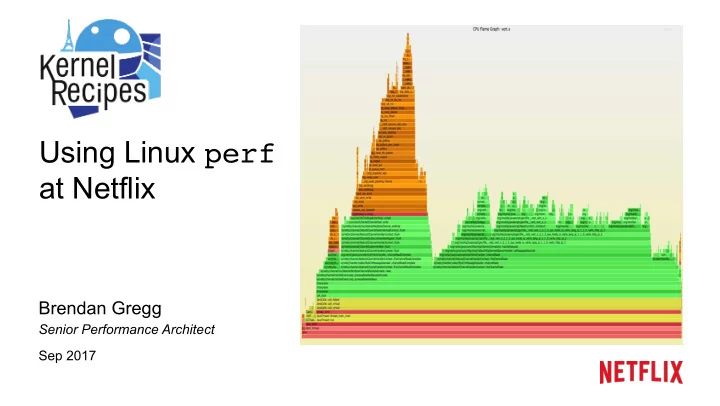
Using Linux perf at Netflix Brendan Gregg Senior Performance Architect Sep 2017 Case Study: ZFS is ea/ng my CPU Easy to debug using Ne9lix Vector & flame graphs How I expected it to look: Case Study: ZFS is ea/ng my CPU (cont.)
Brendan Gregg
Senior Performance Architect Sep 2017
Applica/on (truncated) 38% kernel /me (why?)
Bug: hUps://github.com/zfsonlinux/zfs/issues/6531
Zoomed:
– Stacks (gcc, Java) – Symbols (Node.js, Java) – Guest PMCs – PEBS – Overheads
Flame Graphs Heat Maps …
Eg, Ne9lix Vector (self-service UI):
Java Kernel (C) JVM (C++)
User (C)
– Linux, open source
– Tunable sampling, ring buffers
– Applica/on-basic samplers don't know what's really RUNNING; eg, Java and epoll
– See user, library, kernel with CPU sampling – With some work: hardirqs & SMI as well
– Unlike Java safety point skew
– Small %CPU improvements can mean big $avings
– Explaining regressions in new sooware versions – Incident response – 3rd party sooware evalua/ons – Iden/fy performance tuning targets – Part of CPU workload characteriza/on
– With new BPF capabili/es (off-CPU analysis), that might go from 95 to 90%
– In the linux-tools-common package – Source code & docs in Linux: tools/perf
– CPU Performance Monitoring Counters (PMCs) – Sta/cally defined tracepoints – User and kernel dynamic tracing – Kernel line and local variable tracing – Efficient in-kernel counts and filters – Stack tracing, libunwind – Code annota/on
perf_events ponycorn
# perf usage: perf [--version] [--help] [OPTIONS] COMMAND [ARGS] The most commonly used perf commands are: annotate Read perf.data (created by perf record) and display annotated code archive Create archive with object files with build-ids found in perf.data file bench General framework for benchmark suites buildid-cache Manage build-id cache. buildid-list List the buildids in a perf.data file c2c Shared Data C2C/HITM Analyzer. config Get and set variables in a configuration file. data Data file related processing diff Read perf.data files and display the differential profile evlist List the event names in a perf.data file ftrace simple wrapper for kernel's ftrace functionality inject Filter to augment the events stream with additional information kallsyms Searches running kernel for symbols kmem Tool to trace/measure kernel memory properties kvm Tool to trace/measure kvm guest os list List all symbolic event types lock Analyze lock events mem Profile memory accesses record Run a command and record its profile into perf.data report Read perf.data (created by perf record) and display the profile sched Tool to trace/measure scheduler properties (latencies) script Read perf.data (created by perf record) and display trace output stat Run a command and gather performance counter statistics test Runs sanity tests. timechart Tool to visualize total system behavior during a workload top System profiling tool. probe Define new dynamic tracepoints trace strace inspired tool See 'perf help COMMAND' for more information on a specific command.
from Linux 4.13
# perf list sched:* […] sched:sched_process_exec [Tracepoint event] […] # perf stat -e sched:sched_process_exec -a -- sleep 10 Performance counter stats for 'system wide': 19 sched:sched_process_exec 10.001327817 seconds time elapsed # perf record -e sched:sched_process_exec -a -g -- sleep 10 [ perf record: Woken up 1 times to write data ] [ perf record: Captured and wrote 0.212 MB perf.data (21 samples) ] # perf report -n --stdio # Children Self Samples Trace output # ........ ........ ............ ................................................. 4.76% 4.76% 1 filename=/bin/bash pid=7732 old_pid=7732 |
return_from_SYSCALL_64 do_syscall_64 sys_execve do_execveat_common.isra.35 […] # perf script sleep 7729 [003] 632804.699184: sched:sched_process_exec: filename=/bin/sleep pid=7729 old_pid=7729 44b97e do_execveat_common.isra.35 (/lib/modules/4.13.0-rc1-virtual/build/vmlinux) 44bc01 sys_execve (/lib/modules/4.13.0-rc1-virtual/build/vmlinux) 203acb do_syscall_64 (/lib/modules/4.13.0-rc1-virtual/build/vmlinux) acd02b return_from_SYSCALL_64 (/lib/modules/4.13.0-rc1-virtual/build/vmlinux) c30 _start (/lib/x86_64-linux-gnu/ld-2.23.so) […]
rate, so safe to record
sufficient, or,
perf record -F 99 -a -g -- sleep 10
Event: 99 Hertz Scope: all CPUs AcCon: record stack traces
Note: sleep 10 is a dummy command to set the dura/on
– Uses an efficient in-kernel counter, and prints the results
– Records details of every event to a dump file (perf.data)
– This incurs higher overhead, rela/ve to the rate of events – Include the call graph (stack trace) using -g
– List events (perf list) – Report from a perf.data file (perf report) – Dump a perf.data file as text (perf script) – top style profiling (perf top)
– e.g., 99 Hertz (samples per second)
– CPU Performance Monitoring Counters (PMCs)
– Sta/cally defined in sooware
– Created using uprobes (user) or kprobes (kernel) – Can do kernel line tracing with local variables (needs kernel debuginfo)
# perf list List of pre-defined events (to be used in -e): cpu-cycles OR cycles [Hardware event] instructions [Hardware event] cache-references [Hardware event] cache-misses [Hardware event] branch-instructions OR branches [Hardware event] branch-misses [Hardware event] bus-cycles [Hardware event] stalled-cycles-frontend OR idle-cycles-frontend [Hardware event] stalled-cycles-backend OR idle-cycles-backend [Hardware event] […] cpu-clock [Software event] task-clock [Software event] page-faults OR faults [Software event] context-switches OR cs [Software event] cpu-migrations OR migrations [Software event] […] L1-dcache-loads [Hardware cache event] L1-dcache-load-misses [Hardware cache event] L1-dcache-stores [Hardware cache event] […] skb:kfree_skb [Tracepoint event] skb:consume_skb [Tracepoint event] skb:skb_copy_datagram_iovec [Tracepoint event] net:net_dev_xmit [Tracepoint event] net:net_dev_queue [Tracepoint event] net:netif_receive_skb [Tracepoint event] net:netif_rx [Tracepoint event] […]
# Listing all currently known events: perf list # Searching for "sched" tracepoints: perf list | grep sched # Listing sched tracepoints: perf list 'sched:*'
Dozens of perf one-liners: hUp://www.brendangregg.com/perf.html#OneLiners
# CPU counter statistics for the specified command: perf stat command # CPU counter statistics for the entire system, for 5 seconds: perf stat -a sleep 5 # Detailed CPU counter statistics for the specified PID, until Ctrl-C: perf stat -dp PID # Various CPU last level cache statistics for the specified command: perf stat -e LLC-loads,LLC-load-misses,LLC-stores,LLC-prefetches command # Count system calls for the specified PID, until Ctrl-C: perf stat -e 'syscalls:sys_enter_*' -p PID # Count block device I/O events for the entire system, for 10 seconds: perf stat -e 'block:*' -a sleep 10 # Show system calls by process, refreshing every 2 seconds: perf top -e raw_syscalls:sys_enter -ns comm
# Sample on-CPU functions for the specified command, at 99 Hertz: perf record -F 99 command # Sample CPU stack traces for the specified PID, at 99 Hertz, for 10 seconds: perf record -F 99 -p PID -g -- sleep 10 # Sample CPU stack traces for the entire system, at 99 Hertz, for 10 seconds: perf record -F 99 -ag -- sleep 10 # Sample CPU stacks, once every 10,000 Level 1 data cache misses, for 5 secs: perf record -e L1-dcache-load-misses -c 10000 -ag -- sleep 5 # Sample CPU stack traces, once every 100 last level cache misses, for 5 secs: perf record -e LLC-load-misses -c 100 -ag -- sleep 5 # Sample on-CPU kernel instructions, for 5 seconds: perf record -e cycles:k -a -- sleep 5 # Sample on-CPU user instructions, for 5 seconds: perf record -e cycles:u -a -- sleep 5
# Show perf.data in an ncurses browser (TUI) if possible: perf report # Show perf.data with a column for sample count: perf report -n # Show perf.data as a text report, with data coalesced and percentages: perf report --stdio # List all raw events from perf.data: perf script # List all raw events from perf.data, with customized fields: perf script -f comm,tid,pid,time,cpu,event,ip,sym,dso # Dump raw contents from perf.data as hex (for debugging): perf script -D # Disassemble and annotate instructions with percentages (needs debuginfo): perf annotate --stdio
– Pros: Low (determinis/c) overhead – Cons: Coarse accuracy, but usually sufficient
A B block interrupt
A B A A B A syscall
/me stack samples:
A
# perf record -F 99 -ag -- sleep 30 [ perf record: Woken up 9 times to write data ] [ perf record: Captured and wrote 2.745 MB perf.data (~119930 samples) ] # perf report -n --stdio 1.40% 162 java [kernel.kallsyms] [k] _raw_spin_lock |
| |--63.21%-- try_to_wake_up | | | |--63.91%-- default_wake_function | | | | | |--56.11%-- __wake_up_common | | | __wake_up_locked | | | ep_poll_callback | | | __wake_up_common | | | __wake_up_sync_key | | | | | | | |--59.19%-- sock_def_readable […78,000 lines truncated…]
– x-axis: alphabe/cal stack sort, to maximize merging – y-axis: stack depth – color: random, or hue can be a dimension
non-regression tes/ng ("differen/al flame graphs")
– interpreta/on: top edge is on-CPU, beneath it is ancestry
– Includes JavaScript: open in a browser for interac/vity
git clone --depth 1 https://github.com/brendangregg/FlameGraph cd FlameGraph perf record -F 99 -a –g -- sleep 30 perf script | ./stackcollapse-perf.pl | ./flamegraph.pl > perf.svg
$ flamegraph.pl --help USAGE: flamegraph.pl [options] infile > outfile.svg
# io, wakeup, chain, java, js, perl, red, green, blue, # aqua, yellow, purple, orange
eg, flamegraph.pl --title="Flame Graph: malloc()" trace.txt > graph.svg
perf stat perf record perf report perf script count events capture stacks text UI dump profile stackcollapse-perf.pl perf.data flame graph visualiza/on perf list list events Typical Workflow flamegraph.pl
perf report perf report
text UI summary awk flame graph visualiza/on flamegraph.pl perf script dump perf stat perf record count events capture stacks perf.data perf list list events Typical Workflow
Linux 2.6
perf record perf script capture stacks write text stackcollapse-perf.pl flamegraph.pl perf.data write samples reads samples folded output perf record perf report –g folded capture stacks folded report awk flamegraph.pl perf.data write samples reads samples folded output
Linux 4.5
count stacks (BPF) folded
flamegraph.pl profile.py
Linux 4.9
not perf
Install perf-tools-common and perf-tools-`uname -r` packages; Or compile in the Linux source: tools/perf The "gotchas"…
perf record -F 99 -a –g -- sleep 30 perf report -n --stdio
| |--96.78%-- re_search_stub | rpl_re_search | match_regex | do_subst | execute_program | process_files | main | __libc_start_main |
match_regex do_subst execute_program process_files main __libc_start_main 28.10% 146 sed libc-2.19.so [.] re_search_internal |
| |--12.25%-- 0x3 | 0x100007
broken not broken
|--11.65%-- 0x40a447 | 0x40659a | 0x408dd8 | 0x408ed1 | 0x402689 | 0x7fa1cd08aec5 | |--1.33%-- 0x40a4a1 | | | |--60.01%-- 0x40659a | | 0x408dd8 | | 0x408ed1 | | 0x402689 | | 0x7fa1cd08aec5 78.50% 409 sed libc-2.19.so [.] 0x00000000000dd7d4 | |--3.65%-- 0x7f2516d5d10d | |--2.19%-- 0x7f2516d0332f | |--1.22%-- 0x7f2516cffbd2 | |--1.22%-- 0x7f2516d5d5ad
broken probably not broken missing symbols, but that's another problem
Broken Java stacks (missing frame pointer)
Java == green system == red C++ == yellow
– Pros: simple, supports any system stack walker – Cons: might cost a liUle extra CPU to make available
– Pros: more debug info – Cons: not on older kernels, and inflates instance size – … there's also ORC on the latest kernel
– hUps://github.com/jvm-profiling-tools/async-profiler
– So how do we fix the frame pointer…
– Please make this the default in gcc!
+++ openjdk8/hotspot/src/cpu/x86/vm/macroAssembler_x86.cpp 2014-11-07 … @@ -5236,6 +5236,7 @@ // We always push rbp, so that on return to interpreter rbp, will be // restored correctly and we can correct the stack. push(rbp); + mov(rbp, rsp); // Remove word for ebp framesize -= wordSize;
+++ openjdk8/hotspot/src/cpu/x86/vm/c1_MacroAssembler_x86.cpp … [...]
Involved changes like this: fixing x86-64 func/on prologues
stack samples
values)
# perf script […] java 4579 cpu-clock: ffffffff8172adff tracesys ([kernel.kallsyms]) 7f4183bad7ce pthread_cond_timedwait@@GLIBC_2… java 4579 cpu-clock: 7f417908c10b [unknown] (/tmp/perf-4458.map) java 4579 cpu-clock: 7f4179101c97 [unknown] (/tmp/perf-4458.map) java 4579 cpu-clock: 7f41792fc65f [unknown] (/tmp/perf-4458.map) a2d53351ff7da603 [unknown] ([unknown]) java 4579 cpu-clock: 7f4179349aec [unknown] (/tmp/perf-4458.map) java 4579 cpu-clock: 7f4179101d0f [unknown] (/tmp/perf-4458.map) […]
stacks are full, and go all the way to start_thread()
running: inlined frames are not present
# perf script […] java 8131 cpu-clock: 7fff76f2dce1 [unknown] ([vdso]) 7fd3173f7a93 os::javaTimeMillis() (/usr/lib/jvm… 7fd301861e46 [unknown] (/tmp/perf-8131.map) 7fd30184def8 [unknown] (/tmp/perf-8131.map) 7fd30174f544 [unknown] (/tmp/perf-8131.map) 7fd30175d3a8 [unknown] (/tmp/perf-8131.map) 7fd30166d51c [unknown] (/tmp/perf-8131.map) 7fd301750f34 [unknown] (/tmp/perf-8131.map) 7fd3016c2280 [unknown] (/tmp/perf-8131.map) 7fd301b02ec0 [unknown] (/tmp/perf-8131.map) 7fd3016f9888 [unknown] (/tmp/perf-8131.map) 7fd3016ece04 [unknown] (/tmp/perf-8131.map) 7fd30177783c [unknown] (/tmp/perf-8131.map) 7fd301600aa8 [unknown] (/tmp/perf-8131.map) 7fd301a4484c [unknown] (/tmp/perf-8131.map) 7fd3010072e0 [unknown] (/tmp/perf-8131.map) 7fd301007325 [unknown] (/tmp/perf-8131.map) 7fd301007325 [unknown] (/tmp/perf-8131.map) 7fd3010004e7 [unknown] (/tmp/perf-8131.map) 7fd3171df76a JavaCalls::call_helper(JavaValue*,… 7fd3171dce44 JavaCalls::call_virtual(JavaValue*… 7fd3171dd43a JavaCalls::call_virtual(JavaValue*… 7fd31721b6ce thread_entry(JavaThread*, Thread*)… 7fd3175389e0 JavaThread::thread_main_inner() (/… 7fd317538cb2 JavaThread::run() (/usr/lib/jvm/nf… 7fd3173f6f52 java_start(Thread*) (/usr/lib/jvm/… 7fd317a7e182 start_thread (/lib/x86_64-linux-gn…
Java (no symbols)
12.06% 62 sed sed [.] re_search_internal
|
| |--96.78%-- re_search_stub | rpl_re_search | match_regex | do_subst | execute_program | process_files | main | __libc_start_main 71.79% 334 sed sed [.] 0x000000000001afc1 | |--11.65%-- 0x40a447 | 0x40659a | 0x408dd8 | 0x408ed1 | 0x402689 | 0x7fa1cd08aec5
broken not broken
# perf script Failed to open /tmp/perf-8131.map, continuing without symbols […] java 8131 cpu-clock: 7fff76f2dce1 [unknown] ([vdso]) 7fd3173f7a93 os::javaTimeMillis() (/usr/lib/jvm… 7fd301861e46 [unknown] (/tmp/perf-8131.map) […]
– Agent aUaches and writes the map file on demand (previous versions aUached on Java start, and wrote con/nually) – hUps://github.com/jvm-profiling-tools/perf-map-agent (was hUps://github.com/jrudolph/perf-map-agent)
– We use scripts to find Java processes and dump their map files, paying aUen/on to file
– hUps://github.com/brendangregg/FlameGraph/blob/master/jmaps – Needs to run as close as possible to the profile, to minimize symbol churn
# perf record -F 99 -a -g -- sleep 30; jmaps
Java Kernel (C) JVM (C++)
User (C)
flamegraph.pl --color=java
– -XX:-Inline – Many more Java frames – 80% slower (in this case) – May not be necessary: inlined flame graphs ooen make enough sense – Or tune -XX:MaxInlineSize and - XX:InlineSmallCode to reveal more frames, without cos/ng much perf: can even go faster!
– perf-map-agent unfoldall – We some/mes need and use this
No inlining
– --perf-basic-prof: everything. We found it can log over 1 Gbyte/day. – --perf-basic-prof-only-functions: tries to only log symbols we care about.
– We /dy logs before using them: hUps://raw.githubusercontent.com/brendangregg/Misc/master/perf_events/ perfmap/dy.pl
# perf annotate -i perf.data.noplooper --stdio Percent | Source code & Disassembly of noplooper
: : 00000000004004ed <main>: 0.00 : 4004ed: push %rbp 0.00 : 4004ee: mov %rsp,%rbp 20.86 : 4004f1: nop 0.00 : 4004f2: nop 0.00 : 4004f3: nop 0.00 : 4004f4: nop 19.84 : 4004f5: nop 0.00 : 4004f6: nop 0.00 : 4004f7: nop 0.00 : 4004f8: nop 18.73 : 4004f9: nop 0.00 : 4004fa: nop 0.00 : 4004fb: nop 0.00 : 4004fc: nop 19.08 : 4004fd: nop 0.00 : 4004fe: nop 0.00 : 4004ff: nop 0.00 : 400500: nop 21.49 : 400501: jmp 4004f1 <main+0x4>
(A) (B) (C) (D)
# perf annotate -i perf.data.noplooper --stdio Percent | Source code & Disassembly of noplooper
: : 00000000004004ed <main>: 0.00 : 4004ed: push %rbp 0.00 : 4004ee: mov %rsp,%rbp 20.86 : 4004f1: nop 0.00 : 4004f2: nop 0.00 : 4004f3: nop 0.00 : 4004f4: nop 19.84 : 4004f5: nop 0.00 : 4004f6: nop 0.00 : 4004f7: nop 0.00 : 4004f8: nop 18.73 : 4004f9: nop 0.00 : 4004fa: nop 0.00 : 4004fb: nop 0.00 : 4004fc: nop 19.08 : 4004fd: nop 0.00 : 4004fe: nop 0.00 : 4004ff: nop 0.00 : 400500: nop 21.49 : 400501: jmp 4004f1 <main+0x4>
Go home instruc/on pointer, you're drunk
– perf record -e cycles:pp – The 'p' can be specified mul/ple /mes:
– … from tools/perf/Documenta/on/perf-list.txt
# perf stat -a -d sleep 5 Performance counter stats for 'system wide': 10003.718595 task-clock (msec) # 2.000 CPUs utilized [100.00%] 323 context-switches # 0.032 K/sec [100.00%] 17 cpu-migrations # 0.002 K/sec [100.00%] 233 page-faults # 0.023 K/sec <not supported> cycles <not supported> stalled-cycles-frontend <not supported> stalled-cycles-backend <not supported> instructions <not supported> branches <not supported> branch-misses <not supported> L1-dcache-loads <not supported> L1-dcache-load-misses <not supported> LLC-loads <not supported> LLC-load-misses 5.001607197 seconds time elapsed
– Can't measure instruc/ons per cycle (IPC), cache hits/misses, MMU/TLB events, etc.
– I added vpmu support for subsets, eg, vpmu=arch for Intel architectural set (7 PMCs only) – hUp://www.brendangregg.com/blog/2017-05-04/the-pmcs-of-ec2.html – Now available on the largest AWS EC2 instance types
architectural set
– showboost is from my msr-cloud-tools collec/on (on github)
# ./showboost CPU MHz : 2500 Turbo MHz : 2900 (10 active) Turbo Ratio : 116% (10 active) CPU 0 summary every 5 seconds... TIME C0_MCYC C0_ACYC UTIL RATIO MHz 17:28:03 4226511637 4902783333 33% 116% 2900 17:28:08 4397892841 5101713941 35% 116% 2900 17:28:13 4550831380 5279462058 36% 116% 2900 17:28:18 4680962051 5429605341 37% 115% 2899 17:28:23 4782942155 5547813280 38% 115% 2899 [...]
– please fix
– hUp://blog.alicegoldfuss.com/making-flamegraphs-with-containerized-java/
– Krister Johansen's patches
– In the lab – Run perf stat to understand rate, before perf record
# perf record -e block:block_rq_insert -a ^C[ perf record: Woken up 1 times to write data ] [ perf record: Captured and wrote 0.172 MB perf.data (~7527 samples) ] # perf script […] java 9940 [015] 1199510.044783: block_rq_insert: 202,1 R 0 () 4783360 + 88 [java] java 9940 [015] 1199510.044786: block_rq_insert: 202,1 R 0 () 4783448 + 88 [java] java 9940 [015] 1199510.044786: block_rq_insert: 202,1 R 0 () 4783536 + 24 [java] java 9940 [000] 1199510.065195: block_rq_insert: 202,1 R 0 () 4864088 + 88 [java] […]
include/trace/events/block.h: java 9940 [015] 1199510.044783: block_rq_insert: 202,1 R 0 () 4783360 + 88 [java] DECLARE_EVENT_CLASS(block_rq, [...] TP_printk("%d,%d %s %u (%s) %llu + %u [%s]", MAJOR(__entry->dev), MINOR(__entry->dev), __entry->rwbs, __entry->bytes, __get_str(cmd), (unsigned long long)__entry->sector, __entry->nr_sector, __entry->comm)
format string process PID [CPU] /mestamp: eventname: kernel source may be the
Also see: cat /sys/kernel/debug/tracing/events/block/block_rq_insert/format
# Trace new processes, until Ctrl-C: perf record -e sched:sched_process_exec -a # Trace all context-switches with stack traces, for 1 second: perf record -e context-switches –ag -- sleep 1 # Trace CPU migrations, for 10 seconds: perf record -e migrations -a -- sleep 10 # Trace all connect()s with stack traces (outbound connections), until Ctrl-C: perf record -e syscalls:sys_enter_connect –ag # Trace all block device (disk I/O) requests with stack traces, until Ctrl-C: perf record -e block:block_rq_insert -ag # Trace all block device issues and completions (has timestamps), until Ctrl-C: perf record -e block:block_rq_issue -e block:block_rq_complete -a # Trace all block completions, of size at least 100 Kbytes, until Ctrl-C: perf record -e block:block_rq_complete --filter 'nr_sector > 200' # Trace all block completions, synchronous writes only, until Ctrl-C: perf record -e block:block_rq_complete --filter 'rwbs == "WS"' # Trace all block completions, all types of writes, until Ctrl-C: perf record -e block:block_rq_complete --filter 'rwbs ~ "*W*"' # Trace all ext4 calls, and write to a non-ext4 location, until Ctrl-C: perf record -e 'ext4:*' -o /tmp/perf.data -a
# Add a tracepoint for the kernel tcp_sendmsg() function entry (--add optional): perf probe --add tcp_sendmsg # Remove the tcp_sendmsg() tracepoint (or use --del): perf probe -d tcp_sendmsg # Add a tracepoint for the kernel tcp_sendmsg() function return: perf probe 'tcp_sendmsg%return' # Show avail vars for the tcp_sendmsg(), plus external vars (needs debuginfo): perf probe -V tcp_sendmsg --externs # Show available line probes for tcp_sendmsg() (needs debuginfo): perf probe -L tcp_sendmsg # Add a tracepoint for tcp_sendmsg() line 81 with local var seglen (debuginfo): perf probe 'tcp_sendmsg:81 seglen' # Add a tracepoint for do_sys_open() with the filename as a string (debuginfo): perf probe 'do_sys_open filename:string' # Add a tracepoint for myfunc() return, and include the retval as a string: perf probe 'myfunc%return +0($retval):string' # Add a tracepoint for the user-level malloc() function from libc: perf probe -x /lib64/libc.so.6 malloc # List currently available dynamic probes: perf probe -l
# Add a tracepoint for tcp_sendmsg(), with three entry regs (platform specific): perf probe 'tcp_sendmsg %ax %dx %cx' # Add a tracepoint for tcp_sendmsg(), with an alias ("bytes") for %cx register: perf probe 'tcp_sendmsg bytes=%cx' # Trace previously created probe when the bytes (alias) var is greater than 100: perf record -e probe:tcp_sendmsg --filter 'bytes > 100' # Add a tracepoint for tcp_sendmsg() return, and capture the return value: perf probe 'tcp_sendmsg%return $retval' # Add a tracepoint for tcp_sendmsg(), and "size" entry argument (debuginfo): perf probe 'tcp_sendmsg size' # Add a tracepoint for tcp_sendmsg(), with size and socket state (debuginfo): perf probe 'tcp_sendmsg size sk->__sk_common.skc_state' # Trace previous probe when size > 0, and state != TCP_ESTABLISHED(1) (debuginfo): perf record -e probe:tcp_sendmsg --filter 'size > 0 && skc_state != 1' -a
# perf probe -nv 'tcp_sendmsg size sk->__sk_common.skc_state' […] Added new event: Writing event: p:probe/tcp_sendmsg tcp_sendmsg+0 size=%cx:u64 skc_state=+18(%si):u8 probe:tcp_sendmsg (on tcp_sendmsg with size skc_state=sk->__sk_common.skc_state) You can now use it in all perf tools, such as: perf record -e probe:tcp_sendmsg -aR sleep 1
One server instance with kernel debuginfo, and -nv (dry run, verbose):
# perf probe 'tcp_sendmsg+0 size=%cx:u64 skc_state=+18(%si):u8' Failed to find path of kernel module. Added new event: probe:tcp_sendmsg (on tcp_sendmsg with size=%cx:u64 skc_state=+18(%si):u8) You can now use it in all perf tools, such as: perf record -e probe:tcp_sendmsg -aR sleep 1
All other instances (of the same kernel version):
Copy-n-paste!
Masami Hiramatsu was investigating a way to better automate this
hUp://www.brendangregg.com/blog/2014-07-01/perf-heat-maps.html
SSD I/O (fast, with queueing) HDD I/O (random, modes)
– Ques/ons? – hUp://www.brendangregg.com – hUp://slideshare.net/brendangregg – bgregg@ne9lix.com – @brendangregg