The State Machine Memory - - PDF document

the state machine
SMART_READER_LITE
LIVE PREVIEW

The State Machine Memory - - PDF document

X86 assembly quick tutorial (real mode) Wei Dong The State Machine Memory CPU


slide-1
SLIDE 1
  • X86 assembly quick tutorial

(real mode)

Wei Dong

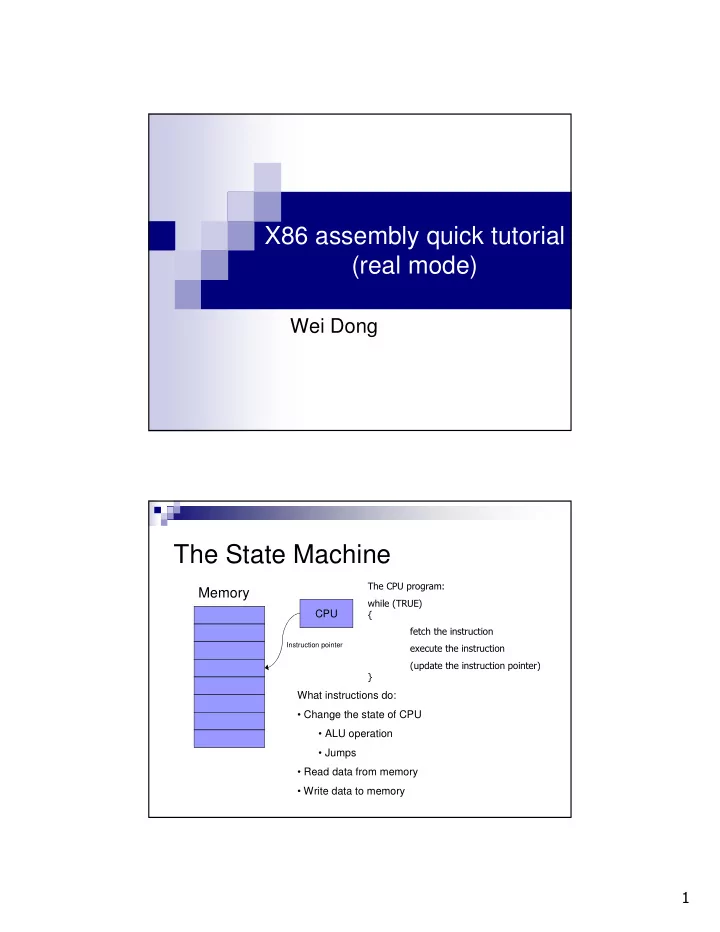
The State Machine

Memory

CPU

Instruction pointer

  • What instructions do:
  • Change the state of CPU
  • ALU operation
  • Jumps
  • Read data from memory
  • Write data to memory
slide-2
SLIDE 2

!

CPU State: Register Set

SP DI SI BP DL DH CL CH BL BH AL AH

General-purpose registers 16bit 32bit

ESI EDX EBP EDI ESP ECX EBX EAX ES FS GS SS DS CS

Segment registers (16bit)

EFLAGS EIP

Instruction Pointer (32bit) Flags (32bit)

DX CX BX AX

Address the register by: %ax, %ebx, etc

A little bit on EFLAGS

OF: overflow 11 std; cld; DF: direction 10 sti; cli; IF: interrupt 9 SF: sign flag 7 ZF: zero flag 6 CF: carry flag

Comment Name Bit Function of EFLAGS:

  • Control the behavior of CPU
  • Save the status of last instruction
slide-3
SLIDE 3

"

Format: segment:displacement(base, index) Offset = Base + Index + Displacement Address = (Segment << 4) + Offset

Displacement: constant Base: %bx, %bp Index: %si, %di Segment: %cs, %ds, %ss, %es

Memory Addressing Memory Addressing (data)

segment:displacement(base, index)

The components are all optional Default segment:

%bp: %ss %bx, %si, %di: %ds

Examples

100 (%si) = %ds:(%si) (%bp) = %ss:(%bp) (%bx,%si) = %ds:(%bx,%si)

  • 10(%bp)

= %ss:-10(%bp) %ds:-10(%bx, %si)

slide-4
SLIDE 4

#

Instructions: arithmetic & logic

add/sub{l,w,b} source, dest inc/dec/neg{l,w,b} dest cmp{I,w,b} source, dest and/or/xor{l,w,b} source, dest

Restrictions

No more than one memory operand mov{lwb} source, dest xchg{lwb} source, dest

Segment registers can only appear with registers

movsb

movb %ds:(%si) %es:(%di) %si %si + inc %di %di + inc %cx %cx $ 1 Often used with %cx to move a number of bytes

Instructions: Data Transfer

If DF = 0 then inc = 1 else inc = -1

slide-5
SLIDE 5

%

Example

  • Move 0x200 bytes from 0x0100:0x0000 to 0x0080:0x0000

movw $0x0100, %ax movw %ax, %ds /* setup %ds */ movw $0x0080, %ax movw %ax, %es /* setup %es */ movw $0, %ax movw %ax, %si /* setup %si */ movw %ax, %di /* setup %di */ movw $0x200, %cx cld /* setup direction flag */ repeat: movsb cmp $0, %cx jnz repeat

Example (cont.)

Move 0x200 bytes from 0x0100:0x0000 to 0x0080:0x0000

movw $0x0100, %ax movw %ax, %ds /* setup %ds */ movw $0x0080, %ax movw %ax, %es /* setup %es */ movw $0, %ax movw %ax, %si /* setup %si */ movw %ax, %di /* setup %di */ movw $0x200, %cx cld /* setup direction flag */ rep movsb

slide-6
SLIDE 6

&

Instructions: stack access

pushw source

%sp %sp – 2 %ss:(%sp) source

popw dest

dest %ss:(%sp), dest %sp %sp + 2

Setup up the stack before

you actually use it

Instructions: unconditional jump

jmp label

%ip label

ljmp NEW_CS, offset

%ip label; %cs NEW_CS

call label

push %ip + ? (address of call instruction) %ip label

ret

pop %ip

Also lcall and lret

slide-7
SLIDE 7

'

Instructions: conditional jump

j* label: jump to label if flag * is 1 jn* label: jump to label if flag * is 0 *: bits of %eflags

Examples: js, jz, jc, jns, jnz, jnc, …

BIOS Service

Use BIOS service through interruption

Store the parameters to the registers Call the interruption

int INT_NUM

slide-8
SLIDE 8

(

Example: BIOS INT 0x13 Function 2

ah = 2 al = number of sectors to read ch = cylinder number bits 0-8 cl, bits 6&7 = cylinder number bits 8-9.

  • bits 0-5 = starting sector number, 1 to 63

dh = starting head number, 0 to 255 dl = drive number es:bx = pointer where to place information read from diskette Returns: ah = return status (0 if successful) carry = 0 successful, = 1 if error occurred

Note for project 1

In our project, the bootloader is working in

real mode (16 bits).

Bootloader code is loaded by BIOS, so it

did not have %ds, %ss, %sp setup properly when it is loaded.

In bootloader, all the code and data share

the same 512 bytes. So data will have the same segment as code.