SLIDE 1
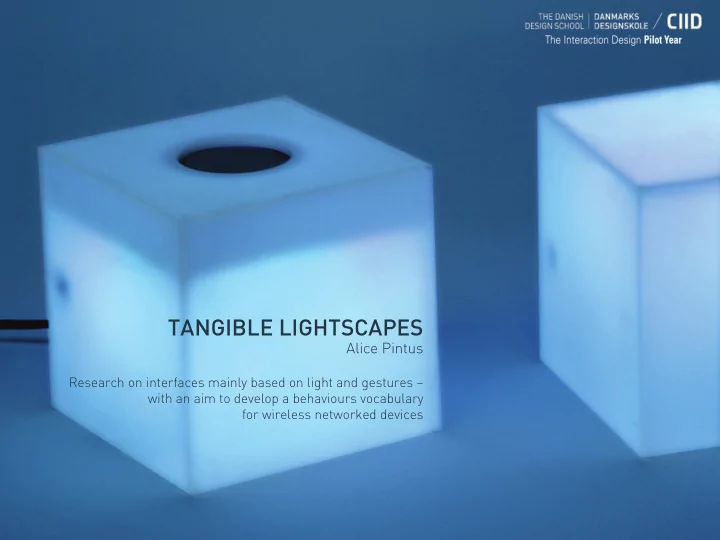
TANGIBLE LIGHTSCAPES
Alice Pintus
Research on interfaces mainly based on light and gestures – with an aim to develop a behaviours vocabulary for wireless networked devices
SLIDE 2 INSPIRATION
I’m interested in the use
humanizing technology. 80% of all sensory perceptions are optic and need light as an information medium. The eye is always consciously or unconsciously monitoring the environment: human attention is captured by the brightest items in the visual field, by moving objects, by unforeseen elements and by everything potentially dangerous.
SLIDE 3 INSPIRATION
Animals like jellyfish have an entire vocabulary only based on bioluminescence signals.
SLIDE 4 INSPIRATION
Use light and sound if there is no other common language! “Close encounters
Steven Spielberg 1977
SLIDE 5 TOPIC/DOMAIN
Beyond any cultural and linguistic barrier, peripheral human attention is attracted by light, this attitude can be used to convey information in a strategic way. It is possible to take advantage of these proprieties: * designing interfaces that use light as a core feedback tool, exploiting light’s not intrusive qualities *limiting the information
traditional interfaces
SLIDE 6 INITIAL STATEMENT
The aim of my research is to understand how to create a basic light behaviour vocabulary to design a non verbal interface. Light can be a very effective feedback. Using a recognisable pattern is already a way to deliver content, because structure is equal to information (Morse code)
* COLOURS * SPEED OF CHANGES (RATE): frequency, duration, cycles, synchronicity, pattern (fading, pulsing, blinking...) * INTENSITY/BRIGHTNESS * SHAPE: using many LEDs, low definition screen * CULTURAL REFERENCES: red/stop, green/go….
SLIDE 7 EXPERIENCE PROTOTYPING
Is it possible to design a light behaviour vocabulary? I used Dubmate prototypes
Sikker Remin and Francesco Mondelli- to run 2 rounds of user tests (12 interviews) to understand people’s reaction to a mainly light based interface. Dubmate is a portable device, basically an evolution of the traditional USB stick, designed to share files through a tangible user interface avoiding the use of
is based on the use of gesture and lights/colours.
SLIDE 8 EXPERIENCE PROTOTYPING/ First round
I designed the first behaviour routine according to my way of imagining the different activities of the device.
SLIDE 9
EXPERIENCE PROTOTYPING/ First round feedbacks ‘This blinking light makes me nervous’ (female, 37 years old) ‘It’s nice to do a physical gesture to start the action, it gives a feeling of control’
(male, 70 years old)
‘It’s useful to show something that is digital in a physical way’ (female, 26 years old) ‘This behaviour is frustrating: it’s too slow, it should be faster also to see the direction of the transfer. This fading light makes me think that the device is not working quite enough for me’ (female, 26 years old) (male, 29 years old) (female, 37
years old)
‘I expected something different...’ (female, 23 years old) (female, 37 years old)
SLIDE 10 EXPERIENCE PROTOTYPING/ Second round
In the second test session, instead, the light behaviour is completely based on the feedback collected during the first round of tests.
SLIDE 11 EXPERIENCE PROTOTYPING/ CONCLUSIONS
These tests allow me to think that it is possible to create a common light language that can be largely understood: people have a clear idea on what is easier for them and why (even if there are different
behaviour). The users can connect pretty easily light behaviours to meanings and states.
‘I understand the meaning, but I think that this signal is too strong, it seems I did something very very bad, this blinking makes you feel stupid’ (male, 27 years old) ‘I like when my Hard Drive LED is blinking really fast, it’s nice to think it is doing its best to do the transfer as quick as possible’ (male, 22 years old) ‘Now it’s simpler then before!’ (female, 37 years old) ‘Light has the potential to make something inviting and intuitive. It is playful and useful and this add value to the interaction with the device. You enjoy using the
- bject more’ (male, 27 years old)
SLIDE 12 CONTEXT
How to use light to show connections between networked objects that don’t have any physical cable? Today, connecting wireless devices is inconvenient: you have to go through interfaces that do not relate to the physical arrangement of the objects. It can also be difficult to understand which devices are connected and what they are communicating.
SLIDE 13 CONCEPT
My “device language” gives a concrete representation
invisible events that are taking place. It allows users to feel more in control by providing them with a direct interaction with the objects they are using.
Design a vocabulary of light behaviours that shows people what their devices are doing. This vocabulary can be applied to a wide range of contexts where devices (speakers, headphones, memory storage devices, cameras, laptops…) are communicating wirelessly.
SLIDE 14 INTERFACE GOALS
I would like to design a tangible communication protocol between networked objects that share data and connection.
UNDERSTANDING How might we show the voice/thoughts/actions of 2 devices communicating to each other?
Make the intangible visible: feel don’t think.
CONTROL How might we design a physical/direct interaction on the device?
People feel more in control if they can physically operate on the device, this interaction amplifies the trust they put in the object.
SLIDE 15 WIRELESS DEVICES
Which are the common activities /states for devices that are communicating wirelessly? HOW CAN WE DESIGN A CABLE MADE OF LIGHT?
COMMUNICATION . connect / disconnect the devices . show the devices’ signal strenght strength DATA TRANSFER . progress . error
SLIDE 16 3D REPRESENTATION OF THE MAP/ PROTOTYPE
I designed a set of cubes to physically represent the light behaviours map
* Device with no memory storage * Device with no personal colour: it takes the colour of the device it is connected to * Device with memory storage * Device with its own personal colour: it gives the colour to the peripheral device it is connected to. The user can set his customized colour
° speaker ° headphone ° ampli ° screen ° projector ° wireless router ° wireless mouse ° keyboard ° web cam ° pen tablet ° microphone ° … ° mp3 player ° memory storage device ° time capsule ° camera ° laptop ° mobile phone ° ...
peripheral device main device
SLIDE 17
THE MAP/ 1
CONNECT
CONNECTION LIGHT
CONNECTED LOSING SIGNAL heart beat pattern heart beat pattern solid light light intensity according to signal strenght
SLIDE 18
THE MAP/ 2
CONTROL LIGHT
TRANSFERING TRANSFER COMPLETE ERROR blinking red light light pulsing (Sender colour) solid light (Sender colour)
SLIDE 19 THE MAP
CONNECT
GESTURE CONNECTION LIGHT CONTROL LIGHT
CONNECTED TRANSFERING TRANSFER COMPLETE LOSING SIGNAL DISCONNECT ERROR heart beat pattern blinking red light blinking red light light pulsing (Sender colour)
join the 2 faces with RFID tag/antenna tap once the button
cover the button on any device for more then 2 sec.
heart beat pattern solid light solid light (Sender colour) light intensity according to signal strenght light intensity according to signal strenght light intensity according to signal strenght light is off light is off light turns off light turns off
SLIDE 20 INTRO TO THE SCENARIO
The light vocabulary applied to an everyday life situation. How to design a product with a light behaviour?
Sally
CONNECTION LIGHT CONTROL LIGHT
Anne
CONNECTION LIGHT CONTROL LIGHT
Paul
MENU
CONNECTION LIGHT CONTROL LIGHT
SLIDE 21 VIDEO SCENARIO
- a. CONNECT 2 DEVICES
- b. TRANSFER DATA
BETWEEN 2 DEVICES
SLIDE 22 PRODUCT DESIGN?
The placement of the light feedback is just an example, it could have been in many
SLIDE 23
CONCLUSIONS
People can easily connect light states to meaning. There are basic universal set of functions for wireless devices that can be expressed trough a light status. Today every device has its own vocabulary, it is hard to guess what it is saying. A research on a “universal device language” could show potentials and opportunities for undeveloped interaction tools. Well designed device-device communication can lead to more intuitive user-device interaction.
SLIDE 24
NEXT STEPS
° More user tests during the exhibition! ° New behaviours for other device’s activities ° Light will be used in the interface to make visible the devices’ behaviour as if they were living beings, stretching its emotive communication qualities, trying to express the device’s personality ° Integration with product design
SLIDE 25
SPECIAL THANKS Dave Mellis Simona Maschi Alie Rose Manuel Scano All my classmates!
THANK YOU!
Alice Pintus
http://alicepintus.wordpress.com/