System Calls and Signals: Communication with the OS System Call - - PDF document

system calls and signals communication with the os system
SMART_READER_LITE
LIVE PREVIEW

System Calls and Signals: Communication with the OS System Call - - PDF document

System Calls and Signals: Communication with the OS System Call Jonathan Misurda An operation (function) that an OS provides for running applications to use jmisurda@cs.pitt.edu CS 1550 2077 strace ./hello fstat(1, {st_mode=S_IFCHR|0600,


slide-1
SLIDE 1

System Calls and Signals: Communication with the OS

Jonathan Misurda jmisurda@cs.pitt.edu

CS 1550 ‐ 2077

System Call

An operation (function) that an OS provides for running applications to use

CS 1550 ‐ 2077

Kernel

The core process of the operating system

strace ./hello

fstat(1, {st_mode=S_IFCHR|0600, st_rdev=makedev(136, 7), ...}) = 0 mmap(NULL, 4096, PROT_READ|PROT_WRITE, MAP_PRIVATE|MAP_ANONYMOUS, ‐1, 0) = 0x2a95557000 write(1, "Hello world!\n", 13Hello world! ) = 13 exit_group(0)

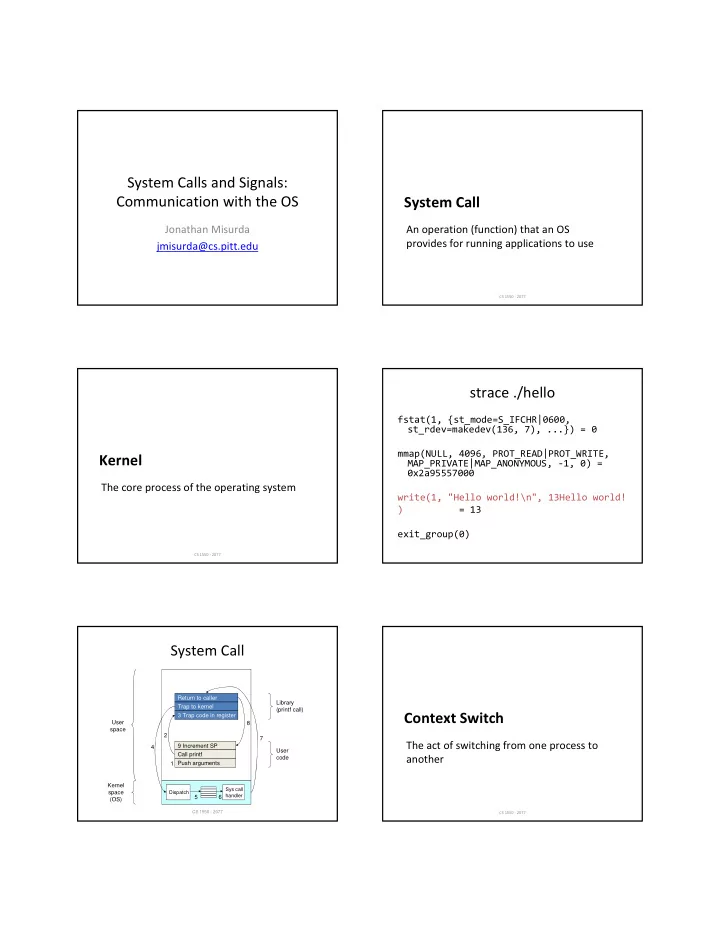
System Call

Return to caller Trap to kernel 3 Trap code in register 9 Increment SP Call printf Push arguments

Dispatch Sys call handler

Kernel space (OS) User space 1 2 4 5 6 7 8 Library (printf call) User code

CS 1550 - 2077 CS 1550 ‐ 2077

Context Switch

The act of switching from one process to another

slide-2
SLIDE 2

Context

  • General Purpose Registers
  • Program counter
  • CPU status word
  • Stack pointer
  • Memory management details

x86 Privilege Levels Linux Syscalls

  • 325 syscall slots reserved (2.6.23.1 kernel)

– Not all are used

Syscall Purpose exit Causes a process to terminate fork Creates a new process, identical to the current

  • ne

read Reads data from a file or device write Writes data to a file or device

  • pen

Opens a file close Closes a file creat Creates a file

Using Syscalls

#include <stdio.h> #include <unistd.h> #include <sys/types.h> #include <sys/stat.h> #include <fcntl.h> int main() { int fd; char buffer[100]; strcpy(buffer, "Hello, World!\n"); fd = open("hello.txt", O_WRONLY | O_CREAT); write(fd, buffer, strlen(buffer)); close(fd); exit(0); return 0; }

OR‐ing Flags

  • Define constants as powers of 2
  • Bitwise OR to combine
  • Bitwise AND to test

#define O_RDONLY 0 #define O_WRONLY 1 #define O_RDWR 2 #define O_CREAT 16

File Descriptors

  • Integer identifying a unique open file

– Similar to FILE *

  • OS maintains additional information about the

file to do things such as clean up on process termination

  • Three standard file descriptors opened

automatically:

0 – stdin 1 – stdout 2 – stderr

slide-3
SLIDE 3

fork()

  • Creates a new process identical to the calling
  • ne
  • Return value differs

– “Child” process return value is 0 – “Parent” process gets child’s process id number

  • Often used with execv family of functions to

launch a new program

Fork Example

#include <stdio.h> #include <unistd.h> int main() { if(fork()==0) { printf("Hi from the child!\n"); } else { printf("Hi from the parent\n"); } printf("Hi from both\n"); return 0; }

Output

Hi from the child! Hi from both Hi from the parent Hi from both

Spawning A Program

#include <stdio.h> #include <unistd.h> int main() { if(fork()==0) { char *args[3] = {“ls”, “‐al”, NULL}; execvp(args[0], args); } else { int status; wait(&status); printf("Hi from the parent\n"); } return 0; }

Signals

  • Notifications sent to a program by OS

– Indicate special events

  • Allows for asynchronous notification rather

than polling

  • Polling – to explicitly ask if something
  • ccurred, usually repeatedly

kill ‐l

SIGHUP SIGINT SIGQUIT SIGILL SIGTRAP SIGABRT SIGBUS SIGFPE SIGKILL SIGUSR1 SIGSEGV SIGUSR2 SIGPIPE SIGALRM SIGTERM SIGCHLD SIGCONT SIGSTOP SIGTSTP SIGTTIN SIGTTOU SIGURG SIGXCPU SIGXFSZ SIGVTALRM SIGPROF SIGWINCH SIGIO SIGPWR SIGSYS

SIGRTMIN SIGRTMIN+1 SIGRTMIN+2 SIGRTMIN+3 SIGRTMIN+4 SIGRTMIN+5 SIGRTMIN+6 SIGRTMIN+7 SIGRTMIN+8 SIGRTMIN+9 SIGRTMIN+10 SIGRTMIN+11 SIGRTMIN+12 SIGRTMIN+13 SIGRTMIN+14 SIGRTMIN+15 SIGRTMAX‐14 SIGRTMAX‐13 SIGRTMAX‐12 SIGRTMAX‐11 SIGRTMAX‐10 SIGRTMAX‐9 SIGRTMAX‐8 SIGRTMAX‐7 SIGRTMAX‐6 SIGRTMAX‐5 SIGRTMAX‐4 SIGRTMAX‐3 SIGRTMAX‐2 SIGRTMAX‐1 SIGRTMAX
slide-4
SLIDE 4

Common Error Signals

  • SIGILL – Illegal Instruction
  • SIGBUS – Bus Error, usually caused by bad

data alignment or a bad address

  • SIGFPE – Floating Point Exception
  • SIGSEGV – Segmentation violation, i.e., a bad

address

Termination Signals

  • SIGINT – Interrupt, or what happens when

you hit CTRL + C

  • SIGTERM – Ask nicely for a program to end

(can be caught)

  • SIGKILL – Ask meanly for a program to end

(cannot be caught)

  • SIGABRT, SIGQUIT – End a program with a

core dump

kill

  • kill() is the system call that can send a process

a signal (any signal, not just SIGKILL)

#include <unistd.h> #include <sys/types.h> #include <signal.h> int main() { pid_t my_pid = getpid(); kill(my_pid, SIGSTOP); return 0; }

kill

  • From the shell in UNIX you can send signals to

a program.

  • Use ps to get a process ID

(1) thot $ ps ‐af UID PID PPID C STIME TTY TIME CMD jrmst106 27500 27470 0 07:13 ??? 00:00:00 crashed_program jrmst106 27507 27474 0 07:13 pts/5 00:00:00 ps ‐af

  • kill it!

kill 27500 – Sends SIGTERM kill ‐9 27500 – Sends SIGKILL

Catching Signals

  • Some signals can be caught like exceptions in

Java

  • Do some cleanup, then exit
  • Generally bad to try to continue, the machine

might be in a corrupt state

  • Some signals can be caught safely though

SIGALRM

#include <unistd.h> #include <signal.h> int timer = 10; void catch_alarm(int sig_num) { printf("%d\n",timer‐‐); alarm(1); } int main() { signal(SIGALRM, catch_alarm); alarm(1); while(timer > 0) ; alarm(0); return 0; }

slide-5
SLIDE 5

SIGTRAP

  • Breakpoint trap

– Debuggers listen for this

  • OS Sends it when breakpoint trap instruction

is hit

– int 3 on x86

  • int 3 is special (Why?)

– 1 byte encoding: 0xCC – All other traps are two bytes: 0xCD 0x80 (linux syscall)