Student Scrums s Wor orks kshop op Tom Reichlmayr Rochester - - PowerPoint PPT Presentation

student scrums s wor orks kshop op
SMART_READER_LITE
LIVE PREVIEW

Student Scrums s Wor orks kshop op Tom Reichlmayr Rochester - - PowerPoint PPT Presentation

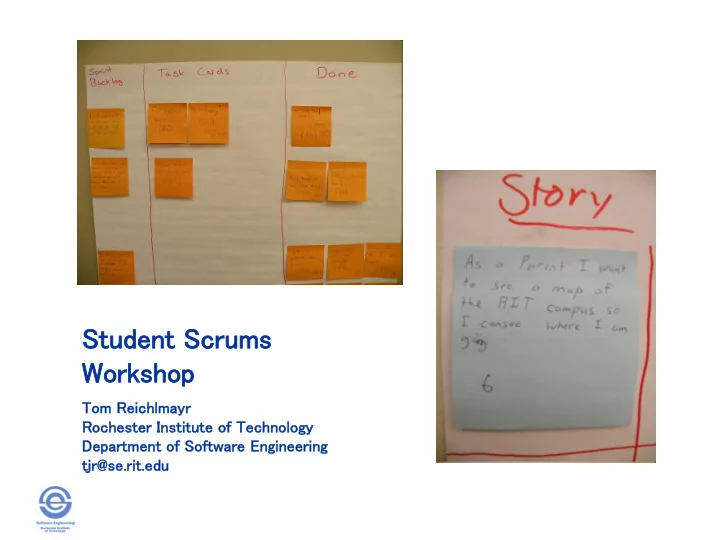
Student Scrums s Wor orks kshop op Tom Reichlmayr Rochester Institute of Technology Department of Software Engineering tjr@se.rit.edu The Scrum Framework Student Scrums Workshop - Tom Reichlmayr, SIGCSE2012 The Scrum Framework Burndown


slide-1
SLIDE 1

Student Scrums s Wor

  • rks

kshop

  • p

Tom Reichlmayr Rochester Institute of Technology Department of Software Engineering tjr@se.rit.edu
slide-2
SLIDE 2

The Scrum Framework

Student Scrums Workshop - Tom Reichlmayr, SIGCSE2012

slide-3
SLIDE 3

The Scrum Framework

Chris Noffke: http://www.noffke.com/

Burndown Charts Student Scrums Workshop - Tom Reichlmayr, SIGCSE2012

slide-4
SLIDE 4

The Scrum Framework

Burndown Charts

Chris Noffke: http://www.noffke.com/

Three Scrum Roles

Student Scrums Workshop - Tom Reichlmayr, SIGCSE2012

slide-5
SLIDE 5

Ham-n-Eggs

Student Scrums Workshop - Tom Reichlmayr, SIGCSE2012

slide-6
SLIDE 6

The Scrum Framework

Burndown Charts

Chris Noffke: http://www.noffke.com/

THE HE SCRUM RUM TEAM AM (aka “PIGS”)

  • Project initiation sprint

Student Scrums Workshop - Tom Reichlmayr, SIGCSE2012

slide-7
SLIDE 7

The Scrum Framework

Burndown Charts

Chris Noffke: http://www.noffke.com/

Three Scrum Ceremonies

Student Scrums Workshop - Tom Reichlmayr, SIGCSE2012

slide-8
SLIDE 8

The Scrum Framework

Burndown Charts

Chris Noffke: http://www.noffke.com/

Three ee Scrum um Ar Artif tifact acts

Student Scrums Workshop - Tom Reichlmayr, SIGCSE2012

slide-9
SLIDE 9

The Scrum Framework

Burndown Charts

Chris Noffke: http://www.noffke.com/

Student Scrums Workshop - Tom Reichlmayr, SIGCSE2012

slide-10
SLIDE 10

Scrum is not about software…

Chris Noffke: http://www.noffke.com/

Burndown Charts Student Scrums Workshop - Tom Reichlmayr, SIGCSE2012

slide-11
SLIDE 11

Scrum is a Project Management FRAMEWORK

Chris Noffke: http://www.noffke.com/

Burndown Charts Student Scrums Workshop - Tom Reichlmayr, SIGCSE2012

slide-12
SLIDE 12

Scrum Origins

Mike Cohn, Mountain Goat Software

Student Scrums Workshop - Tom Reichlmayr, SIGCSE2012

slide-13
SLIDE 13

Scrum is not (always) about software…

“Scrum in church? Of course! How else did God create the world in seven days?”

  • Rev. Arline Conan Sutherland,

First Paris rish h Lexin xingt gton

  • n - Lexin

xingt gton

  • n, MA
  • 1986 Harvard Business Review Paper*
  • 1993 Ken Schwaber & Jeff Sutherland
  • 1995 OOPSLA Presentation
  • 1996 Extreme Programming (XP)
  • 2001 Agile Manifesto
  • “Agile Values & Practices”

Student Scrums Workshop - Tom Reichlmayr, SIGCSE2012

slide-14
SLIDE 14

Is Scrum Mainstream?

“Perils of Agile, But”, Dottie Acton – Lockheed Martin Senior Fellow, 2010

Student Scrums Workshop - Tom Reichlmayr, SIGCSE2012

slide-15
SLIDE 15

2010 State of Agile Development Survey Results VersionOne

Student Scrums Workshop - Tom Reichlmayr, SIGCSE2012

slide-16
SLIDE 16

Scrum is used at…

Microsoft Yahoo Google Electronic Arts IBM Philips Siemens Nokia Lockheed Martin Capital One BBC Intuit Apple Nielsen Media Qualcomm Texas Instruments Salesforce.com John Deere Lexis Nexis Sabre Oracle Time Warner Turner Broadcasting

Student Scrums Workshop - Tom Reichlmayr, SIGCSE2012

slide-17
SLIDE 17

Scrum Illuminates Opportunities

Scrum works by exposing the impediments in our processes, by shoving them in our face so we have no choice but to do something about them.

  • Ron Jeffries

Student Scrums Workshop - Tom Reichlmayr, SIGCSE2012

slide-18
SLIDE 18

“War Stories – Fighter Jets and Agile Development at Lockheed Martin”, Agile Journal, 2007

Student Scrums Workshop - Tom Reichlmayr, SIGCSE2012

slide-19
SLIDE 19

Scrum & Agile Practices

Scrum is a … FRAMEWORK Agile le Pr Practices actices

Time me Boxed ed Iteratio tions Self Organi anizing zing Teams ams Conti tinuous uous Inte tegrati tion

  • n

User r Storie ries Test t First/ st/Dri Driven en Develo lopm pment nt (TFD FD/TD /TDD) D) Pair r Prog

  • gramm

amming ing Refactoring toring Retrospec

  • spectiv

tives … others Scrum Roles Scrum Artifacts Scrum Ceremonies Practices used in a Scrum Project

Student Scrums Workshop - Tom Reichlmayr, SIGCSE2012

slide-20
SLIDE 20

Scrum & Software Engineering Practices

Scrum is a … FRAMEWORK SE SE Pr Practices actices

Time me Boxed ed Iteratio tions Self Organi anizing zing Teams ams Conti tinuous uous Inte tegrati tion

  • n

User r Storie ries Test t First/ st/Dri Driven en Develo lopm pment nt (TFD FD/TD /TDD) D) Pair r Prog

  • gramm

amming ing Refactoring toring Retrospec

  • spectiv

tives … others Scrum Roles Scrum Artifacts Scrum Ceremonies Practices used in a Scrum Project

Student Scrums Workshop - Tom Reichlmayr, SIGCSE2012

slide-21
SLIDE 21

Project Start

“Release” Sprint

“Final” Release “Potentially Shippable” Releases

Ideal Scrum

2-4 weeks Agile practices per iteration: planning, user story implementation, unit testing, acceptance test case generation, acceptance testing, product demonstration, team retrospective Number of required sprints (n) = Total Story points/ Velocity Iteration 2-4 weeks Last Increment Sprint n Sprint Zero (Iteration Zero) ~2-6 weeks Sprint 2 Sprint 1 Product Backlog “Grooming” throughout project (New stories, refined stories, estimate, prioritize) Evolving Architecture/Design throughout project (May vary widely based on project/organization) Initial Architecture / Design Definition Initial Product Backlog Definition Preliminary work required to support the start of Sprint 1 Sprint 1 Start Delivery date driven by number

  • f sprints
slide-22
SLIDE 22

(the often overlooked) Sprint Zero

  • Minimal Backlog to start Sprint 1
  • Project initiation sprint
  • Environment setup / CI Support
  • Architecture / High Level Design
  • Team setup / Team norms
  • Training / Instruction
  • Define Deliverable Artifacts (DONE!)

Student Scrums Workshop - Tom Reichlmayr, SIGCSE2012

slide-23
SLIDE 23

Project Start

“Release” Sprint

“Final” Release “Potentially Shippable” Releases

Ideal Scrum

2-4 weeks Agile practices per iteration: planning, user story implementation, unit testing, acceptance test case generation, acceptance testing, product demonstration, team retrospective Number of required sprints (n) = Total Story points/ Velocity Iteration 2-4 weeks Last Increment Sprint n Sprint Zero (Iteration Zero) ~2-6 weeks Sprint 2 Sprint 1 Product Backlog “Grooming” throughout project (New stories, refined stories, estimate, prioritize) Evolving Architecture/Design throughout project (May vary widely based on project/organization) Initial Architecture / Design Definition Initial Product Backlog Definition Preliminary work required to support the start of Sprint 1 Sprint 1 Start Delivery date driven by number

  • f sprints
slide-24
SLIDE 24

Technical Debt

  • Incurs when project team chooses an

approach that’s expedient in the short term but that increases complexity and is more costly in the long term.

  • Debt can be incurred both intentionally

and unintentionally

  • As in our financial lives, there is

“good” and “bad” debt

Student Scrums Workshop - Tom Reichlmayr, SIGCSE2012

slide-25
SLIDE 25

Scrum & Technical Debt

  • A complete description of what it means to

be DONE-DONE with a user story

– Addresses intentional debt – Conscious decision to complete stuff “later” – Affects credibility of velocity metric

  • Small work increments (minimal WIP)

– Addresses unintentional debt – Defect propagation – Avoid long term hand-offs, work queues

Student Scrums Workshop - Tom Reichlmayr, SIGCSE2012

slide-26
SLIDE 26

Student Scrums Workshop - Tom Reichlmayr, SIGCSE2012

Done-Done? Did you do…

  • Performance testing
  • Stability testing
  • Refactoring
  • Integration with the work of the other six teams
  • Integration testing with the work of the other six

teams so the increment is the totality of all seven teams

  • Release notes
  • Internationalization to the six cultures where the

product will be sold

  • User acceptance testing
  • Regression testing
slide-27
SLIDE 27

Student Scrums Workshop - Tom Reichlmayr, SIGCSE2012

Creating the Product Backlog

slide-28
SLIDE 28

Product Backlog

  • Prioritized list of product features as

determined by the Product Owner

  • Reprioritized are the start of each new sprint.
  • Scru

rum m does es not specify ecify the format mat of items ms on the Produc duct t Bac acklog, klog, but typicall ically y they y expresse ressed d as User er Storie ries.

  • Each User Story also defines the acceptance

criteria the Product Owner will use to accept the release at the end of the Sprint - DONE!

  • Acceptance criteria is expressed as

Acceptance (Functional) Test Cases

Student Scrums Workshop - Tom Reichlmayr, SIGCSE2012

slide-29
SLIDE 29

Student Scrums Workshop - Tom Reichlmayr, SIGCSE2012

Product Backlog

slide-30
SLIDE 30

User Stories User Stories

slide-31
SLIDE 31

What is a “User Story”

  • Card

– Stories are traditionally written on index cards. – Cards may be annotated with notes, estimates, etc.

  • Conversation

– Details behind the story come out during conversations with customer, product owner

  • Confirmation

– Acceptance tests validate the story was correctly implemented in the application

Student Scrums Workshop - Tom Reichlmayr, SIGCSE2012

slide-32
SLIDE 32

The Card

As a user, I want to purchase a book.

As a user, I want to

cancel an order.

Student Scrums Workshop - Tom Reichlmayr, SIGCSE2012

slide-33
SLIDE 33

Communciating the Details

“As a user, I want to cancel an order”

  • Does the user get a full or partial

refund?

– Credit card? Site credit? Other?

  • Is a confirmation provided to the user?

– How?

  • Can you specify a subset of items from

an order?

Student Scrums Workshop - Tom Reichlmayr, SIGCSE2012

slide-34
SLIDE 34

Details are in the Confirmation

“As a user, I can cancel an order” Acceptance Criteria:

  • Verify that the user canceling a credit

card order is credited on their account.

  • Verify the user receives an email

confirmation.

  • On an order of multiple items, cancel a

subset of those items and verify the remaining items are still processed.

Student Scrums Workshop - Tom Reichlmayr, SIGCSE2012

slide-35
SLIDE 35

Requirements Communication

“Bridging the Communication Gap” - Gojko Adzic

Student Scrums Workshop - Tom Reichlmayr, SIGCSE2012

slide-36
SLIDE 36

Traditional Flow

Big Hunka Requirements Spec Functional Spec Test Spec User Doc Programmers, Developers Testers, QA Tech Writers Customers, Product Owners, Analysts

PRODUCT!

Student Scrums Workshop - Tom Reichlmayr, SIGCSE2012

slide-37
SLIDE 37

Agile Flow

  • User stories are the initial entry into the

elicitation process.

  • Further conversations and questions identify

requirement details.

  • Details are captured as acceptance criteria.
  • Acceptance criteria becomes executable test

cases.

  • Developers implement to the acceptance test

cases.

  • Clarifications, changes generated new test

cases.

  • New requirements generate new user stories

Student Scrums Workshop - Tom Reichlmayr, SIGCSE2012

slide-38
SLIDE 38

Why this Works

  • 1. Words are imprecise – stories shift the focus

from writing to talking.

  • 2. Stories are equally understood by customers and

developers.

  • 3. Stories support iterative development.
  • 4. Stories are the right side for planning.
  • 5. Stories support participatory design.
  • 6. Stories emphasize the user’s goals.

“The words we write on the story card are less important than the conversations we have”

“User Stories Applied” – Mike Cohn

Student Scrums Workshop - Tom Reichlmayr, SIGCSE2012

slide-39
SLIDE 39

User Story Template

As a <user role>, I want <goal>, so that <reason>

As a premium site member, I

can cancel my reservation up to 24 hours in advance if my travel plans change.

Student Scrums Workshop - Tom Reichlmayr, SIGCSE2012

slide-40
SLIDE 40

INVEST

  • Independent

– As much as possible, stories should not be dependent on each other.

  • Negotiable

– Details identified in the conversation.

  • Valuable

– The story has value to the customer/user.

  • Estimable

– Story allows prioritization and planning

  • Short

– Story can be implemented in one sprint

  • Testable

– We do not develop what we can’t test. Defines DONE!

Student Scrums Workshop - Tom Reichlmayr, SIGCSE2012

slide-41
SLIDE 41

Student Scrums Workshop - Tom Reichlmayr, SIGCSE2012

Story Writing Activity

slide-42
SLIDE 42

Volunteer Support Site

  • In groups hold a short user story workshop to

write story cards for a generic web application that will support the coordination

  • f volunteers for an event ( festival, sports

tournament, fundraiser, etc.).

  • Identify the primary user roles that would be

using this application.

  • Start by brain-storming potential stories, then

collect similar stories and begin splitting as necessary.

  • Collect acceptance criteria as it is identified.

Student Scrums Workshop - Tom Reichlmayr, SIGCSE2012

slide-43
SLIDE 43

Agile Estimation & Planning

  • Planning Levels:

– Strategy – Portfolio – Product – Release – Iteration (Sprint) – Daily

Student Scrums Workshop - Tom Reichlmayr, SIGCSE2012

slide-44
SLIDE 44

User Stories & the Planning Process

  • Stories are estimated in unit-less “story

points”

– Estimates are based on size – not duration – Size estimate are relative to other stories

  • As stories are selected from the product

backlog for a sprint:

– Teams identify tasks, estimated in duration

  • The number of story points completed during

a sprint is the team’s velocity

  • Velocity is used to predict what features can

be completed for a release (collection of sprints).

Student Scrums Workshop - Tom Reichlmayr, SIGCSE2012

slide-45
SLIDE 45

Planning Poker

  • Variation on the Wideband Delphi

technique used in the Rand Corp (~1946).

  • Those who do the work, estimate the

work.

  • Requires justification of estimate.
  • Involves ALL team members.

Student Scrums Workshop - Tom Reichlmayr, SIGCSE2012

slide-46
SLIDE 46

Homeowner chores

  • 1. Replace sash cord on two bedroom windows
  • 2. Power wash deck (12x12)
  • 3. Stain deck (12x12)
  • 4. Install ceiling fan in living room
  • 5. Strip wallpaper in bedroom (10x11)
  • 6. Hang mirror in dining room
  • 7. Replace electrical outlet (1) in kitchen
  • 8. Seal driveway (20x100)
  • 9. Apply fertilizer to front lawn (2500 sq ft)

10.Assemble new gas grill

Student Scrums Workshop - Tom Reichlmayr, SIGCSE2012

slide-47
SLIDE 47

Scrum Sprints

  • Starts with a Sprint Planning Session where a

Sprint Goal is identified.

  • 2-4 Week Iterations of all required life-cycle

activities (Requirements-Test-Design- Construct-Test-Package-Document)

  • Team creates a plan to FULLY complete

features from the Sprint Backlog.

  • Sprint ends with a Sprint Review – demo for

Product Owner and acceptance or rejection

  • Sprint Retrospective is held at the end to

identify process improvements (keep, toss, try)

Student Scrums Workshop - Tom Reichlmayr, SIGCSE2012

slide-48
SLIDE 48

Student Scrums Workshop - Tom Reichlmayr, SIGCSE2012

Sprint Planning

slide-49
SLIDE 49

Sprint Backlog

  • Teams select items from the (prioritized) Product

Backlog that they can commit to completing.

  • Product Backlog items are decomposed into

development tasks and estimated by the team.

  • Team members commit (sign up) to individual
  • tasks. Tasks are not “assigned”.
  • Any team member can add, delete or update

tasks on the Sprint Backlog.

  • Estimates of remaining work are updated daily (or

each time team meets).

  • Additional tasks added and estimated as the

Sprint proceeds.

Student Scrums Workshop - Tom Reichlmayr, SIGCSE2012

slide-50
SLIDE 50

Student Scrums Workshop - Tom Reichlmayr, SIGCSE2012

Task Estimation

slide-51
SLIDE 51

Student Scrums Workshop - Tom Reichlmayr, SIGCSE2012

Sprint Planning Activity

slide-52
SLIDE 52

Student Scrums Workshop - Tom Reichlmayr, SIGCSE2012

Sprint Execution

slide-53
SLIDE 53

Managing the sprint backlog

  • Any team member can add, delete or

change the sprint backlog

  • Work for the sprint emerges
  • If work is unclear, define a sprint backlog

item with a larger amount of time and break it down later

  • Update work remaining as more becomes

known

  • Estimated work remaining

maining is updated daily

Student Scrums Workshop - Tom Reichlmayr, SIGCSE2012

slide-54
SLIDE 54

A sprint burndown chart

Hours

Student Scrums Workshop - Tom Reichlmayr, SIGCSE2012

slide-55
SLIDE 55

“Daily” Stand-Ups

At the start of each classroom session:

  • 1. What did I accomplish since the last

stand-up? (last session)

  • 2. What am I planning on accomplishing

before the next stand-up? (today)

  • 3. What roadblocks are in my way?

*Making a verbal commitment to your team

Student Scrums Workshop - Tom Reichlmayr, SIGCSE2012

slide-56
SLIDE 56

“Daily” Student Scrums

  • Start by doing mock stand-ups
  • Individually critique teams, the have

class observe provide critique

  • Make sure students are addressing

their team, not you.

  • “What I did on my summer vacation”

team members become obvious.

  • (Cheech & Chong: “Sister Mary Elephant”)

Student Scrums Workshop - Tom Reichlmayr, SIGCSE2012

slide-57
SLIDE 57

Technical Practices

  • Collaborative Software Development
  • Continuous Integration
  • Test-Driven Development
  • Acceptance Testing
  • Unit Testing
  • Automated Testing
  • Simple Design
  • Refactoring
  • Coding Standards

Student Scrums Workshop - Tom Reichlmayr, SIGCSE2012

slide-58
SLIDE 58

Sprint Retrospective

Examples of Keep, Toss, Try…

  • Allowing more group members to participate in

programming tasks

  • Better estimation of how long tasks would take
  • More frequently working as pairs or in small groups on

tasks

  • Including more group members in the project overall
  • More testing at the unit and acceptance levels
  • More fine grained break down of user stories into tasks
  • Making sure to include all types of tasks needed to be

completed for a story on the task breakdown chart

Student Scrums Workshop - Tom Reichlmayr, SIGCSE2012

slide-59
SLIDE 59

Student Scrum Challenges

  • Course context – relate to learning
  • utcomes
  • Time (lack of) – Scrum teams get

better after a series of Sprints

  • Scrum roles – Product Owner, Scrum

Master

  • Initial state of requirements

Student Scrums Workshop - Tom Reichlmayr, SIGCSE2012

slide-60
SLIDE 60

Student Scrum Opportunities

  • Course context – relate to learning
  • utcomes
  • It’s a framework!
  • PM practices – task breakdown, estimation,

planning, process improvement …

  • Discipline and rhythm
  • Communication and collaboration
  • TESTING – TESTING - TESTING

Student Scrums Workshop - Tom Reichlmayr, SIGCSE2012

slide-61
SLIDE 61

“Are we doing Scrum right?”

  • Better to ask:

– “Is Scrum doing right by us?” – “How useful has Scrum/Agile been to this project?”

  • Famous quotes:

– “A design is not good or bad, it is just more or less useful” – “There are no best practices, just darn good ones within a certain context”

Student Scrums Workshop - Tom Reichlmayr, SIGCSE2012

slide-62
SLIDE 62

Any Questions?

Student Scrums Workshop - Tom Reichlmayr, SIGCSE2012

slide-63
SLIDE 63

References

  • Mike Cohn – Mountain Goat Software
  • Scrum.org
  • Alistair Cockburn

Student Scrums Workshop - Tom Reichlmayr, SIGCSE2012