Spiral 3-2 Signal & Image Processing Finding and exploiting - - PowerPoint PPT Presentation

spiral 3 2
SMART_READER_LITE
LIVE PREVIEW

Spiral 3-2 Signal & Image Processing Finding and exploiting - - PowerPoint PPT Presentation

3-2.1 3-2.2 Spiral 3-2 Signal & Image Processing Finding and exploiting patterns in raw data SIGNAL AND IMAGE PROCESSING 3-2.3 3-2.4 Example Low Pass Filter Take USC fight song and remove high frequency audio from the song (i.e.


slide-1
SLIDE 1

3-2.1

Spiral 3-2

Signal & Image Processing

3-2.2

SIGNAL AND IMAGE PROCESSING

Finding and exploiting patterns in raw data

3-2.3

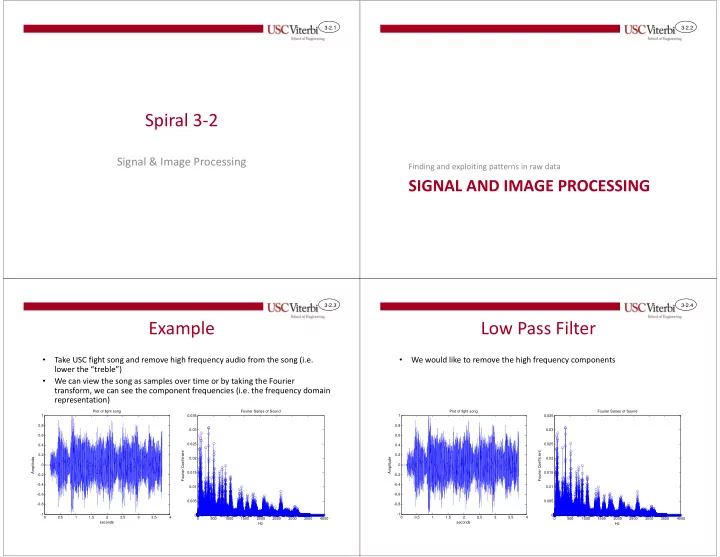
Example

  • Take USC fight song and remove high frequency audio from the song (i.e.

lower the “treble”)

  • We can view the song as samples over time or by taking the Fourier

transform, we can see the component frequencies (i.e. the frequency domain representation)

0.5 1 1.5 2 2.5 3 3.5 4

  • 1
  • 0.8
  • 0.6
  • 0.4
  • 0.2

0.2 0.4 0.6 0.8 1 Plot of fight song seconds Amplitude 500 1000 1500 2000 2500 3000 3500 4000 0.005 0.01 0.015 0.02 0.025 0.03 0.035 Fourier Series of Sound Hz Fourier Coefficient

3-2.4

Low Pass Filter

  • We would like to remove the high frequency components

0.5 1 1.5 2 2.5 3 3.5 4

  • 1
  • 0.8
  • 0.6
  • 0.4
  • 0.2

0.2 0.4 0.6 0.8 1 Plot of fight song seconds Amplitude 500 1000 1500 2000 2500 3000 3500 4000 0.005 0.01 0.015 0.02 0.025 0.03 0.035 Fourier Series of Sound Hz Fourier Coefficient

slide-2
SLIDE 2

3-2.5

Tangent – Frequency Domain

  • Fourier theory says any signal can be represented as

sum of different frequency sine waves

Fourier Composition – By summing different sine waves we can form a square wave or any other signal

0.01 0.02 0.03 0.04 0.05 0.06 0.07 0.08 0.09 0.1

  • 1
  • 0.8
  • 0.6
  • 0.4
  • 0.2

0.2 0.4 0.6 0.8 1 0.01 0.02 0.03 0.04 0.05 0.06 0.07 0.08 0.09 0.1

  • 1
  • 0.8
  • 0.6
  • 0.4
  • 0.2

0.2 0.4 0.6 0.8 1

Individual Sine waves of 1*f, 3*f, 5*f, 7*f Sum of those sine waves

3-2.6

Fourier Decomposition

  • Fourier theory says we can also find the sine wave

components given the original signal

Fourier Composition – By summing different sine waves we can form a square wave or any other signal

0.01 0.02 0.03 0.04 0.05 0.06 0.07 0.08 0.09 0.1

  • 1
  • 0.8
  • 0.6
  • 0.4
  • 0.2

0.2 0.4 0.6 0.8 1

Original signal Component Sine Waves (Freq. Domain)

500 1000 1500 2000 2500 3000 3500 4000 0.1 0.2 0.3 0.4 0.5 0.6 0.7 0.8 0.9 1 Fourier Series of Composite Signal Hz Fourier Coefficient

1*f Component 3*f Component 5*f Component 7*f Component 9*f Component f = 60Hz

3-2.7

Designing a Low Pass Filter

  • Below is a zoomed view
  • Removing high frequency components (parts of the signal that change

rapidly) means smoothing the signal or finding its basic curve and not the bumpiness

  • To do this, for each sample, make it equal to the average of neighboring

pixels.

0.62 0.625 0.63 0.635 0.64 0.645 0.65 0.655 0.66 0.665 0.67

  • 0.8
  • 0.6
  • 0.4
  • 0.2

0.2 0.4 0.6

3-2.8

Moving Average

  • By making each sample equal to the average
  • f itself plus neighboring samples we tend to

smooth the signal

Original signal, x[i] Averaged Signal, y[i]

slide-3
SLIDE 3

3-2.9

Averaged Signal

  • Averaging smoothes the waveform and

effectively filters out high-frequency components

0.62 0.625 0.63 0.635 0.64 0.645 0.65 0.655 0.66 0.665 0.67

  • 0.8
  • 0.6
  • 0.4
  • 0.2

0.2 0.4 0.6 0.62 0.625 0.63 0.635 0.64 0.645 0.65 0.655 0.66 0.665 0.67

  • 0.4
  • 0.3
  • 0.2
  • 0.1

0.1 0.2 0.3 0.4

Original signal After averaging each sample with 8 nearest samples

3-2.10

8-tap Moving Average Filter

  • Assume each sample is the average of 8 surrounding

samples, we can describe the output as: y[i] = Σk=0 to 7 (1/8) * x[i-k]

  • Example:

– y[7] = 1/8*x[7] + 1/8*x[6] + … + 1/8*x[0] – y[8] = 1/8*x[8] + 1/8*x[7] + … + 1/8*x[1]

  • If we want a weighted average rather than pure

average we can generalize from 1/8 to some weight coefficient: wk y[i] = Σk=0 to 7 wk*x[i-k]

3-2.11

Digital Implementation

  • The system we want to design gets one

sample per clock and produces one output sample per clock

Moving Average Filter

x[i] y[i] clk reset

3-2.12

Storing Last 8 Samples

  • Since we only get one sample a clock, but need to

use the last 8 samples to do our average, we need to save the last 8 samples

– To store values we use registers – Chain together several registers

  • xd1 = x[i] delayed by 1 clock
  • xd2 = x[i] delayed by 2 clocks
slide-4
SLIDE 4

3-2.13

Time Space Diagram

Clock X[i] Xd1 Xd2 Xd3 Xd4 Xd5 Xd6 Xd7

X(0) X(-1)=0 X(-2)=0 X(-3)=0 X(-4)=0 X(-5)=0 X(-6)=0 X(-7)=0

1

X(1) X(0) X(-1)=0 X(-2)=0 X(-3)=0 X(-4)=0 X(-5)=0 X(-6)=0

2

X(2) X(1) X(0) X(-1)=0 X(-2)=0 X(-3)=0 X(-4)=0 X(-5)=0

3

X(3) X(2) X(1) X(0) X(-1)=0 X(-2)=0 X(-3)=0 X(-4)=0

4

X(4) X(3) X(2) X(1) X(0) X(-1)=0 X(-2)=0 X(-3)=0

5

X(5) X(4) X(3) X(2) X(1) X(0) X(-1)=0 X(-2)=0

6

X(6) X(5) X(4) X(3) X(2) X(1) X(0) X(-1)=0

7

X(7) X(6) X(5) X(4) X(3) X(2) X(1) X(0)

8

X(8) X(7) X(6) X(5) X(4) X(3) X(2) X(1)

9

X(9) X(8) X(7) X(6) X(5) X(4) X(3) X(2)

Samples x[i] where i < 0 (negative indices) are equal to 0 since there register will be reset (cleared) at clock 0

3-2.14

Averaging the Samples

  • Multiple each sample by the appropriate

weight (in this case each wk = 1/8)

  • Add up all values

3-2.15

CONCEPTS

HW/SW Design (System on Chip)

3-2.16

Another Example: Image Compression

  • Images are just 2-D arrays (matrices) of numbers
  • Each number corresponds to the color or a pixel in

that location

  • Image store those numbers in some way

Column Index

slide-5
SLIDE 5

3-2.17

Image Compression

129 131 130 133 132 132 130 129 128 130 131 129 130 130 131 129 131 132 131 133 130 129 129 131 132 131 130 132 134 132 131 132 133 131 156 157 153 155 154 152 207 204 208 205 3-2.18

Image Compression

129 131 130 133 132 132 130 129 128 130 131 129 130 130 131 129 131 132 131 133 130 129 129 131 132 131 130 132 134 132 131 132 133 131 156 157 153 155 154 152 207 204 208 205 129 131 130 133 130 130 131 129 132 131 130 132 134 132 131 132 129 2 1 4 2 1 2 3 2 1 3 5 3 2 3

  • 1. Break Image into small blocks of pixels
  • 2. Store the difference of each pixel and the upper left

(or some other representative pixel)

129 2 4 2 2 2 2 2 4 2 2 2

  • 3. We can save more space by rounding numbers to a

smaller set of options (i.e. only even # differences)

129 2 1 4 2 1 2 3 2 1 3 5 3 2 3 3-2.19

Video Compression

  • Video is a sequence of still frames

– 24-30 frames per second (fps)

  • How much difference is expected between frames?
  • Idea:

– Store 1 of every N frames (aka key frame or I-frame), with

  • ther N-1 frames being differences from previous or next

frame

3-2.20

JPEG

slide-6
SLIDE 6

3-2.21

JPEG Conversion Process

Break into 8x8 Tiles

129 131 130 133 130 130 131 129 132 131 130 132 134 132 131 132 129 131 130 133 130 130 131 129 132 131 130 132 134 132 131 132 129 131 130 133 130 130 131 129 132 131 130 132 134 132 131 132

Perform Discrete Cosine Transform

  • n each

8x8 Block

129 20 15 3 17

  • 3

2 4 12 3 2 1 10 1

  • 2

129 20 15 3 17

  • 3

2 4 12 3 2 1 10 1

  • 2

129 20 15 3 17

  • 3

2 4 12 3 2 1 10 1

  • 2

32 5 3 4

  • 1

1 3 2 32 5 3 4

  • 1

1 3 2 32 5 3 4

  • 1

1 3 2

Quantize Huffman Coding

Storage (as .jpeg)

3-2.22

Huffman Code

  • Compression algorithm
  • Variable-length code

– Each character can be coded with a different number of bits

  • Prefix code

– No two codes start with the same prefix

  • Assignment of codes to characters is based on

frequency of the code in the message

3-2.23

Huffman Example 1

  • "Mississippi"

3-2.24

Huffman Example 2

  • "i boo big bruins"
slide-7
SLIDE 7

3-2.25

DESIGN EXERCISE

3-2.26

Design Exercise

  • Design a system that breaks

a 8x8 image into 4 tiles of 4x4 and:

– Leaves the upper-left pixel of each tile as is – Codes the remaining 15 pixels

  • f the tile as relative values

based on the upper-left – Computes the frequency of each pixel value to prepare for Huffman coding

1 2 3 4 5 6 7 8 9 10 11 12 13 14 15 16 17 18 19 20 21 22 23 32 33 34 35 36 37 38 39 40 56 57 58 59 60 61 62 63 3-2.27

Computing Frequencies

  • Given an array 16 numbers between 0-255

how could you compute their frequencies in software?

3-2.28

Block Diagram

slide-8
SLIDE 8

3-2.29

Addressing

  • Given the HW

counter that counts 0000-1111 and tile counter 00-11, can you use those 6-bits to form the correct system address?

1 2 3 4 5 6 7 8 9 10 11 12 13 14 15 16 17 18 19 20 21 22 23 32 33 34 35 36 37 38 39 40 56 57 58 59 60 61 62 63 1 2 3 1 2 3 4 5 6 7 4 5 6 7 8 9 10 11 8 9 10 11 12 13 14 15 12 13 14 15 1 2 3 1 2 3 4 5 6 7 4 5 6 7 8 9 10 11 8 9 10 11 12 13 14 15 12 13 14 15

Tile 0 Tile 2 Tile 1 Tile 3 System Address HW Counters

3-2.30

Verilog Description