SLIDE 1 Soot
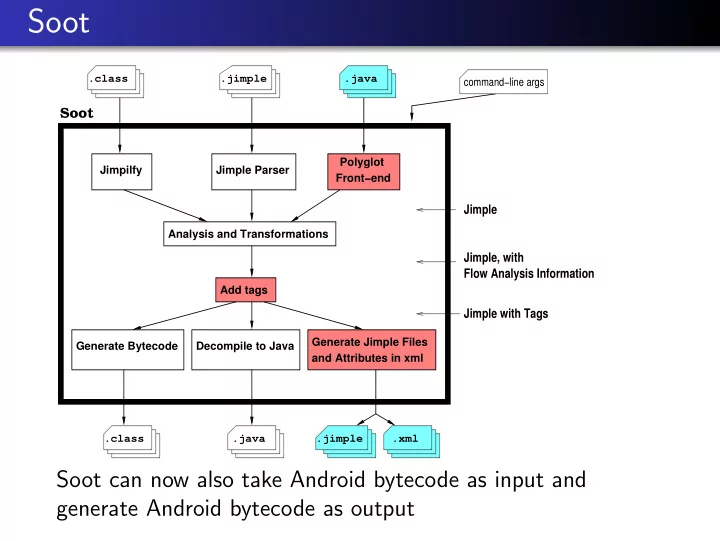
Soot
Jimpilfy Polyglot Front−end Analysis and Transformations Add tags Generate Bytecode Decompile to Java Jimple Parser
Jimple Jimple, with Flow Analysis Information Jimple with Tags
and Attributes in xml Generate Jimple Files command−line args .class .java .class .java .xml .jimple .jimple
Soot can now also take Android bytecode as input and generate Android bytecode as output
SLIDE 2
Soot Resources
Soot main page: http://sable.github.io/soot/ Soot download page: http: //www.sable.mcgill.ca/soot/soot_download.html Soot tutorials: https://github.com/Sable/soot/wiki/Tutorials (Temporarily: soot-2.5.0.jar is available through the course website)
SLIDE 3
Installing Soot
Command-line Soot Download soot-2.5.0.jar and add to CLASSPATH environment variable: export CLASSPATH=soot-2.5.0.jar:$CLASSPATH Soot-Eclipse plugin Follow installation instructions at: https://github.com/ Sable/soot/wiki/Running-Soot-as-Eclipse-Plugin
SLIDE 4
Command-line Examples
List command line options java soot.Main --help Process MyClass.class, output .class file java soot.Main MyClass Process MyClass.class, output .jimple file java soot.Main -f jimple MyClass Process MyClass.java, output .class file java soot.Main -src-prec java MyClass Process MyClass.class, output .jimple file with tags java soot.Main -f jimple -print-tags MyClass
SLIDE 5
Command-line Examples Warning
Soot has its own class path and loads only classes from that path. java soot.Main MyClass will not run. Use the -cp option to Soot to specify a path: java soot.Main -cp . MyClass will still not run Need to provide Java library classes: java soot.Main -cp .:<path-to-rt.jar> MyClass will run
SLIDE 6
Jimple Statements
SLIDE 7
Jimple Expressions
SLIDE 8
Soot Classes
SootClass SootMethod JimpleBody Scene SootField getMethod() getField() getSootClass() Scene.v() (singleton) getSignature() getActiveBody() getSignature()
SLIDE 9
Soot Classes
SootMethod Chain Chain Chain JimpleBody UnitGraph getLocals() getActiveBody() getTraps() getUnits() getBody() getUnits() new BriefUnitGraph()
SLIDE 10
“Boxes” (References)
s: x = y op z
SLIDE 11
SLIDE 12
Soot Attributes
We often want to attach annotations to code
to convey low-level analysis results, such as register allocation or array bounds check elimination to a VM to convey analysis results to humans to record profiling information
SLIDE 13
Tags
Tags are objects that can be attached to Hosts:
package soot.tagkit; public interface Tag { public String getName (); public String toString(); }
SLIDE 14
Hosts
Hosts are objects that can hold Tags:
package soot.tagkit; public interface Host { public void addTag (Tag t); public Tag getTag (String aName); public List getTags (); public void removeTag (String name); public boolean hasTag (String aName); }
Implementations:
SootClass, SootField, SootMethod, Body, Unit, ValueBox
SLIDE 15
Visual Representations
Three visual representations of attribute information:
Text displayed in tooltips Color highlighting of chunks of code Pop-up links
SLIDE 16
String Tags
StringTags attach a string of information to a Host. s.addTag(new StringTag(val+": NonNull"));
SLIDE 17
Color Tags
ColorTags attach a color to a Host. v.addTag(new ColorTag(ColorTag.GREEN)); v.addTag(new ColorTag(255, 0, 0));
SLIDE 18
Link Tags
LinkTags attach a string of information, and a link to another part of code to a Host. SootMethod m; String text = "Target:"+m.toString(); Host h = m; String cName = m.getDeclaringClass().getName(); s.addTag(new LinkTag(text, h, cName));