Simpler World Due October 16 th Goal Recover the 3D structure of - - PowerPoint PPT Presentation

simpler world
SMART_READER_LITE
LIVE PREVIEW

Simpler World Due October 16 th Goal Recover the 3D structure of - - PowerPoint PPT Presentation

COS 429 PS2: Reconstructing a Simpler World Due October 16 th Goal Recover the 3D structure of the world Problem 1: Making the World Simpler Simple World Assumptions: Flat surfaces that are either horizontal or vertical Objects


slide-1
SLIDE 1

COS 429 PS2: Reconstructing a Simpler World

Due October 16th

slide-2
SLIDE 2

Goal

  • Recover the 3D structure of the world
slide-3
SLIDE 3

Problem 1: Making the World Simpler

  • Simple World Assumptions:

– Flat surfaces that are either horizontal or vertical – Objects rest on a white horizontal ground plane

  • Task:

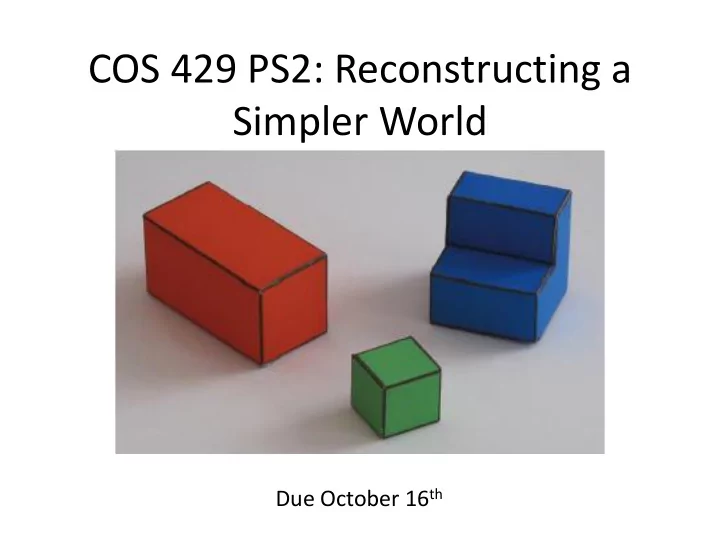
– Print Figure 1 and create objects for the world – Take a picture of the world you created and add it to the report

slide-4
SLIDE 4

Problem 2: Taking Orthographic Pictures

  • Goal:

– Want pictures that preserve parallel lines from 3D to 2D

  • Willing to accept weak perspective effects
slide-5
SLIDE 5
  • How:

– Use the zoom of the camera or crop the central part of a picture

  • Task:

– Take two pictures of the same scene so one image exhibits perspective projection and the other

  • rthographic project and add it to the report

– Want both pictures to look as similar as possible

slide-6
SLIDE 6

Problem 3: Orthographic Projection

  • Two coordinate systems (X, Y, Z) world and (x, y)

image

  • X axis of world coordinate system aligns with x

axis of camera plane

  • Y and Z axes of world coordinate system align

with y axis of camera plane

slide-7
SLIDE 7
  • Task:

– Prove the two projection equations below that relate the 3D world position (X, Y, Z) to the 2D projected camera position (x, y)

x = αX + x0 y = α(cos(θ)Y – sin(θ)Z) + y0

slide-8
SLIDE 8

Problem 4: Geometric Constraints

  • Find edges with corresponding strengths and
  • rientations
  • End goal is to find X(x, y), Y(x, y), Z(x, y)

– Given our coordinate system: X(x, y) = x – Harder to find Y and Z since one dimension was lost due to projection

  • Create linear system of equations of constraints
slide-9
SLIDE 9
  • Color threshold determines ground from
  • bjects

– On the ground Y(x, y) = 0

  • Assume parallel projection

– All 2D vertical edges are 3D vertical edges

  • Fails occasionally
slide-10
SLIDE 10

Constraints

  • Vertical Edges:

𝜖𝑍 𝜖𝑧 = 1 cos 𝜄

– Equals

1 cos 𝜄 using the projection equations proved earlier

  • The vector t = (-ny, nx) is the direction tangent to an

edge

  • Horizontal Edges:

𝜖𝑍 𝜖𝑢 = ∇𝑍 ∙ 𝑢 = −𝑜𝑧 𝜖𝑍 𝜖𝑦 + 𝑜𝑦 𝜖𝑍 𝜖𝑧 = 0

– Equals 0 since the Y coordinate does not change for horizontal edges

  • Task:

– Write the derivative constraints for Z(x, y) in the report

  • 𝜖𝑎

𝜖𝑧 , 𝜖𝑎 𝜖𝑢 , 𝜖2𝑎 𝜖𝑦2 , 𝜖2𝑎 𝜖𝑧2 , 𝜖2𝑎 𝜖𝑧𝜖𝑦

slide-11
SLIDE 11

A simple inference scheme

= A Y = b Y b Y = (ATA)-1 ATb Matlab Y = A\b; Constraint weights

slide-12
SLIDE 12

Problem 5: Approximation of Derivatives

  • Want to use constraints from Problem 4 to

determine Y(x, y) and Z(x, y)

– Two constraints missing from existing code

  • Task:

– Write two lines of code (lines 171 and 187) – Copy these two lines and add them to the report

slide-13
SLIDE 13

Problem 6: A Simple Inference Scheme

  • Write the constraints as a system of linear

equations

  • Task:

– Run simpleworldY.m to generate images for the report – Include some screen shots of the generated figures and include in report

slide-14
SLIDE 14

Extra Credit 1: Violating Simple World Assumptions

  • What if we violate our assumptions?

– Show examples where the reconstruction fails – Why does it fail?

slide-15
SLIDE 15

Extra Credit 2: The Real World

  • Take pictures of the real world

– How can we modify this assignment to getter better 3D reconstruction in the real world?

  • Try to handle a few more situations
  • Possible final project?
slide-16
SLIDE 16

What to Submit:

  • One PDF file report
  • One ZIP file containing all the source code,

and a “simpleworldY.m” file that takes no parameters as input and runs directly in Matlab to generate the results reported in your PDF file.

slide-17
SLIDE 17

PDF Report

  • (1) Take a picture of the world you created
  • (2) Submit two pictures – one showing
  • rthographic projection and the other

perspective projection

  • (3) Prove the two projection equations
  • (4) Write the constraints for Z(x, y)
  • (5) Fill in missing kernels (lines 171 and 187) and

copy code into report

  • (6) Show results and figures output by

simpleworldY.m

  • [Optional] Extra credit