
Richm hmond H
- nd Hill A
Affor
- rdabl
dable H Hous
- using S
ng Strat ateg egy
Publ blic Open en Hous use | November 5, 2020 | Videoconference Tips and Tricks
3. 3. Loca Locate i icons at s at the he bot bottom of
- m of you
- ur s
screen. a) a) Loca Locate t the he mut mute aud e audio f funct
- unction. You
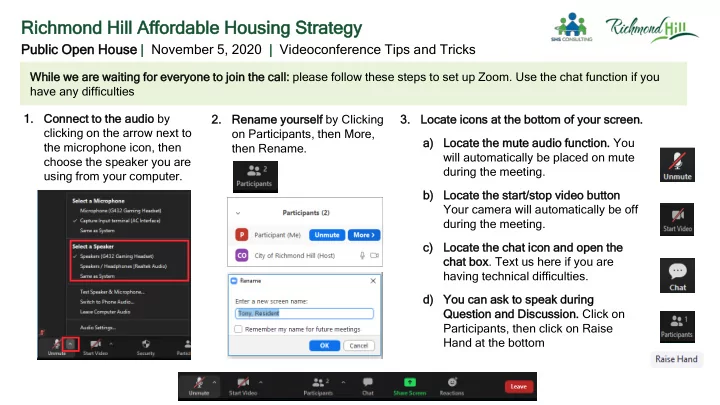
will automatically be placed on mute during the meeting. b) b) Loca Locate t the he star art/st stop video but button Your camera will automatically be off during the meeting. c) c) Loca Locate t the he cha hat i ico con and ope and open t the he cha hat box
- box. Text us here if you are
having technical difficulties. d) d) You
- u c
can an ask t ask to
- spe
peak dur during Quest uestion and and D Discu scussi
- sion. Click on
Participants, then click on Raise Hand at the bottom Whi hile w we e ar are w e wai aiting f for
- r ev
everyo yone t to
- joi
- in t
the c he cal all: please follow these steps to set up Zoom. Use the chat function if you have any difficulties 1. 1. Conn
- nnect
ct to
- the
he aud audio by clicking on the arrow next to the microphone icon, then choose the speaker you are using from your computer. 2. 2. Renam ename y you
- urse
self by Clicking
- n Participants, then More,
then Rename.