Review Version Control Concepts SWEN-261 Introduction to Software - - PowerPoint PPT Presentation

review version control concepts
SMART_READER_LITE
LIVE PREVIEW

Review Version Control Concepts SWEN-261 Introduction to Software - - PowerPoint PPT Presentation

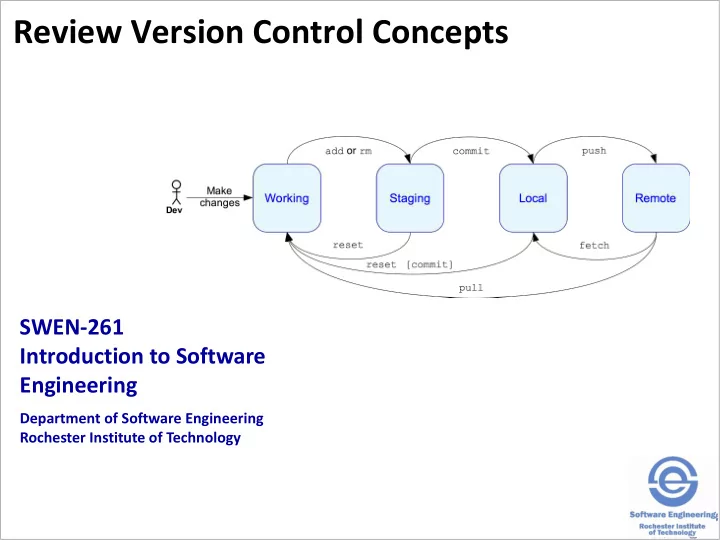
Review Version Control Concepts SWEN-261 Introduction to Software Engineering Department of Software Engineering Rochester Institute of Technology Managing change is a constant aspect of software development. The Product and Sprint

slide-1
SLIDE 1

SWEN-261 Introduction to Software Engineering

Department of Software Engineering Rochester Institute of Technology

Review Version Control Concepts

slide-2
SLIDE 2

Managing change is a constant aspect of software development.

  • The Product and Sprint backlogs represent the

upcoming changes.

  • A software release is a snapshot of code at a

certain time.

  • Capturing a certain set of user stories
  • Multiple releases may be done so the team needs to

keep track of multiple snapshots (aka versions)

  • Version control systems (VCS) are used to

manage changes made to software and tag releases.

2

slide-3
SLIDE 3

There are a few fundamental activities of change management that every VCS supports.

  • Directories and files are tracked in a repository.
  • Each developer has their own workspace.
  • But share a common remote repository.
  • You can
  • Make changes in your workspace

 Add files or directories  Remove files or directories  Modify or move files  Binary files are tracked as a single unit

  • Commit the changes to a repository.
  • Sync your workspace with a repository.
  • Create branches to track user stories.
  • Explore the history and changes to a repository.

3

slide-4
SLIDE 4

Git has four distinct areas that your work progresses through.

4

Working Staging Local Remote This is your local working directory where you do your development work. This is the shared remote repository that you use to synchronize your work with the rest of the team's work. This is your local copy of the shared remote repository which may not be in sync with the remote. These are the changes that you specified you want in your next commit to the local repository.

slide-5
SLIDE 5

Your local repository and working copy do not automatically stay in sync with the remote.

5

Working Local Remote

fetch

A fetch synchronizes the local repository with the remote repository.

merge

A merge incorporates new changes fetched to the local repository into the current branch that your working copy is on. fetch merge pull A merge may detect changes that can not be automatically incorporated. This is called a merge conflict. A branch is an independent stream of repository changes which isolates work from the rest of the repository.

slide-6
SLIDE 6

When you make local changes, those changes must pass through all four areas.

6

Working Staging Local Remote

push commit add

You add to the staging area all

  • f your working copy changes

that you want to commit. Then you commit those changes to your local copy

  • f the repository.

Works

  • n files

Finally, you push the changes to the remote repository. The default behavior for git will not allow you to push to the remote repository if your local repository is not up-to-date with remote. Getting in sync may create merge conflicts with your local changes that you will have to fix.

slide-7
SLIDE 7

Version control branching supports the ability to manage software releases.

  • At the end of a sprint, the team will want to include

done stories but exclude incomplete stories.

  • This cannot be done when all of the stories are

developed in the master branch.

  • Feature branching is a technique that creates a

branch for each story during development.

  • Changes are isolated in specific branches.
  • When the story is done, the feature branch is merged

into the master branch.

  • The master branch never receives incomplete work.
  • Thus master is always the most up-to-date, working

increment.

7

slide-8
SLIDE 8

An example sprint at the end.

8 In Dev In Test Ready for Test Sprint 2 Done

S3 S4 S6

Sprint 2 Backlog

S8 (5)

Sprint 1 Done

S1 S2 S5

slide-9
SLIDE 9

The life cycle of the feature branch is tied to the development cycle of the user story.

9

slide-10
SLIDE 10

Two developers collaborate on a story by working

  • n the same feature branch.
  • The developers share code on a story by syncing

to the same remote feature branch.

10

slide-11
SLIDE 11

Two interdependent stories can share changes across two branches.

  • The first story branch is created from master and

the second branch is created from the first.

11

Not shown are the coordinating remote branches

slide-12
SLIDE 12

Merging happens a lot and usually goes well; other times not so much.

  • Every time you sync with the remote repository a

merge occurs.

  • A merge conflict occurs when there is at least one

file with overlapping changes that can not be automatically resolved.

12

slide-13
SLIDE 13

Here's an example of a merge conflict.

  • Consider Betty and Sam independently fix this

bug.

/** * Calculate a half-off discount. */ public float calculateDiscount(final float cost) { return cost * 2; }

  • Betty did this: return cost / 2;
  • Sam did this: return cost * 0.5f;
  • When Sam merges in the code from Betty:

➔ git merge dev1

Auto-merging src/main/java/com/example/model/Promotion.java CONFLICT (content): Merge conflict in src/main/java/com/example/model/Promotion.java Automatic merge failed; fix conflicts and then commit the result.

13

slide-14
SLIDE 14

Resolving a simple text conflict is often easy.

  • When a conflict occurs git reports the affected

files. public float calculateDiscount(final float cost) {

<<<<<<< HEAD return cost * 0.5f; ======= return cost / 2; >>>>>>> dev1 }

  • Determine the best solution, and remove the other

solution and the marker text.

  • Then follow through with an add, commit, and

push.

14

The HEAD in Sam's workspace. This is the code from Betty's branch.

slide-15
SLIDE 15

To minimize the number of times when conflicts will not resolve easily, follow several guidelines.

  • 1. Keep code lines short; break up long

calculations.

  • 2. Keep commits small and focused.
  • 3. Minimize stray edits.
  • 4. If multiple developers are collaborating on a

feature, each developer should sync with the remote feature branch regularly.

Merge in the remote feature branch and then push to it, if you have changes.

  • 5. If development of a feature is taking a long time,

back merge master to sync completed features for this sprint into the feature branch.

15

slide-16
SLIDE 16

Using feature branches will be a standard part of your development workflow.

16