+ + Review n Parameterizing a shape n have a default size frame for - - PDF document

review n parameterizing a shape n have a default size
SMART_READER_LITE
LIVE PREVIEW

+ + Review n Parameterizing a shape n have a default size frame for - - PDF document

2/10/16 + + Review n Parameterizing a shape n have a default size frame for your shape to fit in. n alter position relative to the reference point and scale n alter size relative to scale. n instead of scale n use a scaled


slide-1
SLIDE 1

2/10/16 ¡ 1 ¡

+

Scope, Tracing, and Basic Trigonometry

+Review

n Parameterizing a shape n have a default size frame for your shape to fit in. n alter position relative to the reference point and scale n alter size relative to scale. n instead of scale n use a scaled reference size frame n Functions and named constants improve readability,

reusability, and scalability of your code.

n Variable Lifetime and Scope n global variables

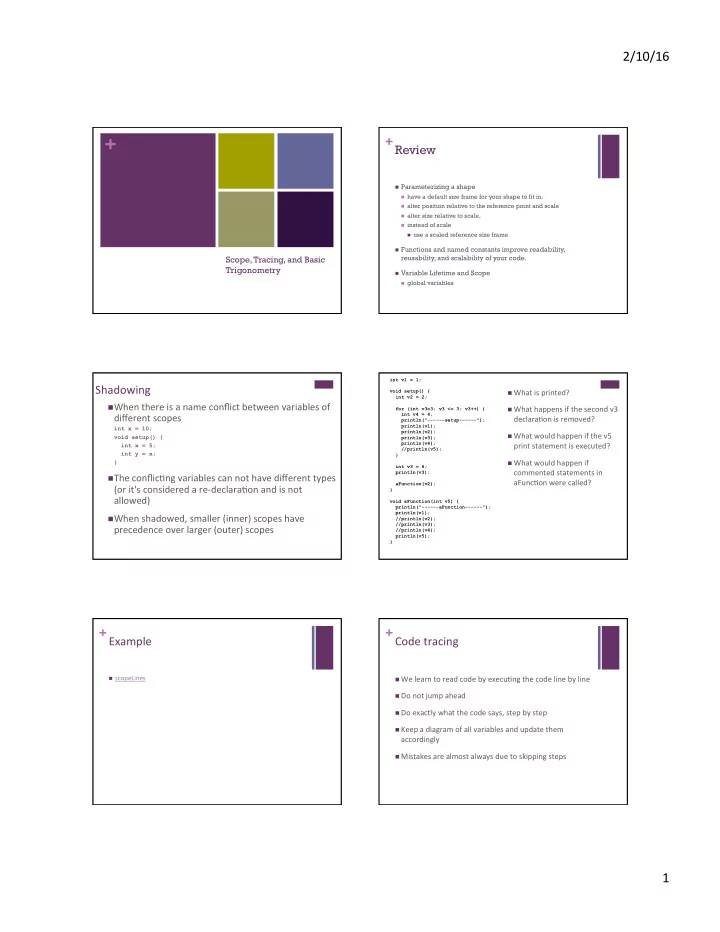
Shadowing ¡

n When ¡there ¡is ¡a ¡name ¡conflict ¡between ¡variables ¡of ¡

different ¡scopes ¡

int x = 10; void setup() { int x = 5; int y = x; }

n The ¡conflic?ng ¡variables ¡can ¡not ¡have ¡different ¡types ¡

(or ¡it's ¡considered ¡a ¡re-­‑declara?on ¡and ¡is ¡not ¡ allowed) ¡

n When ¡shadowed, ¡smaller ¡(inner) ¡scopes ¡have ¡

precedence ¡over ¡larger ¡(outer) ¡scopes ¡

int v1 = 1; void setup() { int v2 = 2; for (int v3=3; v3 <= 3; v3++) { int v4 = 4; println("------setup------"); println(v1); println(v2); println(v3); println(v4); //println(v5); } int v3 = 6; println(v3); aFunction(v2); } void aFunction(int v5) { println("------aFunction------"); println(v1); //println(v2); //println(v3); //println(v4); println(v5); }

n What ¡is ¡printed? ¡ n What ¡happens ¡if ¡the ¡second ¡v3 ¡

declara?on ¡is ¡removed? ¡

n What ¡would ¡happen ¡if ¡the ¡v5 ¡

print ¡statement ¡is ¡executed? ¡

n What ¡would ¡happen ¡if ¡

commented ¡statements ¡in ¡ aFunc?on ¡were ¡called? ¡

+Example ¡

n scopeLines ¡

+Code ¡tracing ¡

n We ¡learn ¡to ¡read ¡code ¡by ¡execu?ng ¡the ¡code ¡line ¡by ¡line ¡ n Do ¡not ¡jump ¡ahead ¡ n Do ¡exactly ¡what ¡the ¡code ¡says, ¡step ¡by ¡step ¡ n Keep ¡a ¡diagram ¡of ¡all ¡variables ¡and ¡update ¡them ¡

accordingly ¡

n Mistakes ¡are ¡almost ¡always ¡due ¡to ¡skipping ¡steps ¡

slide-2
SLIDE 2

2/10/16 ¡ 2 ¡

+Trace ¡this ¡

7 ¡

1 int n = 365; 2 int sum = 0; 3 int digit; 4 while(n>0) { 5 digit = n%10; 6 sum += digit; 7 n /= 10; 8 } 9 println(sum);

+Nested ¡loops ¡

n You ¡can ¡put ¡a ¡loop ¡within ¡a ¡

loop ¡

n Nes?ng ¡levels ¡are ¡unlimited, ¡

but ¡in ¡prac?ce ¡programmers ¡ rarely ¡go ¡beyond ¡3 ¡

n Two ¡loops ¡nested ¡is ¡very ¡

common, ¡especially ¡when ¡ dealing ¡with ¡naturally ¡2-­‑ dimensional ¡structures ¡(grids) ¡

n for(...){

for(...){ } }

n while(...){

while(...){ } }

n for(...){

while(...){ } }

n while(...){

for(...){ } }

+Nested ¡for ¡

9 ¡

int i, j, end = 10; for (i = 1; i <= end; i++) { for (j = i; j <= end; j++) { print("*"); } println(); }

+Nested ¡for ¡

10 ¡

int i, j, end = 10; for (i = 1; i <= end; i++) { for (j = 1; j <= i; j++) { print("*"); } println(); }

+Examples ¡

n indexTile ¡(one ¡loop) ¡ n indexTile ¡(loop ¡with ¡nested ¡Loop) ¡

+Basics ¡of ¡Trigonometry ¡assuming ¡ ¡ right/up ¡axes ¡

h (hypotenuse) a (adjacent)

  • (opposite)

q

slide-3
SLIDE 3

2/10/16 ¡ 3 ¡

+Basics ¡of ¡Trigonometry ¡assuming ¡ ¡ right/up ¡axes ¡

h (hypotenuse) a (adjacent)

  • (opposite)

q

Recall: a^2 + o^2 = h^2

+Basics ¡of ¡Trigonometry ¡assuming ¡ ¡ right/up ¡axes ¡

h (hypotenuse) a = h * cos(q) (adjacent)

  • = h * sin(q)

(opposite) q

Recall: a^2 + o^2 = h^2 sin(q) = o/h cos(q) = a/h

+Defini?on ¡

n sin(q) = o/h n o = h*sin(q) n cos(q) = a/h n a = h*cos(q) n tangent(q) = o/a = sin(q)/cos(q)

+Trigonometry ¡on ¡a ¡unit ¡circle ¡

q r p

0° 90°

  • rigin

Recall: x^2 + y^2 = r^2 r = 1

  • (1*cos(q))^2 +

(1*sin(q))^2 = 1^2

  • r
  • cos^2(q) +

sin^2(q) = 1

x y

+Trigonometry ¡on ¡Processing ¡unit ¡circle ¡

q r p

0° 90°

  • rigin

x y

+Trigonometry ¡on ¡a ¡unit ¡circle ¡

q r p

0° 90°

slide-4
SLIDE 4

2/10/16 ¡ 4 ¡

+Trigonometry ¡on ¡a ¡unit ¡circle ¡

0° 90°

q

Drawing ¡points ¡along ¡a ¡circle ¡ ¡

int steps = 8; int radius = 20; float angle = 2*PI/steps; for (int i=0; i<steps; i++) { float x = cos(angle*i)*radius; float y = sin(angle*i)*radius; // draw a point every 1/8th of a circle ellipse(x, y, 10, 10); }

¡

+Examples

n points on a circle n overlapping ellipses on a circle n spokes n polygon n nested version (star)

+Example: cyclical change

n Drawing a sine wave n Using sine to manipulate height of an object n Using cosine to manipulate width of an object