SLIDE 1 Regular Expressions
Is a special text string for describing a search pattern. You can think of regular expressions as wildcards on
- steroids. You are probably familiar with wildcard notations such as *.txt to find all text files in a file
manager. Essentially allows us to find a pattern in a string. Regexes are widely supported in many programming languages including Java, Python, C++, Perl, Javascript, and PHP. It is also supported in text processing programs advanced text editors, and some other programs.
Regular Expressions
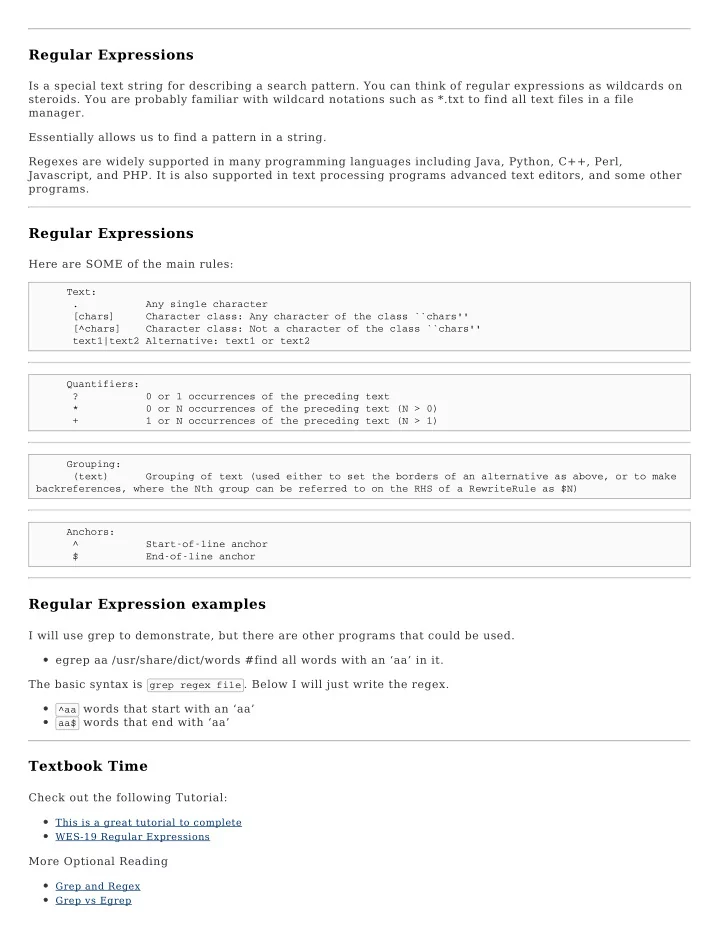
Here are SOME of the main rules:
Text: . Any single character [chars] Character class: Any character of the class ``chars'' [^chars] Character class: Not a character of the class ``chars'' text1|text2 Alternative: text1 or text2 Quantifiers: ? 0 or 1 occurrences of the preceding text * 0 or N occurrences of the preceding text (N > 0) + 1 or N occurrences of the preceding text (N > 1) Grouping: (text) Grouping of text (used either to set the borders of an alternative as above, or to make backreferences, where the Nth group can be referred to on the RHS of a RewriteRule as $N) Anchors: ^ Start-of-line anchor $ End-of-line anchor
Regular Expression examples
I will use grep to demonstrate, but there are other programs that could be used. egrep aa /usr/share/dict/words #find all words with an ‘aa’ in it. The basic syntax is grep regex file . Below I will just write the regex.
^aa words that start with an ‘aa’ aa$ words that end with ‘aa’
Textbook Time
Check out the following Tutorial:
This is a great tutorial to complete WES-19 Regular Expressions
More Optional Reading
Grep and Regex Grep vs Egrep
SLIDE 2
Here is a chart of some basic regex combinations
Sed
Stands for ‘stream editor’ which allows us to filter and transform text. Often used in conjunction with regex Substitution Replaces all instances of day with night inside myfile.txt. Note the g at the end.
sed 's/day/night/g' myfile.txt
Sed
Removing stuff Do not print the first line
sed '1d' file.txt
Remove the first character of every line
sed 's/^.//' file
Sed
Remove the last character of every line sed ’s/.$//’ file Remove lines 7 thru 9 of a file sed ‘7,9d’ filename.txt Remove the line containing the string Fred
sed '/Fred/d' filename.txt
Sed
Print every nth line beginning with in the file Print only the first line
sed -n '1p' file.txt
Print every third line starting from line 3 (which will print lines 3, 6, 9, etc)
sed -n '0~3p' file.txt
Sed
Print every fifth line starting with the second line (which will print lines 2, 7, 12, 17, etc)
sed -n '2~5p' file.txt
Print a range of lines Print lines 1 through 4
sed -n '1,4p' file.txt
Print lines 2 through 4
sed -n '2,4p' file.txt
SLIDE 3
Textbook Time
Read the following webpage:
Basics of Using SED.
Optional Reading
WES-20 Text Processing pp. 295-303 Unix School SED
awk
Awk is hugely powerful, but we will just look at how it can be used for text pattern scanning. It is also often used with Regular Expressions. Here are some examples: print the first and third columns in the output of a command
ls -l | awk '{ print $1 $3 }'
awk
print the first column in the output of a command
ps aux | awk '{ print $1 }'
print the first column in the output of a command and add text.
ps aux | awk '{ print "this process is owned by " $1 }'
print first column of values in file separated by :
awk -F: '{ print $1 }' /etc/passwd
print second and eighth column separated by ;
awk -F';' '{ print $2, $8 }' master_file_room_104.dhcp
awk
print first column of values in a file
awk '{ print $1 }' /etc/fstab
Using regular expressions search for lines that start with UUID and print 3rd column of results
awk '/^UUID/ {print $3}' /etc/fstab
Figure this one out - if you don’t know what the lspci -v command does - read the man page.
lspci -v | awk '/VGA/ { print $6 }'
Awk does Arithmetic operations too (assuming grades is a file with 3 scores on each row)
awk '{ print "the average is ", ($1+$2+$3)/3 }' grades
Textbook Time
Here is a basic tutorial
SLIDE 4
Basic Awk Print and -F option Basic Awk Print
Optional Advanced Awk Reading
Unix School Awk Awk Commandi Awk Full Tutorial Awk and Regular Expressions