SLIDE 1
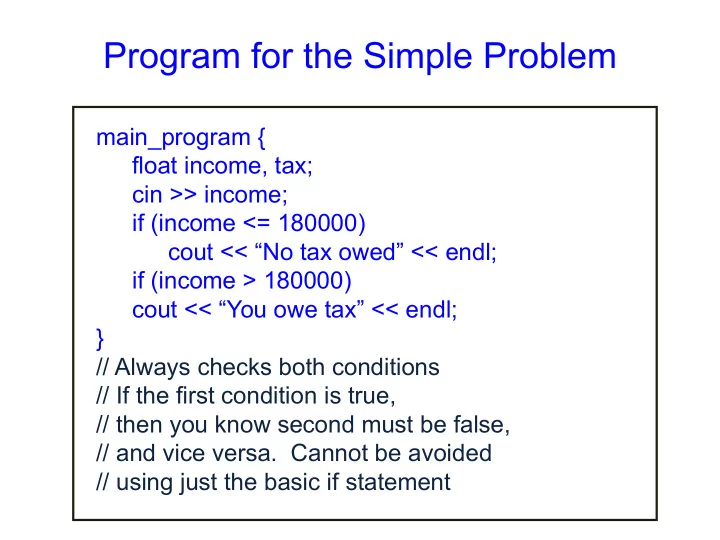
Program for the Simple Problem
main_program { float income, tax; cin >> income; if (income <= 180000) cout << “No tax owed” << endl; if (income > 180000) cout << “You owe tax” << endl; } // Always checks both conditions // If the first condition is true, // then you know second must be false, // and vice versa. Cannot be avoided // using just the basic if statement
SLIDE 2 Flowchart of the IF Statement
Condition Previous Statement Consequent New Statement True False
SLIDE 3 Flowchart of the IF-ELSE statement
Condition Previous Statement Alternate Consequent True False New Statement
SLIDE 4 Most General Form of the IF-ELSE Statement
if (condition_1) consequent_1 else if (condition_2) consequent_2 … else if (condition_n) consequent_n else alternate Evaluate conditions in order Some condition true: execute the corresponding
- consequent. Do not evaluate subsequent conditions
All conditions false: execute alternate
SLIDE 5 Flowchart of the General IF-ELSE Statement (with 3 conditions)
New Statement Condition 2 Condition 3 Consequent 1 Consequent 2 Consequent 3 Alternate True True
False False
Previous Statement Condition 1 True False
SLIDE 6
Tax Calculation Program
main_program { float tax,income; cin >> income; if (income <= 180000) tax = 0; else if (income <= 500000) tax = (income – 180000) * 0.1; else if (income <= 800000) tax = (income – 500000) * 0.2 + 32000; else tax = (income – 800000) * 0.3 + 92000; cout << tax << endl; }
SLIDE 7 Tax Calculation Flowchart
Income<=180000 Income<=500000 Income<=800000 tax = 0; tax = (income - 180000) * 0.1; tax = 32000 + (income - 320000) * 0.2; tax = 92000 + (income - 800000) * 0.3; Read Income Print Tax True True False False False True
SLIDE 8 More General Conditions
- condition1 && condition2 : true only if both true
Boolean AND
- condition1 || condition2 : true only if at least one is true
Boolean OR
- ! condition : true if only if condition is false
- Components of general conditions may themselves be
general conditions, e.g. !((income < 18000) || (income > 500000))
- Exercise: write tax calculation program using general
conditions wherever needed
SLIDE 9
Remark
The consequent in an if statement can be a block containing several statements. If the condition is true, all statements in the block are executed, in order Likewise the alternate Example: If income is greater than 800000, then both the statements below get executed if (income > 800000){ tax = 92000 + (income – 800000)*0.3; cout << “In highest tax bracket.\n”; } \n : Newline character. Another way besides endl
SLIDE 10 Logical Data
- We have seen that we can evaluate conditions, combine
conditions
- Why not allow storing the results (true or false) of such
computations?
- Indeed, C++ has data type bool into which values of
conditions can be stored
- The type bool is named after George Boole, who
formalized the manipulation of logical data
- An int variable can have 232 values, a bool variable can
have only two values (true/false)
SLIDE 11
The Data Type Bool
bool highincome, lowincome; Declares variables highincome and lowincome of type bool highincome = (income > 800000); bool fun = true; Will set highincome to true if the variable income contains value larger than 800000 boolean variables which have a value can be used wherever conditions are expected, e.g. if (highincome) tax = …
SLIDE 12 Example: Determining If a Number is Prime
- Program should take as input a number x (an integer >
1)
- Output Number is prime if it is, or number is not prime if
it is not
– For all numbers 2 to x-1, check whether any one of these is a factor of n
– If none, then number is prime
SLIDE 13 Example...Prime
main_program { int x; cin >> x; // read x 4534534536 int i = 2; //first factor to check; bool factorFound = false; // no factor found yet; repeat (x-2) { factorFound = factorFound || ((x % i) == 0 ); // Remainder is 0 when x is divisible by i i++; } if (factorFound) cout << x << " is not prime" << endl; }
SLIDE 14 Remarks
- Conditional execution makes life interesting
- Master the 3 forms of if
- Exercise: write the tax calculation program without using
the general if and without evaluating conditions
- unnecessarily. Hint: use blocks
- You can nest if statements inside each other: some pitfalls
in this are discussed in the book
SLIDE 15 SAFE quiz
- What is printed by this code snippet: "int
x=3,y=1; {int x=4; {x = x+2;} y=x;} cout << (x+y);}
- What does this code print? "int i=0,s=0;
repeat(3) {if (i%2==0) s += i; else s += 2*i; i++;} cout << s;
- What does this program print? "unsigned int
x,c=0; cin>>x; repeat (32) {if (x%2==1) c++; x = x/2;} cout << c;
- What does this program print? "unsigned int
x,c=0; cin>>x; repeat (32) {if (x%2==1) c++; x = x/2;} cout << c;
SLIDE 16
CS 101: Computer Programming and Utilization
SLIDE 17
How To Write Programs
So far, we wrote very simple programs Simple programs can be written intuitively Even slightly complex programs should be written with some care and planning You must try to ensure that your program works correctly no matter what input is given to it This is tricky even for slightly complex programs As a professional programmer, you must remember that an incorrect program could cause a plane to crash, an X-ray machine to supply the wrong amount of radiation: your program may be controlling such devices
SLIDE 18 Program Development Strategy
- 1. Writing specification
- 2. Constructing test cases
- 3. Thinking how to solve the problem on pencil and paper
- 4. Writing out your ideas formally and making a plan
- 5. Writing the program
- 6. Checking mentally if your program is following your plan,
- r if you made a mistake in writing the program
- 7. Running the test cases
- 8. Redoing steps if some test cases fail
SLIDE 19 Program Development Strategy
Write specification (i.e. - exact input, exact output) Construct testcases Figure out how you would solve the problem on a paper and write the steps Write the program Check that the program is correct, by reasoning and by running testcases
Repeat steps if wrong
SLIDE 20 The Problem
The following series approaches e as n increases: e = 1/0! + 1/1! + 1/2! + … + 1/n! Write a program which takes n as input and prints the sum
SLIDE 21 The Specification
- Usually, the problem will be specified in real life terms,
where there may be some ambiguity, or possibilities of
- confusion. So it is desirable to write to write down what
is given and what is needed very precisely
- Specification: A statement of what is the input and the
corresponding output. Clear description of when the
- utput is to be considered correct
SLIDE 22 The Specification For Our Problem
Input: an integer n, where n ≥ 0 Output: The sum 1/0! + … + 1/n!
- This is simple enough, but note that we have made explicit
that n cannot be a negative number
- Also, it is worth reading this carefully yourself and asking,
can something be misunderstood in this?
- You may realize that carelessly, you may think of n as also
being the number of terms to be added up.
- The number of terms being added together is n+1.
- The number of additions is indeed n, however
SLIDE 23 Constructing Test Cases
- Write down some specific input values, and the
corresponding expected output values
- This will help ensure that you understand the problem and
cross-check the specification you wrote
- 3 test cases are enough for this simple problem
− For n=0, clearly the answer must be 1 − For n=1, answer = 1+1/1! = 2 − For n=2, answer = 1+1/1!+1/2! = 2.5 − We can put the test cases into a table:
Input (n) 1 2 Output 1 2 2.5
SLIDE 24
Designing the Algorithm (1)
Solving the problem by pencil and paper − Calculate the first term, 1/0!, which is just 1 − Calculate the second term, 1/1! which is just 1. Add to 1 − Calculate the third term, 1/2!, add to sum so far − Calculate the fourth term 1/3! … Now, you can calculate the fourth term by observing that it is just the third term multiplied by 1/3: − 1/3! = 1/2! * 1/3 This idea will save work in your program too But you need to find the general pattern, which is: − 1/t! = 1/(t-1)! * 1/t So now you can think of a program
SLIDE 25 What Variables To Use
- When we solve on paper, we write many numbers; we
do not need separate variables to store them
- As you calculate on paper, identify the numbers that are
- reused. These must be stored in a variable. Usually
these will be few
- We need to keep track of the sum, so clearly we need a
variable for it: let us call it result
- We generate the tth term from the t-1th. So we need to
remember the previous term. Store it as variable term
- According to our general pattern, we also need to
remember t, so we will have a variable i for that
SLIDE 26
A Program Sketch
There are (n+1) terms We need to perform n additions. Clearly we should have a loop for that So our program should have the following form main_program{ int n; cin >> n; double i = …, term = …, result = …; repeat(n){ … } cout << result << endl; }
SLIDE 27 Filling in the Details (1)
- If n is given as 0, then the loop does not execute even
- nce, and the result is printed
– The value that is printed is the value we initialize result with – Since we want 1 to be printed, we must initialize result = 1
SLIDE 28 Filling in the Details (2)
- We next decide what values (i, term) should have when
we enter the loop for the tth time, where t=1, 2, …, n
- In the loop iterations the terms 1/1!, 1/2!, 1/3!....1/n!
need to get added one by one into the variable result
- We can do this in the following way. When we enter the
loop the tth time – i has the value t-1 – term has the value 1/(t-1)! i.e. the value of the previous term added – result has the sum till 1/(t-1)!
SLIDE 29 Filling in the Details (3)
- So on entering for the first time, i.e. when t=1:
– i should have the value t-1 = 0 – term must have the value (t-1)!=1
- Thus before the loop we must initialize
– i=0; term=1;
- Inside the loop we have to add the next term to result.
But i and term holds the previous values – So the first statement in the loop should be: – i = i+ 1;
- i now has the value t. So Next statement is:
– term = term/i
- Now we have to add this into result. So we have:
– result = result + term
- Now result has the sum upto 1/t!, so tth iteration is
complete, and coding is done
SLIDE 30 The Final Code
main_program{ int n; cin >> n; int i=0; double term = 1, result = 1; repeat(n) { // On entry for tth time, t=1..n // i=t-1, term=1/(t-1)! // result =1/0!+..+1/(t-1)! i = i + 1; // now i = t term = term/i; // now term = 1/t! result = result + term; // now result =1+..+1/t! } cout << result << endl;
}
SLIDE 31 Code Review
It is useful to go over the code again to see that the values
- f the variables indeed satisfy what we say about them
Specially check: will the values of the variables agree with what we say about them on the t+1th iteration?
SLIDE 32 Testing
- Next, compile and run the program for the
test cases you generated.
- Check if the program output agrees with
what was in the table.
- If the program does not agree, you are
said to have a bug.
- Now you must remove the bug, or debug.
SLIDE 33 Debugging
- Simplest strategy: print intermediate results.
main_program{ int n; cin >> n; int i=0, term = 1, result = 1; repeat(n){// On tth entry, t=1..n // i=t, term=1/(t-1)! // result =1/0!+..+1/(t-1)! term = term / i result = result + term; // now result =1+..+1/t! i = i + 1; cout << i <<‘ ‘<< term <<’ ‘<< result << endl; } cout << result << endl; }
- From the printed values you should know what is going wrong.