Physically Addressed System Physically Addressed System CS 105 - - PowerPoint PPT Presentation

physically addressed system physically addressed system
SMART_READER_LITE
LIVE PREVIEW

Physically Addressed System Physically Addressed System CS 105 - - PowerPoint PPT Presentation


slide-1
SLIDE 1

Virtual Memory Virtual Memory

Topics

Address translation

Motivations for VM

Accelerating translation with TLBs

CS 105

“Tour of the Black Holes of Computing!”

– 2 – CS 105

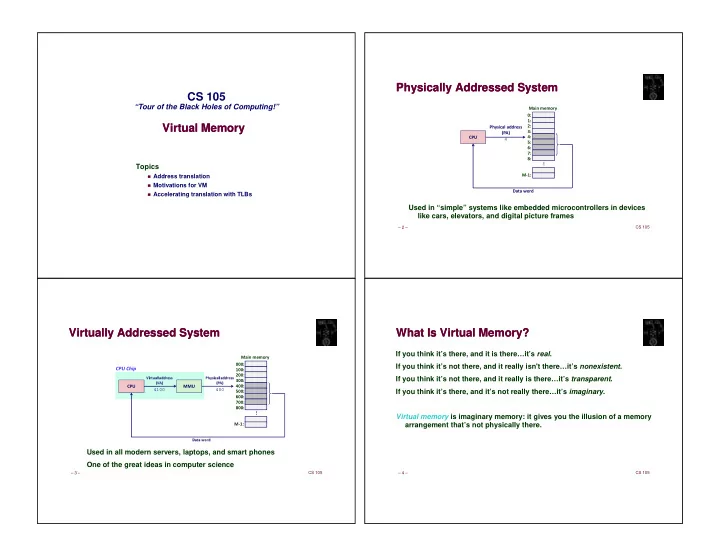
Physically Addressed System Physically Addressed System

Used in “simple” systems like embedded microcontrollers in devices like cars, elevators, and digital picture frames

  • 4

– 3 – CS 105

Virtually Addressed System Virtually Addressed System

Used in all modern servers, laptops, and smart phones One of the great ideas in computer science

✂ ✄ ☎ ✆ ✝ ✞ ✟ ✞ ✡ ✡ ☛ ☞ ☎ ☎ ✌ ✁ ✍ ✎ ✏ ✞ ✑ ✞ ✒ ✓ ☛ ✡
✆ ☛ ✑ ✕ ✞ ✟ ✞ ✡ ✡ ☛ ☞ ☎ ☎ ✌ ✔ ✍ ✎
  • 400

4100

– 4 – CS 105

What Is Virtual Memory? What Is Virtual Memory?

If you think it’s there, and it is there…it’s real. If you think it’s not there, and it really isn't there…it’s nonexistent. If you think it’s not there, and it really is there…it’s transparent. If you think it’s there, and it’s not really there…it’s imaginary. Virtual memory is imaginary memory: it gives you the illusion of a memory arrangement that’s not physically there.

slide-2
SLIDE 2

– 5 – CS 105

Address Spaces Address Spaces

Linear address space: Ordered set of contiguous non-negative integer addresses: {0, 1, 2, 3 … } Virtual address space: Set of N = 2n virtual addresses {0, 1, 2, 3, …, N-1} Physical address space: Set of M = 2m physical addresses {0, 1, 2, 3, …, M-1} Clean distinction between data (bytes) and their attributes (addresses) Every byte in main memory has one physical address and zero or more virtual addresses

– 6 – CS 105

Why Virtual Memory (VM)? Why Virtual Memory (VM)?

Uses main memory efficiently

Use DRAM as a cache for parts of a large virtual address space

Simplifies memory management

Each process gets the same uniform linear address space

Isolates address spaces

One process can’t interfere with another’s memory

User program can’t access privileged kernel information and code

– 7 – CS 105

VM as Tool for Caching VM as Tool for Caching

Conceptually, virtual memory is an array of N contiguous bytes stored on disk. The contents of the array on disk are cached in physical memory (DRAM cache)

These cache blocks are called pages (size is P = 2p bytes)

✁ ✁ ✖ ✁ ✂ ✄ ✗ ✘
✆ ✝ ✞
✆ ✝ ✞ ✟ ✠ ✡ ☛ ✡ ☞ ✌ ✍ ✔ ✁ ✙ ✔ ✁ ✘ ✔ ✁ ✖ ✎ ✂ ✄ ✗ ✘
✠ ☛ ✏ ✏ ✑ ✡ ☛ ✝ ✌ ✍ ✒ ☛ ✡ ☞ ✌ ✍ ✟ ✠ ✡ ☛ ✡ ☞ ✌ ✍ ✟ ✠ ☛ ✏ ✏ ✑ ✡ ☛ ✝ ✌ ✍ ✒ ☛ ✡ ☞ ✌ ✍ ✟ ✠ ✡ ☛ ✡ ☞ ✌ ✍ ✁ ✁ ✙ ✁ ✁ ✘
✆ ✝ ✞ ✒ ☛ ✡ ☞ ✌ ✍ ✓ ✔ ✕ ✚ ✛ ✕ ✚ ✓
  • – 8 –

CS 105

DRAM Cache Organization DRAM Cache Organization

DRAM cache organization driven by the enormous miss penalty

DRAM is about 10x slower than SRAM

Hard disk is about 10,000x slower than DRAM

Consequences

Large page (block) size: typically 4-8 KB, sometimes 4 MB

Fully associative

Any VP can be placed in any PP Requires a “large” mapping function – different from CPU caches

Highly sophisticated, expensive replacement algorithms

Too complicated and open-ended to be implemented in hardware

Write-back rather than write-through

slide-3
SLIDE 3

– 9 – CS 105

Enabling Data Structure: Page Table Enabling Data Structure: Page Table

A page table is an array of page table entries (PTEs) that maps virtual pages to physical pages.

Per-process kernel data structure in DRAM

✚ ✕ ✟ ✟ ✚ ✕ ✟ ✟
✁ ✛ ✔ ✁ ✜
✘ ✙ ✘ ✙ ✘ ✙ ✘
✁ ✖ ✔ ✁ ✘
✁ ✘ ✔ ✁ ✖ ✔ ✁ ✜ ✔ ✁ ✢ ✔ ✁ ✛ ✔ ✁ ✣

– 10 – CS 105

Page Hit Page Hit

Page hit: reference to VM word that is in physical memory (DRAM cache hit)

✚ ✕ ✟ ✟ ✚ ✕ ✟ ✟
✁ ✛ ✔ ✁ ✜
✘ ✙ ✘ ✙ ✘ ✙ ✘
✁ ✖ ✔ ✁ ✘
✁ ✘ ✔ ✁ ✖ ✔ ✁ ✜ ✔ ✁ ✢ ✔ ✁ ✛ ✔ ✁ ✣

Virtual address – 11 – CS 105

Page Fault Page Fault

Page fault: reference to VM word that is not in physical memory (DRAM cache miss)

✚ ✕ ✟ ✟ ✚ ✕ ✟ ✟
✁ ✛ ✔ ✁ ✜
✘ ✙ ✘ ✙ ✘ ✙ ✘
✁ ✖ ✔ ✁ ✘
✁ ✘ ✔ ✁ ✖ ✔ ✁ ✜ ✔ ✁ ✢ ✔ ✁ ✛ ✔ ✁ ✣

Virtual address – 12 – CS 105

Handling Page Fault Handling Page Fault

Page miss causes page fault (an exception)

✚ ✕ ✟ ✟ ✚ ✕ ✟ ✟
✁ ✛ ✔ ✁ ✜
✘ ✙ ✘ ✙ ✘ ✙ ✘
✁ ✖ ✔ ✁ ✘
✁ ✘ ✔ ✁ ✖ ✔ ✁ ✜ ✔ ✁ ✢ ✔ ✁ ✛ ✔ ✁ ✣

Virtual address

slide-4
SLIDE 4

– 13 – CS 105

Handling Page Fault Handling Page Fault

Page miss causes page fault (an exception) Page fault handler selects a victim to be evicted (here VP 4)

✚ ✕ ✟ ✟ ✚ ✕ ✟ ✟
✁ ✛ ✔ ✁ ✜
✘ ✙ ✘ ✙ ✘ ✙ ✘
✁ ✖ ✔ ✁ ✘
✁ ✘ ✔ ✁ ✖ ✔ ✁ ✜ ✔ ✁ ✢ ✔ ✁ ✛ ✔ ✁ ✣

Virtual address – 14 – CS 105

Handling Page Fault Handling Page Fault

Page miss causes page fault (an exception) Page fault handler selects a victim to be evicted (here VP 4)

✚ ✕ ✟ ✟ ✚ ✕ ✟ ✟
✁ ✛ ✔ ✁ ✣
✘ ✘ ✙ ✙ ✘ ✙ ✘
✁ ✖ ✔ ✁ ✘
✁ ✘ ✔ ✁ ✖ ✔ ✁ ✜ ✔ ✁ ✢ ✔ ✁ ✛ ✔ ✁ ✣

Virtual address – 15 – CS 105

Handling Page Fault Handling Page Fault

Page miss causes page fault (an exception) Page fault handler selects a victim to be evicted (here VP 4) Offending instruction is restarted: page hit!

✚ ✕ ✟ ✟ ✚ ✕ ✟ ✟
✁ ✛ ✔ ✁ ✣
✘ ✘ ✙ ✙ ✘ ✙ ✘
✁ ✖ ✔ ✁ ✘
✁ ✘ ✔ ✁ ✖ ✔ ✁ ✜ ✔ ✁ ✢ ✔ ✁ ✛ ✔ ✁ ✣

Virtual address

  • – 16 –

CS 105

Allocating Pages Allocating Pages

Allocating a new page (VP 5) of virtual memory.

✚ ✕ ✟ ✟
✁ ✛ ✔ ✁ ✣
✘ ✘ ✙ ✙ ✘ ✙ ✘
✁ ✖ ✔ ✁ ✘
✁ ✘ ✔ ✁ ✖ ✔ ✁ ✜ ✔ ✁ ✢ ✔ ✁ ✛ ✔ ✁ ✣ ✔ ✁ ✤
slide-5
SLIDE 5

– 17 – CS 105

Locality to the Rescue Again! Locality to the Rescue Again!

Virtual memory seems terribly inefficient, but it works because of locality. At any point in time, programs tend to access a set of active virtual pages called the working set

Programs with better temporal locality will have smaller working sets

If working set size < main memory size

Good performance for one process after compulsory misses

If SUM(working set sizes) > main memory size

Thrashing: Performance meltdown where pages are swapped (copied) in and out continuously

– 18 – CS 105

VM as Tool for Memory Management VM as Tool for Memory Management

Key idea: each process has own virtual address space

Can view memory as a simple linear array

Mapping function scatters addresses through physical memory

Well-chosen mappings can improve locality

✥ ✗ ✘ ✌ ☞ ✦ ✧ ✦ ★ ☛ ☞ ✞ ✡ ✗ ✓ ✚ ✟ ✄ ✟ ✆ ✩ ☛ ✞ ☛ ✄ ✝ ✓ ✡ ☞ ✎
  • VP 1

VP 2

✦ ✦ ✦ ✙ ✥ ✗ ✘

VP 1 VP 2

✦ ✦ ✦

PP 2 PP 6 PP 8

✦ ✦ ✦ ✙ ✪ ✗ ✘
  • – 19 –

CS 105

VM as Tool for Memory Management VM as Tool for Memory Management

Memory allocation

Each virtual page can be mapped to any physical page

A virtual page can be stored in different physical pages at different times

Sharing code and data among processes

Map virtual pages to the same physical page (here: PP 6)

✥ ✗ ✘ ✌ ☞ ✦ ✧ ✦ ★ ☛ ☞ ✞ ✡ ✗ ✓ ✚ ✟ ✄ ✟ ✆ ✩ ☛ ✞ ☛ ✄ ✝ ✓ ✡ ☞ ✎
  • VP 1

VP 2

✦ ✦ ✦ ✙ ✥ ✗ ✘

VP 1 VP 2

✦ ✦ ✦

PP 2 PP 6 PP 8

✦ ✦ ✦ ✙ ✪ ✗ ✘
  • – 20 –

CS 105

Simplifying Linking and Loading Simplifying Linking and Loading

Linking

Each program has similar virtual address space

Code, stack, and shared libraries always start at same virtual address

Loading

execve allocates virtual pages for .text and .data sections & creates PTEs marked as invalid

The .text and .data sections are copied, page by page, on demand by the virtual memory system

  • malloc
  • %rsp
  • brk

0x400000

  • databss
  • .inittext.rodata
slide-6
SLIDE 6

– 21 – CS 105

VM as Tool for Memory Protection VM as Tool for Memory Protection

Extend PTEs with permission bits Page fault handler checks these before remapping

If violated, send process SIGSEGV (segmentation fault)

  • PP 2
  • PP 6

PP 8

  • PP 11
  • – 22 –

CS 105

VM Address Translation VM Address Translation

Virtual Address Space

V = {0, 1, …, N–1}

Physical Address Space

P = {0, 1, …, M–1}

Address Translation

MAP: V → → → → P U {∅ ∅ ∅ ∅}

For virtual address a:

MAP(a) = a’ if data at virtual address a is at physical address a’ in P MAP(a) = ∅

∅ ∅ ∅ if data at virtual address a is not in physical memory » Either invalid or stored on disk

– 23 – CS 105

Address-Translation Symbols Address-Translation Symbols

Basic Parameters

N = 2n : Number of addresses in virtual address space

M = 2m : Number of addresses in physical address space

P = 2p : Page size (bytes)

Components of the virtual address (VA)

TLBI: TLB index

TLBT: TLB tag

VPO: Virtual page offset

VPN: Virtual page number

Components of the physical address (PA)

PPO: Physical page offset (same as VPO)

PPN: Physical page number

– 24 – CS 105

Address Translation With a Page Table Address Translation With a Page Table

Virtual page number (VPN) Virtual page offset (VPO)

✁ ✂ ✄ ☎ ✆ ✝ ✞ ✟ ✫ ✞ ✧ ☞ ✚ ✕ ✬ ✩ ☞ ☛ ✌ ✁ ✁ ✥ ✎

Physical page offset (PPO)

✞ ✟ ✆ ✡ ✁ ✂ ✄ ☎ ✆ ✝ ✞ ✟ ✫ ✞ ✧ ☞ ✚ ✕ ✬ ✩ ☞ ☛ ✌ ✁ ✁ ✥ ✎ ✁ ✞ ✧ ☞ ✑ ✞ ✩ ✟ ☞ ✩ ✞ ☎ ☞ ☛ ☞ ✧ ✆ ☎ ✑ ☞ ☛ ✌ ✁ ✭ ✮ ✯ ✎
✞ ✧ ☞ ✑ ✞ ✩ ✟ ☞ ✞ ✡ ✡ ☛ ☞ ☎ ☎ ✰ ✓ ☛ ✫ ☛ ✓ ✝ ☞ ☎ ☎ ✔ ✞ ✟ ✆ ✡ ✩ ✆ ✑ ✱ ✙ ✲ ✫ ✞ ✧ ☞ ✚ ✓ ✑ ✆ ✚ ✬ ☞ ✬ ✓ ☛ ✄ ✌ ✫ ✞ ✧ ☞ ✰ ✞ ✕ ✟ ✑ ✎ ✁ ✂ ✄ ☎ ✂ ✆ ✄ ☎ ✁ ✂ ✄ ☎ ✂ ✝ ✄ ☎
slide-7
SLIDE 7

– 25 – CS 105

Address Translation: Page Hit Address Translation: Page Hit

1) Processor sends virtual address to MMU 2-3) MMU fetches PTE from page table in memory 4) MMU sends physical address to cache/memory 5) Cache/memory sends data word to processor

✍ ✏ ✞ ✑ ✞
✭ ✳ ✍ ✁ ✭ ✳ ✘ ✖ ✣ ✜ ✤

– 26 – CS 105

Address Translation: Page Fault Address Translation: Page Fault

1) Processor sends virtual address to MMU 2-3) MMU fetches PTE from page table in memory 4) Valid bit is zero, so MMU triggers page fault exception 5) Handler identifies victim (and, if dirty, pages it out to disk) 6) Handler pages in new page and updates PTE in memory 7) Handler returns to original process, restarting faulting instruction

✭ ✳ ✍ ✁ ✭ ✳ ✘ ✖ ✣ ✜ ✤
✆ ✝ ✑ ✆ ✬ ✫ ✞ ✧ ☞ ✥ ☞ ✒ ✫ ✞ ✧ ☞ ✳ ✴ ✝ ☞ ✫ ✑ ✆ ✓ ✚ ✢ ✛

– 27 – CS 105

Integrating VM and Cache Integrating VM and Cache

VA CPU MMU PTEA PTE PA Data Memory PA

PA miss

PTEA

PTEA miss PTEA hit PA hit

Data PTE L1 cache

CPU Chip

VA: virtual address, PA: physical address, PTE: page table entry, PTEA = PTE address

– 28 – CS 105

Speeding up Translation With a TLB Speeding up Translation With a TLB

Page table entries (PTEs) are cached in L1 like any other memory word

PTEs may be evicted by other data references

PTE hit still requires a small but significant L1 delay (3-4 cycles)

Net effect is to double time needed to access data in L1 cache!

Solution: Translation Lookaside Buffer (TLB)

Tiny set-associative (or fully associative) hardware cache inside MMU

Maps virtual page numbers to physical page numbers

Contains complete page table entries for small number of pages

slide-8
SLIDE 8

– 29 – CS 105

Accessing the TLB Accessing the TLB

MMU uses the VPN portion of the virtual address to access the TLB:

TLB tag (TLBT) TLB index (TLBI) p-1 p n-1 VPO

VPN

p+t-1 p+t

  • – 30 –

CS 105

TLB Hit TLB Hit

✍ ✏ ✞ ✑ ✞
✭ ✳ ✘ ✖ ✜ ✤
✁ ✥ ✣

– 31 – CS 105

TLB Miss TLB Miss

✍ ✏ ✞ ✑ ✞
✭ ✳ ✘ ✖ ✤ ✢
✁ ✥ ✜ ✁ ✭ ✳ ✍ ✣
  • – 32 –

CS 105

Multi-Level Page Tables Multi-Level Page Tables

Suppose:

4KB (212) page size, 48-bit virtual address space, 8-byte PTE

Problem:

Would need a 512 GB page table!

248 * 2-12 * 23 = 239 bytes

Common solution: Multi-level page table Example: 2-level page table

Level 1 table (always memory-resident): each PTE points to a page table

Level 2 table (paged in and out like any other data): each PTE points to a page

slide-9
SLIDE 9

– 33 – CS 105

A Two-Level Page Table Hierarchy A Two-Level Page Table Hierarchy

✁ ✁
✁ ✙ ✦ ✦ ✦ ✔ ✁ ✘ ✙ ✖ ✣ ✔ ✁ ✘ ✙ ✖ ✜ ✦ ✦ ✦ ✔ ✁ ✖ ✙ ✜ ✛ ✵ ✞ ✫ ✏ ✁ ✭ ✳ ✙ ✦ ✦ ✦ ✁ ✭ ✳ ✘ ✙ ✖ ✣ ✁ ✭ ✳ ✙ ✦ ✦ ✦ ✁ ✭ ✳ ✘ ✙ ✖ ✣ ✘ ✙ ✖ ✣ ✚ ✕ ✟ ✟ ✁ ✭ ✳ ☎ ✁ ✭ ✳ ✘ ✙ ✖ ✣ ✘ ✙ ✖ ✣ ✕ ✚ ✞ ✟ ✟ ✓ ✝ ✞ ✑ ☞ ✡ ✫ ✞ ✧ ☞ ☎ ✔ ✁ ✶ ✖ ✘ ✤
✘ ✷ ✗ ✶ ✎ ✚ ✕ ✟ ✟ ✁ ✭ ✳ ☎ ✁ ✭ ✳ ✙ ✁ ✭ ✳ ✘ ✁ ✭ ✳ ✖ ✌ ✚ ✕ ✟ ✟ ✎ ✁ ✭ ✳ ✣ ✌ ✚ ✕ ✟ ✟ ✎ ✁ ✭ ✳ ✜ ✌ ✚ ✕ ✟ ✟ ✎ ✁ ✭ ✳ ✤ ✌ ✚ ✕ ✟ ✟ ✎ ✁ ✭ ✳ ✢ ✌ ✚ ✕ ✟ ✟ ✎ ✁ ✭ ✳ ✛ ✌ ✚ ✕ ✟ ✟ ✎ ✁ ✭ ✳ ✸
☎ ✆ ✆ ✝ ✞ ☎ ✟ ✠ ✡ ☛ ☞ ✌ ☎ ✍ ✠ ✎ ✄ ✝ ✑ ✞ ✝ ✡ ✠ ☎ ✒ ✡ ✡ ☎ ✟ ☎ ✓ ✂ ✔ ✒ ☎ ✆ ✆ ✝ ✞ ☎ ✟ ✠ ✡ ☛ ☞ ✌ ☎ ✍ ✠ ✎ ✕ ✖
✔ ✒ ☎ ✆ ✆ ✝ ✞ ☎ ✟ ✠ ✡ ✌ ☎ ✍ ✠ ✎ ✕ ☎ ✆ ✆ ✝ ✞ ☎ ✟ ✠ ✡ ☛ ☞ ✌ ☎ ✍ ✠ ✄ ✝ ✑ ✟ ✘ ✠ ✎ ✟ ☎ ✞ ✙
  • – 34 –

CS 105

Translating With a k-level Page Table Translating With a k-level Page Table

  • VPN 1

p-1 n-1 VPO VPN 2 ... VPN k PPN p-1 m-1 PPO PPN VIRTUAL ADDRESS PHYSICAL ADDRESS ... ... Level-1 page table Level-2 page table Level-k page table

– 35 – CS 105

Summary Summary

Programmer’s view of virtual memory

Each process has its own private linear address space

Cannot be corrupted by other processes

System view of virtual memory

Uses memory efficiently by caching virtual memory pages

Efficient only because of locality

Simplifies memory management and programming

Simplifies protection by providing a convenient interpositioning point to check permissions