Models needed for physically based rendering Repetition from Week 1: - - PowerPoint PPT Presentation

models needed for physically based rendering
SMART_READER_LITE
LIVE PREVIEW

Models needed for physically based rendering Repetition from Week 1: - - PowerPoint PPT Presentation

Models needed for physically based rendering Repetition from Week 1: Think of the experiment: taking a picture. 02941 Physically Based Rendering What do we need to model it? Camera and Eye Models Camera Scene geometry


slide-1
SLIDE 1

02941 Physically Based Rendering

Camera and Eye Models

Jeppe Revall Frisvad June 2018

Models needed for physically based rendering

Repetition from Week 1: ◮ Think of the experiment: “taking a picture”. ◮ What do we need to model it?

◮ Camera ◮ Scene geometry ◮ Light sources ◮ Light propagation ◮ Light absorption and scattering

◮ Mathematical models for these physical phenomena are required as a minimum in order to render an image. ◮ We can use very simple models, but, if we desire a high level

  • f realism, more complicated models are required.

Ray casting

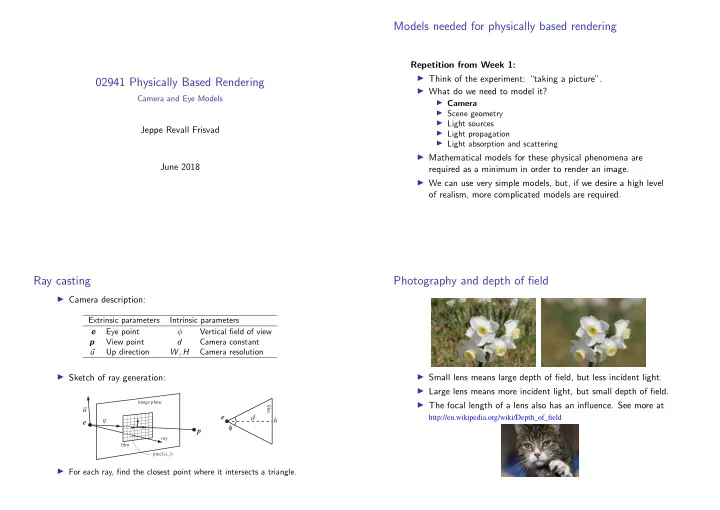
◮ Camera description:

Extrinsic parameters Intrinsic parameters e Eye point φ Vertical field of view p View point d Camera constant

  • u

Up direction W , H Camera resolution

◮ Sketch of ray generation:

e p u v

image plane film ray pixel (i, j)

d h φ e

film

◮ For each ray, find the closest point where it intersects a triangle.

Photography and depth of field

◮ Small lens means large depth of field, but less incident light. ◮ Large lens means more incident light, but small depth of field. ◮ The focal length of a lens also has an influence. See more at

http://en.wikipedia.org/wiki/Depth_of_field

slide-2
SLIDE 2

A model for thin lenses

f d z image plane δ focal plane

aperture, ℓ

z is the distance to the photographed object. d is the camera constant: the distance between the lens and the image plane. f is the focal length: the distance to the focal plane where collimated light is focused in a point. ℓ is the aperture: the diameter of the lens. δ is the diameter of the circle of confusion for objects at the distance z.

The thin lens equation

f d z image plane δ focal plane

aperture, ℓ

◮ An image will be perfectly sharp for objects at the distance zd, where 1 zd + 1 d = 1 f . ◮ Using the concept of similar triangles, we may derive δ =

  • ∆d

d + ∆d

  • ℓ =
  • zd

z − 1

zd − f

  • f ℓ .

Modelling depth of field

238

  • 6. Advanced Lighting and Shading

'_

__

focal point Figure 6.27. Depth of field. The viewer's location is moved a small amount, keeping the view direction pointing at the focal point, and the images are accumulated.

6.10 Reflections

Reflection, refraction, and shadowing are all examples of global illumination effects in which one object in a scene affects the rendering of another.

Efect~

such as reflections and shadows contribute greatly to increasing the realism in a rendered image, but they perform another important task as

  • well. They are used by the viewer as cues to determine spatial relationships,

as shown in Figure 6.28.

Figure 6.28. The leh image was rendered without shadow and reflections, an~ so it is hard to see where the object is truly located. The right image was rendered With both shadow and reflections, and the spatial relationships are easier to estimate. (Car model is reused courtesy 0/ Nya Perspektiv Design AB.)

  • 6. 10. Reflections

, ~

239

Environment mapping techniques for providing reflections of objects at a distance have been covered in Section 5.7.4 and 6.4.2, with reflected rays computed using Equation 4.5 on page 76. The limitation of such techniques is that they work on the assumption that the reflected objects are located far from the reflector, so that the same texture can be used by all reflection

  • rays. Generating planar reflections of nearby objects will be presented in

this section, along with methods for rendering frosted glass and handling curved reflectors.

6.10.1 Planar Reflections

Planar reflection, by which we mean reflection off a flat surface such as a mirror, is a special case of reflection off arbitrary surfaces. As often occurs with special cases, planar reflections are easier to implement and execute more rapidly than general reflections. An ideal reflector follows the law of reflection, which states that the angle of incidence is equal to the angle of reflection. That is, the angle between the incident ray and the normal is equal to the angle between the reflected ray and the normal. This is depicted in Figure 6.29, which illus- trates a simple object that is reflected in a plane. The figure also shows an "image" of the reflected object. Due to the law of reflection, the re- flected image of the object is simply the object itself physically reflected

viewer

7'-. angle of

~-+-.!.C

/

incidence reflector

:/

.

...

~ ......

.

,

~ .

.

{, ....... ~'

:,. .

.

  • .

. ....

image'~

':

I '

geometry\.~

.• _J

Figure 6.29. Reflection in a plane, showing angle of incidence and reflection, the reflected geometry, and the reflector.

◮ Centering the circle of confusion around the eye point, we can simulate depth of field by sampling different eye positions within the circle of confusion.

Modelling depth of field

◮ Centering the circle of confusion around the eye point, we can simulate depth of field by sampling different eye positions within the circle of confusion. ◮ Then we need a circle of confusion that is independent of z. ◮ Suppose we let z go to infinity, then δ∞ = lim

z→∞ δ = lim z→∞

  • zd

z − 1

zd − f

  • f ℓ

= lim

z→∞

  • zd

z − 1

  • f ℓ

zd − f = f ℓ zd − f . ◮ Now, we can sample an offset inside the circle of confusion with diameter δ∞. ◮ Blending images seen from slightly displaced viewers that look at the same focal point will result in a depth of field effect. ◮ Error (considering similar triangles):

δ∞ zd = δmodel |zd−z| ⇔ δmodel = |zd−z| zd

δ∞ = zd

z δ .

◮ Thus, since f is constant and zoom changes d, the camera has largest depth of field when zoomed out as much as possible.

slide-3
SLIDE 3

Example

◮ A demo program is available in the OptiX SDK.

02941 Physically Based Rendering

Glare and Fourier Optics

Jeppe Revall Frisvad June 2018

Examples of artistic and simulated glare

◮ All people experience glare to some degree ◮ Painting by Carl Saltzmann, 1884 ◮ Renderings by Kakimoto et al. [2005] ◮ Columbia Pictures Intro Video ◮ Why is it not in photos?

Categories of glare

◮ Glare

◮ An interference with visual perception caused by a bright light source or reflection. ◮ A form of visual noise.

◮ Discomfort glare

◮ Glare which is distracting or uncomfortable. ◮ Does not significantly reduce the ability to see information needed for activities. ◮ The sensation one experiences when the overall illumination is too bright e.g. on a snow field under bright sun.

◮ Disability glare

◮ Glare which reduces the ability to perceive the visual information needed for a particular activity. ◮ A haze of veiling luminance that decreases contrast and reduces visibility. ◮ Typically caused by pathological defects in the eye.

slide-4
SLIDE 4

Anatomy of the human eye

✂ ✄☎ ✆
✞ ✝ ✆✂ ✟ ✠ ✡ ☛☞ ✞ ☎ ☛ ✌ ☎ ✄☛ ✍ ✝ ✎ ✂ ☎ ✁ ✡ ☛ ✏ ✡ ✠ ✁ ✂ ✑ ☎ ✒ ✄✆ ✌ ☎ ✄☛ ☞ ✁ ✂ ✎ ☎ ✓ ✌ ☎ ✄☛ ✄ ✡ ☞ ✞ ☎ ✡ ☛ ✔ ✝ ✕ ☎ ✂ ☛ ✌ ✝ ✖ ✏ ✎ ✗ ✘ ✡ ☎ ✁ ✡ ☛ ✏ ✡ ✠ ✁ ✂ ✙ ✂ ✝ ☛

◮ Glare is due to particle scattering.

Ocular haloes and coronas

◮ The glare phenomenon as described by Descartes in 1637: ◮ This cannot be captured by a camera as it happens inside the eye, but could we simulate this? ◮ Fourier developed his transform to solve heat transfer

  • problems. It is well-known that there are many other uses.

◮ In Fourier optics, it is used to compute the scattering of particles that we can model as obstacles in a plane. ◮ This is particularly useful for modelling lens systems such as the human eye.

Related Work

Simpson [1953] “Occular Haloes and Coronas” Nakamae et al. [1992] “A Lighting Model Aiming at Drive Simulators” Spencer et al. [1995] “Physically-Based Glare Effects for Digital Images”

Related Work

Kakimoto et al. [2004] “Glare Generation Based

  • n Wave Optics”

van den Berg et al. [2005]

“Physical Model and Simulation of the Fine Needles Radiating from Point Light Sources”

Yoshida et al. [2008] “Brightness of the Glare Illusion”

slide-5
SLIDE 5

Wave optics

◮ Huygen’s principle:

◮ Every element of a wave front gives rise to a spherical wave. ◮ The envelope of the secondary waves determines the subsequent positions of the wave front.

◮ Simplistic eye model: ◮ Mathematically: ui(xi, yi) = d iλ

  • P

up(xp, yp)exp (ikr) r2 dxpdyp .

Fresnel’s approximation

◮ Huygen’s principle: ui(xi, yi) = d iλ

  • P

up(xp, yp)exp (ikr) r2 dxpdyp . ◮ Fresnel’s approximation:

(Taylor expansion of the square root in the Pythagorean theorem)

r ≈ d + x2

i + y2 i

2d + x2

p + y2 p

2d − xixp + yiyp d r2 ≈ d2 ◮ Inserted:

ui(xi, yi) = K(xi, yi) +∞

−∞

up(xp, yp)E(xp, yp) exp

  • −i k

d (xixp + yiyp)

  • dxpdyp ,

where

K(xi, yi) = 1 iλd exp

  • ik
  • d + x2

i + y 2 i

2d

  • and

E(xp, yp) = exp

  • i π

λd (x2

p + y 2 p )

  • .

What we want is light intensity

◮ The diffracted light wave:

ui(xi, yi) = K(xi, yi) +∞

−∞

up(xp, yp)E(xp, yp) exp

  • −i k

d (xixp + yiyp)

  • dxpdyp ,

◮ This leads to Fourier optics, since ui(xi, yi) = K(xi, yi)F {up(xp, yp)E(xp, yp)}p=xi/(λd),q=yi/(λd) . where F {. . . } is the Fourier transform. ◮ The light intensity is the squared absolute value of the wave: L(xi, yi) = |ui(xi, yi)|2 =

  • K(xi, yi)F {up(xp, yp)E(xp, yp)}p=xi/(λd),q=yi/(λd)
  • 2

= 1 (λd)2

  • F {up(xp, yp)E(xp, yp)}p=xi/(λd),q=yi/(λd)
  • 2

.

Fresnel diffraction (in summary)

◮ Simplistic eye model: ◮ Fresnel diffraction of the particles in the eye when modelled as

  • bstacles in the pupil plane:

|ui(xi, yi)|2 = 1 (λd)2

  • F {up(xp, yp)E(xp, yp)}p=xi/(λd),q=yi/(λd)
  • 2

, where F {. . . } is the Fourier transform, up is the light passing the pupil, E is a complex exponential term, λ is the wavelength, and d is the distance between pupil and retina.

slide-6
SLIDE 6

Input for the Fourier transform

◮ The FFT is an obvious choice. The input is a simplified “image” of the obstacles in the eye that cause diffraction. Pupil Cornea Lens Exponential term

Chromatic blur

◮ Recall the dispersive properties of scattering by particles (Newton’s discovery). ◮ We need FFTs for several wavelengths to get colours. ◮ Coordinates in frequency space involve the wavelength: p = xi/(λd) , q = yi/(λd) . ◮ This means that we can find the result for a different wavelength λnew by simply scaling the result from one FFT: Fλnew(xi, yi) = Fλ λ λnew xi, λ λnew yi

  • .

◮ Unfortunately, λ is also part of the expression for the complex exponential E, so the scaling introduces a small error. ◮ Accepting this small error saves many FFT computations.

Wavelengths to RGB

◮ To go from wavelengths to RGB we integrate over the CIE RGB color matching functions ◮ After this “chromatic blur” of the monochromatic scattering result, we have a simulation of the glare from a point source.

slide-7
SLIDE 7

The point spread function of the eye

◮ We can think of the simulated glare from a point source as the point spread function (PSF) of the eye. ◮ Suppose we are looking at a candle: ◮ We should convolve the PSF of the eye with the pixels that are bright enough to result in a visible glare effect. + ∗

FFT on the GPU

◮ Only 2 log2(N) passes for two 2D FFTs ◮ This is fast enough for real-time simulation of dynamic effects

slide-8
SLIDE 8

Temporal Glare

◮ Noise model for pupil ◮ Mass-spring system for lens ◮ Damped random forces for vitreous humor ◮ Simple up-down motion for squint/blink/flinch

Perceptual study

✁ ✂ ✄ ☎ ✆ ✝ ✞ ✟ ✆ ✠ ✆ ✡ ☛ ☞ ✌ ✍
✁ ✎ ✂ ✏ ✑ ✞ ✁ ✒ ✓ ✔ ✁ ✆ ✆ ✔ ✕✁ ✆ ✆ ✖ ✕ ☞ ✏✏ ✆ ✎ ✗ ✘ ✙ ✗ ✗ ✘ ✗ ✘ ✙ ✗ ✗ ✘ ✚ ✛ ✜ ✛ ✢ ✗ ✚ ✣

Model overview

◮ The eye model includes Eye part Scatter Dyn. Incl. Eyelashes varies yes yes Cornea 25-30% no yes Aqueous humor none no no Lens 40% yes yes Iris ≤1% yes no Pupil aperture yes yes Vitreous humor 10% yes yes Retina 20% no yes ◮ This is the first model to simulate the dynamical aspects of glare. ◮ Convolution ensures that the model works for area sources.

Example

◮ A demo program is available online at http://people.compute.dtu.dk/jerf/code/. ◮ Provide input images to this program to add glare effects.