Outline The IP protocol 15-441/641: Computer Networks IPv4 The - - PowerPoint PPT Presentation

outline
SMART_READER_LITE
LIVE PREVIEW

Outline The IP protocol 15-441/641: Computer Networks IPv4 The - - PowerPoint PPT Presentation

9/16/2019 Outline The IP protocol 15-441/641: Computer Networks IPv4 The Internet Protocol IPv6 Fall 2019 Profs Peter Steenkiste & Justine Sherry IP in practice Network address translation Tunnels ARP


slide-1
SLIDE 1

9/16/2019 1

15-441/641: Computer Networks The Internet Protocol

Fall 2019 Profs Peter Steenkiste & Justine Sherry https://computer-networks.github.io/fa19/

Outline

  • The IP protocol
  • IPv4
  • IPv6
  • IP in practice
  • Network address translation
  • Tunnels
  • ARP

2

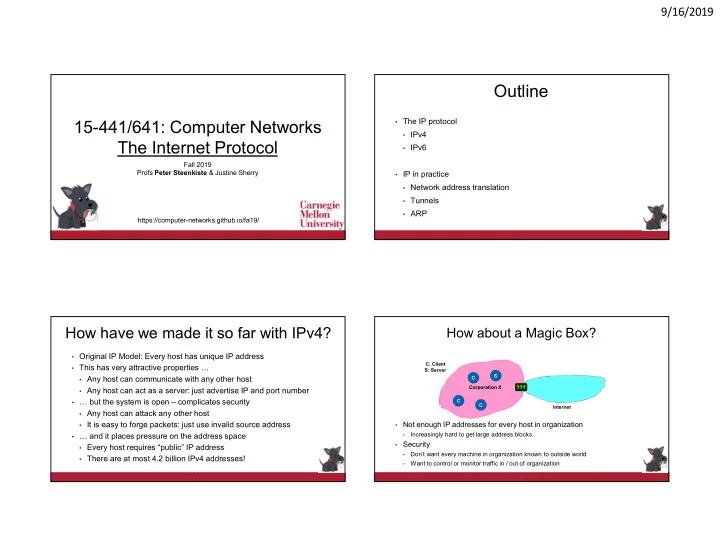
How have we made it so far with IPv4?

  • Original IP Model: Every host has unique IP address
  • This has very attractive properties …
  • Any host can communicate with any other host
  • Any host can act as a server: just advertise IP and port number
  • … but the system is open – complicates security
  • Any host can attack any other host
  • It is easy to forge packets: just use invalid source address
  • … and it places pressure on the address space
  • Every host requires “public” IP address
  • There are at most 4.2 billion IPv4 addresses!

3

How about a Magic Box?

  • Not enough IP addresses for every host in organization
  • Increasingly hard to get large address blocks
  • Security
  • Don’t want every machine in organization known to outside world
  • Want to control or monitor traffic in / out of organization

4

Internet Corporation X C C C S ??? C: Client S: Server

slide-2
SLIDE 2

9/16/2019 2

Not All Hosts are Equal!

  • Most machines within organization are used by individuals
  • They always act as clients
  • Only a small number of machines act as servers for the organization
  • E.g., mail server, web, ..
  • All traffic to outside passes through firewall

5

(Most) machines within organization do not need public IP addresses!

Internet Corporation X C C C S NAT C: Client S: Server

Reducing Address Use: Network Address Translation

  • Within organization: assign

each host a private IP address

  • IP address blocks 10/8 &

192.168/16 are private

  • Used for routing within the
  • rganization by IP protocol
  • Can do subnetting, ..

6

  • The NAT translates between public and private IP addresses as packets travel

to/from the Internet

  • It does not let any packets from internal nodes “escape”
  • Outside world does not need to know about internal addresses

Corporation X Internet Corporation X C C C NAT C: Client

10.1.1.1 10.2.2.2 10.3.3.3

Corporation X

NAT: Opening Client Connection

  • Client 10.2.2.2 wants to connect to server 198.2.4.5:80
  • OS assigns ephemeral port (1000)
  • Connection request intercepted by

firewall

  • Maps client to port of firewall (5000)
  • Creates NAT table entry

7

C C: Client S: Server

10.2.2.2:1000

Int Addr Int Port NAT Port 10.2.2.2 1000 5000

NAT has public IP address

Internet NAT C: Client

10.2.2.2

S

198.2.4.5:80 243.4.4.4

NAT: Client Request

  • NAT acts as proxy for client
  • Intercepts message from client and

marks itself as sender

8 source: 10.2.2.2 dest: 198.2.4.5 src port: 1000 dest port:80 source: 243.4.4.4 dest: 198.2.4.5 src port: 5000 dest port:80

Int Addr Int Port NAT Port 10.2.2.2 1000 5000

Corporation X C C: Client S: Server

10.2.2.2:1000

Internet NAT C: Client

10.2.2.2

S

198.2.4.5:80 243.4.4.4 10.5.5.5

slide-3
SLIDE 3

9/16/2019 3

NAT: Server Response

  • NAT acts as proxy for client
  • Acts as destination for server messages
  • Relabels destination to local addresses

9 source: 198.2.4.5 dest: 243.4.4.4 src port: 80 dest port:5000 source: 198.2.4.5 dest: 10.2.2.2 src port: 80 dest port:1000

Int Addr Int Port NAT Port 10.2.2.2 1000 5000

Corporation X C C: Client S: Server

10.2.2.2:1000

Internet NAT C: Client

10.2.2.2

S

198.2.4.5:80 243.4.4.4 10.5.5.5

Client Request Mapping

  • NAT manages mapping between two four-tuples
  • Mapping must be unique: one to one
  • Must respect practical constraints
  • Cannot modify server IP address or port number
  • Client NAT has limited number of IP addresses, often 1
  • Mapping client port numbers is important!
  • Mapping must be consistent: the same for all packets in the session

10 source: 10.2.2.2 src port: 1000 dest: 198.2.4.5 dest port: 80 source: 243.4.4.4 src port: 5000 dest: 198.2.4.5 dest port: 80

Private network: Public Internet:

NAT: Enabling Servers

  • Use port mapping to make servers available
  • Manually configure NAT table to include entry for well-known port
  • External users give address 243.4.4.4:80
  • Requests forwarded to server

11

Int Addr Int Port NAT Port 10.3.3.3 80 80

Corporation X C C: Client S: Server

10.2.2.2:1000

Internet NAT

10.2.2.2

C

198.2.4.5:80 243.4.4.4 10.5.5.5 10.3.3.3

S

NAT Benefits

  • They significantly reduce the need for public IP addresses
  • NATs directly help with security
  • Hides IP addresses used in internal network
  • Basic protection against external attack
  • Does not expose internal structure to outside world
  • Can easily control what packets come in and out of system
  • Can reliably determine whether packet from inside or outside
  • And NATs have many additional benefits
  • Easy to change ISP: only NAT box needs to have a public IP address
  • NAT boxes make home networking simple
  • Can be used to map between addresses from different address families, e.g, IPv4

and IPv6

12

slide-4
SLIDE 4

9/16/2019 4

NAT Challenges

  • NAT has to be consistent during a session.
  • Mapping (hard state) must be maintained during the session
  • Recall Goal 1 of Internet: Continue despite loss of networks or gateways
  • Recycle the mapping after the end of the session
  • May be hard to detect when a session is really over
  • NATs only works for certain applications.
  • Some applications (e.g. ftp) pass IP information in payload - oops
  • Need application level gateways to do a matching translation
  • NATs are a problem for peer-peer applications
  • File sharing, multi-player games, … Everyone is a server!
  • Need to “punch” hole through NAT

13

Principle: Fate Sharing

  • “You can lose state information relevant to an entity’s connections if and only if

the entity itself is lost”

  • Example: OK to lose TCP state if either endpoint crashes
  • The TCP connection is no longer useful anyway!
  • It is NOT okay to lose the connection if an unrelated entity goes down
  • Example: if an intermediate router reboots
  • NATs violate this principle: if it goes down, all communication session are lost!
  • Unless you add redundancy and put state in persistent storage
  • Bad news: many stateful “middleboxes” violate this rule
  • Firewalls, mobility services, … - more on this later
  • Good news: today’s hardware is very reliable

14

Connection State State No State

Outline

  • The IP protocol
  • IPv4
  • IPv6
  • IP in practice
  • Network address translation
  • Tunnels
  • ARP (next lecture)

15

Motivation Tunneling

There are cases where not all routers have the same features

  • An experimental IP feature is only selectively deployed – how do we

use this feature end-to-end?

  • E.g., IP multicast
  • A few are using a protocol other than IPv4 – how can they

communicate?

  • E.g., incremental deployment of IPv6
  • I am traveling with a CMU laptop - how can I can I keep my CMU IP

address?

  • E.g., must have CMU address to use some internal services

16

slide-5
SLIDE 5

9/16/2019 5

Tunneling - Concept

  • Force a packet to go to a specific point in

the network.

  • Cannot rely on routers on the regular path
  • Achieved by adding an extra IP header to

the packet with a new destination address.

  • Similar to putting a letter in another envelope
  • preferable to IP source routing
  • Used increasingly to deal with special

routing requirements or new features.

  • Mobile IP,..
  • Multicast, IPv6, research, ..

Data IP1 IP2

IP2 IP1

upgraded legacy

Data IP1 = =

IP-in-IP Tunneling

  • Described in RFC 1993.
  • IP source and destination address

identify tunnel endpoints.

  • Protocol id = 4.
  • Just an example: IPv4
  • Could be “6” for IPv6
  • Several fields are copies of the

inner-IP header.

  • TOS, some flags, ..
  • Inner header is not modified,

except for decrementing TTL.

V/HL TOS Length ID Flags/Offset TTL 6

  • H. Checksum

Tunnel Entry IP Tunnel Exit IP V/HL TOS Length ID Flags/Offset TTL Prot.

  • H. Checksum

Source IP address Destination IP address Payload

Tunneling Example

19

A D B E C I J K L F G H AL

Payload

AL

Payload

AL

Payload

CH a  b k  l e  f tunnel

Tunneling Applications

  • Virtual private networks.
  • Connect subnets of a corporation using IP tunnels
  • Often combined with IP Sec (later)
  • Support for new or unusual protocols.
  • Routers that support the protocols use tunnels to “bypass” routers

that do not support it

  • E.g. multicast, IPv6 (!)
  • Force packets to follow non-standard routes.
  • Routing is based on outer-header
  • E.g. mobile IP (later)

20

slide-6
SLIDE 6

9/16/2019 6

Extending Private Network

  • Employee works remotely with local address 198.3.3.3
  • Wants to appear as if working internally
  • Establishes Virtual Private Network (VPN) – “tunnel”
  • Receives internal address 10.6.6.6 through tunnel
  • Encapsulation forces packets through corporate network
  • Provides access to internal/external services

21

Internet Corporation X C C C S C: Client S: Server

198.3.3.3 10.6.6.6 10.X.X.X

C VPNS S

197.2.2.2

V/HL TOS Length ID Flags/Offset TTL 4

  • H. Checksum

198.3.3.3 234.4.4.4 V/HL TOS Length ID Flags/Offset TTL Prot.

  • H. Checksum

10.6.6.6 197.2.2.2 Payload

10.1.2.3 243.4.4.4